

If you’re looking to enhance your website’s SEO without spending hours manually tweaking metadata, you’re in the right place. In this tutorial, I’ll introduce you to a variation of a method that I’ve created years ago and named “Fuzzy Booster”.
In this tutorial, we’ll automatically optimize your SEO metadata by analyzing top-performing queries and crafting better titles, headers, and descriptions. You will learn how to use Python, FuzzyWuzzy, and OpenAI in Google Colab.
About the method: What is Fuzzy Booster?
The main idea is to ensure that your page titles, headers (h1), and descriptions match the search queries that bring you the most visitors. By doing so, we can improve out site’s click-through rates and rankings on search engines.
Normally, optimizing these elements involves a lot of manual labor, but with the power of Python and some python libraries, we can automate this process. We’ll extract top-performing queries from Google Search Console, check how well they align with your current metadata using FuzzyWuzzy, and even generate new, optimized content using OpenAI. Pretty cool, right?
Tools and libraries
Google Search Console API
This API provides access to detailed performance data about your website. We’ll use it to retrieve the top-performing queries for each URL, based on the number of clicks.
BeautifulSoup
BeautifulSoup is a Python library that helps us scrape and extract HTML data from web pages. We’ll use it to pull existing SEO metadata from your site.
FuzzyWuzzy
FuzzyWuzzy is a library that performs fuzzy string matching, ideal for comparing your current SEO metadata to top search queries to identify areas for improvement.
The token_set_ratio function is particularly effective because it measures similarity between strings regardless of word order, making it useful for assessing how well your metadata matches search queries.
OpenAI
OpenAI provides us with advanced language models like GPT, which we’ll use to automatically generate new SEO metadata that’s more aligned with top queries.
Additional Resources
Check out also the following resources to see documentation on the modules we’ll be using. This can be useful for troubleshooting if you run into errors with the code at any point:
- Google Search Console API Documentation
- BeautifulSoup Documentation
- FuzzyWuzzy Documentation
- OpenAI API Documentation
Step-by-step guide on using Fuzzy Booster for SEO metadata optimization in Google Colab
Prerequisites
Before you start, you’ll need:
- A Google Cloud account with billing enabled.
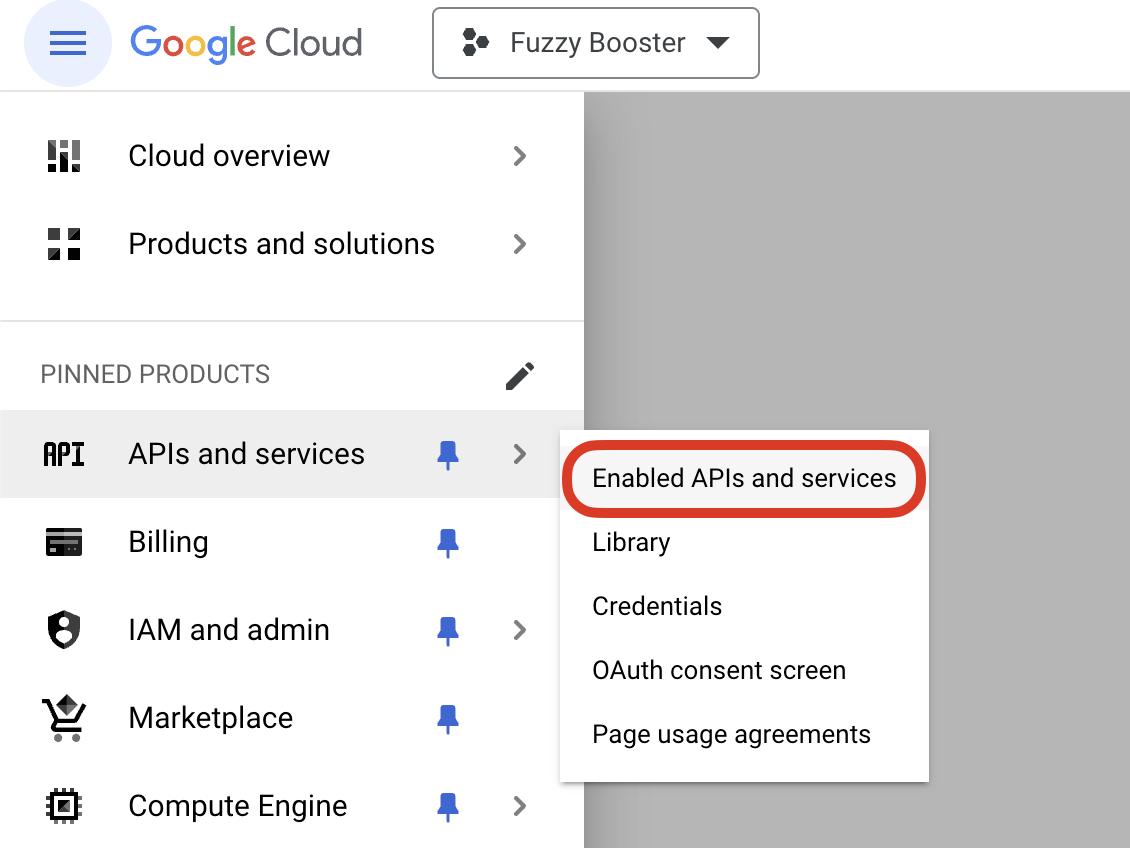
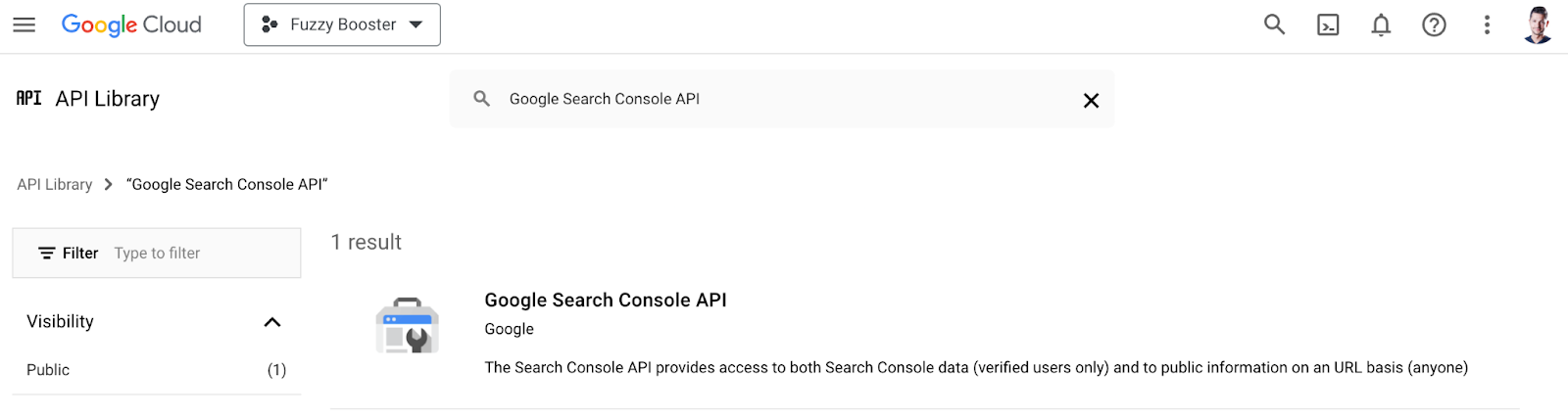
- A project in Google Cloud Console with the Search Console API enabled.
- An OAuth 2.0 Client ID and JSON credentials file.
- An OpenAI API Key
How to set up your Google Cloud Console project
- Create a project in Google Cloud Console:
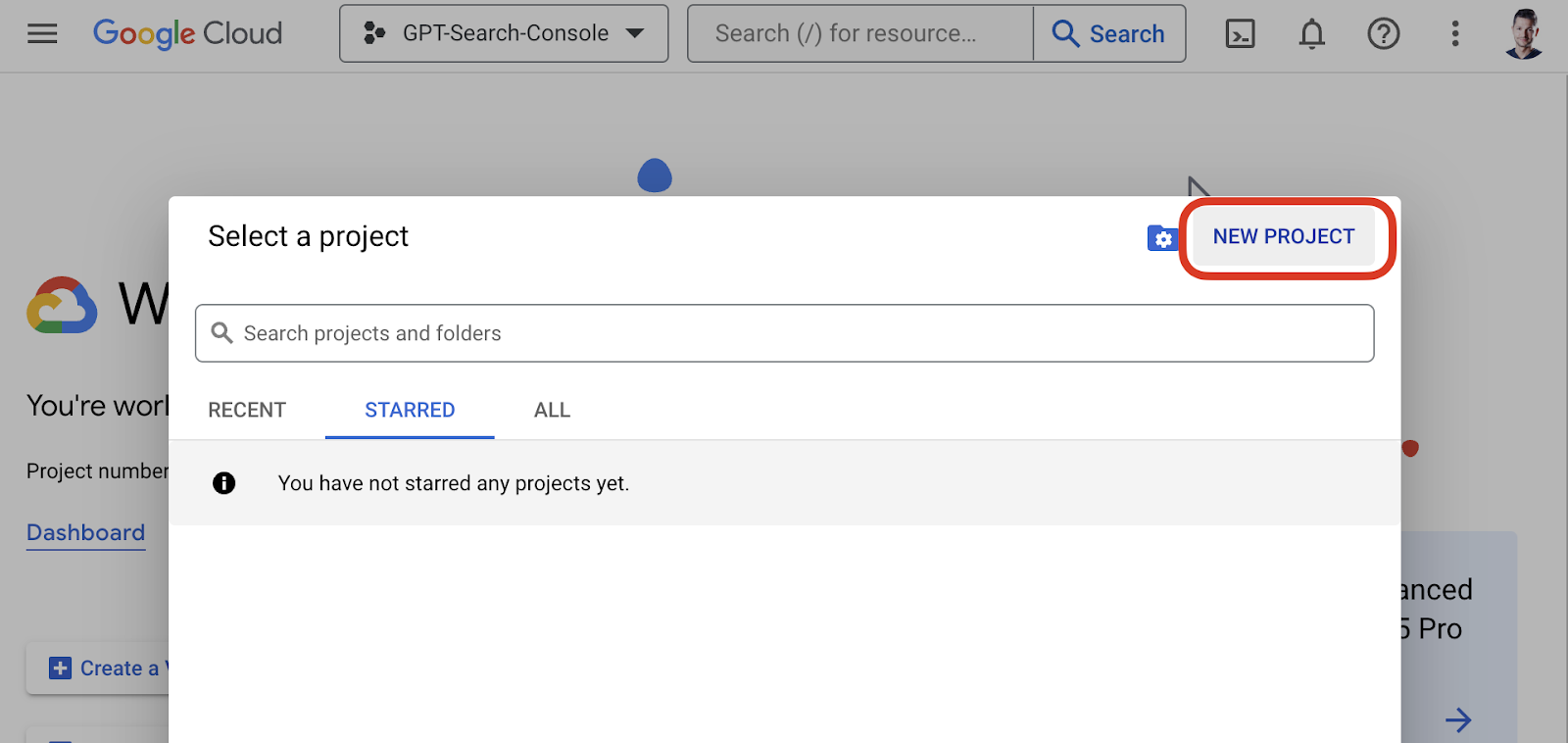
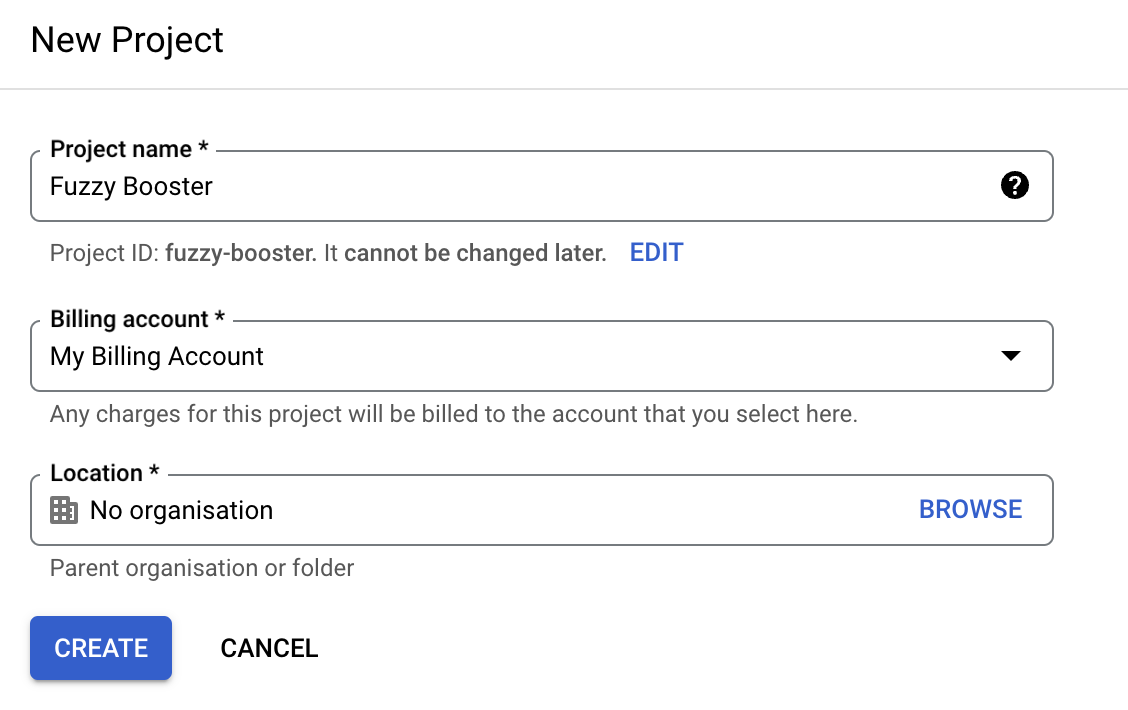
- Head over to Google Cloud Console.
- Create a new project or use an existing one.
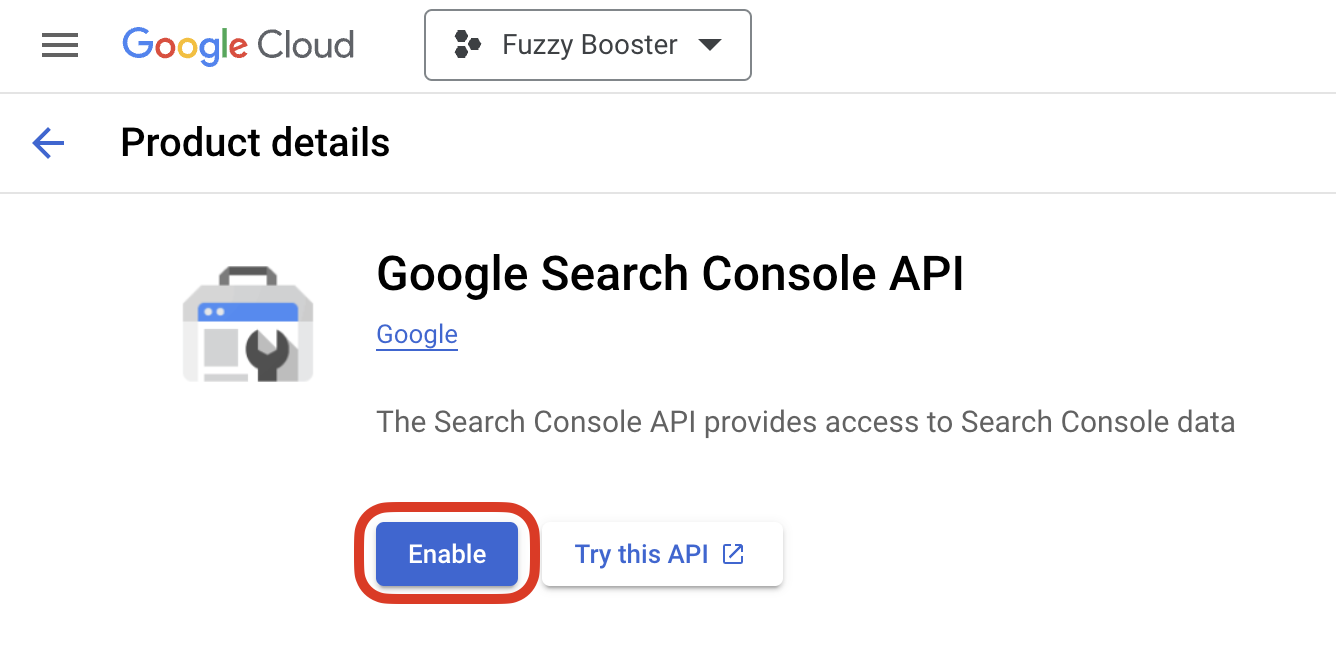
- Enable the Search Console API:
- Go to API & Services > Library.
- Search for “Google Search Console API” and enable it.
- Create OAuth 2.0 Credentials:
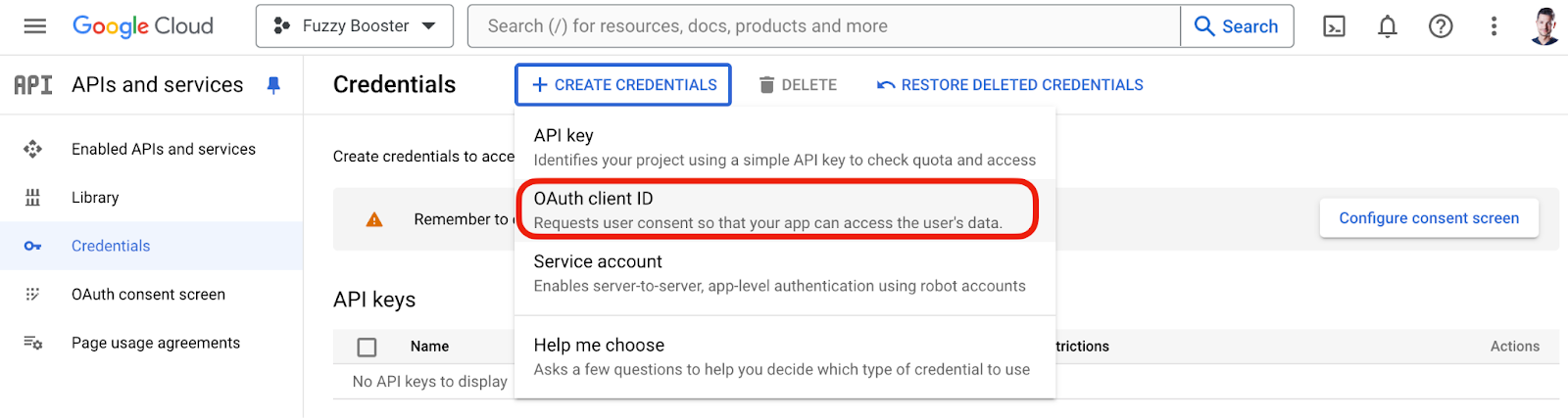
- Navigate to API & Services > Credentials.
- Click Create Credentials > OAuth 2.0 Client ID.
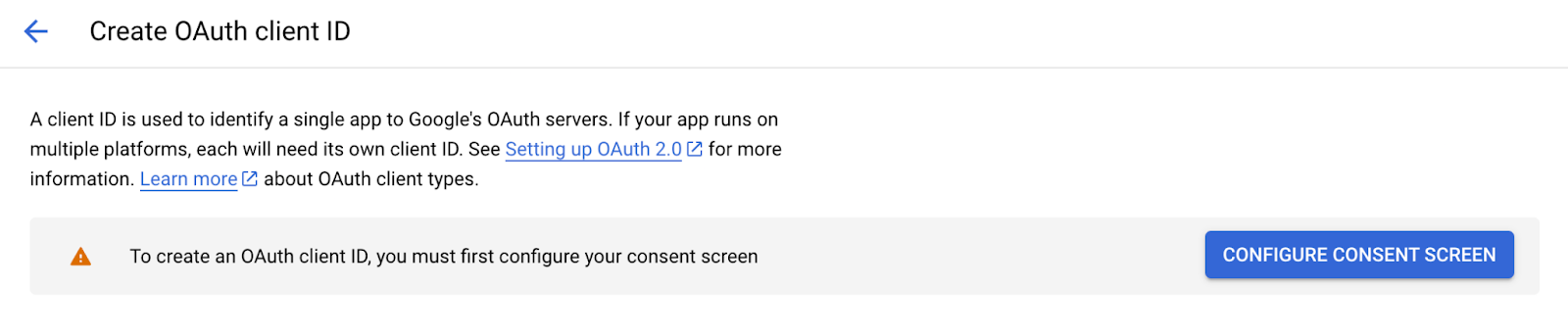
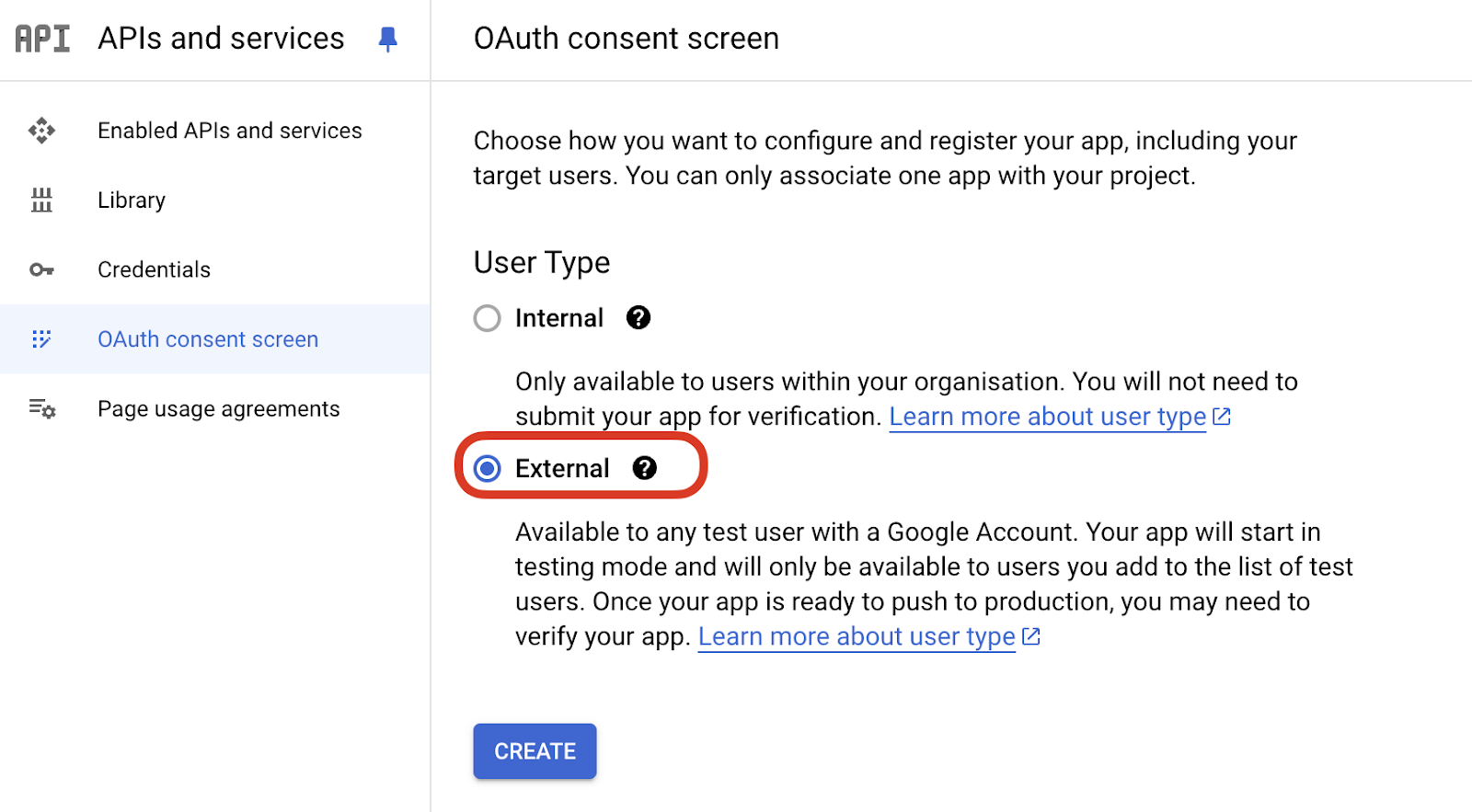
- Set up the OAuth consent screen if it’s your first time and add User Scopes to Google Search Console Api > Read Only.
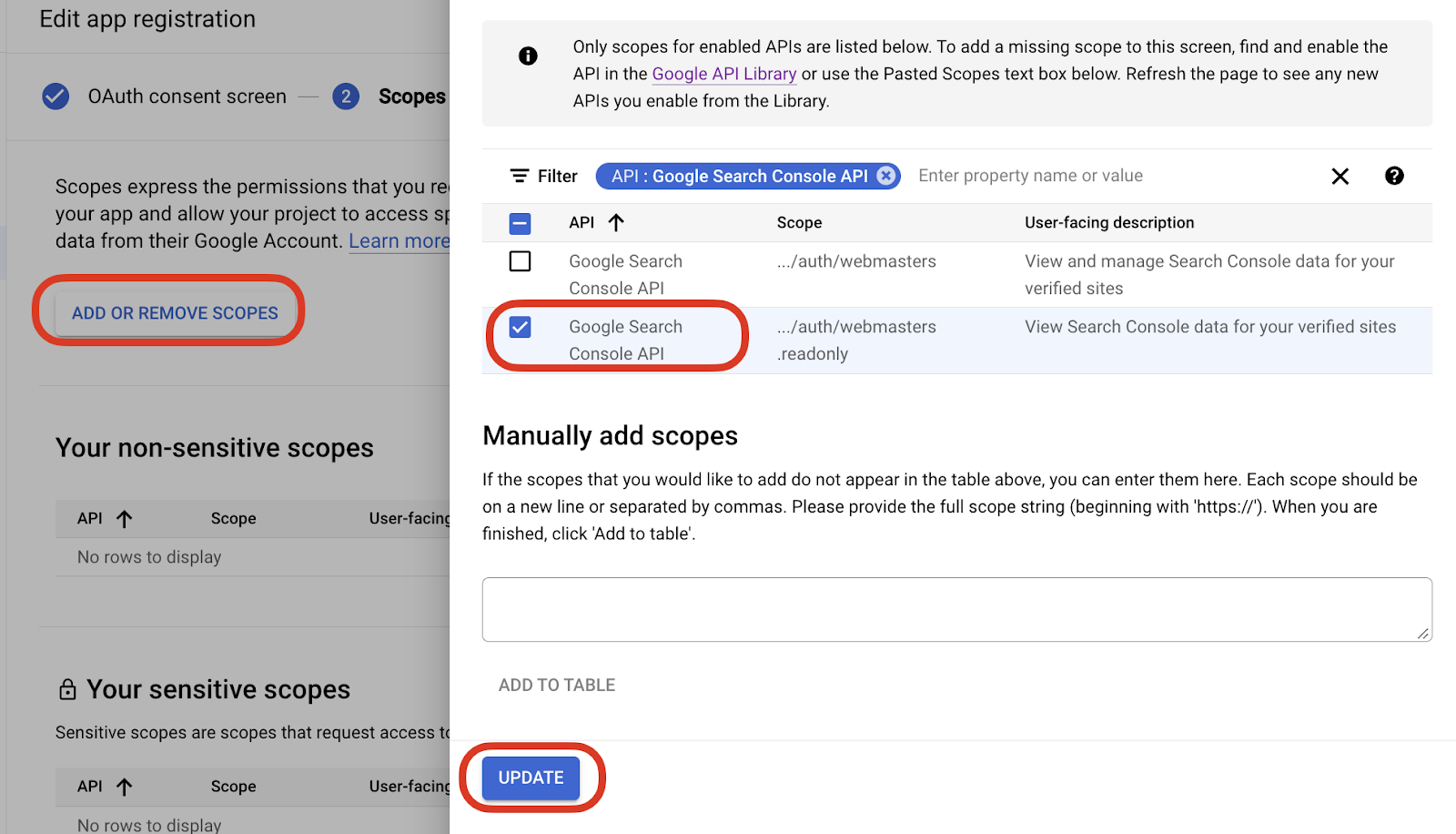
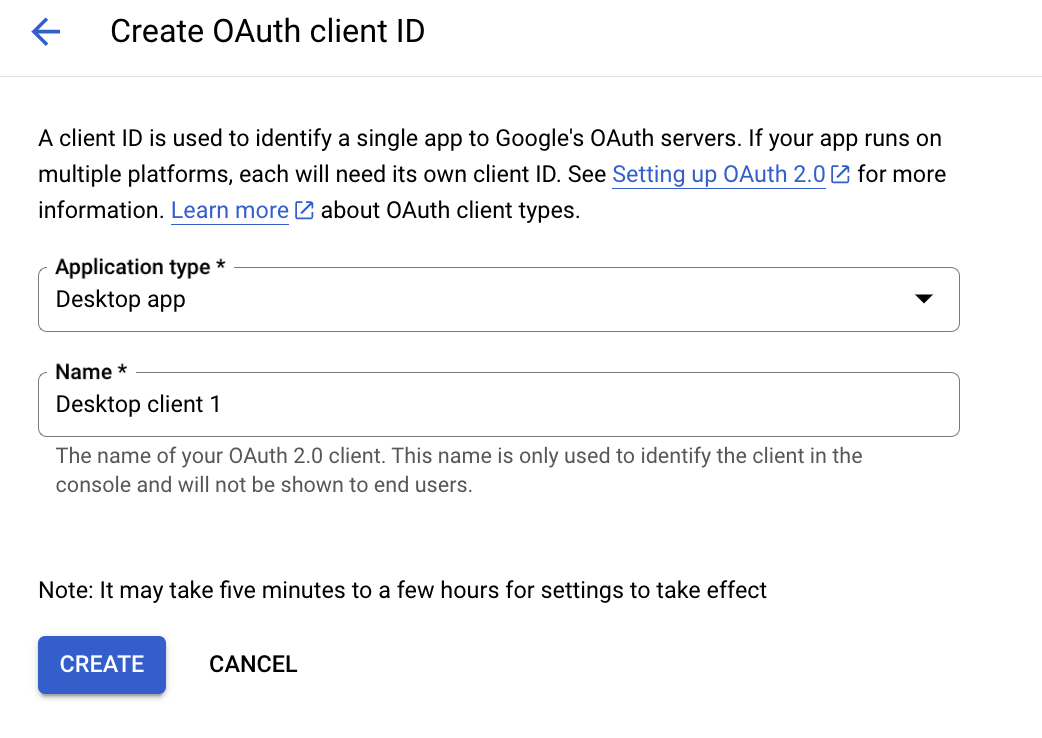
- Create a new OAuth 2.0 Client ID for desktop applications.
- Download the JSON credentials file.
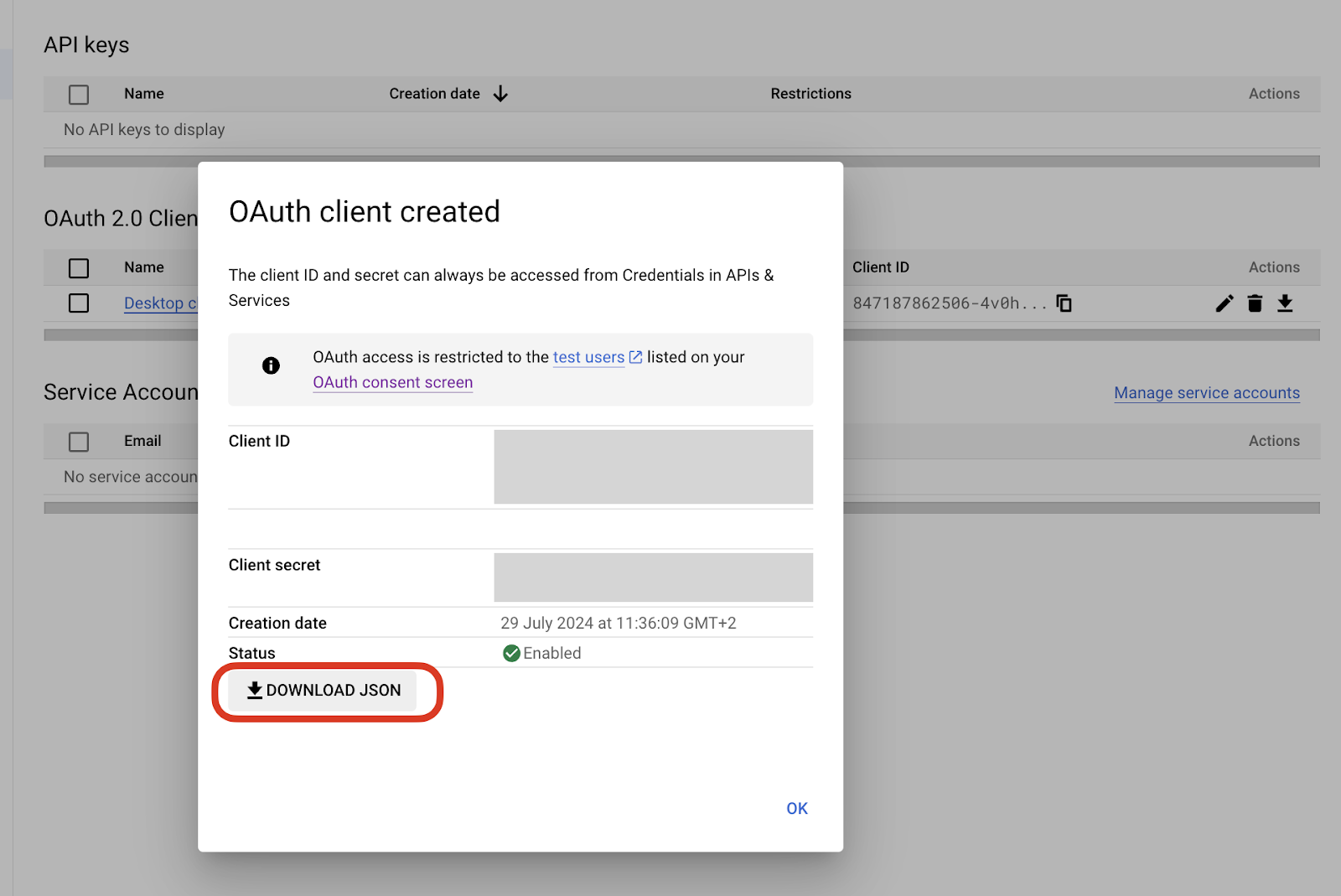
How to Set up your OpenAI API Key
To use OpenAI for generating optimized SEO metadata, you’ll need to create an API key. Follow these steps to set up your OpenAI account and obtain the key:
- Create an OpenAI account:
- Go to the OpenAI website.
- Sign up for a new account if you don’t have one. If you already have an account, just log in.
- Generate an API Key:
- In the API dashboard, look for the “API Keys” section.
- Click on “Create API Key” or “New Secret Key” to generate a new key.
- Give your key a name for easy identification.
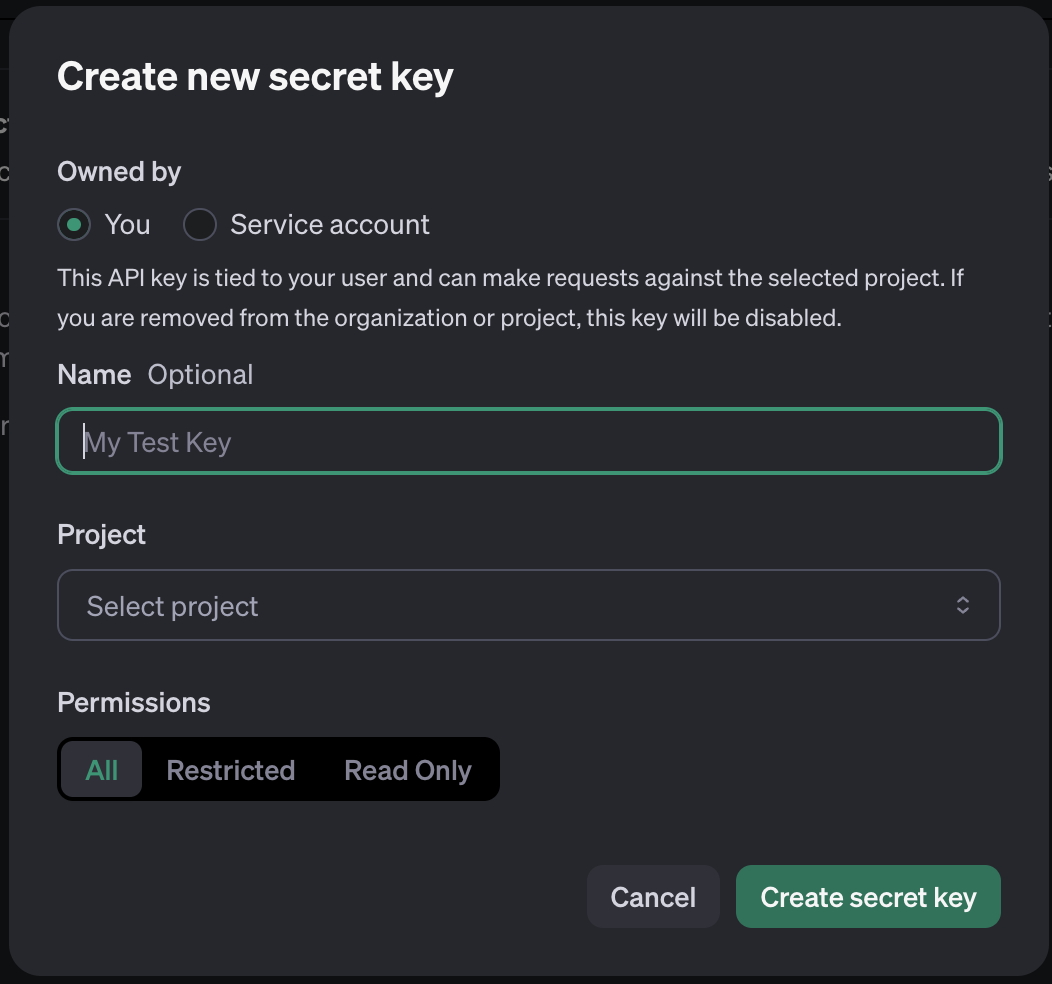
- Save your API Key:
- Once the key is generated, make sure to copy it and save it in a secure location. You will use this key to authenticate requests to the OpenAI API in your Google Colab environment.
- Configure billing:
- Configure billing settings to ensure you have access to the API features.
How to use the Fuzzy Booster Google Colab for meta data optimization
Complete steps from above, then, make a copy of the Google Colab template.
Step 1: Define query parameters
In this analysis, we usually exclude branded queries—those that include the brand name or specific product names. The reason for this is that branded searches are generally influenced by existing brand awareness and marketing efforts, which might not reflect your site’s organic search performance accurately. The goal here is to identify organic, non-branded SEO keywords that potential customers use to find your site.
However, feel free to modify this approach if you wish to include branded queries, especially if brand visibility and recognition are part of your core objectives.
The home page is often excluded from this analysis because it’s usually optimized for broad and general terms, which might not be as actionable as insights gathered from more specific internal pages. If your strategy requires insights from the home page or you believe there’s potential for further optimization, you can choose not to exclude it.
| # Select the date range end_date = datetime.date.today() start_date = end_date – relativedelta.relativedelta(months=16) # Select the site site = ‘https://www.analistaseo.es/’ # https://www.example.com/ for a URL-prefix property or sc-domain:example.com for a Domain property home = “^”+site+”$” # Regex to match the home page branded_queries = ‘natzir|analistaseo|analista seo’ # Branded queries to exclude # Request payload for Google Search Console API request = { ‘startDate’: datetime.datetime.strftime(start_date,’%Y-%m-%d’), ‘endDate’: datetime.datetime.strftime(end_date,’%Y-%m-%d’), ‘dimensions’: [‘page’,’query’], ‘dimensionFilterGroups’: [ { ‘filters’: [ { # Excluding home page ‘dimension’: ‘page’, ‘operator’: ‘excludingRegex’, ‘expression’: home }, { # Excluding branded queries ‘dimension’: ‘query’, ‘operator’: ‘excludingRegex’, ‘expression’: branded_queries } ] } ], ‘rowLimit’: 25000 # Up to 25,000 URLs } # Execute the request to the Search Console API response = service.searchanalytics().query(siteUrl=site, body=request).execute() print(“Getting Google Search Console…”) # Parse the JSON response scDict = defaultdict(list) for row in response[‘rows’]: scDict[‘page’].append(row[‘keys’][0] or 0) scDict[‘query’].append(row[‘keys’][1] or 0) scDict[‘clicks’].append(row[‘clicks’] or 0) scDict[‘ctr’].append(row[‘ctr’] or 0) scDict[‘impressions’].append(row[‘impressions’] or 0) scDict[‘position’].append(row[‘position’] or 0) # Create a DataFrame from the parsed data df = pd.DataFrame(data=scDict) |
Step 2: Upload your credentials file
Once you have set up the data for the analysis, Colab will ask you to upload the JSON credentials file you downloaded before.
| from google.colab import files # Upload the credentials file uploaded = files.upload() # Save the credentials file with open(‘credentials.json’, ‘wb’) as f: f.write(uploaded[list(uploaded.keys())[0]]) |
Step 3: Scrape metadata with BeautifulSoup
Using BeautifulSoup, we can pull existing SEO metadata from your site, like title, h1 and descriptions.
| # Function to extract metadata from a URL def get_meta(url): try: response = requests.get(url) encoding = chardet.detect(response.content)[‘encoding’] if encoding: page_content = response.content.decode(encoding) else: page_content = response.content soup = BeautifulSoup(page_content, ‘html.parser’) title = soup.find(‘title’).get_text() if soup.find(‘title’) else ‘No title’ # Get the title meta = soup.select(‘meta[name=”description”]’)[0].attrs[“content”] if soup.select(‘meta[name=”description”]’) else ‘No meta description’ # Get the meta description h1 = soup.find(‘h1’).get_text() if soup.find(‘h1’) else ‘No h1’ # Get the first h1 return title, meta, h1 except Exception as e: return ‘Error’, ‘Error’, ‘Error’ # Apply the function and add the results to the DataFrame df[‘title’], df[‘meta’], df[‘h1’] = zip(*df[‘page’].apply(get_meta)) df |
It’s very important to note whether you can scrape a website beforehand by checking the terms of use. Some websites (although public) do not allow scraping and will ban you if you scrape their content or metadata.
If you find yourself banned by a website during scraping, you can use the curl_cffi library to change your user agent. This helps you rotate user agents and avoid detection, allowing you to continue accessing the site. Check this Python library here.
Step 4: Clean and prepare text data
In this step, we focus on cleaning the text data extracted from your website to make it easier to analyze and compare with search queries.
lang = ‘spanish’ # Language for stopwords
We set the language to Spanish, which helps us identify common words (stopwords) that don’t add much meaning to our analysis, such as “and,” “the,” and “is.” Change this to the language of your website.
| # Function to clean text def clean_text(text): text = str(text).lower().strip() text = re.sub(r’\d+’, ”, text) text = re.sub(r'[^\w\s]’, ”, text) text = re.sub(r’\s+’, ‘ ‘, text) text = unicodedata.normalize(‘NFKD’, text).encode(‘ascii’, errors=’ignore’).decode(‘utf-8’) stop_words = set(stopwords.words(lang)) words = text.split() words_cleaned = [word for word in words if word.lower() not in stop_words] return ‘ ‘.join(words_cleaned) # Clean specified columns columns_to_clean = [‘title’, ‘meta’, ‘h1’, ‘query’] for column in columns_to_clean: df[column + ‘_clean’] = df[column].apply(clean_text) |
This function performs several operations to clean the text:
- Lowercasing: Converts all characters to lowercase for consistency.
- Number removal: Strips out numerical digits.
- Punctuation removal: Eliminates punctuation marks.
- Whitespace normalization: Ensures consistent spacing between words.
- Accent removal: Converts accented characters to their non-accented versions.
- Stopwords removal: The function filters out these stopwords from the text, keeping only the meaningful words.
Step 5: Compute similarity using Fuzzy matching
In this step, we use the fuzzywuzzy library to measure how closely the cleaned SEO metadata (titles, meta descriptions, and headers) matches the top-performing search queries. This helps us identify areas where the content might not be optimized for relevant search terms.
We use token_set_ratio from the fuzzywuzzy library, which compares strings based on their content, ignoring the order and repeated words. This method is ideal for analyzing how well the cleaned text matches the search queries, as it provides a robust similarity score.
| columns = [‘title_clean’, ‘meta_clean’, ‘h1_clean’] for col in columns: similarity = [] for index, row in df.iterrows(): sim = fuzz.token_set_ratio(row[‘query_clean’], row[col]) similarity.append(sim) df[f'{col}_similarity’] = similarity # Rename columns for clarity df.rename(columns=lambda x: x.replace(‘_clean_similarity’, ‘_similarity’) if x.endswith(‘_clean_similarity’) else x, inplace=True) columns_to_drop = [col for col in df.columns if ‘_clean’ in col] df.drop(columns=columns_to_drop, inplace=True) |
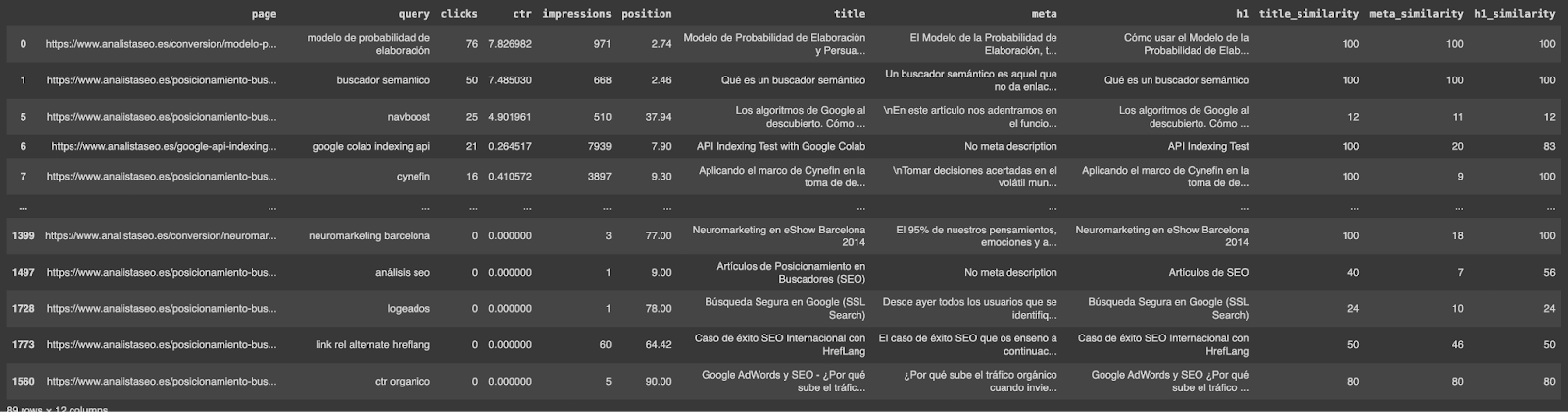
We loop through each row of the DataFrame, comparing the cleaned search query (query_clean) with each cleaned SEO element (title, meta, h1).
For each comparison, we calculate a similarity score using token_set_ratio. The score ranges from 0 to 100, where 100 indicates an exact match.
The similarity scores are stored in new columns (title_similarity, meta_similarity, h1_similarity) for each corresponding SEO element.
Step 6: Generate new titles using OpenAI (Optional)
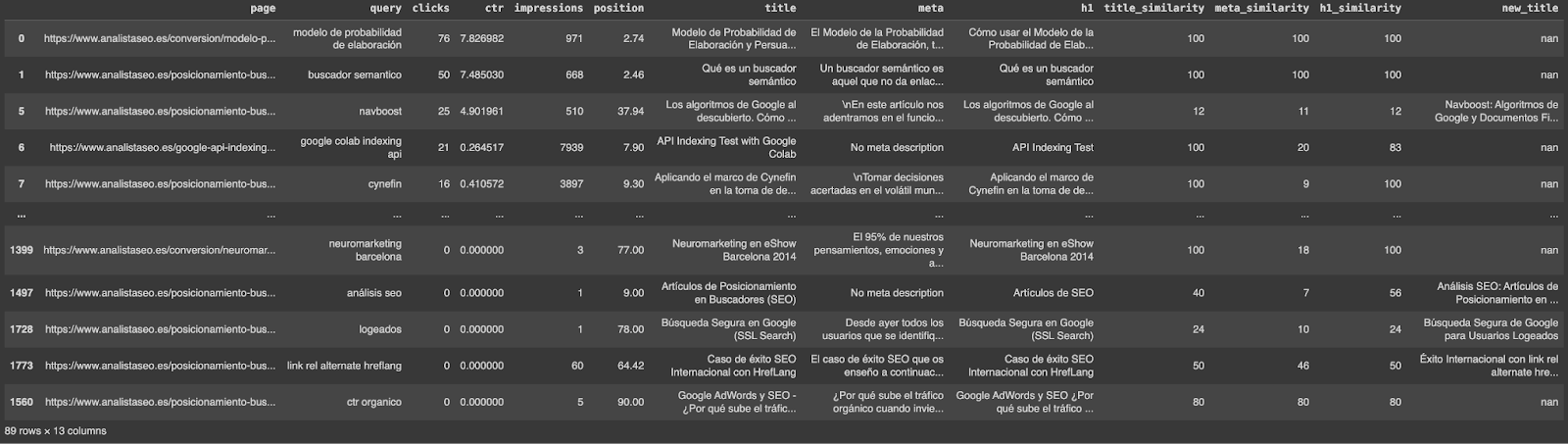
In this optional step, we aim to enhance our website’s relevance by generating new titles for pages where the existing titles don’t align well with top-performing queries. This involves using the OpenAI API to automatically create more relevant and optimized SEO content.
| filtered_df = df[df[‘title_similarity’] <= 60] |
We filter the DataFrame to identify pages where the similarity score between the current title and the top-performing query is 60 or below. These low scores indicate a poor match and an opportunity for improvement.
You can adjust the similarity threshold based on your observations and needs. If the results suggest that a different threshold is more effective, feel free to modify it.
| # Configure OpenAI API client = OpenAI(api_key=”YOUR OPENAI TOKEN HERE”) MODEL = “gpt-4o” TEMPERATURES = [0.0] |
Use your OpenAI API key to set up the client and specify the model and temperature for generating content. The temperature controls the randomness of the output, with lower values producing more deterministic results.
| PROMPT_TEMPLATE = “””Task: Generate a new title that meets the following criteria: 1. The title cannot be longer than 60 characters. 2. The title must include the specified query, represented in the template as ‘{query}’. 3. The title must be written in the specified language, represented in the template as ‘{lang}’. 4. No words should be repeated in the title. 5. Use the entities found in the given ‘current title’ ‘{title}’ to construct the new title. Please ensure that your title meets all of the criteria. “”” |
This template guides the AI to generate a new title that includes the top query, is concise, and maintains the original title’s context. You can modify this prompt if needed to suit your specific requirements or preferences.
Using the OpenAI API may incur costs, especially with large datasets, so consider your budget and usage limits.
| # Function to generate a new title using OpenAI def generar_titulo(prompt, temperature): completion = client.chat.completions.create( model=MODEL, temperature=temperature, messages=[{“role”: “user”, “content”: prompt}], ) return completion.choices[0].message.content.strip() # Generate new titles for each filtered row for index, row in filtered_df.iterrows(): query = row[‘query’] current_title = row[‘title’] prompt = PROMPT_TEMPLATE.format(query=query, lang=lang, title=current_title) new_title = generar_titulo(prompt, TEMPERATURES[0]) df.at[index, ‘new_title’] = new_title # Function to strip quotes from the beginning and end of a string def strip_quotes(title): if title.startswith(‘”‘) and title.endswith(‘”‘): return title[1:-1] return title # Apply the function to the ‘new_title’ column df[‘new_title’] = df[‘new_title’].apply(strip_quotes) # Save the results to a CSV file df.to_csv(‘fuzzy_booster.csv’, index=False) # Download the CSV file files.download(‘fuzzy_booster.csv’) |
You can apply the same process to h1 tags and meta descriptions. Simply adjust the filtering and prompts to target these elements.
If necessary, you can apply this method to any other content scraped from the page, such as subheadings or paragraph text, by adjusting the prompt and process accordingly.
Benefits of using Fuzzy Booster with FuzzyWuzzy and OpenAI in Google Colab
Here’s how it can make a significant difference in your SEO strategy:
- Time savings and efficiency: By automating the analysis and optimization of SEO metadata, you can save hours of manual work. This allows you to focus more on strategic planning and less on repetitive tasks.
- Data-Driven insights: Fuzzy Booster provides clear, actionable insights by identifying which SEO elements are underperforming. The use of similarity scoring helps highlight opportunities for optimization that might otherwise be overlooked.
- Improved SEO performance: By focusing on non-branded keywords, you can boost your site’s visibility to new audiences. Optimized metadata increases click-through rates and enhances search rankings, driving more organic traffic to your site.
- Flexibility and customization: The approach is adaptable, allowing you to adjust thresholds and prompts according to your specific needs. Whether you want to include branded queries or optimize specific page elements
Next Steps: Incorporate Fuzzy Booster into your organic strategy
Now that you’ve completed this tutorial, here are some ideas on how to incorporate the Fuzzy Booster method into your broader organic strategy:
- Apply to other content types: Beyond just titles and meta descriptions, consider using this approach for other content on your site, like blog headings or product descriptions. The principles can also apply to external content platforms, such as optimizing YouTube video titles or organizing forum posts.
- Continuous improvement: Use Fuzzy Booster as a regular part of your SEO audits to continually enhance your metadata. Regularly update your data collection and analysis processes to adapt to changing search patterns.

Natzir Turrado Ruiz
Natzir is a recognized Online Marketing Expert, renowned for his work as a consultant for the web portals of top-tier global brands. He has led SEO and CRO strategies for major multinational corporations and startups, orchestrating successful campaigns in these areas. He is distinguished by his holistic approach to SEO, where he applies his knowledge of data science, technical expertise, and consumer psychology. This methodology has enabled him to successfully uplift projects where others have not been able to. As a business school professor, he imparts his knowledge and experience to the next generation of marketing professionals. Additionally, he is a speaker at major industry events, sharing his insights into the evolving landscape of online marketing.
- Natzir Turrado Ruiz