
Tell search engines about your changes the moment you make them. IndexNow is a website protocol, designed and maintained by Microsoft Bing in collaboration with Yandex, that enables website owners to instantly notify search engines (Bing, Yandex, Naver, Seznam.cz, Yep and others) about changes they make to their website.
IndexNow is a simple notification to search engines, letting them know that a URL and its content have been added, updated, or deleted. This enables search engines to quickly reflect this change in their search results, resulting in overall more efficient crawling.
In this guide, I will explain how IndexNow works, how to set it up, and how to bulk-submit URLs with Python, then track whether they get indexed in Data Studio. I will also cover the plug-ins and platforms that do the submission for you, and answer the most common IndexNow questions along the way.
Updated October 2026: what changed since the first version
I first wrote this guide in June 2022, when IndexNow was eight months old. I have re-checked every endpoint and re-written and re-tested the code. The short version:
- More engines take part. Naver, Seznam.cz and Yep joined Bing and Yandex, and the Internet Archive and Amazon’s crawler now receive IndexNow notifications too. Google still doesn’t.
- It’s no longer an experiment. By December 2024, Bing reported more than 3.5 billion URLs submitted every day, and 18% of the new URLs clicked in its results came through IndexNow.
- The submission script is new. It sends a JSON request to the IndexNow endpoint, batches large lists for you and checks your key before it sends anything.
- The Google indexation check now uses the Search Console URL Inspection API instead of scraping
site:results from a Google Sheet.
All of the code is in the MLforSEO code hub: grab the IndexNow scripts here. They run locally or in Google Colab.
Which search engines support IndexNow?
Search engines that adopt IndexNow agree to share every submitted URL with all the other participating engines. So you only need to notify one of them, and the rest find out too. Here is the list as of October 2026, from the official IndexNow registry:
| Participant | IndexNow endpoint | Notes |
|---|---|---|
| Any (shared endpoint) | https://api.indexnow.org/indexnow | Forwards to all participants. The one I use in the script |
| Microsoft Bing | https://www.bing.com/indexnow | Co-founder (October 2021). Also powers results in many other search and AI products |
| Yandex | https://yandex.com/indexnow | Co-founder (October 2021) |
| Seznam.cz | https://search.seznam.cz/indexnow | Czech search engine, supported since 2022 |
| Naver | https://searchadvisor.naver.com/indexnow | South Korea’s largest search engine, joined 2023 |
| Yep | https://indexnow.yep.com/indexnow | Ahrefs’ search engine |
| Internet Archive | receives notifications | Uses them to archive pages close to the moment they change (announced December 2024) |
| Amazonbot | receives notifications | Amazon’s crawler is now listed as a participant |
Does Google support IndexNow?
No. When I first wrote this guide, Google had announced that it would test the IndexNow API, and there had been no updates since. Four years later, the answer is the same: Google has never adopted the protocol, and it isn’t on the list of participating engines.
There have been talks at Google in relation to how to improve crawl efficiency and, as a result, make crawls more sustainable, so in theory IndexNow fits into this aim Google has for reducing crawl rate. In practice, Google still relies on its own signals. For Google, your best tools remain:
- XML sitemaps with accurate
<lastmod>dates, submitted in Search Console; - good internal linking, so new pages are discovered from pages Google already crawls often;
- the “Request indexing” button in the Search Console URL Inspection tool, for a handful of important URLs.
A note on the Google Indexing API, because people often ask: it is not Google’s version of IndexNow. Google only supports it for pages with job posting or livestream (broadcast event) structured data. Don’t use it as a shortcut for regular pages.
So is IndexNow worth it without Google? I think so. It takes ten minutes to set up (or one click with a plug-in), it costs nothing, and it gets your changes to Bing, and everything Bing powers, within minutes rather than days.
How does IndexNow work?
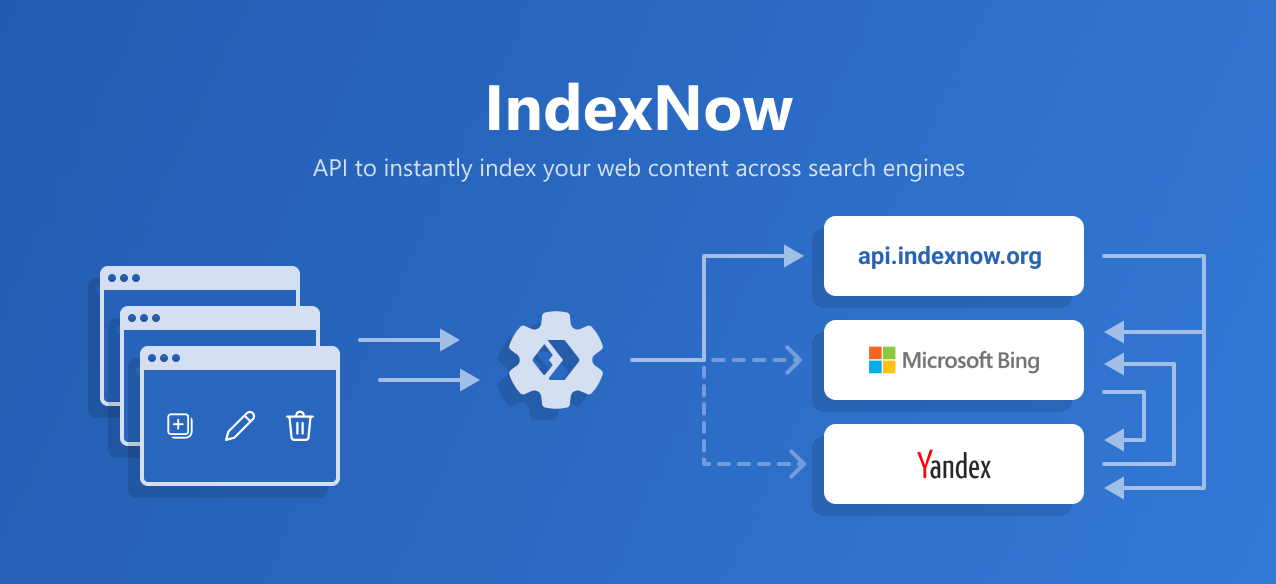
Essentially, the protocol processes the submitted URLs and passes the updates on, via notifications, to all the participating search engines. The promise of IndexNow is that you submit a URL to one search engine via this protocol, and not only will that search engine immediately discover that URL, but it will also be discovered by all the other participating search engines.
The principle of co-sharability of URL discoveries is what makes the protocol revolutionary, as well as improving the overall sustainability of the web, which is why it is referred to as the future of web crawling. It also eases the strain on webmasters and website owners, as they only need to submit URLs to this one protocol, as opposed to keeping all the different search engines in the marketplace updated.
Four years on, the numbers back this up. In December 2024, Microsoft reported that over 3.5 billion URLs are submitted through IndexNow every day, and that 18% of all new URLs clicked in Bing’s results were discovered through it.
How can you start using the IndexNow API?
In order to start using IndexNow, you need to:
- generate a key supported by IndexNow;
- host the key in a text file, named with the value of the key, at the root of your website, and provide it as part of your query;
- start submitting URLs when your URLs are added, updated, or deleted.
Where can you get your IndexNow API key from?
Generating a key is extremely easy and can be done online for free. You can generate a key supported by the IndexNow protocol using Microsoft’s online key generation tool.
You can also make your own. A valid key is 8 to 128 characters long and can only contain lowercase letters (a-z), uppercase letters (A-Z), numbers (0-9) and dashes (-). My script does it for you, and writes the key file you need for the next step:
python indexnow_submit.py generate-key
# Key: 3f6c1d2e9b0a4c7d8e5f1a2b3c4d5e6f
# Key file written: 3f6c1d2e9b0a4c7d8e5f1a2b3c4d5e6f.txt
How do you authenticate with the IndexNow API?
To submit URLs, you must “prove” ownership of the host for which URLs are being submitted by hosting at least one text file within the host. Once you submit your URLs to search engines, search engines will crawl the key file to verify ownership and use the key until you change the key. Only you and the search engines should know the key and your key file location.
The easiest way to verify ownership is by hosting a text key file at the root directory of your host.
You must host a UTF-8 encoded text key file, {your-key}.txt, listing the key in the file, at the root directory of your website.
For instance, with the key 87ee692678e54f28a2f0db03d36f2636, you will need to host your UTF-8 key file at https://www.example.com/87ee692678e54f28a2f0db03d36f2636.txt, and this file must contain the key 87ee692678e54f28a2f0db03d36f2636.
If you can’t put files at the root, there is a second option: host the key file anywhere on the same host and tell search engines where it is with the keyLocation parameter. Be aware that the folder you choose limits what you can submit. A key file at https://www.example.com/catalog/key.txt only covers URLs that start with https://www.example.com/catalog/. The root is simpler, and it’s what the protocol recommends.
Before you submit anything, check the key file opens in a browser. A missing or wrong key file is the number one reason for a 403 error, and my script checks it for you automatically:
python indexnow_submit.py check-key --host www.example.com --key YOUR-KEYAre there any limits to the number of URLs that can be submitted?
Yes, you can submit no more than 10,000 URLs with a single request to the IndexNow API.
There is no published daily quota, but if you submit too often you will get a 429 (Too Many Requests) response. So only submit URLs that have actually changed, rather than your whole sitemap every day. Re-submitting unchanged URLs doesn’t speed anything up, and it can look like spam.
The recommended way is to automate the submission of URLs as soon as the content is added, updated, or deleted, up to some limit.
How do you submit URLs via IndexNow?
You can submit URLs individually or in bulk.
Submitting a single URL
To submit a single URL, send a GET request to the following URL (replace <searchengine> with the endpoint of the search engine, or use api.indexnow.org):
https://<searchengine>/indexnow?url=url-changed&key=your-keyurl-changedis a URL of your website which has been added, updated, or deleted. The URL must be URL-escaped and encoded, and please make sure that your URLs follow the RFC-3986 standard for URIs.your-keyis the key you are hosting in your key file.
You can issue the HTTP request using your browser, wget, curl, or any other mechanism of your choosing.
Submitting URLs in bulk
To submit a set of URLs, send a POST request with a JSON body. This is the part that matters for bulk submission, so here is exactly what it looks like:
POST /indexnow HTTP/1.1
Content-Type: application/json; charset=utf-8
Host: api.indexnow.org

{
  "host": "www.example.com",
  "key": "87ee692678e54f28a2f0db03d36f2636",
  "keyLocation": "https://www.example.com/87ee692678e54f28a2f0db03d36f2636.txt",
  "urlList": [
    "https://www.example.com/url1",
    "https://www.example.com/folder/url2",
    "https://www.example.com/url3"
  ]
}
Three details trip people up:
hostis your host, not the search engine’s;- the body must be JSON, not a form;
- every URL in
urlListmust belong to that host, or you get a 422.
A successful request will return an HTTP 200 response code. If you receive a different response, verify the reason (see the response codes below) and resubmit the request. The HTTP 200 response code only indicates that the search engine has received your URLs.
What can you expect after submitting your URLs via IndexNow?
The IndexNow protocol will prompt search engines to crawl the updated or new URLs, and you can monitor indexation and ranking performance via the usual tools. There is no notification once a URL has been crawled or indexed, besides the response code you receive upon submission.
There is one improvement since 2022: Bing Webmaster Tools now has an IndexNow insights report (added in March 2024), which shows the URLs Bing received through IndexNow and whether it has crawled them. If Bing matters to your audience, it’s worth checking after your first big submission.
Can IndexNow be used for URLs that were updated, or only for new pages?
Absolutely, IndexNow can be used for notifying search engines that a page has been updated. In fact, it can be used for notifications of content being added, updated, or deleted. The message you send via the protocol allows search engines to quickly reflect this change in their search results.
For deleted pages, submit the URL once it returns a 404 or 410, so search engines can drop it sooner.
What challenges does IndexNow alleviate for website owners?
The IndexNow API can resolve challenges related to:
- high rates of not discovered and not crawled URLs;
- URL discoverability of new URLs in poorly interlinked websites;
- change detection in URLs on large websites.
What are the benefits of using the IndexNow API?
With the IndexNow API, you can expect:
- faster discovery and crawling of new and updated URLs;
- as a result, faster visibility for fresh content in the participating search engines;
- less wasted crawling of pages that haven’t changed, which is good for your server and the web.
One caveat I’d add in 2026: IndexNow speeds up discovery, not judgement. A search engine still decides whether a page is worth indexing and ranking. If a page isn’t indexed because it’s thin or duplicate, submitting it ten times won’t change that.
The IndexNow protocol is especially useful for websites whose pages update frequently, or for large, enterprise-level websites with a poor internal linking structure and poor URL discoverability rates.
What responses can you expect from the API, and what do they mean?
The IndexNow documentation specifies six response codes you could get from the API once you’ve submitted your URLs. I’ve added what to do about each one:
| Code | Meaning | What to do |
|---|---|---|
| 200 | OK, URLs submitted successfully | Nothing. Move on to tracking |
| 202 | Accepted, IndexNow key validation pending | Normal for a new key. Keep the key file in place |
| 400 | Bad request, invalid format | Check you’re sending JSON with host, key and urlList |
| 403 | Forbidden, the key isn’t valid (key file not found, or the key isn’t in the file) | Open the key file in a browser and check it contains exactly the key |
| 422 | Unprocessable entity: the URLs don’t belong to the host, or the key doesn’t match the protocol schema | Check host is your host and the key format is valid |
| 429 | Too many requests (potential spam) | Slow down. Wait, then retry with backoff |
How to bulk-submit URLs for indexation via the IndexNow API
Now for the practical part. I’ll show you two ways to build the list of URLs to submit, a script to submit them, and a dashboard to track the results.
Method 1: Crawl your sitemap, check indexation, and bulk-submit non-indexed URLs
Step 1: Crawl your sitemap with Python and store it in Google Sheets. Advertools, Elias Dabbas’ library, still makes this a one-liner, including sitemap index files. Here’s the code, written for the current versions of the libraries:
!pip install -q advertools gspread

import advertools as adv
import pandas as pd

sitemap_url = "https://www.example.com/sitemap_index.xml"   # your sitemap or sitemap index
sitemap_df = adv.sitemap_to_df(sitemap_url)

# optional: keep only URLs changed recently
sitemap_df = sitemap_df[sitemap_df["lastmod"] >= "2026-10-01"]
sitemap_df = sitemap_df[["loc", "lastmod"]]

# authenticate to Google Sheets (in Colab)
from google.colab import auth
auth.authenticate_user()
import gspread
from google.auth import default
creds, _ = default()
gc = gspread.authorize(creds)

# create the sheet and write the data
sh = gc.create("IndexNow submissions")
worksheet = sh.sheet1
sitemap_df = sitemap_df.astype(str).fillna("")   # dates must be text for Sheets
worksheet.update(values=[sitemap_df.columns.tolist()] + sitemap_df.values.tolist(),
                 range_name="A1")
print(sh.url)
Two details worth knowing. gspread 6 takes the values first and the range second, so I pass both by name to keep it unambiguous. And advertools returns lastmod as a real date, which Google Sheets can’t take, so I convert everything to text first.
Step 2: Check whether the URLs have been indexed. The reliable way is to ask Google directly with the Search Console URL Inspection API. It returns the same verdict you see in the URL Inspection tool (“Submitted and indexed”, “Crawled – currently not indexed”, “Discovered – currently not indexed” and so on) for any URL in a property you have access to. The limit is 2,000 inspections per property per day (and 600 per minute), so for big sites, inspect a sample per page type, or let the script run over a few days. It saves its progress and carries on where it stopped:
python check_indexation_gsc.py --property sc-domain:example.com \
    --credentials service-account.json --urls-file urls.txt
Setup is a one-off: enable the Search Console API in Google Cloud, create a service account, and add its email address as a user on your Search Console property. The README in the code hub walks you through it. For a no-code alternative, export the “Why pages aren’t indexed” lists from the Page indexing report in Search Console.
Step 3: Submit your non-indexed URLs via the IndexNow API. Save the URLs you want to submit (one per line, or as CSV or JSON) and run the script. Always start with a dry run, which shows you what would be sent without sending anything:
python indexnow_submit.py submit --host www.example.com --key YOUR-KEY \
    --urls-file not_indexed.txt --dry-run

python indexnow_submit.py submit --host www.example.com --key YOUR-KEY \
    --urls-file not_indexed.txt
You can also point it straight at your sitemap and only send what changed since a date: --sitemap https://www.example.com/sitemap_index.xml --since 2026-10-01.
If you’d rather see the core of it in a few lines, here is the request on its own:
import requests

key = "YOUR-KEY"
not_indexed_list = ["https://www.example.com/page-1/", "https://www.example.com/page-2/"]

data = {
    "host": "www.example.com",      # your host, not the search engine's
    "key": key,
    "urlList": not_indexed_list     # up to 10,000 URLs per request
}
r = requests.post("https://api.indexnow.org/indexnow", json=data, timeout=60)
print(r.status_code)                # 200 or 202 = received
Method 2: Export not crawled and not indexed URLs from a log analyser, then bulk-submit them
If you want to save yourself a bit of hassle, you can also simply download a list of the not crawled and not indexed URLs from Oncrawl (now part of BrightEdge) or an equivalent tool, for example Botify or any other tool that reports on log files and bot behaviour.
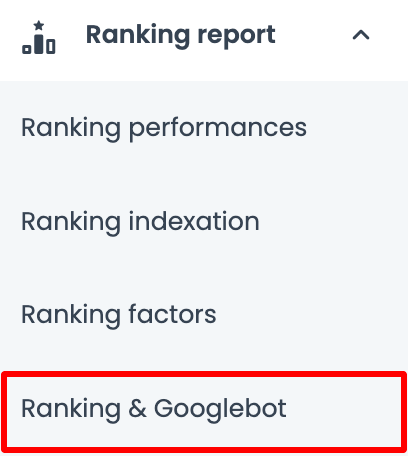
Using Oncrawl as an example, this is easy to find via Ranking > Ranking & Googlebot, where you can directly download a list of such URLs.
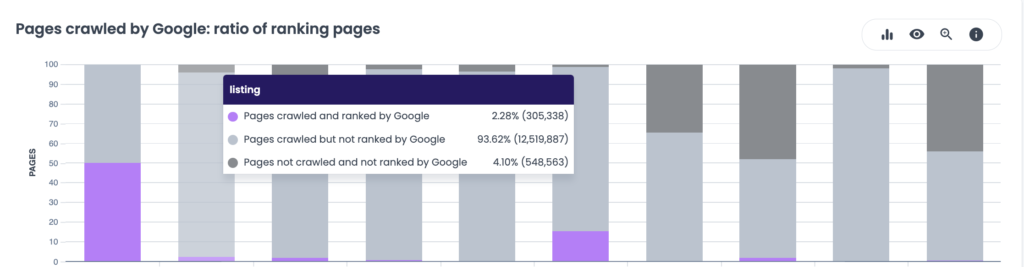
When you reach the report titled Pages crawled by Google: ratio of ranking pages, you can click on any of the dark grey bars to view the list of not crawled and not ranked URLs for each of your page groups.
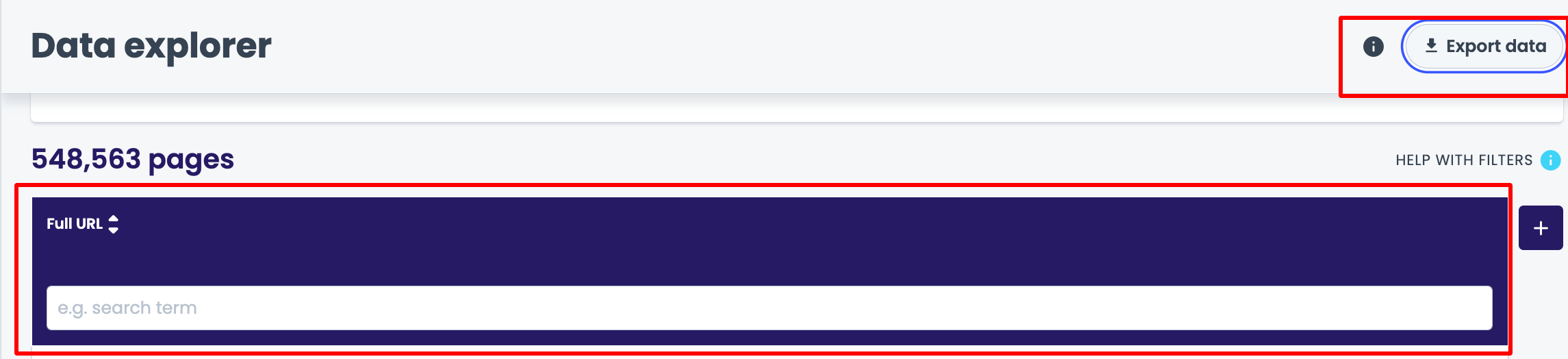
Then, remove all other columns besides the URL, and export the data (JSON, JSON lines or CSV all work with the script).
The script takes it from there: it reads the export, pulls the URL out of every row, splits the list into batches of 10,000 (IndexNow’s limit per request), pauses between batches, retries politely on a 429, and stops if a batch fails, so you don’t burn through the rest of the list:
python indexnow_submit.py submit --host www.example.com --key YOUR-KEY \
    --urls-file oncrawl_export.jsonl --log indexnow_submissions.csv
Every URL it sends goes into indexnow_submissions.csv with the batch number, the response code and a timestamp. You’ll need that file in the next step.
I’ve saved you a bit of hassle and put all of this in one place: check out the IndexNow scripts in the MLforSEO code hub.
Track indexation progress with Data Studio
So, you’ve submitted the URLs to the API. Now what?
Well, it’s time for the most important step: progress tracking.
This is where the list of submitted URLs comes in handy. Whichever method you used, upload the submission log (or your list of URLs) to Google Sheets. You will blend it in Data Studio with the Google Search Console data source, and check:
- how fast your URLs have been indexed after the submission date;
- how many impressions and clicks they are getting;
- how many URLs have been indexed after you’ve submitted them via the IndexNow API;
- how many queries the URLs you’ve submitted rank for.
Data Studio is perfect for this type of work, as it enables you to slice the data by top-level and sub-level directories via custom dimensions, and also monitor time-series performance after indexation.
Your Data Studio dashboard needs just two data sources:
- a Google Sheet with one column: the list of all URLs submitted to the IndexNow API (the script’s log works as is);
- the Google Search Console connector, using the URL impression table, so you get data per landing page.
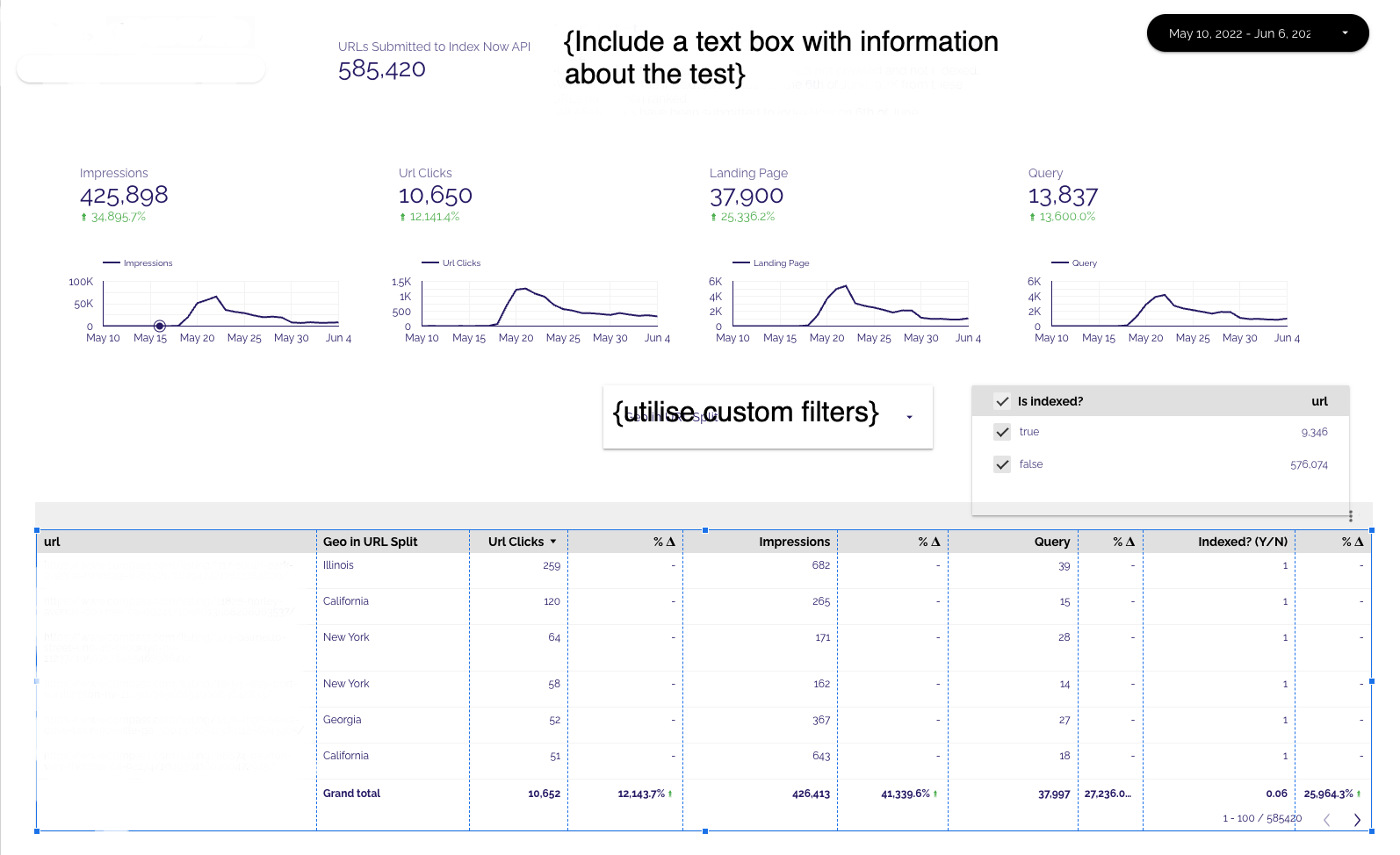
In order to create this view, you need a blended data source between the list of URLs and Google Search Console, blended as follows:
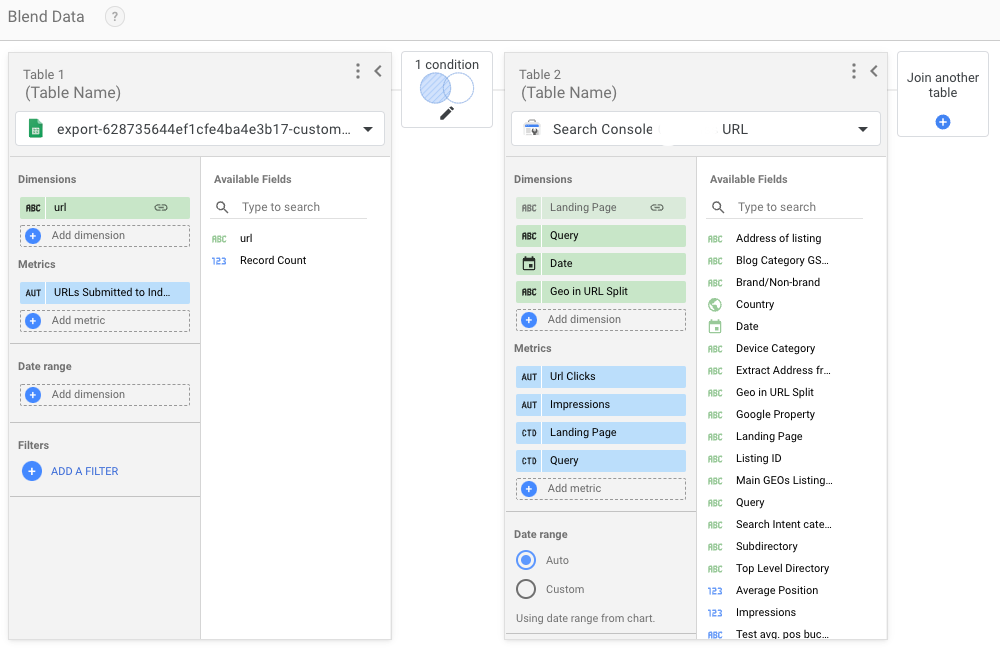
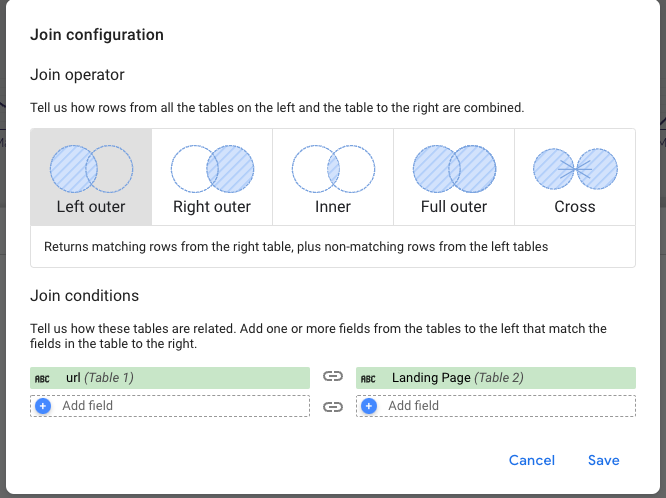
The join is a left outer join, configured on the url (Sheet) = Landing Page (Search Console) join field. This enables you to only monitor the rankings and indexation of URLs that were submitted as part of the test.
For the Indexed? Y/N field, use the following formula:
CASE WHEN Impressions > 0 THEN 1 ELSE 0 ENDAnd that’s it! You are all set to track indexation on your submitted URLs.
One honest caveat: “has impressions” is a proxy for “indexed”. A page can be indexed and still get zero impressions. For the full picture, add the output of the URL Inspection script (gsc_inspection.csv) as a third data source and use its coverage_state column instead. And if you track Bing too, its Webmaster Tools data can be exported and added the same way.
How else can you submit your URLs? IndexNow plug-ins and partners
You don’t have to write code to use IndexNow. A lot of the web now submits automatically.
The IndexNow plug-in for WordPress
When you add the WordPress IndexNow plug-in, you enable automated submission of URLs from WordPress sites to multiple search engines, without the need to register and verify your site with them.
Once installed, the plug-in automatically generates and hosts the API key on your site, speeding up the process of setting up and submitting URLs significantly. It’s still maintained by the Bing Webmaster Tools team (last updated in June 2026 at the time of writing). If you already use an SEO plug-in, check its settings before you add another one: Rank Math, for example, has IndexNow built into its Instant Indexing module, and running two submitters side by side just doubles the requests.
Cloudflare support for IndexNow via Crawler Hints
Crawler Hints is a Cloudflare service which, among other things, integrates with IndexNow URL submissions. It is free for all Cloudflare customers, on every plan. It uses Cloudflare’s own view of when your content changes (when a cached page is refreshed) to tell search engines when they should crawl particular parts of your website. To switch it on:
- Sign in to your Cloudflare account and select your domain.
- Go to Caching > Configuration.
- Find Crawler Hints and switch the toggle on.
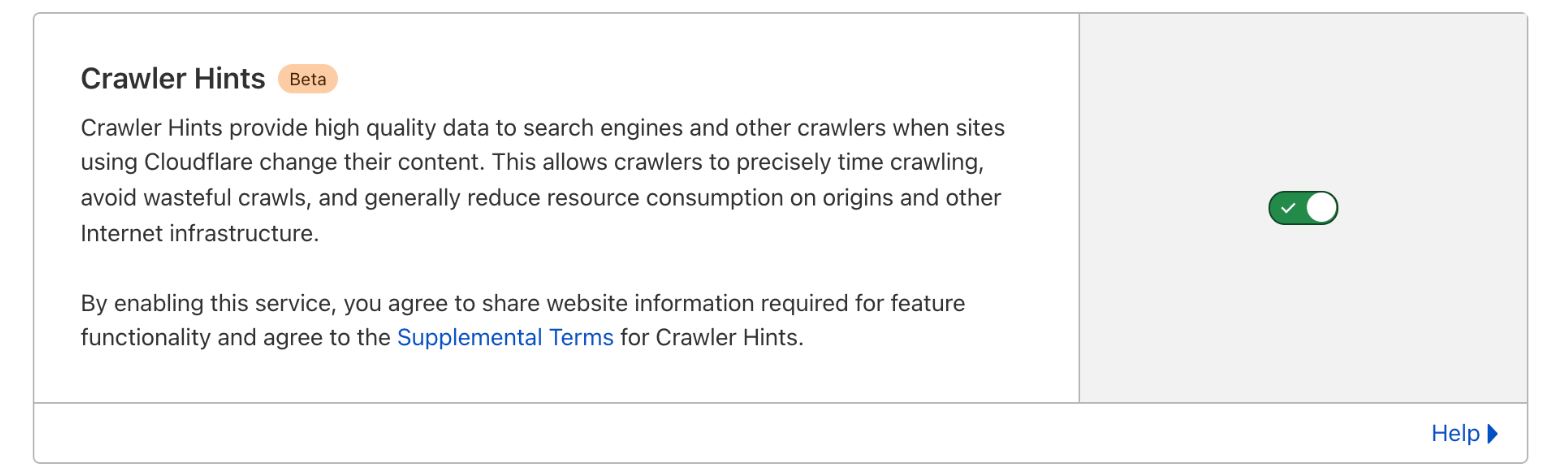
Once you’ve enabled it, Cloudflare will begin sending hints to search engines about when they should crawl particular parts of your website. Pages that return an error aren’t reported, and you can keep pages out with a noindex tag or header as usual.
Platforms and tools with IndexNow built in
Since 2022, IndexNow support has spread to many of the platforms sites are built on, so check yours before you write any code. Wix added native support in 2023, GoDaddy joined in 2024, and Shopify stores can submit through apps or built-in integrations. In 2025, Microsoft also started to promote IndexNow for ecommerce, so that price, availability and product changes reach Bing’s shopping and AI search features quickly. Enterprise SEO platforms such as Botify can also submit on your behalf.
IndexNow and AI search
This is the part that has changed most since I first wrote this guide. Bing’s index doesn’t only serve Bing.com: it also grounds Microsoft Copilot and other AI assistants that search the web. When an AI answer pulls in a stale price or an outdated paragraph, the root cause is often a page that hasn’t been re-crawled. IndexNow is one of the few levers you have to shorten that delay, and it’s free.
It won’t make a page more citable on its own. That’s about content, structure and entities. But it does make sure the version being retrieved is the current one.
Go deeper on AI search
Getting crawled faster is step one. The AI Search Optimisation & Agentic SEO course shows you how AI systems retrieve, evaluate and select sources, and how to become the source they cite.
What to look out for next…
Keep an eye on two things. First, Google: if it ever adopts IndexNow, this becomes a must-have for every site, and I’ll update this guide. Second, your own submission logs: if the response codes start changing, or URLs you submit aren’t crawled within a few days, something has changed with your key file or your site, not with the protocol.
You can find all of the code in the MLforSEO code hub: the submission script, the Search Console indexation checker and a README with every option.
Thanks so much for reading, and let me know how you get on with this tutorial.
Frequently asked questions
What is IndexNow?
IndexNow is a website protocol, designed and maintained by Microsoft Bing in collaboration with Yandex, that enables website owners to instantly notify search engines (Bing, Yandex, Naver, Seznam.cz, Yep and others) about content that has been added, updated or deleted.
Does Google support IndexNow?
No. Google announced in 2021 that it would test IndexNow, but as of October 2026 it hasn’t adopted the protocol. For Google, use XML sitemaps with accurate lastmod dates, good internal linking and the Request indexing button in Search Console.
How does IndexNow work?
You submit a URL to one participating search engine (or to api.indexnow.org), and it is shared with all the other participating search engines, so they can all discover the change without waiting to crawl your site.
How can you start using the IndexNow API?
Generate a key, host it in a text file named with the value of the key at the root of your website, and start submitting URLs when they are added, updated or deleted.
Where can you get your IndexNow API key from?
You can generate one for free with Microsoft’s online key generation tool at bing.com/indexnow, or make your own: 8 to 128 characters using letters, numbers and dashes.
How do you authenticate with the IndexNow API?
The easiest way to verify ownership is by hosting a UTF-8 text file named {your-key}.txt, containing the key, at the root directory of your host. Search engines fetch it to check that you own the site.
Are there any limits to the number of URLs that can be submitted?
Yes, you can submit no more than 10,000 URLs in a single request. There is no published daily quota, but submitting too often returns a 429 error, so only submit URLs that have changed.
How can you submit URLs via IndexNow?
You can submit URLs individually, with a GET request, or in bulk, with a JSON POST request of up to 10,000 URLs. Plug-ins (WordPress, Rank Math), Cloudflare Crawler Hints and many platforms can also submit for you automatically.
Can IndexNow be used for URLs that were updated, or only for new pages?
Absolutely, IndexNow can be used for notifying search engines that a page has been updated. In fact, it can be used for notifications of content being added, updated, or deleted.
What challenges does IndexNow alleviate for website owners?
The IndexNow API can help with high rates of not discovered and not crawled URLs, the discoverability of new URLs on poorly interlinked websites, and change detection on large websites.
Why does IndexNow return a 200 but my pages still aren’t indexed?
A 200 only means the search engine received your URLs. It still decides whether to crawl, index and rank each page. Also make sure the request went to an IndexNow endpoint, such as api.indexnow.org/indexnow.
Related glossary terms
MLforSEO Academy
Take your skills further — pick your path
AI Search Optimisation & Agentic SEO
by Beatrice Gamba
How agentic systems retrieve, evaluate and select — and how to become the source they cite.
View course →AI Search, LLMs, Entity SEO & Knowledge Graph Strategies
by Beatrice Gamba
Build the entity authority and knowledge-graph presence that makes AI recognise and trust your brand.
View course →Semantic ML-enabled Keyword Research
by Lazarina Stoy
Query understanding, search intent and semantic clustering for how people and AI really search.
View course →Introduction to Machine Learning for SEO
by Lazarina Stoy
Ship practical ML workflows — classification, clustering, entity extraction — no CS degree required.
View course →