Okay, you have completed a YouTube SEO audit, and identified that your channel and videos could do with a bit of a facelift. With billions of users and hundreds of hours of content uploaded every minute, standing out might seem impossible. Yet, it’s more achievable than you think.
In this guide, I’ll go through the main areas you can put on autopilot to improve your YouTube SEO, and in turn boost your organic visibility, on the platform and off it! My aim with this guide (and the associated free checklist) is to enable you to set up the right systems to make the most out of your content and create good quality, SEO-friendly videos by default, leaving time to focus on what really matters for your YouTube channel to thrive: content and substance!
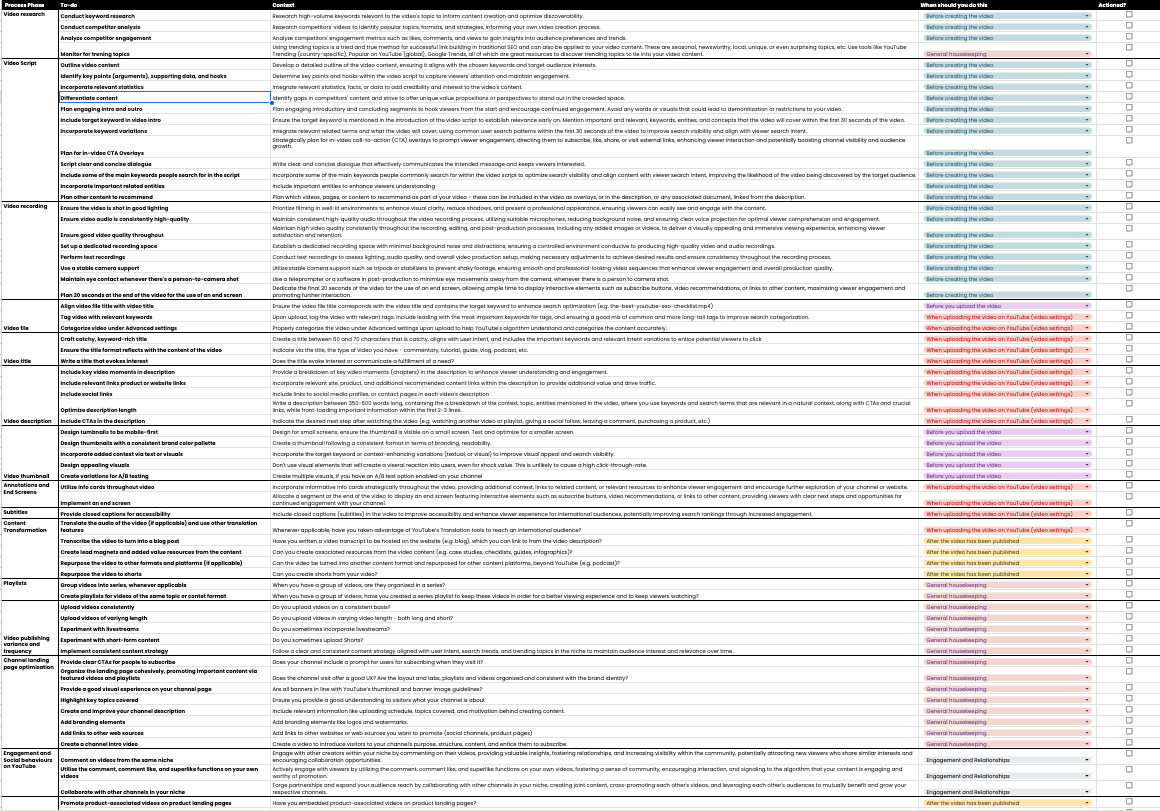
The ultimate checklist
YouTube SEO Checklist
72 steps to help boost the search visibility of your videos, organised by production area and by when to do each one, with context for every step and a checkbox to track what you’ve actioned.
Updated October 2026: what changed since the first version
I first wrote this guide in February 2024. The evergreen principles haven’t moved, but a few YouTube features have, so I’ve re-checked every one of them:
- A/B testing is built in now, for titles as well as thumbnails, and YouTube judges the winner by watch time.
- Shorts can be up to three minutes, and they link to your long-form videos with a related-video button rather than links in the description.
- The Community tab is now Posts, open to every channel with advanced features, and the Trending page is gone (since July 2025).
- Tags play a minimal role in discovery, by YouTube’s own account. Titles, thumbnails and descriptions do the heavy lifting.
- YouTube videos are among the most-cited sources in Google’s AI Overviews, which is one more reason to get captions, chapters and descriptions right.
Why is YouTube SEO important for businesses and content creators?
There are several factors that are making YouTube ever so important for companies, service providers, freelancers, educators, and entertainment creators:
- Diversifying the Google SERP to feature more video content: Google features diverse content in its results, which includes video, from video carousels and key moments to short-form video results.
- Video is a favourite source for AI search: a BrightEdge study of AI search citations (May 2024 to September 2025) found YouTube was the most-cited domain in Google’s AI Overviews and in AI Mode, with how-to queries leading. If your video explains something well, it can be the source an AI answer points to.
- Monetisation and a chance to get yourself in front of a pretty sizeable audience: YouTube is in a long-running battle with TikTok (and Instagram Reels) for attention, and keeps pouring money into creator tools, Shorts and user retention to sustain ad revenue.
- Get recommended: create high-quality videos that get noticed by YouTube’s algorithms and appear in search results, suggestions, and even the home feed.
- Visibility boost: reaching the right audience with relevant keywords leads to more likes, comments, and shares, pushing your video further.
- Targeted audience: having a strategy behind your uploads and building topical authority on the platform, combined with publishing high-quality videos, can attract viewers genuinely interested in your content, boosting watch times and subscribers.
- Search behaviours are changing: whether you like it or not, people are using YouTube search and TikTok search (a.k.a. their preferred platforms for entertainment and education) to search instead of using Google Search. They might use both, or either. In which case, doesn’t it sound ever so important for you to be there, just in case they don’t jump to Google? That’s how I see it anyway.
What is YouTube’s search algorithm and how does it work?
Understanding the algorithm is key to YouTube success. It ranks videos based on factors like content relevance, user engagement, video quality, content freshness, and overall satisfaction (YouTube literally surveys viewers and counts highly rated watch time as “valued watch time”). These are all highly niche-dependent, and success in each will vary per niche, type of videos created, topics covered, and so on.
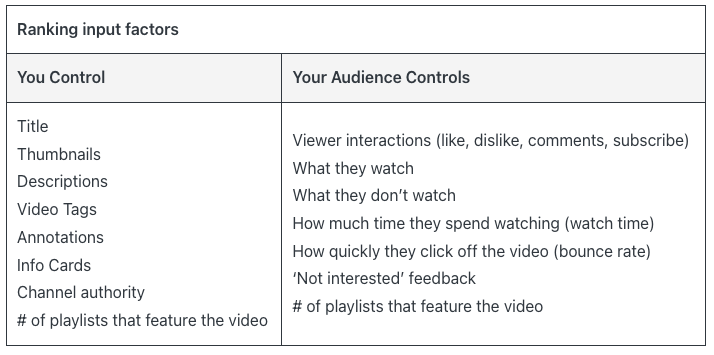
Generally, however, there are some evergreen principles of YouTube SEO that will be exactly the topic of the rest of this guide (and the checklist), and they fall mostly into one of these factors:
- Research: find what your audience searches for and use those keywords strategically. Incorporate associated entity information, and stay within the same topic and/or content format niche with the channel you create.
- Engaging, high-quality content: create videos that keep viewers glued and encourage interaction.
- Consistency: regularly upload valuable content to enable the algorithm to recommend your channel to more people.
- Analytics: track your performance and adjust your strategy based on data.
By understanding and setting up systems to address these aspects of YouTube content publishing, you can reach your target audience and achieve success on YouTube.
How important is YouTube SEO?
Whether you want to believe it or not, people use YouTube as a search engine, so implementing search engine optimisation tactics can undoubtedly help you stand out.
YouTube matters:
- Often called the second largest search engine: the exact ranking is debatable (and depends on whether you count AI assistants), but the scale isn’t. Use it to improve your brand omnipresence.
- Quicker indexing: indexing on YouTube, and subsequently in Google Search’s video results, is in my experience quicker. With the proper linking between videos and web pages, this might be a great way to improve indexing rates.
- More views, engagement, and subscribers: optimised videos get noticed, leading to growth, which can, with the appropriate linking between videos and product/service pages, lead to new customers, too.
- Understand your audience: reach the right people, and answer their questions uniquely.
SEO is ongoing, not a one-time fix. While the platform and its best practices change, we will discuss some evergreen tactics from traditional web-based SEO and how they translate to YouTube SEO, as well as how to best use features that are unique to YouTube.
Tips and strategies for improving your YouTube SEO
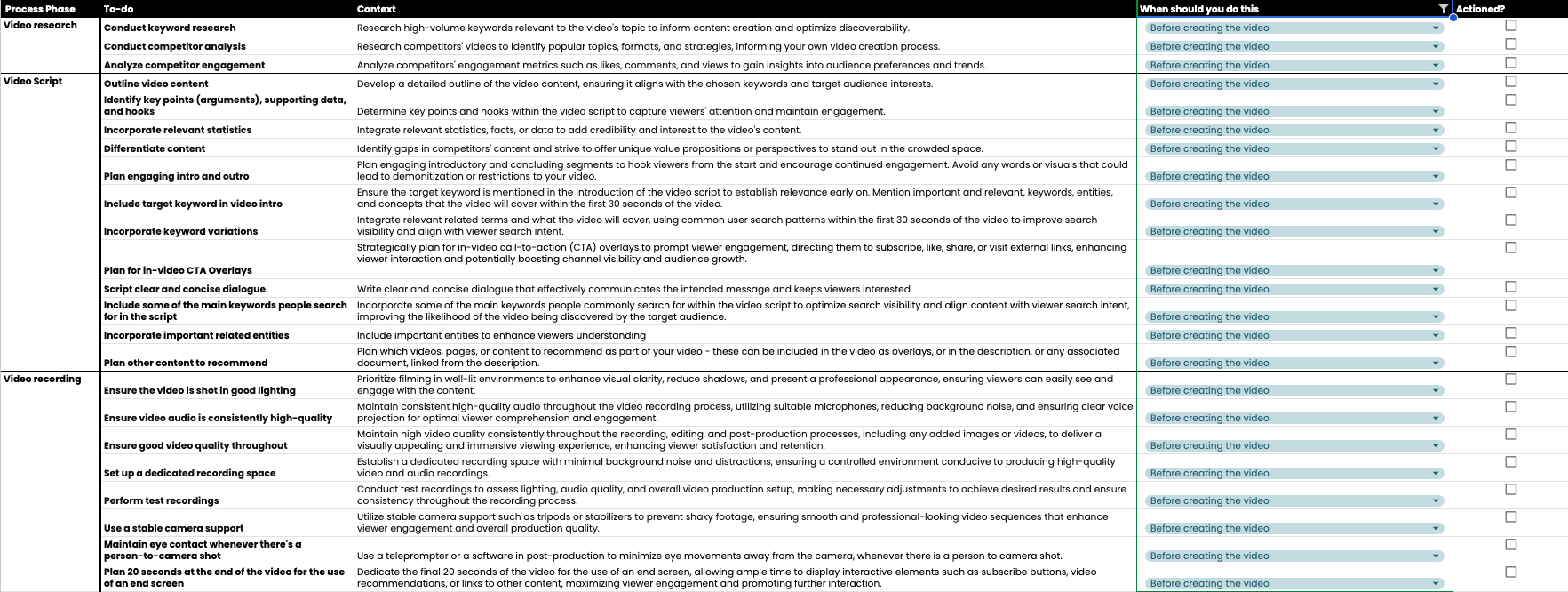
Before you create your YouTube video, focus on video research, scripting and production
There are essentially three phases you will go through before you even have a video file ready: video research, scripting and production. For each of these phases, I will share various tactics to incorporate SEO practices.
When it comes to video research, here are some elements to consider before publishing a video:
- Conduct keyword research: research high-volume keywords relevant to the video’s topic to inform content creation and optimise discoverability. YouTube search suggest is a great free source (my multi-platform autocomplete notebook pulls YouTube suggestions in bulk), and so is the Trends tab in YouTube Studio Analytics, which shows what your audience searched for over the last 28 days and where there are content gaps.
- Conduct competitor analysis: research competitors’ videos to identify popular topics, formats, and strategies, informing your own video creation process.
- Analyse competitor engagement: analyse competitors’ engagement metrics such as likes, comments, and views to gain insights into audience preferences and trends. The free benchmark notebook from the audit guide pulls these for any list of channels.
When scripting your video, consider the following aspects:
- Outline and hooks: create a detailed outline, identify key points and hooks, and sprinkle in relevant statistics.
- Differentiation: stand out by offering unique value and avoiding copied content.
- Engaging intro and outro: hook viewers from the start and encourage interaction. Mention your target keyword within the first 30 seconds.
- CTA overlays: strategically use CTAs to prompt subscriptions, likes, shares, and clicks.
- Clear and concise: write engaging dialogue that keeps viewers glued.
- Include search keywords and related entities: include main keywords naturally throughout the script. Enhance understanding by featuring relevant entities. This matters even more now that YouTube’s captions are what search engines and AI systems read to understand your video.
- Content recommendations: plan the videos, pages, or content to recommend for further engagement.
Remember: avoid demonetisable content, visuals, or words, especially early on in the video but also throughout, and plan CTAs and promotions within legal boundaries.
When you are ready to record the video, think about these aspects, as they can also impact your video’s reach:
- Ensure the video is shot in good lighting: prioritise filming in well-lit environments to enhance visual clarity, reduce shadows, and present a professional appearance, ensuring viewers can easily see and engage with the content.
- Ensure video audio is consistently high-quality: maintain consistent high-quality audio throughout the recording process, using suitable microphones, reducing background noise, and ensuring clear voice projection for optimal viewer comprehension and engagement.
- Ensure good video quality throughout: maintain high video quality consistently throughout the recording, editing, and post-production processes, including any added images or videos, to deliver a visually appealing and immersive viewing experience, enhancing viewer satisfaction and retention.
- Set up a dedicated recording space: establish a dedicated recording space with minimal background noise and distractions, ensuring a controlled environment conducive to producing high-quality video and audio recordings.
- Perform test recordings: conduct test recordings to assess lighting, audio quality, and the overall video production setup, making the necessary adjustments to achieve the desired results and ensure consistency throughout the recording process.
- Use a stable camera support: use stable camera support such as tripods or stabilisers to prevent shaky footage, ensuring smooth and professional-looking video sequences that enhance viewer engagement and overall production quality.
- Maintain eye contact whenever there’s a person-to-camera shot: use a teleprompter or software in post-production (e.g. the Eye Contact feature of the Descript video editor) to minimise eye movements away from the camera whenever there is a person-to-camera shot.
- Plan 20 seconds at the end of the video for an end screen: dedicate the final 20 seconds of the video (the maximum YouTube allows; the minimum is five) to an end screen, allowing ample time to display interactive elements such as a subscribe prompt, video recommendations, or links to other content, maximising viewer engagement and promoting further interaction.
Before you upload the video to YouTube, optimise the video file and thumbnail
Before uploading your video to YouTube, title the video file descriptively and create an enticing and search-friendly thumbnail.
Regarding the thumbnail, take note of the following best practices:
- Design thumbnails to be mobile-first: design for small screens, and ensure the thumbnail is legible on one. Test and optimise for a smaller screen (and, increasingly, for TV screens too).
- Design thumbnails with a consistent brand colour palette: create thumbnails following a consistent format in terms of branding and readability.
- Incorporate added context via text or visuals: incorporate the target keyword or context-enhancing variations (textual or visual) to improve visual appeal and search visibility.
- Design appealing visuals: don’t use visual elements that will create a visceral reaction in users, even for shock value. This is unlikely to lead to a high click-through rate.
- Create variations for A/B testing: create up to three thumbnail options per video for YouTube’s built-in Test & compare tool (available in YouTube Studio on desktop for channels with advanced features; not for Shorts).

When you are uploading your video to YouTube, follow a thorough process of title and description optimisation and feature use
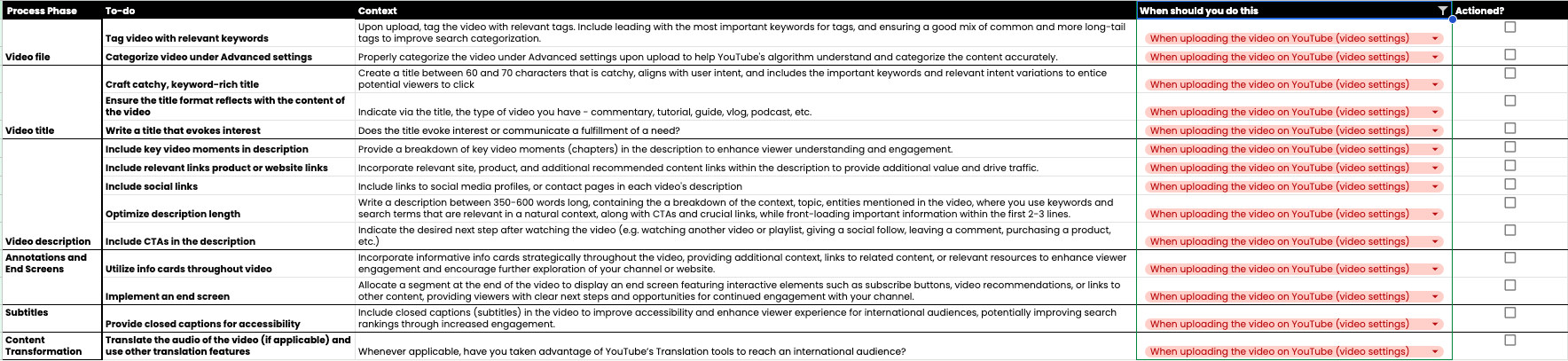
When you are uploading your video to YouTube, there are a number of features to take advantage of that can help improve your visibility on the platform. Mainly, focus on improving the title and description, but don’t neglect aspects like info cards, end screens, chapters, subtitles, and other extra features (if you’re eligible).
Here are some SEO aspects to consider when writing your YouTube video title:
- Craft a catchy, keyword-rich title: create a title of roughly 60 to 70 characters (YouTube allows up to 100, but longer titles get cut off in most places) that is catchy, aligns with user intent, and includes the important keywords and relevant intent variations to entice potential viewers to click.
- Ensure the title format reflects the content of the video: indicate via the title the type of video you have: commentary, tutorial, guide, vlog, podcast, etc.
- Write a title that evokes interest: does the title evoke interest or communicate the fulfilment of a need?
- Test it: Test & compare now takes up to three title variations too. It picks the winner based on watch time, not clicks, so a clickbait title that people abandon won’t win.
When writing a video description for your YouTube video, don’t forget to:
- Include key video moments in the description: provide a breakdown of key video moments (chapters) in the description to enhance viewer understanding and engagement. For YouTube to show them, you need at least three timestamps in ascending order, starting at 0:00, each chapter at least 10 seconds long (YouTube’s chapter rules). Chapters also power the “key moments” you see in Google’s video results.
- Include relevant product or website links: incorporate relevant site, product, and additional recommended content links within the description to provide additional value and drive traffic. (On Shorts, description links aren’t clickable, so use the related video link instead.)
- Include social links: include links to your social media profiles or contact pages in each video’s description. Your top links also appear on your channel profile, next to the Subscribe button.
- Optimise the description length: write a description of roughly 350 to 600 words (well within YouTube’s 5,000-character limit), containing a breakdown of the context, topic, and entities mentioned in the video, where you use keywords and search terms that are relevant in a natural context, along with CTAs and crucial links, while front-loading important information within the first two to three lines (that’s all viewers see before clicking “more”).
- Include CTAs in the description: indicate the desired next step after watching the video (e.g. watching another video or playlist, giving a social follow, leaving a comment, purchasing a product, etc.).
Don’t forget to tag your video and choose a category for it, as well as upload subtitles. A note on tags: YouTube says they play a minimal role in discovery, so add a handful (including common misspellings of your topic) and move on. Subtitles are a different story: accurate, uploaded captions make your video accessible, give YouTube and AI systems a clean transcript to read, and open the door to translations. If you’re in the YouTube Partner Program, you can also turn on auto-dubbing or add multi-language audio tracks.
Use the info cards to recommend other content from your channel (up to five per video), or, if you’re eligible, other external content that’s relevant to the viewer (e.g. product pages or blog posts; link cards require Partner Program membership). Choose and implement your end screen design at this stage, too. Viewers can now tap “Hide” to dismiss end screens, but YouTube’s own testing found that cost creators less than 1.5% of end screen views, so they’re still worth setting up.
After you upload your video to YouTube, focus on content transformation and video promotion
After your video has been published, schedule in some time for content transformation and video promotion.
Regarding content transformation, here are some ideas to make your content work harder for your organic visibility:
- Transcribe the video to turn it into a blog post: have you written up the video transcript to be hosted on the website (e.g. the blog), which you can link to from the video description? (If you want to automate the transcription, my guide to transcribing audio with the Whisper API walks you through it.)
- Create lead magnets and added-value resources from the content: can you create associated resources from the video content (e.g. case studies, checklists, guides, infographics)?
- Repurpose the video to other formats and platforms (if applicable): can the video be turned into another content format and repurposed for other content platforms beyond YouTube (e.g. a podcast)?
- Repurpose the video into Shorts: can you create Shorts (now up to three minutes long) from your video, and link each one back to the full video?
Regarding promotion, initiate the following tasks:
- Promote product-associated videos on product landing pages: have you embedded product-associated videos on product landing pages?
- Feature your videos in blogs: promote YouTube videos in associated blog posts on your website and tag them with the appropriate structured data (
VideoObject). - Promote the video in communities of interest: reach out to site owners and post in various communities to get your video featured on other websites, and in other videos on YouTube.

Evergreen tactics for YouTube organic visibility and a good user experience on your channel
Here are some additional tips to make sure your YouTube channel is set up for growth:
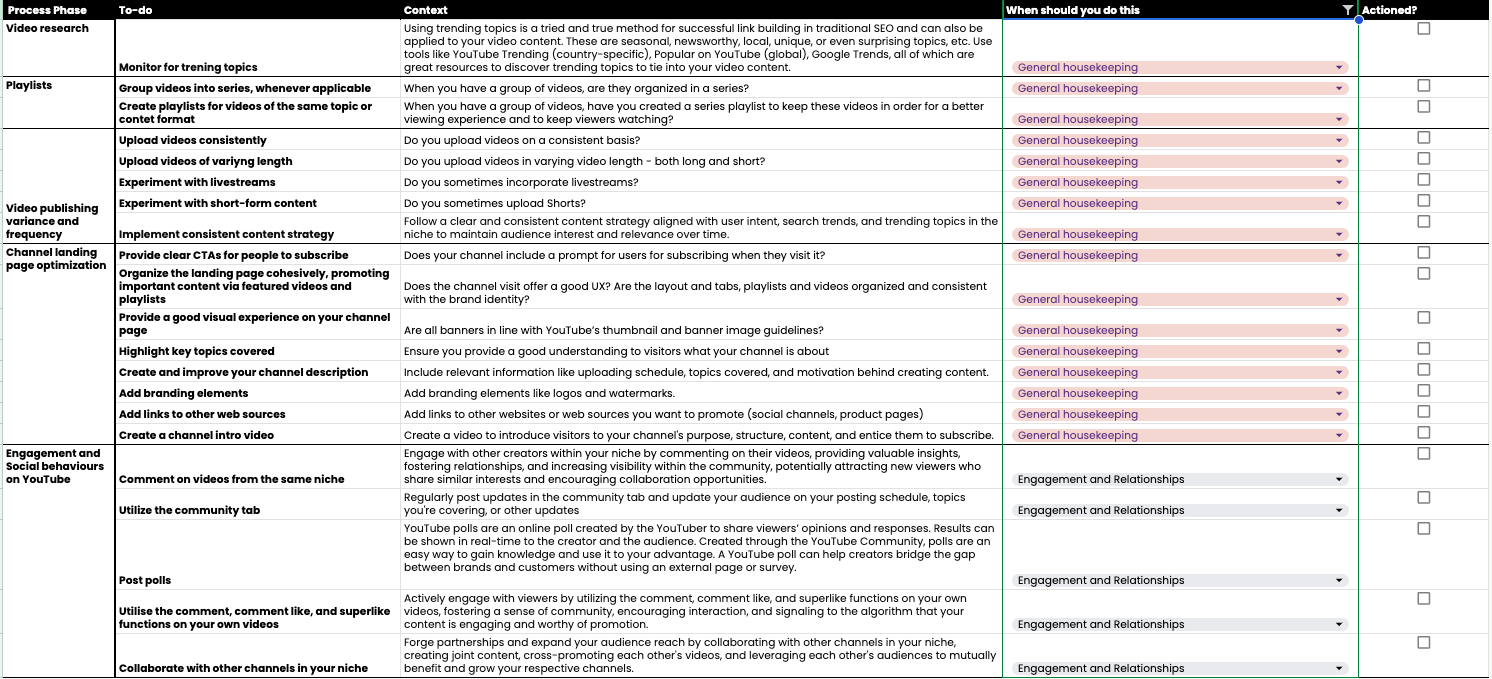
- Monitor and incorporate trending topics into your content strategy. YouTube retired its Trending page in July 2025, so use the Trends tab in YouTube Studio, YouTube Charts, and Google Trends instead.
- Regularly comment on other creators’ videos, and engage with your own comments section.
- Use Posts (formerly the Community tab) to share updates related to your channel, post photos, or post polls.
- Collaborate with other channels in your niche.
- Optimise your channel landing page’s user experience by adding a description and associated links to web pages and socials, organising your videos clearly into playlists (per topic or content type), and maintaining consistent, professional branding in the logo and other visual elements.
- Upload videos consistently, and experiment with different video formats and lengths.
How to use AI to speed up YouTube SEO (without sounding like a robot)
A lot of the checklist above is repetitive writing work: titles, descriptions, chapters, captions, repurposed posts. Good news: that’s exactly where AI saves you hours. The catch? Ask a model to “write a YouTube description” with nothing else, and you’ll get the same beige paragraph everyone else is publishing. The trick is to always start from your transcript, so the model works with what you actually said.
- Titles and descriptions: give the model your transcript, your target keyword and the search intent, and ask for five title options of 60 to 70 characters and a description draft that front-loads the key information in the first two lines and names the tools, people and concepts you cover. Pick, edit, then put your best two or three titles into Test & compare. (Same idea as generating meta descriptions with LLMs, just for video.)
- Chapters: a timestamped transcript lets a model suggest chapter breaks and titles in seconds. Check every timestamp against the video, and make sure the list starts at 0:00 with at least three chapters, or YouTube won’t show them.
- Transcripts and captions: tools like Whisper or Descript give you a far cleaner transcript than auto-captions. Fix names, brands and jargon (that’s where they slip), then upload the file as your captions. It’s the clean text YouTube, Google and AI search systems read.
- Repurposing: the same transcript can become a blog post draft, a newsletter, social posts, and a shortlist of 30 to 90 second moments worth cutting into Shorts. Ask the model to quote the exact lines it picked, so you can find them in the edit.
A few ground rules I’d stick to: you edit everything before it’s published (models invent facts and timestamps with total confidence), keep your own phrasing in titles, and never let a tool write claims about your product you wouldn’t say on camera. AI is the first draft; you’re the editor.
If you want to go further and use AI to diagnose a whole channel (transcript analysis, topic clustering of your catalogue, thumbnail critique and comment mining), I cover that in the AI section of my YouTube SEO audit guide.
Key takeaways on YouTube SEO
Mastering YouTube SEO is a strategic investment that unlocks visibility, engagement, and growth for your channel.
Don’t forget to grab a copy of the YouTube SEO checklist
Key takeaways and high-level YouTube SEO tips to follow:
- Optimise for search: use relevant keywords in titles, descriptions, and chapters (tags are a minor extra).
- Boost visibility: optimise titles, thumbnails and descriptions with relevant keywords to help viewers find your content, and test your titles and thumbnails.
- Aim for retention: hook viewers and keep them watching.
- Engage your audience: create high-quality content that entices viewer interactions (likes, comments, shares).
- Prioritise viewer experience: focus on relevance, engagement, and satisfaction.
- Track and adapt: use analytics to understand what works and refine your SEO strategy for better rankings and growth.
- Stay ahead of the curve: keep up with YouTube’s evolving algorithm and features to ensure long-term visibility and success.
- Continuous optimisation: stay updated with new content trends and video production techniques, and adapt to algorithm changes.
By following these steps and consistently optimising your content, you’ll attract the right audience and propel your channel towards success. Remember, SEO is a journey, not a destination. Embrace the learning process, refine your approach, and watch your channel flourish.
Find the topics worth a video
Great YouTube SEO starts with knowing what your audience is really searching for. The Semantic ML-enabled Keyword Research course covers query understanding, search intent and semantic clustering, so you can plan videos around real demand, not guesses.
Frequently asked questions on YouTube SEO
Why is YouTube SEO important for content creators?
YouTube SEO is crucial for visibility, engagement, and growth. It helps your videos appear in search results, suggested lists, and the home feed, increasing your chances of reaching a wider audience. Proper optimisation signals to YouTube that your content is valuable, enhancing your video’s reach and engagement. It also makes your videos easier for Google and AI search to understand and cite.
How does optimising videos for YouTube affect audience targeting?
Optimising videos with the right keywords, titles, and descriptions aids in accurately targeting your audience. It ensures that your content reaches viewers actively searching for the topics you cover, improving the likelihood of engagement and subscription.
What factors does YouTube’s search algorithm consider?
YouTube’s algorithm prioritises relevance, engagement, quality, freshness, and viewer satisfaction. Videos that perform well on these fronts are more likely to be recommended, appearing in search results and suggested video lists, enhancing visibility and audience reach.
How can keywords improve my YouTube video ranking?
Incorporating relevant keywords in your video’s title, description, chapters, and script (which becomes your captions) helps YouTube understand the content and context of your video. This improves the chances of your video being discovered by viewers searching for those topics, thereby increasing visibility and rankings. Tags help a little, mainly for misspellings.
What role does viewer engagement play in YouTube SEO?
Viewer engagement, including likes, comments, and shares, signals to YouTube that viewers find your content valuable. High engagement rates can boost your video’s visibility in search results and suggested feeds, leading to increased watch time and subscriber growth.
Why is monitoring YouTube analytics important for SEO?
Monitoring YouTube analytics is essential to understand the performance of your SEO strategy. Key metrics like traffic sources, watch time, retention rates, and click-through rate provide insights into what’s working and what needs improvement, allowing you to refine your strategy for better results.
Is YouTube SEO a one-time task?
No, YouTube SEO is an ongoing process. The digital landscape and viewer preferences constantly evolve, so it’s important to continuously analyse and optimise your videos (learn how to do a YouTube SEO audit with this step-by-step guide). Regular updates to keywords, titles, descriptions, and content based on analytics insights are crucial for sustained growth and audience engagement.
Do YouTube tags still matter in 2026?
Only a little. YouTube’s help centre says tags play a minimal role in a video’s discovery, and that the title, thumbnail and description matter more. Tags are still useful for words your audience commonly misspells. Add a few, then spend your time on the title, thumbnail, description and chapters.
Can I use AI to write YouTube titles and descriptions?
Yes, as long as you start from your own transcript and edit the result. Give the model your transcript, target keyword and search intent, ask for several title options and a description draft, then pick and rewrite in your own voice. Test your best titles with YouTube’s Test & compare tool, and always check AI-suggested chapter timestamps against the video.
Related on MLforSEO
MLforSEO Academy
Take your skills further — pick your path
Semantic ML-enabled Keyword Research
by Lazarina Stoy
Query understanding, search intent and semantic clustering for how people and AI really search.
View course →AI Search Optimisation & Agentic SEO
by Beatrice Gamba
How agentic systems retrieve, evaluate and select — and how to become the source they cite.
View course →AI Search, LLMs, Entity SEO & Knowledge Graph Strategies
by Beatrice Gamba
Build the entity authority and knowledge-graph presence that makes AI recognise and trust your brand.
View course →Introduction to Machine Learning for SEO
by Lazarina Stoy
Ship practical ML workflows — classification, clustering, entity extraction — no CS degree required.
View course →