If you want a quick and dirty way to generate meta descriptions programmatically and at scale using Python, this is the tutorial for you. Notebooks, as well as a step-by-step process, included.
2026 refresh
I first wrote this tutorial in 2021, when BERT extractive summarisation was the most accessible way to do this. The method still works, and I’ve kept it here (with the bugs in my original code fixed and explained). But a lot has happened since 2021, so the post now also covers the modern options: sentence embeddings, small open-source LLMs you can run for free, and LLM APIs, along with the guardrails you need around all of them.
Here is what this article will cover:
- why meta descriptions are important
- what BERT is, and how extractive and abstractive summarisation differ
- how to identify pages with missing meta descriptions and scrape site content using Screaming Frog (or Python)
- how to generate meta descriptions in bulk automatically using BERT and Python, and what I’d fix in my 2021 code
- the modern options: embeddings, small open LLMs and LLM APIs, with their trade-offs
- how to check automated meta descriptions before they go live
- how to optimise meta descriptions for better CTR
- other automation approaches for generating meta descriptions
Meta descriptions: crash course and important considerations
Meta descriptions are used as part of the site’s metadata, as well as shown in SERPs to provide search engine users with a brief summary of a page.
They can be of any length, though Google truncates snippets as needed, typically to fit the device width. In practice that means roughly 155–160 characters on desktop, so that’s the length most SEO tools (and the notebooks in this tutorial) check for. Shorter meta descriptions are also permitted, e.g. ~50–100 characters, as long as they are descriptive.
Meta descriptions don’t directly impact search rankings. They are not a built-in component of the ranking algorithm and haven’t been for many years.
Nonetheless, they impact search performance indirectly. By being visible in the SERPs, meta descriptions can impact the click-through rate (CTR).
Here are some best practices from our friends at Google regarding meta descriptions:
Use the “description” meta tag by placing it within the <head> element of your HTML document
<html>
<head>
    <title>Brandon's Baseball Cards - Buy Cards, Baseball News, Card Prices</title>
    <meta name="description" content="Brandon's Baseball Cards provides a large selection of vintage and modern baseball cards for sale. We also offer daily baseball news and events.">
</head>
<body>
...
Accurately summarise the page content
Avoid keyword stuffing.
Don’t use generic or non-descriptive meta descriptions, such as “This is a blog post”.
Don’t use blanket meta descriptions for sections of your website. I commonly see this in blog sections, where all pages have the same meta descriptions.
Use unique descriptions for each page
To emphasise my previous point: duplication is lazy. Avoid at all costs.
Unique meta descriptions help users make more informed decisions and provide search engines with more context off the bat.
Imagine how lazy you look to a potential advanced Google Search user, who is using the site: operator to find content on your site related to a particular product or service you offer. Not a good look.
Programmatically generate meta descriptions for multiple pages
If you had any doubts about the legitimacy of the proposed programmatic approach, rest assured. Google’s own documentation has long said that if your site has thousands or even millions of pages, hand-crafting description meta tags probably isn’t feasible, and that you can generate descriptions automatically based on each page’s content. Its current guidance on snippets still says page-specific data is a good candidate for programmatic generation, with one condition: good descriptions are human-readable and diverse. Keep that condition in mind. It’s the whole reason the second half of this tutorial is about checking your output.
Always provide a meta description, even though Google might sometimes ignore it
It’s no news that Google dynamically generates snippets to make the SERPs more attractive to its users. Google may choose to use a relevant section of your page’s visible text if it does a good job of matching up with a user’s query. And it does this a lot: an Ahrefs study of 20,000 keywords found Google rewrote the meta description 62.78% of the time.
It’s a common misconception amongst site owners that this translates to not needing to provide pages with a meta description. Nothing could be further from the truth. Google still uses your description when it thinks it describes the page more accurately than the on-page text, and it’s one of the few summaries of your page that you fully control.
Having a unique, high-quality, descriptive, clear and optimised meta description is part of good site housekeeping.
Background to BERT
Bidirectional Encoder Representations from Transformers (BERT) is a machine learning model, which uses natural language processing techniques to transform text. BERT is pre-trained by Google.
Context-free models such as word2vec or GloVe generate a single word embedding representation for each word in the vocabulary, whereas BERT takes into account the context for each occurrence of a given word.
This enables better contextualisation of the model’s output, which considers not only the importance of the word and how frequently it’s used but also the context of the use.
In 2019, Google Search started applying BERT models to search queries in English. Within a couple of months, BERT had already expanded to over 70 languages. A year after its introduction, almost every single English-based query was processed by BERT.
Why BERT? To quote the scientists who developed it: “BERT is conceptually simple and empirically powerful.”
A 2026 footnote: BERT is now considered a small model. It’s an encoder, built to understand text and turn it into numbers, while the LLMs everyone talks about today (GPT, Claude, Gemini, Llama, Qwen) are decoders, built to generate text. That distinction matters a lot for this task, as you’ll see shortly.
Text summarisation is the task of compressing long text into a short one while keeping the central idea. This can be achieved via:
- extractive summarisation: selects the top N sentences that best represent the key points of the article
- abstractive summarisation: seeks to reproduce the key points of the article in new words
Extractive methods can only ever say what’s already on your page, so they can’t make things up. Abstractive methods write better copy, but they can make things up. Hold onto that trade-off. It decides which method you should use.
In the first part of this tutorial, we will use the BERT extractive summariser to programmatically generate meta descriptions. Then we’ll look at the abstractive options.
How to auto-generate meta descriptions using Python and BERT (step-by-step tutorial)
Requirements
Before we begin with the tutorial, a couple of notes on preparation and necessary requirements.
1. Identify all pages on your site with missing meta descriptions
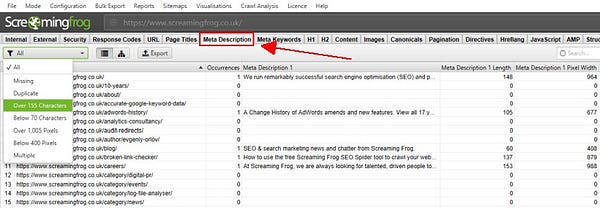
There are multiple ways of doing this. To identify pages with meta description issues using Screaming Frog:
- Crawl the website.
- Open the ‘Meta Description‘ tab.
- Export the URLs of all missing and duplicate meta descriptions.
Here are links to tutorials on doing the same thing using:
- Yoast SEO plugin bulk import/export feature for WordPress
- Sitebulb (skip to the section: On-Page SEO)
2. Scrape the text from the pages with a missing meta description, using the exported URL list
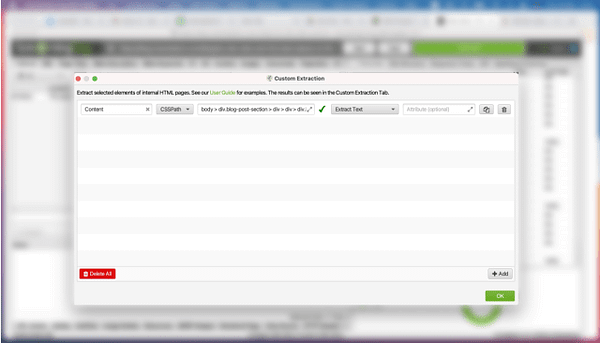
I’ve already written an in-depth guide about how to scrape text from URLs using Screaming Frog, but here is a brief recap:
- Copy the selector of the element you want to extract text from.
- Set up a custom extraction in Screaming Frog.
- Export your data.
Here are some alternative ways to scrape content using a list of URLs:
- New in the notebooks: put your URLs in a text file, flip one setting, and the notebooks use trafilatura, a Python library that downloads each page and pulls out the main text and title, ignoring menus, footers and cookie banners. No crawler needed.
- Using Beautiful Soup and Python to scrape content from URLs in bulk
- Bulk import/export WordPress plugins
Whichever route you take, check a site’s terms before scraping pages that aren’t yours.
⚠️ Important note regarding file formatting
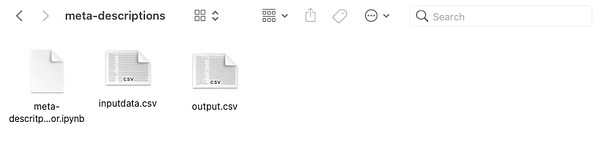
The input file must be in the following format:
- File format: .CSV
- File content: Column A: URL; Column B: scraped content on the respective URL. Two optional columns help the modern methods:
TitleandTop query. - Filename: inputdata.csv
Now, let’s get to business.
3. Open the notebook, upload your file and run it
All the code for this tutorial lives in three notebooks: the notebook on GitHub. They run in Google Colab (no setup) or locally in Jupyter, and they ship with a sample inputdata.csv so you can try them before using your own data.
- 01: the BERT method from this tutorial, refreshed
- 02: the modern local options: embeddings and a small open LLM
- 03: LLM-assisted generation through an API, with cost estimates and guardrails
Running BERT using Python
Let’s run through the Python code. Here’s what I published in 2021, because I think it’s useful to see the original before the fixes.
First, we import the necessary modules.
# import necessary modules
import pandas as pd
from summarizer import Summarizer
Then, we import the file using Pandas.
# import your file
# format it with two columns - A with URLs, B with extracted page content
df = pd.read_csv("../meta-descriptions/inputdata.csv", header=0,
                 encoding="utf-8-sig", error_bad_lines=False)
In order to run BERT, we must first create a list to store the generated meta descriptions. Then, for each URL in the CSV we’ve provided, we store the respective generated meta description. We run BERT, specifying the model type (Summarizer), the text for analysis, and the maximum text length of the summarised text. Finally, we store the values in the list, save them in a column in the data frame, and output the file with the meta descriptions attached as an additional column in a new CSV.
# Create a list to store the MDs
metadesc = []

# For each URL in the input CSV run the analysis and store the results in the list
for i in range(len(df)):
    body = str(df.iloc[i][1])

    # BERT
    model = Summarizer()
    result = model(body, max_length=150)
    full = ''.join(result)
    print(full)

    # Storing all values into the list
    metadesc.append(full)

# save stored values in a column
df['Meta Desc'] = metadesc

# save output
output = df.to_csv('output.csv')
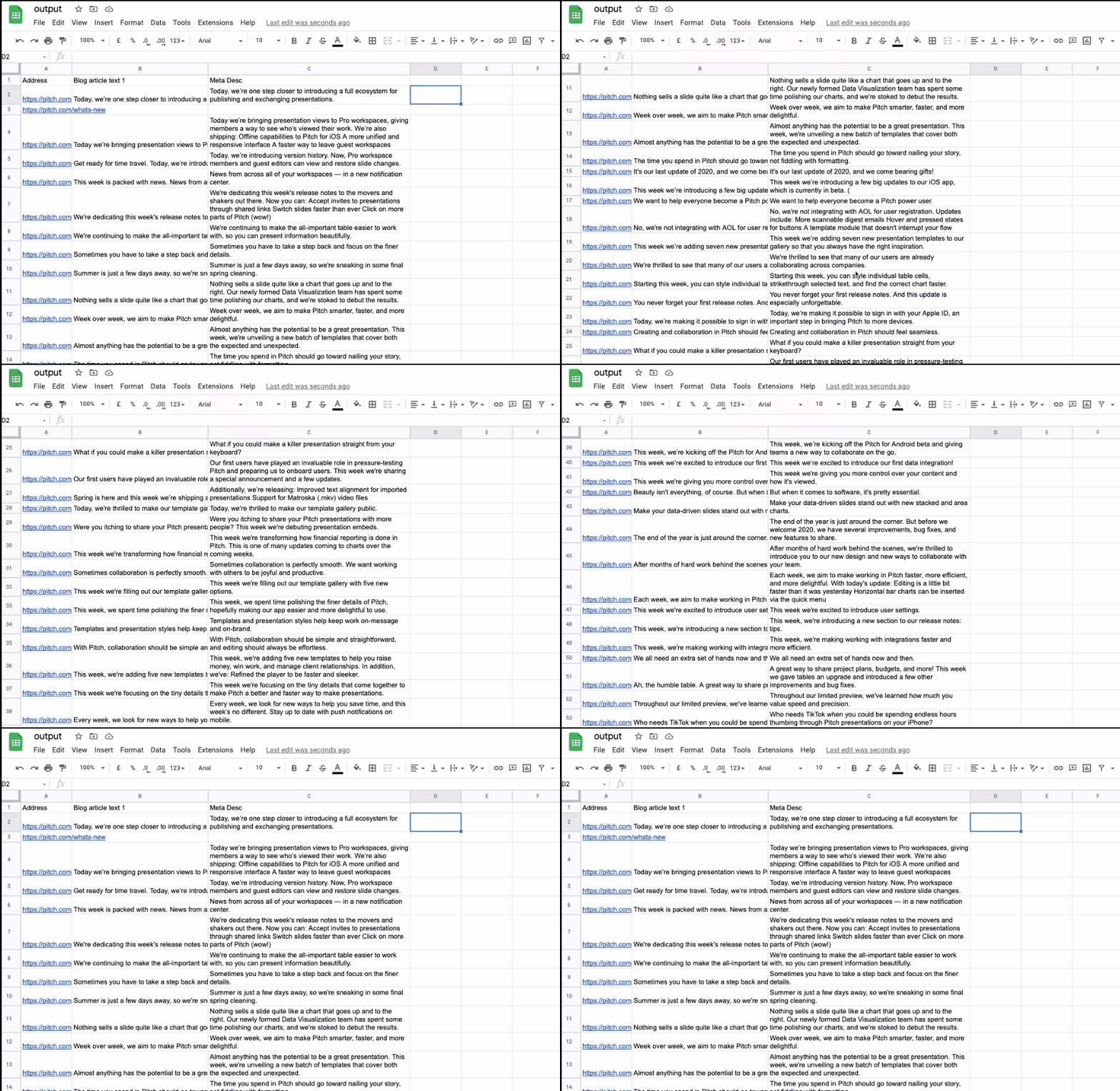
…and voilà!
What I’d fix in my 2021 code
Look closely at that screenshot: several of those “meta descriptions” are three or four sentences long. When I re-tested the code for this refresh, I found out why, and I want to be upfront about it, because the mistake is an easy one to make.
max_length=150never limited the length of the output. In the bert-extractive-summarizer library,min_lengthandmax_lengthdecide which sentences are allowed into the competition (by character count). How much text you get back is controlled byratio(by default, 20% of the page’s sentences) ornum_sentences. On the five sample pages I re-tested, my original call returned anything from 138 to 1,419 characters. Oops.- By default, the library always keeps the page’s first sentence (
use_first=True). Sometimes that’s exactly what you want, because a good intro sentence is a good summary. Sometimes it’s a cookie notice or “Welcome to our blog!”. Now you can choose. - The model was loaded inside the loop, so BERT was reloaded from scratch for every single URL. Load it once.
error_bad_lines=Falseno longer exists. It was removed in pandas 2.0, and the code now errors. The replacement ison_bad_lines="skip".
Here’s the refreshed version:
import pandas as pd
from summarizer import Summarizer

df = pd.read_csv("inputdata.csv", encoding="utf-8-sig", on_bad_lines="skip")
df = df.rename(columns={df.columns[0]: "URL", df.columns[1]: "Content"})

model = Summarizer()   # load BERT once, outside the loop

def bert_meta(body, use_first=False):
    body = str(body)
    if len(body.split()) < 40:
        return ""      # too little text to summarise: write these by hand
    # one sentence, and only sentences of 60-155 characters may compete
    return model(body, num_sentences=1, min_length=60, max_length=155,
                 use_first=use_first).strip()

df["Meta Desc"] = [bert_meta(b) for b in df["Content"]]
df.to_csv("output.csv", index=False)
Because only sentences of 60–155 characters can win, whatever comes back already fits in the SERP. Notebook 01 runs both settings of use_first side by side so you can compare.
⚠️ Important note about the model’s ability to process text
In 2021 I wrote that BERT can only generate a meta description for texts longer than 400 words, and linked that to Google’s understanding of thin content. I need to correct both halves of that. In my re-test, the summariser handled a 233-word glossary page without any trouble. And Google has never published a word count for thin content; the 400-word mark is a heuristic some audit tools use, not a Google rule. What is true: the less text a page has, the fewer sentences there are to choose from, and the worse an extractive summary gets. The refreshed notebook skips pages under ~40 words and leaves them for a human. If a lot of your pages land in that bucket, the meta descriptions are not your biggest problem. Make sure your indexable pages give users and search engines enough to work with.
We now have a file with automatically generated meta descriptions, which we can upload to the site or start optimising for better CTR. But first, let’s see what else is possible in 2026.
The modern options: embeddings, small open LLMs and LLM APIs
Extractive summaries are safe (every word comes from your page), but they are not written for clicks. You’ll often get a sentence that is accurate but a bit flat, or one that leans on context it doesn’t have (“This is why we…”). Here are three upgrades, from the most controlled to the most fluent.
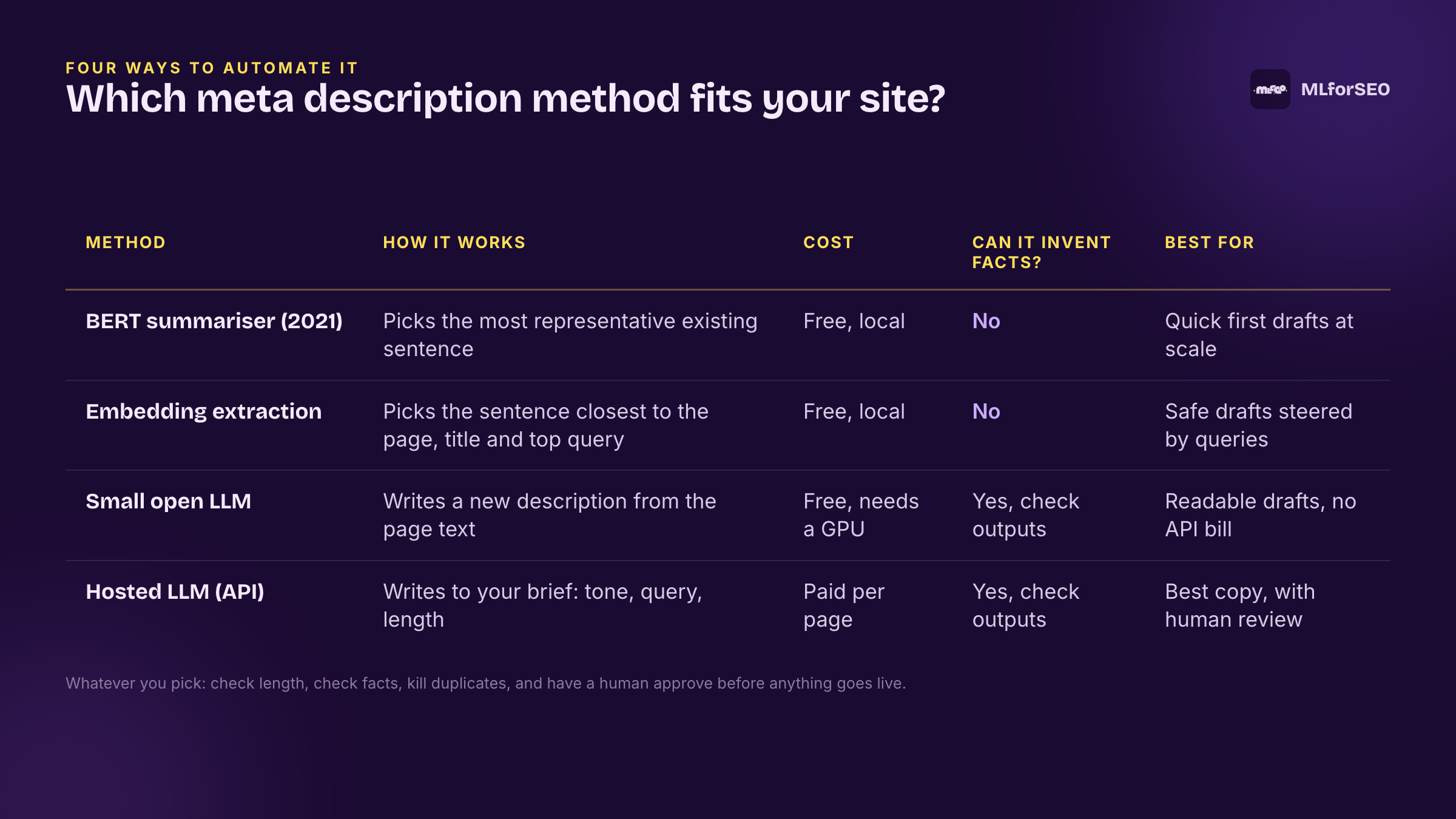
Option 1: Embedding-based extraction (still extractive, but you’re in control)
This is the same idea as the BERT summariser (pick the sentence that best represents the page), rebuilt so you can see and steer how the choice is made. It uses sentence-transformers (SBERT), the library behind a lot of the MLforSEO notebooks, including keyword clustering with KeyBERT.
- Split the page into sentences and keep only candidates that could work as a description on their own: 70–155 characters, a capital letter at the start, a full stop at the end, and no opening word that needs context (“And”, “This”, “It”…).
- Turn every candidate into an embedding, a list of numbers that captures its meaning.
- Score each candidate on three things: how close it is to the page as a whole, how close it is to the query the page ranks for (or the title, if you don’t have query data), and a small bonus for appearing early on the page.
- Keep the winner.
from sentence_transformers import SentenceTransformer, util
import torch

embedder = SentenceTransformer("sentence-transformers/all-MiniLM-L6-v2")

def embedding_meta(text, title="", query=""):
    cands = candidate_sentences(text)          # the filtering from step 1 (in the notebook)
    if not cands:
        return ""
    E = embedder.encode(cands, convert_to_tensor=True, normalize_embeddings=True)
    page = torch.nn.functional.normalize(E.mean(0), dim=0)
    focus = embedder.encode(query or title, convert_to_tensor=True, normalize_embeddings=True)
    position = torch.tensor([1 - i / len(cands) for i in range(len(cands))], device=E.device)
    score = 0.40 * util.cos_sim(page, E)[0] + 0.45 * util.cos_sim(focus, E)[0] + 0.15 * position
    return cands[int(score.argmax())]
The weights (40/45/15) are a starting point, not gospel. Change them and see what happens on your pages. The embedding model is about 90 MB and fast on an ordinary laptop. For non-English sites, swap in paraphrase-multilingual-MiniLM-L12-v2.
Option 2: A small open LLM writes the description (abstractive, free, local)
This is where we cross from extractive to abstractive. Instead of picking a sentence, a language model writes one. You don’t need an API or a credit card for this: small open models now run on a free Colab GPU or a recent laptop. The notebook uses Qwen3-1.7B through Hugging Face Transformers. At 1.7 billion parameters it’s tiny by LLM standards, but plenty for a two-sentence summary, and on my Mac it took about 4–8 seconds per page.
The prompt does three jobs: it grounds the model (“use only facts stated in the page text”), sets the format (length, no quotes or emojis), and passes the title and top query so the description reflects what people actually search for.
SYSTEM_PROMPT = (
    "You write meta descriptions for web pages. Use only facts stated in the page text. "
    "Write one or two sentences, 120-155 characters in total, plain text, no quotes, "
    "no hashtags, no emojis. If a target query is given and it fits the page naturally, include it."
)
Before I settled on Qwen, I also tried flan-t5-base, a small model often recommended for summarisation. On my test pages it mostly copied the first couple of sentences and ignored the length instruction entirely. So “it’s a summarisation model” doesn’t automatically mean “it writes good meta descriptions”. Test on your own pages.
Option 3: LLM-assisted generation through an API
A large hosted model (Claude, GPT, Gemini) writes the most natural copy of all the options. It follows instructions about tone of voice, the target query and the angle you want, and it handles messy pages better than a small model. Notebook 03 uses the Anthropic API. If you’d rather use OpenAI, the pattern is identical, and our Natzir Turrado’s Fuzzy Booster tutorial shows the OpenAI client in Colab.
Now for my usual caveats, because this is where people get burned.
- Precision. LLMs are confident writers, not careful readers. They can produce a description that sounds right but misrepresents the page: the wrong product, a feature you don’t have, a “free” that isn’t free. In my comparison of NLP APIs and generative AI, some models inferred things the text never said. Meta descriptions are no different.
- Hallucination. The classic version here is a number. “Over 500 templates”, “trusted by 10,000 marketers”: if it’s not on the page, it shouldn’t be in the snippet. The prompt tells the model to stick to the page text, and the checks (below) catch numbers and names that don’t appear on the page. Neither is a guarantee.
- Cost. You pay per token, on every page, every time you re-run. For a few hundred pages it’s pennies to a few dollars. For a million-page ecommerce site it’s a budget line. Notebook 03 runs in
DRY_RUNmode by default: it builds every prompt and estimates the bill before making a single call. Only sending the first ~800 words of each page keeps it down, and the batch API runs the same requests at half price if you can wait. - Privacy. Your page content goes to a third party. For public pages that’s usually fine. For anything behind a login, check your agreements first.
I’m not saying don’t use an LLM for this. I use them. What I am saying is: an LLM is a drafting tool, not a publishing tool. The moment you go from “it writes my descriptions” to “it publishes my descriptions”, you’ve handed your SERP copy to a system that doesn’t know your business.
How the methods compared on real pages
I ran the local methods on five MLforSEO pages (the sample file in the notebooks). Two examples:
| Method | Page: How to do keyword clustering with KeyBERT | Chars |
|---|---|---|
| BERT, my 2021 call | Four sentences, including a bullet point from the requirements list | 813 |
BERT, refreshed (use_first=True) | In this guide, I’ll show you how to work with KeyBERT, and how to use it for keyword clustering in the process of keyword research. | 132 |
| Embedding extraction | Same sentence as above, chosen because it matched the top query (“keybert keyword clustering”) | 132 |
| Qwen3-1.7B | This guide explains how to use KeyBERT for keyword clustering in keyword research, focusing on extracting relevant keywords from text using BERT-based embeddings. | 162 ⚠️ |
| Method | Page: What fuzzy matching is, and where it fits in SEO | Chars |
|---|---|---|
| BERT, refreshed | Redirect maps, 404 clean-ups, hreflang audits, brand-mention monitoring, they all come down to measuring how alike two pieces of text are. | 137 ⚠️ query missing |
| Embedding extraction | Fuzzy matching is a form of string matching, a machine learning problem that dates back to the 1980s. | 101 |
| Qwen3-1.7B | Fuzzy matching is a string matching technique in SEO to determine similarity between text strings, addressing issues like redirects, 404 errors, and brand mentions. | 164 ⚠️ |
A few things worth noticing. The embedding method reliably picked a clean, on-topic sentence, because we told it what “on-topic” means. The small LLM wrote the most complete summaries (and its descriptions were the closest to the page by embedding similarity), but it overshot the length on three of five pages, even after the notebook asked it a second time with the exact character count. Small models are bad at counting characters. That’s not a reason to avoid them; it’s a reason to check.
Check before you publish: guardrails for automated meta descriptions
Every notebook ends with the same set of checks, and adds a column flagging anything a human should look at:
- Length: under 70 or over 155 characters.
- Numbers not on the page: any number in the description that doesn’t appear in the page text. This is the cheapest hallucination check there is, and it catches the most damaging ones.
- Names not on the page: capitalised words (brands, products, tools) that never appear in the page text.
- Top query missing: none of the query’s words made it into the description.
- Duplicates: the same description on more than one URL. That’s the problem we set out to fix, so let’s not recreate it with automation.
- Similarity to the page: an embedding score between the description and the page. A low score means the description drifted off-topic.
The checks flag problems; they don’t prove a description is good. Notebook 03 also adds an empty Approved column, and I’d treat that as non-negotiable: nothing goes into your CMS until a person has read it. For WordPress, both Yoast and Rank Math support bulk CSV import of SEO meta once you’re happy.
How to optimise your meta descriptions for better CTR
1. Include the top query or the main keyword for the page in the meta description
You can export the top query for each page using a Google Sheets add-on called Search Analytics for Sheets.
Provide the add-on with the necessary permissions, then connect your domain. Adjust the date and type of report. Select Group by: Page, Query.
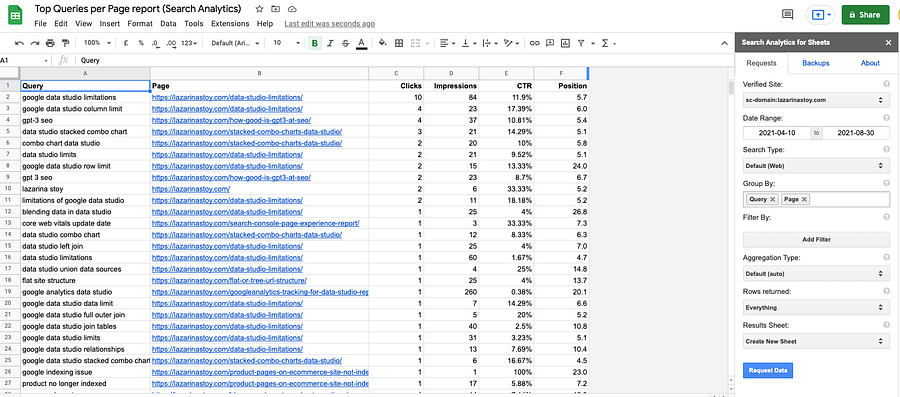
Then, using a VLOOKUP function, match the queries from the Search Console export with the URLs, content export and newly generated meta descriptions from the previous step of this tutorial, using the URLs as the matching dimension.
Provided that you name the Search Console report ‘GSC report’, and the file with the meta descriptions is named ‘output’, your formula will look like this:
=VLOOKUP(A2, 'GSC report'!A:G, 2, false)Then check if the keyword is contained within the meta description and, if not (yet it is relevant to the content on the page), try to add it in a sentence.
Even better: paste that top query into the Top query column of your inputdata.csv before you run the notebooks. The embedding method then picks the sentence closest to the query, the LLM methods are asked to work it in, and the checks flag any description that leaves it out. If you want to go a step further and score how well your existing titles, H1s and descriptions match the queries that bring you clicks, follow the Natzir Turrado’s Fuzzy Booster tutorial on optimising SEO metadata with FuzzyWuzzy and OpenAI, which pulls the queries straight from the Search Console API. The two tutorials work well together: this one fills the gaps, Fuzzy Booster tunes what’s already there.
2. Inspire curiosity, especially for informational queries
Based on some advice from Search Engine Land, inspiring curiosity in a reader matters most for informational queries. By the time someone finishes reading your description, they should be curious about what the page will say. Give just enough to explain what the page is about, but not so much that you ruin the curiosity factor.
This is one place an LLM genuinely helps: you can ask for it in the prompt (notebook 03’s system prompt already does). Extractive methods can’t do this, because they can only reuse sentences you’ve already written.
Curious which of your keywords or queries are informational? Check out this article about search intent keyword classification (which includes a free Looker Studio dashboard), or the transformer-based search intent classification notebook.
Other methods you can use to programmatically generate meta descriptions
1. Utilising other state-of-the-art (SOTA) research for text summarisation
The late Hamlet Batista taught us to seek out and use state-of-the-art (SOTA) research and code, so I can’t help but include his advice on finding other text summarisation approaches, which you might find more useful than this one.
In 2021 I pointed you to the SOTA section of Papers with Code. That site was shut down by Meta in July 2025 and now redirects to Hugging Face’s Trending Papers. Today I’d go to:
- the Hugging Face model hub, filtered to summarisation (or to text generation, for small instruction-tuned models like the one in notebook 02)
- Hugging Face Papers, for research papers with linked code and models
- the original research behind BERT-based summarisation, like the PreSumm paper and its code
The benefit of this approach is that you can experiment with different models to find the best-performing one for your pages. This can be quite challenging for beginner Pythonistas, though. Notebook 02 is built so you can swap in a different model by changing one line, which is a gentler way to start.
2. Automatically generating meta descriptions using a Google Sheets add-on
Another method is to use a Google Sheets add-on called Meta Descriptions Writer.
This approach uses a similar methodology to the one in the tutorial above. A crucial difference is that instead of scraping content from the website, you just need the URLs for the summariser to run as a function in your Sheet. Here is a YouTube tutorial detailing the steps.
Limitations
When I tested it in 2021, you got 25 free meta descriptions upon installing the add-on, and everything after that was paid. (The marketplace listing was last updated in 2023, so check the current terms.)
Another thing I noticed with this approach is that the output quality was less great than the Python-based approach. For this page, BERT generated this meta description:
Today, we’re one step closer to introducing a full ecosystem for publishing and exchanging presentations.
While the Meta Descriptions Writer generated this one:
We use cookies to analyze site performance and deliver personalized content. By clicking Agree you consent to the storing of cookies. You can revoke your consent at any time. Learn more about this in our privacy policy.
As you can see, because the add-on visits the URLs dynamically, wherever there are pop-ups it fails to get to the actual page content. (This is exactly why the notebooks use trafilatura or your own crawler export: you control what text the model sees.)
Personally, I would still recommend a more controlled approach for generating meta descriptions, using Python.
3. Using a Streamlit app (only suitable for individual text snippet summarisation)
Chetan Ambi has shared the code for a really cool Streamlit app, which gives the user a choice of model: BART or T5 transformer. You can find his full tutorial with Python code in this article.
This approach is amazing for when you want to summarise individual snippets of text, using the clean and tidy UI of Streamlit. It would not be suitable for bulk summarisation unless the code is modified. In addition, it requires the app to be deployed.
4. Using the AI features built into your SEO tools (new in 2026)
The biggest change since 2021 is that the tools we already use now do some of this for us:
- Screaming Frog (version 21 onwards) can connect to OpenAI, Gemini, Anthropic and Ollama and run custom prompts against your crawl, so you can generate draft descriptions for the pages you’ve just found with missing ones, in the same tool.
- WordPress SEO plugins like Yoast and Rank Math offer AI-generated titles and descriptions on paid plans, one page at a time inside the editor.
These are convenient, and for a small site they may be all you need. The trade-off is control: you get less say over which text the model sees, which model runs, and how outputs are checked. Everything in the “check before you publish” section applies just as much here.
Takeaway
Generating meta descriptions is a really boring task, yet one that every site owner or SEO must do at some point. Python and models such as BERT enabled a quick-and-easy solution to this repetitive and time-consuming task back in 2021, and today’s embeddings and LLMs make the results better still. Just remember the trade-off: extractive methods can’t invent anything but don’t write for clicks; abstractive methods write better copy but need checking.
There are different approaches you can take to programmatically generate the meta descriptions on your website, but the most important takeaway from this article should be that you must have them. Period. And if a machine writes them, a human reads them before they go live.
Feel free to reach out about other tools you’ve come across that can achieve this task effortlessly.
Resources
Grab the three notebooks (BERT refreshed, embeddings and a small open LLM, and the LLM-assisted version with guardrails) plus a sample input file: the notebook on GitHub.
Want to understand what’s going on under the hood: how transformer models and embeddings power tasks like topic modelling, and when a purpose-built model beats a generative one? That’s what Introduction to Machine Learning for SEO covers, hands-on, in the MLforSEO Academy.
Related glossary terms
MLforSEO Academy
Take your skills further — pick your path
Introduction to Machine Learning for SEO
by Lazarina Stoy
Ship practical ML workflows — classification, clustering, entity extraction — no CS degree required.
View course →AI Search Optimisation & Agentic SEO
by Beatrice Gamba
How agentic systems retrieve, evaluate and select — and how to become the source they cite.
View course →AI Search, LLMs, Entity SEO & Knowledge Graph Strategies
by Beatrice Gamba
Build the entity authority and knowledge-graph presence that makes AI recognise and trust your brand.
View course →Semantic ML-enabled Keyword Research
by Lazarina Stoy
Query understanding, search intent and semantic clustering for how people and AI really search.
View course →