Explore search data at scale. Google Trends is a public platform that you can use to analyse interest over time for a given topic, search term, and even company.
PyTrends is an unofficial Google Trends API for Python that provides different methods to download reports of trending results from Google Trends. The package can be used to automate different processes, such as quickly fetching data that you can use for further analysis later on.
In this guide, I will share what you can do with PyTrends, how to do basic data pulls, with snippets of Python code along the way. I will also answer some FAQs about Google Trends and, most importantly, address the limitations of using the API and the data.
Updated October 2026: what changed since the first version
I first wrote this guide in 2021. A lot has happened since, so I re-tested every line of code against the live service. The short version:
- PyTrends still works for the core methods (suggestions, interest over time, interest by region, related queries), but its GitHub repository was archived in April 2025, so nobody is fixing it any more.
- Rate limits (HTTP 429) are much stricter. Below I show you how to back off and retry politely.
- Four methods are dead:
trending_searches,today_searches,realtime_trending_searchesandtop_chartsnow return 404, andget_historical_interestwas removed. I show you what to use instead. - Google now has an official Google Trends API, in alpha and by application only. More on that below.
All of the code in this guide is in one runnable Colab notebook: grab it from the MLforSEO code hub, open it in Google Colab and run it top to bottom.
Why use the Google Trends API instead of the Google Trends web interface?
There is no problem with just using the web interface. However, when you’re doing a large-scale project that requires building a large dataset, it can become very cumbersome. Manually researching and copying data from the Google Trends site is a research- and time-intensive process. When you use an API, this time and effort are cut dramatically.
Using code also makes your research repeatable. You can re-run the same pull every month, feed it into a dashboard, or use it as an input for forecasting and semantic keyword research, rather than starting from scratch every time.
What data can you pull with the Google Trends API?
Related to a particular keyword you provide, you could traditionally pull the following data. Here is where each one stands in October 2026, based on my own tests:
| Data | PyTrends method | Status (Oct 2026) |
|---|---|---|
| Keyword suggestions | suggestions() | Works |
| Interest over time | interest_over_time() | Works |
| Historical hourly interest | get_historical_interest() | Removed. Use interest_over_time() with an hourly timeframe |
| Interest by region | interest_by_region() | Works |
| Related topics | related_topics() | Unreliable: often crashes with an IndexError. Fall back to TrendSpy |
| Related queries | related_queries() | Works, heavily rate-limited |
| Trending searches (daily and realtime) | trending_searches(), today_searches(), realtime_trending_searches() | 404. Use TrendSpy or the Trending now RSS feed |
| Top charts | top_charts() | 404. Use Google’s Year in Search pages |
| Categories | categories() | Works |
We will explore the different methods available for pulling this data in a bit, alongside what the syntax for each of them looks like.
Getting started: install PyTrends and connect to Google Trends
Everything in this guide runs in Google Colab, so you don’t need to install anything locally. Start by installing PyTrends (and TrendSpy, which we will use for the methods PyTrends can no longer handle), then create your connection object:
# install the libraries (Colab already has pandas and matplotlib)
!pip install -q pytrends trendspy

# import the libraries
import pandas as pd
from pytrends.request import TrendReq

# connect to Google Trends
pytrend = TrendReq(hl='en-US', tz=0, timeout=(10, 25))
Two things have changed here since 2021. First, I now pass a timeout: the default of two seconds to connect and five to read is too short, and you’ll get random ReadTimeout errors without it. Second, don’t use the retries and backoff_factor options you’ll see in older tutorials. PyTrends was never updated for version 2 of the urllib3 library, so those options now crash with TypeError: ... unexpected keyword argument 'method_whitelist'.
Handling rate limits (the dreaded 429 error)
If you’ve used PyTrends recently, you have almost certainly seen this: TooManyRequestsError: The request failed: Google returned a response with code 429. Google limits how many requests one IP address can make, it doesn’t publish the limit, and in practice a handful of requests in quick succession is enough to trigger it. In my tests, related_queries was by far the most sensitive method.
Since the built-in retries are broken, here is a small helper that does it for you. When Google says 429, it waits (30 seconds, then 60, then 120, plus a little randomness) and tries again. If it still fails, it returns None rather than crashing your notebook.
import random, time
from pytrends.exceptions import ResponseError, TooManyRequestsError

def polite(fn, *args, retries=4, base_wait=30, pause=5, **kwargs):
    # Call fn(*args, **kwargs); back off and retry on HTTP 429.
    for attempt in range(retries):
        try:
            result = fn(*args, **kwargs)
            time.sleep(pause)  # breathing room before the next request
            return result
        except TooManyRequestsError:
            wait = base_wait * (2 ** attempt) + random.uniform(0, 5)
            print(f"429 hit. Waiting {wait:.0f}s (attempt {attempt + 1}/{retries})")
            time.sleep(wait)
        except ResponseError as e:
            # 400 (bad request) or 404 (retired endpoint): retrying won't help
            print(f"Google returned an error retrying won't fix: {e}")
            return None
    return None
Still stuck? Wait 15 to 60 minutes, or restart your Colab runtime (more often than not you get a new IP address). If you need Trends data reliably and at volume, that’s your sign to look at the official API or a paid provider, which I cover at the end.
What parameters can you specify in your queries?
In PyTrends, you specify most of your parameters once, in build_payload(), and then call whichever method you need (interest over time, by region, related queries…). Here is what you can set:
- kw_list (required): your target search term(s), as a list. You can provide up to five, and each must be under 100 characters. You can also pass a topic ID here instead of a plain search term (more on that in the limitations below).
- timeframe: the time period of interest. The default is
'today 5-y'. Other options are'today 12-m','today 3-m','today 1-m','now 7-d','now 1-d','now 4-H','now 1-H','all'(everything since January 1, 2004, the oldest available Google Trends data), or a specific date range such as'2025-01-01 2025-12-31'. - geo: the location of interest, as a two-letter country code (
'US','GB','BG') or a region ('US-CA'). Leave it empty for worldwide. - cat: the category to search within, as a number. It defaults to
0(all categories). You can get the full category tree withpytrend.categories(). - gprop: the Google property to filter on. It defaults to web search (
''). The other options are'images','news','youtube'and'froogle', the latter relating to Google Shopping results.
A few more are set when you create the connection or call a specific method:
- hl (in
TrendReq): your preferred language, which defaults to English ('en-US'). - tz (in
TrendReq): the timezone, as the number of minutes behind UTC. For example,360is US Central time,0is UTC and-60is Central European Time. It only changes how the timestamps are labelled. - resolution (in
interest_by_region()): the granularity of the geo search:'COUNTRY','REGION','CITY'or'DMA'(US metro areas). - Finer time resolution: there is no separate switch for this. Google decides the granularity from the length of your timeframe: up to about a week gives you hourly data, up to around nine months gives you daily data, up to five years gives weekly data, and anything longer is monthly.
A note if you read the 2021 version of this post: the parameter list there followed the documentation of google-trends-api, a JavaScript (Node.js) package with the same idea (startTime, endTime, property, a callback, and so on). That package hasn’t been updated since 2020, so I’ve rewritten this section for PyTrends, which is what all the code here uses.
Are there any limitations to using the PyTrends Google Trends API?
Yes, there are. Before you begin, you must be aware of these few things. The first six are about the data itself, so they apply whichever tool you use; the last two are about PyTrends specifically.
1. Search terms and topics are two different things
Search terms and topics are measured differently, so related topics will not work with comparisons that contain both search terms and topics. This leads to duplicate entries.
This is something easily observable in the Google Trends UI, which sometimes offers several topics for the same phrase. A search term like “apple” matches that exact string (fruit lovers included), while the topic “Apple Inc.” groups every search about the company, in any language or spelling.
The workaround: use suggestions() to find the topic’s ID (the mid), and pass that to build_payload() instead of the plain word. Just don’t mix topics and search terms in the same comparison.
apple_options = pd.DataFrame(polite(pytrend.suggestions, keyword='Apple'))

# pick the company entity, not the fruit
apple_inc = apple_options.loc[apple_options['type'].str.contains('company', case=False), 'mid'].iloc[0]
pytrend.build_payload([apple_inc], timeframe='today 12-m')
apple_topic = polite(pytrend.interest_over_time)
2. Disproportionate results
When using the interest_by_region method, a higher value means a higher proportion of all queries, not a higher absolute query count.
So a small country where 80% of the queries are for “Google” will get twice the score of a giant country where only 40% of the queries are for that term.
3. Keyword length limitations
Google returns a response with code 400 when a keyword is longer than 100 characters.
4. All data is relative, not absolute
The data Google Trends shows you is relative, not absolute. Forbes Baxter Associates explained this neatly:
Look at the chart for searches in 2019. When you see the red line on the chart reaching 100 in about June, it doesn’t mean there were 100 searches for that term in June. It means that was the most popular search in 2019 and that it hit its peak in June.
There’s an important consequence for anyone writing code: every request is scaled to its own 0 to 100. Pull “Netflix” for January in one request and for February in another, and the two 100s don’t mean the same thing. You can’t simply glue requests together. (This, incidentally, is exactly the problem Google’s new official API promises to solve, with consistently scaled data across requests.)
5. The categories are unreliable at best
There are some top-level categories, but they are not representative of the real interest and data.
There are cases where the categories and the data don’t represent real-life operations, and this may be due to a lack of understanding from the searcher, falsely attributed intent, or an algorithm bug.
Another limitation is that you can only pick one category. But if you need to choose more than one due to a discrepancy between the data in the two categories, this becomes a challenge for the next steps in data consolidation, visualisation, and analysis.
6. You can only provide five entries per chart
This can be really annoying. If you are using the API for professional purposes, such as analysing a particular market, this makes the reporting really challenging.
Most markets have more than five competitors in them. Most topics have more than five keywords in them. Comparisons need context in order to work.
The workaround: the anchor-term method. Put the same “anchor” keyword in every batch (four new keywords plus the anchor), then rescale each batch so the anchor’s value matches its value in the first batch. Pick an anchor with steady, mid-sized interest: if it’s tiny, the rounding noise gets amplified.
def compare_many(keywords, anchor, timeframe='today 12-m', geo=''):
    # Mean interest for any number of keywords, on one comparable scale
    others = [k for k in keywords if k != anchor]
    batches = [others[i:i + 4] for i in range(0, len(others), 4)]
    combined, reference = {}, None
    for batch in batches:
        pytrend.build_payload(batch + [anchor], timeframe=timeframe, geo=geo)
        df = polite(pytrend.interest_over_time)
        if df is None:
            continue
        means = df.drop(columns='isPartial', errors='ignore').mean()
        if reference is None:
            reference = means[anchor]
        scale = reference / means[anchor]
        for kw in batch:
            combined[kw] = means[kw] * scale
    combined[anchor] = reference
    return pd.Series(combined).sort_values(ascending=False)

streaming = ['Netflix', 'Disney+', 'Hulu', 'Max', 'Peacock',
             'Paramount+', 'Apple TV', 'Prime Video', 'Crunchyroll']
compare_many(streaming, anchor='Hulu', geo='US')
When I ran this in October 2026 (US, past 12 months), “Max” came out on top, ahead of Disney+ and Netflix. Before you call it a market shift: “max” is also an everyday word, so it’s catching far more than the streaming service. That’s limitation 1 in action. For brand comparisons like this one, swap the plain words for topic mids.
7. Rate limits are strict, and undocumented
As covered above, Google answers too many requests with a 429 error, and it doesn’t tell you what “too many” is. Build pauses and retries into everything, cache what you pull (save it to CSV as you go), and keep your batches small.
8. It’s unofficial, so it can break at any time
PyTrends reads the same internal endpoints that the Google Trends website uses. When Google redesigns a page, the corresponding method breaks, which is exactly what happened to the trending searches and top charts methods. With the repository now archived, those breakages won’t be fixed. Treat PyTrends as a great tool for exploration and one-off research, not as a foundation for a client-facing product.
What API methods are available with PyTrends?
The following methods are available (and here’s what to do about the ones that aren’t any more). All the snippets below assume you’ve run the setup code above, so pytrend and polite() already exist.
Keyword suggestions: suggestions()
Returns the results from the “Add a search term” input box in the Google Trends UI.
# Get Google keyword suggestions
keywords = polite(pytrend.suggestions, keyword='Facebook')
df = pd.DataFrame(keywords)
df.head(5)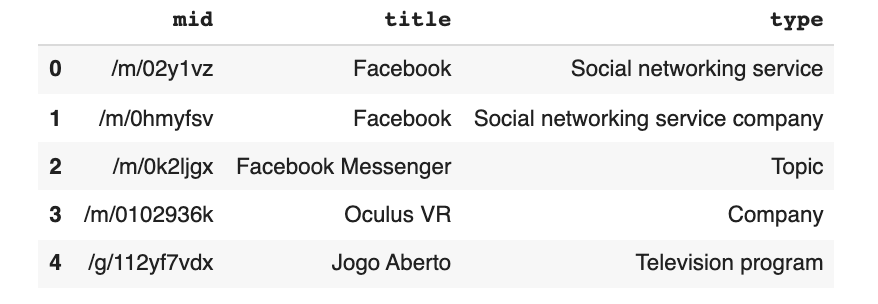
Each suggestion comes with a mid, which is a Knowledge Graph entity ID, plus a title and a type. Here’s a fun detail: when I first ran this, the entity /m/0hmyfsv came back as “Facebook, Social networking service company”. Run the same code today and the same ID comes back as Meta, technology company. Entities survive rebrands; keyword strings don’t. That’s one more reason to use topics (via their mid) when you track brands over time.
If keyword suggestions are what you’re really after, I’ve written a separate guide on using Google’s autocomplete APIs for keyword suggestions, which gives you far more than the five results the Trends box returns.
Daily and realtime trends: trending_now() (replaces trending_searches and today_searches)
Daily search trends used to highlight searches that jumped significantly in traffic among all searches over the past 24 hours, updated hourly. These trends highlighted specific queries that were searched, and an absolute number of searches made. Realtime search trends, meanwhile, highlighted stories trending across Google surfaces within the last 24 hours, updated in real time.
In 2024, Google merged both into a single Trending now page. As a result, the PyTrends methods that read the old pages (trending_searches(), today_searches() and realtime_trending_searches()) now fail with Google returned a response with code 404. You have two good replacements.
Option A: TrendSpy. TrendSpy is a newer open-source library that supports the Trending now page. It returns hundreds of trends, each with an approximate search volume, growth percentage, start time, the related “breakdown” searches and topics:
from trendspy import Trends
tr = Trends(language='en', request_delay=4.0)

# get what's trending in the US over the past 24 hours (also: hours=4, 48 or 168)
trending = tr.trending_now(geo='US', hours=24)

trending_df = pd.DataFrame({
    'keyword': t.keyword,
    'search_volume': t.volume,
    'growth_pct': t.volume_growth_pct,
    'topics': ', '.join(t.topic_names),
    'breakdown': ', '.join((t.trend_keywords or [])[:5]),
} for t in trending).sort_values('search_volume', ascending=False)

trending_df.head(20)
Option B: the Trending now RSS feed. Google publishes a public RSS feed at https://trends.google.com/trending/rss?geo=US, with the current top trends, an approximate traffic band (like “200+” or “10K+”) and linked news stories. It’s shorter than the full list, but it’s the most stable option because it’s a published feed rather than an internal endpoint. The notebook includes a ten-line function that turns it into a DataFrame.
Top charts: top_charts() (retired)
You used to be able to get the topics that were trending historically, for instance for a particular year:
# Get Google Top Charts (no longer works: returns a 404)
df = pytrend.top_charts(2020, hl='en-US', tz=300, geo='GLOBAL')
df.head()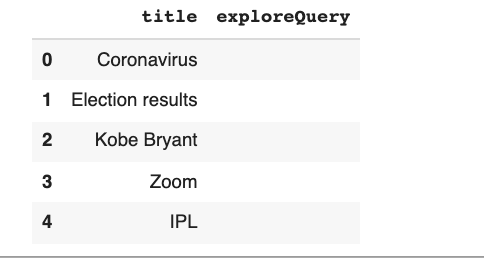
This endpoint now returns a 404 too, in PyTrends and TrendSpy alike, and I haven’t found a working programmatic replacement. The yearly lists now live on Google’s Year in Search pages, which you can browse and copy from manually. For a handful of years, that’s honestly fine.
Interest over time: interest_over_time()
Numbers represent search interest relative to the highest point on the chart for the given region and time. You can compare up to five search terms, and the result comes back as a DataFrame with one column per keyword (plus an isPartial column flagging the latest, still-incomplete period).
import matplotlib.pyplot as plt

# provide your search terms (can also be competitors)
kw_list = ['Facebook', 'Apple', 'Amazon', 'Netflix', 'Google']

pytrend.build_payload(kw_list, timeframe='today 12-m')
iot = polite(pytrend.interest_over_time)

# drop the flag for the incomplete latest period
iot = iot.drop(columns='isPartial')

# visualise
iot.plot(figsize=(14, 6), title='Interest over time, past 12 months')
plt.show()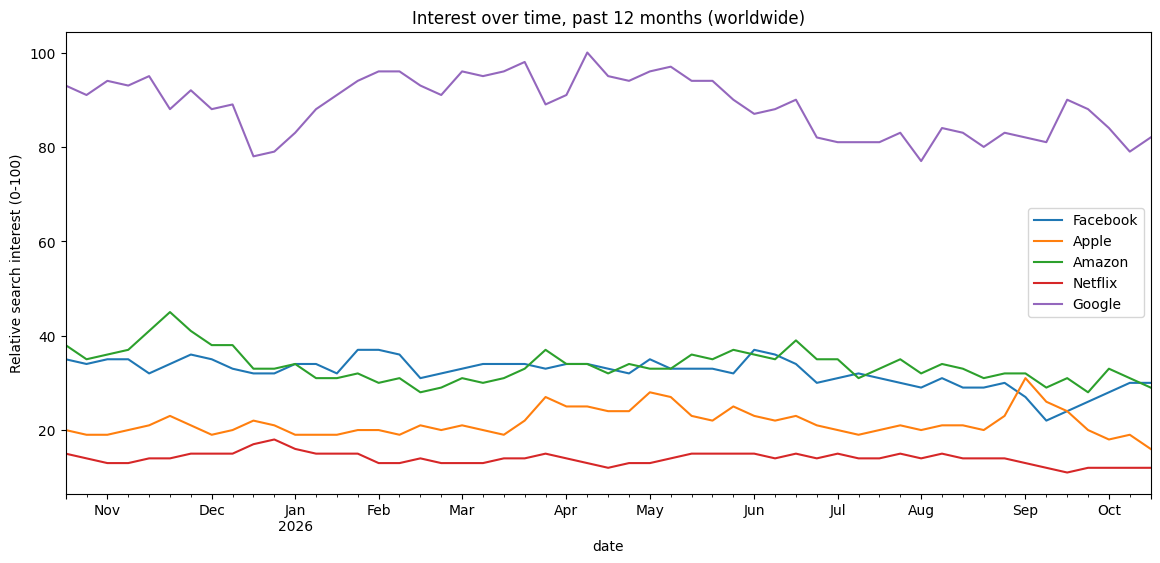
Historical hourly interest (replaces get_historical_interest)
You can also get historical interest by specifying a time period. In 2021, I did this with get_historical_interest(), which pulled hourly data week by week and stitched the weeks together. That method has since been removed from PyTrends (calling it raises NotImplementedError), and for a good reason: as we saw in limitation 4, every request is scaled to its own 0 to 100, so the stitched weeks weren’t actually comparable with each other.
Today, there are two honest ways to do it. For hourly data, ask for a window of seven days or less, either with 'now 7-d' or with explicit hours:
# hourly interest for the last 7 days
pytrend.build_payload(['Netflix', 'Disney+'], timeframe='now 7-d')
hourly = polite(pytrend.interest_over_time)

# or a specific window (maximum 7 days), format YYYY-MM-DDTHH
pytrend.build_payload(['Netflix'], timeframe='2026-10-01T00 2026-10-07T23')
hourly_window = polite(pytrend.interest_over_time)

# plot separate graphs, one per keyword
hourly.drop(columns='isPartial').plot(subplots=True, figsize=(14, 6))
For a long daily series (anything over about nine months, where Google switches to weekly data), PyTrends ships a helper, dailydata.get_daily_data(). It pulls month by month and rescales each month against a monthly series, so the values stay comparable. It makes one request per month, so give it a generous wait_time:
from pytrends import dailydata

# daily data for March to August 2026 (about 7 requests)
daily = dailydata.get_daily_data('netflix', 2026, 3, 2026, 8, geo='US', wait_time=10)
daily[['netflix']].plot(figsize=(14, 5))
This has to be my favourite one, as it enables super cool additional projects such as forecasting, calculating the share of search (if using competitors as input) and other cool mini-projects.
Here’s share of search in four lines. Each brand’s interest becomes a percentage of the combined interest for that week, which makes a decent proxy for share of voice:
# share of search, using the interest over time data from above
share_of_search = iot[kw_list].div(iot[kw_list].sum(axis=1), axis=0) * 100
share_of_search.plot.area(figsize=(14, 6), title='Share of search (%)')
share_of_search.mean().round(1).sort_values(ascending=False)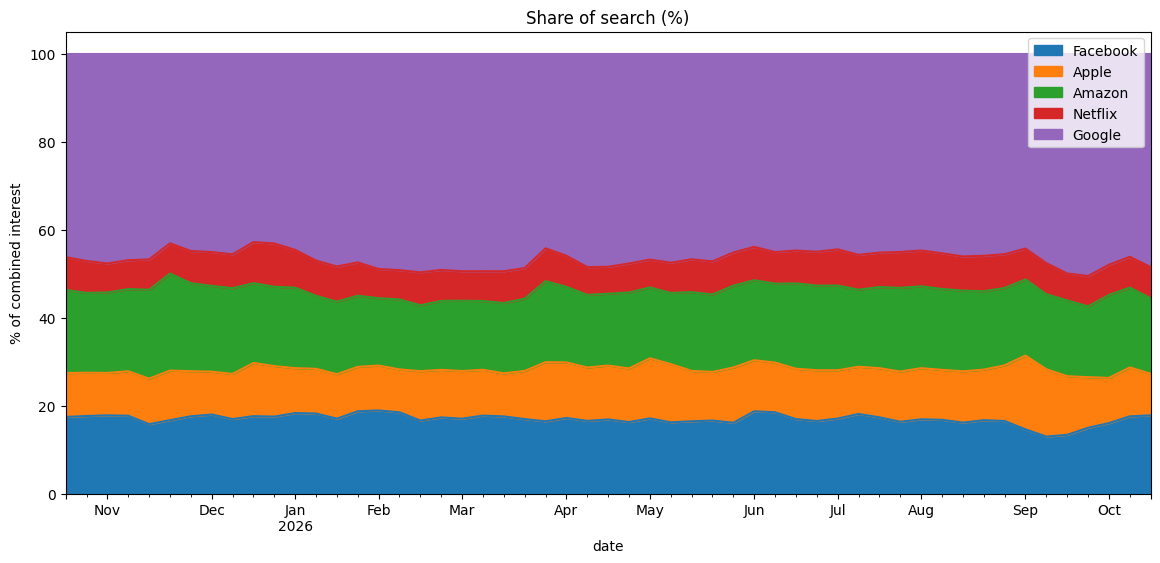
Interest by region: interest_by_region()
This allows examining search term popularity based on location during the specified time frame.
Values are calculated on a scale from 0 to 100, where 100 is the location with the most popularity as a fraction of total searches in that location, a value of 50 indicates a location that is half as popular, and a value of 0 indicates a location where there was not enough data for this term.
You can check the regional interest for multiple search terms at once:
# provide your search terms
kw_list = ['Facebook', 'Apple', 'Amazon', 'Netflix', 'Google']

# search interest per region, past month
pytrend.build_payload(kw_list, timeframe='today 1-m')
regiondf = polite(pytrend.interest_by_region, resolution='COUNTRY',
                  inc_low_vol=False, inc_geo_code=True)

# looking at rows where all values are not equal to 0
regiondf = regiondf[(regiondf[kw_list] != 0).all(axis=1)]

# drop all rows that have null values in all columns
regiondf = regiondf.dropna(how='all', axis=0)

# visualise
regiondf.plot(figsize=(20, 12), y=kw_list, kind='bar')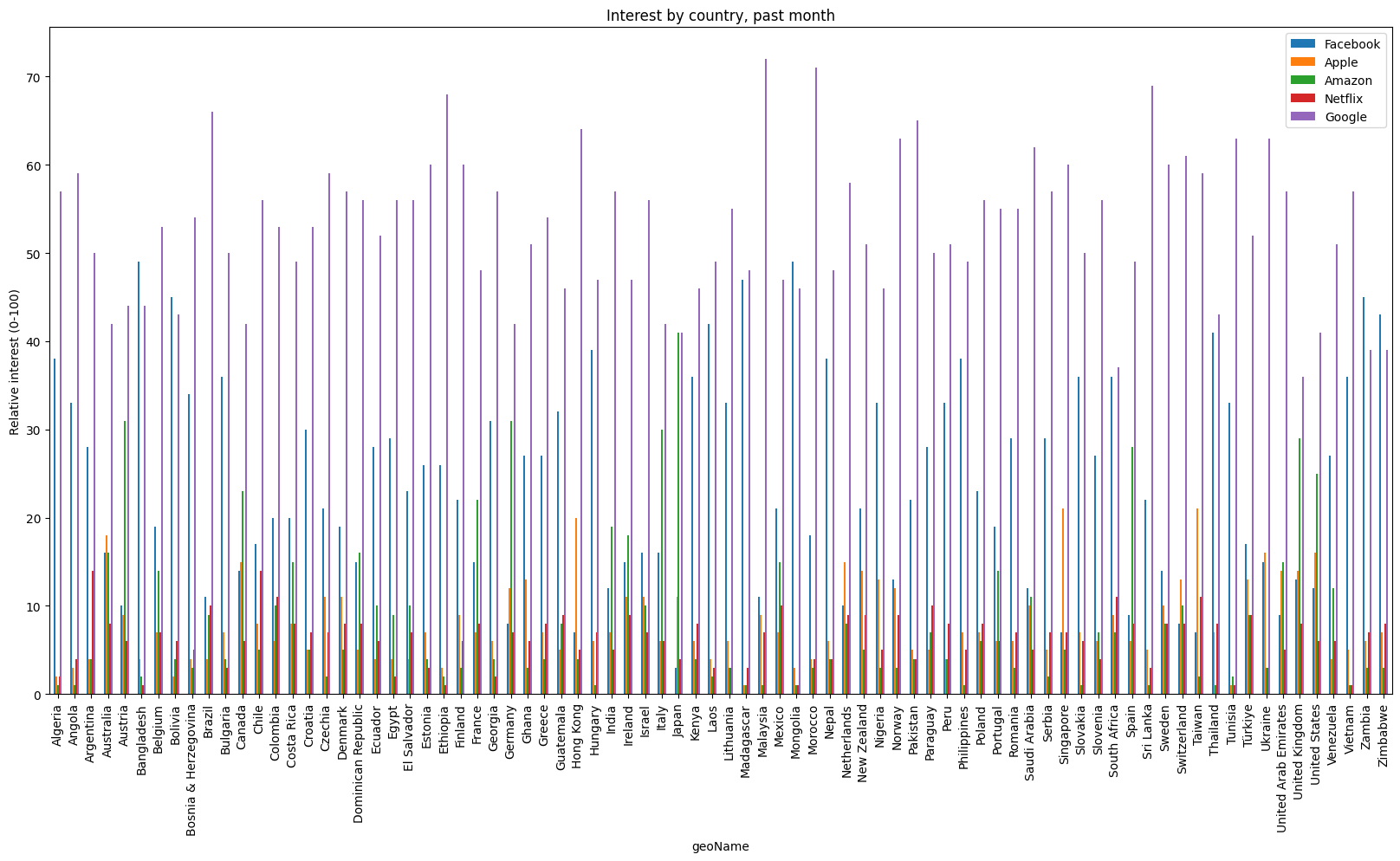
Change resolution to 'REGION' (with geo='US', for example) to break a country down by state, or to 'DMA' for US metro areas. Set inc_low_vol=True to include low-volume locations, and inc_geo_code=True adds the ISO code column, which is handy if you want to map the results.
Related queries: related_queries()
Users searching for your term also searched for these queries. The following metrics are returned:
- Top: the most popular search queries. Scoring is on a relative scale where a value of 100 is the most commonly searched query, 50 is a query searched half as often, and a value of 0 is a query searched for less than 1% as often as the most popular query.
- Rising: queries with the biggest increase in search frequency since the last time period. Results marked “Breakout” had a tremendous increase (Google defines it as more than 5,000%), probably because these queries are new and had few (if any) prior searches.
This is the method Google rate-limits hardest, so the code below tries PyTrends first and falls back to TrendSpy if it gets a 429. I’ve also improved on my 2021 version, which only kept the results for the first keyword in your list. This one loops over every keyword and stacks the results into one tidy table, ready to export:
def related_queries_table(keywords, timeframe='today 3-m', geo=''):
    # One tidy DataFrame: keyword | type (top/rising) | query | value
    pytrend.build_payload(keywords, timeframe=timeframe, geo=geo)
    result = polite(pytrend.related_queries)

    if result is None:  # rate-limited: fall back to TrendSpy
        result = {}
        for kw in keywords:
            r = tr.related_queries(kw, timeframe=timeframe, geo=geo,
                                   headers={'referer': 'https://www.google.com/'})
            if r is not None:
                result[kw] = r

    rows = []
    for kw, tables in result.items():
        for kind in ('top', 'rising'):
            df = tables.get(kind)
            if df is not None and not df.empty:
                df = df.copy()
                df.insert(0, 'type', kind)
                df.insert(0, 'keyword', kw)
                rows.append(df)
    return pd.concat(rows, ignore_index=True) if rows else pd.DataFrame()

# get related queries
allqueries = related_queries_table(['Netflix', 'Disney+'])

# check your dataset
allqueries.head(50)

# save to csv
allqueries.to_csv('allqueries.csv', index=False)

# download from Colab
from google.colab import files
files.download('allqueries.csv')
Prefer the side-by-side layout from the original version of this guide, with the top queries next to the rising ones? The notebook includes a short pivot that rebuilds it, without the duplicate-column renaming function I needed back then.
Related topics: related_topics()
Users searching for your term also searched for these topics. The following metrics are returned:
- Top: the most popular topics. Scoring is on a relative scale where a value of 100 is the most commonly searched topic, a value of 50 is a topic searched half as often, and a value of 0 is a topic searched for less than 1% as often as the most popular topic.
- Rising: related topics with the biggest increase in search frequency since the last time period. Results marked “Breakout” had a tremendous increase, probably because these topics are new and had few (if any) prior searches.
The syntax here is the same as above, with the change only in the method name. You get back a dictionary of DataFrames, one per keyword, with a topic_title, topic_type and topic_mid for each topic (and that mid can go straight back into build_payload()).
One caveat from my 2026 tests: related_topics() regularly crashes with IndexError: list index out of range. Google sometimes sends back an empty list of topics, and PyTrends only knows how to handle a missing one. So, as with related queries, catch the error and fall back to TrendSpy:
# Related topics, returns a dictionary of dataframes
pytrend.build_payload(['Netflix'], timeframe='today 3-m')
try:
    related_topic = polite(pytrend.related_topics)
    top_topics = related_topic['Netflix']['top']
    rising_topics = related_topic['Netflix']['rising']
except (IndexError, KeyError, TypeError):
    # PyTrends couldn't parse the response: ask TrendSpy instead
    related_topic = tr.related_topics('Netflix', timeframe='today 3-m',
                                      headers={'referer': 'https://www.google.com/'})
    top_topics, rising_topics = related_topic['top'], related_topic['rising']

top_topics.head(10)
rising_topics.head(10)
Is there an official Google Trends API now?
Yes, finally. In July 2025, Google announced an official Google Trends API, in alpha. Here’s what Google has shared publicly:
- a rolling five-year window of data, up to about two days before your request;
- daily, weekly, monthly and yearly aggregations;
- region and sub-region breakdowns (using the ISO 3166-2 standard);
- consistently scaled data, so results from different requests can be compared and joined, which is the one thing no unofficial tool can do properly.
The catch: access is by application, granted on a rolling basis to a limited number of developers, and there’s no public self-serve API key, pricing or quota table yet. If you have a concrete project, it’s worth applying for the alpha. If you get in, use it for anything long-running or client-facing, and keep PyTrends for quick exploration.
PyTrends alternatives at a glance
| Option | Best for | Watch out for |
|---|---|---|
| PyTrends | Interest over time and by region, suggestions, related queries | Archived, 429s, four retired methods |
| TrendSpy | Everything PyTrends does, plus Trending now | Same internal endpoints, so the same rate limits and the same risk of breaking |
| Trending now RSS feed | A stable list of what’s trending today | Top trends only, traffic shown as a band |
| Official Google Trends API (alpha) | Reliable, consistently scaled data for real projects | Application-only, five-year window |
| Paid SERP data providers (for example DataForSEO or SerpApi) | Volume, with the rate limits handled for you | Cost per request; it’s still relative Trends data underneath |
Take your keyword research further
Trends data tells you when and where people search. The Semantic ML-enabled Keyword Research course shows you how to combine it with autocomplete, entities and clustering to build a keyword universe you can actually act on.
What to look out for next…
Hope you enjoyed this exploration.
You can find all of the code compiled into one Colab notebook in the MLforSEO code hub. It includes everything above, plus a few extras: the side-by-side related queries layout, the RSS trending function, and a CSV export for every dataset.
Keep an eye on two things. First, the official Google Trends API: once it opens up beyond the alpha, it will be the right answer for most professional use cases, and I’ll update this guide when it does. Second, if a PyTrends method suddenly starts returning 404s, it’s almost certainly not your code: Google has changed a page, and with the library archived, it’s time to switch to one of the alternatives above.
Thanks for reading. Check out these resources created by brilliant people:
- Google Trends API exploration: Google Trends API for Python
- Script as a function for getting daily search data using PyTrends: pytrends/dailydata.py at master · GeneralMills/pytrends
- The newer library for Trending now: TrendSpy on GitHub
- Google’s own explanation of how the numbers work: FAQ about Google Trends data
Frequently asked questions
Why use the Google Trends API instead of the Google Trends web interface?
There is no problem with just using the web interface. However, when doing a large-scale project that requires building a large dataset, it can become very cumbersome. Manually researching and copying data from the Google Trends site is a research- and time-intensive process. When using an API, this time and effort are cut dramatically.
Does PyTrends still work in 2026?
Partly. Suggestions, interest over time, interest by region, related queries and categories still work (with frequent 429 rate-limit errors), and related topics works some of the time. The trending searches, today’s searches, realtime trending and top charts methods return 404, and the historical interest method was removed. The GitHub repository was archived in April 2025, so these won’t be fixed.
How do I fix the PyTrends 429 “Too Many Requests” error?
Slow down. Add pauses between requests, retry with exponential backoff (wait 30 seconds, then 60, then 120), keep batches small and save results as you go. Don’t use PyTrends’ built-in retries option, which crashes on current versions of urllib3. If you’re still blocked, wait up to an hour or restart your Colab runtime to get a new IP address.
Is there an official Google Trends API?
Yes. Google announced the Google Trends API (alpha) in July 2025. It offers five years of consistently scaled data with daily to yearly aggregation and region breakdowns, but access is by application only and is being granted to a limited number of developers.
Are there any limitations to using the PyTrends Google Trends API?
Yes, there are. Before you begin you must be aware of these few things: 1) search terms and topics are two different things; 2) the results are disproportionate; 3) there are keyword length limitations; 4) all data is relative, not absolute; 5) the categories are unreliable at best; 6) you can only provide five entries per chart; 7) rate limits are strict; and 8) it’s unofficial, so methods can break at any time.
What do Google Trends values actually denote?
According to Google Trends, the values are calculated on a scale from 0 to 100, where 100 is the location (or point in time) with the most popularity as a fraction of total searches in that location, and a value of 50 indicates a location that is half as popular. A value of 0 indicates a location where there was not enough data for this term.
Related glossary terms
MLforSEO Academy
Take your skills further — pick your path
Semantic ML-enabled Keyword Research
by Lazarina Stoy
Query understanding, search intent and semantic clustering for how people and AI really search.
View course →AI Search Optimisation & Agentic SEO
by Beatrice Gamba
How agentic systems retrieve, evaluate and select — and how to become the source they cite.
View course →AI Search, LLMs, Entity SEO & Knowledge Graph Strategies
by Beatrice Gamba
Build the entity authority and knowledge-graph presence that makes AI recognise and trust your brand.
View course →Introduction to Machine Learning for SEO
by Lazarina Stoy
Ship practical ML workflows — classification, clustering, entity extraction — no CS degree required.
View course →