Forget the soul-crushing disappointment of unseen videos. In this guide, I’ll share a YouTube SEO audit step-by-step process, with which you will be able to shine a light on the hidden factors holding your channel back.
Ditch the band-aid approach. We will go beyond tweaking titles and tags. Think of it as a full-body scan, uncovering:
- Channel roadblocks: identify technical issues hindering visibility.
- Audience blind spots: understand what truly resonates with your viewers.
- Competitor insights: learn from the winning strategies of the channels you compete with, so you can outrank them.
- Content gaps: discover untapped opportunities to attract new audiences.
The result? A data-driven roadmap to transform your channel into a beacon of engagement and growth.
Updated October 2026: what changed since the first version
I first published this audit process in February 2024. The method still holds, but YouTube has changed a fair bit since, so I’ve re-checked every feature mentioned below. The short version:
- You can now A/B test titles as well as thumbnails natively, with YouTube’s Test & compare tool, and it picks the winner on watch time, not clicks.
- The Community tab is called Posts in YouTube Studio, and it’s no longer gated behind a subscriber count.
- Shorts can be up to three minutes long (since October 2024), and viewers can now hide end screens.
- Annotations are long gone, and YouTube says tags play only a minimal role in discovery, so I’ve updated the ranking factors table.
- YouTube is now one of the most-cited sources in Google’s AI Overviews, which makes your videos part of your AI search visibility, too. I’ve added a check for that.
- New: a free notebook that builds the competitor benchmark table for you with the YouTube Data API.
- New: how to use AI to run the audit: transcript analysis, topic clustering, thumbnail critique, comment mining, and the caveats.
Take me to the audit, skip the context
What is a YouTube SEO audit?
Understanding how to do a YouTube SEO audit is vital for anyone aiming to enhance their channel’s performance, or any SEO professional looking to incorporate video into their organic growth strategy. Essentially, the audit is a comprehensive review process where you scrutinise various aspects of your YouTube channel, videos, visuals, and written elements to identify strengths, weaknesses, opportunities, and threats related to your search visibility strategy.
During this audit, you’ll review several key areas:
- Channel overview: you’ll start by examining your channel’s overall health. This includes looking at subscriber count, total views, and engagement metrics. It’s like taking your channel’s pulse to get an initial sense of how well it’s performing.
- Competitor benchmarking: by comparing your channel to competitors, you’ll uncover insights on what they’re doing well and areas where you could improve. This can help you identify trends and content gaps in your niche.
- Content analysis: here, you analyse the quality of your content. Are your videos providing value to your audience? Are they optimised for both search engines and real viewers? You’ll look at titles, descriptions, tags, and the actual video content to ensure they’re all working together seamlessly.
- Audience engagement: understanding who watches your videos and how they interact with your content is crucial. You’ll review comments, likes, shares, and view duration to gauge what’s resonating with your audience, and what’s not.
Through each of these steps, you’re not just collecting data; you’re gathering actionable insights that will drive your YouTube channel forward.
Why is a YouTube SEO audit important?
Do a YouTube audit to understand what’s holding you back, or what’s helping your competitors thrive. Essentially, learn what you need to do to grow faster.
- Uncover hidden growth opportunities by analysing video quality, engagement, and technical SEO.
- Decode audience behaviour: learn what keeps viewers hooked (and what makes them click away).
- Outsmart competitors: see their winning strategies and refine your content to outperform.
- Fix technical roadblocks: identify issues like weak titles, missing chapters and thin descriptions that hurt visibility.
- Make data-driven decisions: craft content aligned with audience preferences and YouTube best practices.
- Show up in AI search: YouTube videos are cited heavily in Google’s AI Overviews and AI Mode, so a well-optimised channel now supports your visibility well beyond YouTube itself.
Regular audits lead to strategic growth. A YouTube SEO audit is an investment in the success of your channel.
Step 0: Before you begin the YouTube SEO audit, establish your goals
Before starting your YouTube SEO audit, it’s crucial to set clear, measurable goals. Without establishing what success looks like for your channel, it would be difficult to understand which aspects to highlight throughout the analysis.
First, identify what you’re aiming to achieve with your YouTube channel. Goals can range from the tangible, like increasing subscriber count or boosting video views, to improving user engagement in the form of likes, comments, and shares. You could also set more intangible goals, like ensuring that each blog post on your website also has a YouTube video or vice versa, or attracting leads via YouTube. Below is a table with more examples of YouTube channel goals you might set for yourself.
| Type of goal | Example goals |
|---|---|
| Tangible YouTube channel and video goals | Increase subscriber count Increase video views (set a monthly or quarterly target) Increase engagement (measured in likes, comments, or shares) Increase social comment likes (measured in likes and replies to the comments you leave on other channels’ videos) Increase watch time Increase new or returning viewers |
| Intangible YouTube channel and video goals | Improve brand awareness on YouTube (can be broken down into a combination of tangible goals like increased engagement, video views, and comment likes) Improve brand omnipresence (can be broken down into measuring the reusability of your content assets, like making sure each blog post has an associated YouTube video and posts on company socials, and vice versa) Improve lead generation from YouTube (while this is measurable, it’s less so when trying to determine the role YouTube played in converting an audience member to a lead. Some tactics include adding a form question about touchpoints and the last touchpoint when onboarding potential customers, and implementing tracking on YouTube videos hosted on your website) Improve video reach (can be made up of several goals, like better video quality, watch time and engagement, but also video features on other websites, citations in AI search answers, and changes in your views’ traffic sources) |
Once you’ve pinpointed your objectives, break them down into actionable targets.
For example, if your goal is to grow your subscriber base by 20% in the next six months, what steps will you take to get there? This might include optimising your video titles and descriptions, improving the quality of your videos, or enhancing your engagement with viewers (see my YouTube SEO checklist for kickstarting this process). Quantifying your goals not only makes them more realistic but also enables you to track your progress effectively.
Key performance indicators (KPIs) are your best friend when it comes to measuring success. Here are a few you might consider:
- Subscriber growth rate: how quickly is your channel gaining new subscribers?
- Average view duration: are viewers watching your videos all the way through?
- Engagement rate: how often are viewers liking, commenting on, or sharing your videos?
Setting goals and identifying KPIs are essential steps in a YouTube SEO audit. They not only guide your strategy and efforts but also provide a benchmark to measure your channel’s growth. Keep your goals specific, measurable, achievable, relevant, and time-bound (SMART). This is especially important if you have intangible goals: identify the metrics that would go into achieving them.
This approach ensures your audit aligns with your channel’s vision and paves the way for strategic growth.
Step 1: Identify your competitor channels and benchmark your performance against theirs
Identify the main channels with which you compete for views, but also the ones with which you compete for potential customers (e.g. other affiliate businesses, e-commerce businesses, or other service providers).
Understand that audience time and attention is limited, and it’s unlikely (although possible in some niches, like commentary, news, or drama) for audience members to watch multiple videos with the same argument or premise from different creators. Therefore, you must ensure that you not only understand who you’re competing against, but also their competitive advantages and how you might be able to stand out (how to beat them).
Identify your business competitors with YouTube channels
Start by doing a SERP analysis for your main keywords, using a tool like DataForSEO, or the SERP analysis feature of Semrush. The goal here is to identify the main competitors you’re up against from a business standpoint, meaning you compete with them not only for views or clicks but also for customers. Then, using YouTube’s search function or vidIQ, find which of these competitors do or don’t have a YouTube channel or presence.
Identify other key organic competitors, with whom you compete on YouTube for visibility
Besides the business competitors, there will inevitably be channels on YouTube with whom you will be competing in terms of views and watch time, even though these might not be competitors in the business sense of the word (i.e. you’re not directly up against them in any monetary aspect, besides YouTube ad revenue).
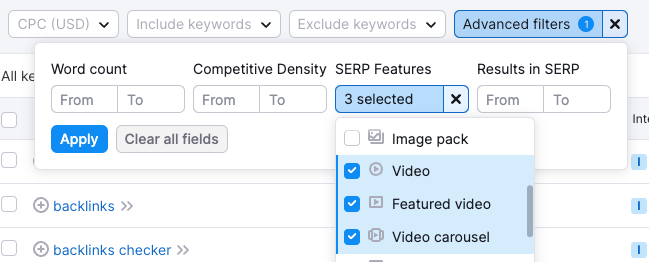
You can identify these competitors by using Semrush’s SERP features trend for featured videos, or Semrush’s Keyword Magic Tool for a given keyword, with the advanced filters for SERP features enabled for video, video carousel, and featured video, as shown in the image below. This analysis is a lot more manual in nature, though.
You can also use DataForSEO‘s bulk Google SERP API or its YouTube SERP API (which returns YouTube’s own organic results, plus video info, subtitles and comments) to get the competitors for your selected keywords in seconds, either in Google Sheets or in Python. If you’d rather start for free, the companion notebook to this guide (more on it below) has an optional cell that searches YouTube for each of your keywords through the official YouTube Data API and counts which channels keep showing up.
Of course, you can also just manually perform this analysis for a limited keyword list using the YouTube search bar.
Benchmark your performance against competitors based on an omnipresence 360-degree assessment
Once you have your business and search competitors list, you can move on to benchmarking. I suggest performing a 360-degree assessment, where you:
- benchmark yourself against each competitor’s social portfolio (including Facebook, Instagram, Pinterest, X/Twitter, TikTok, YouTube), mapped also as a % of total web traffic, whenever relevant;
- benchmark your YouTube channel against theirs (more on this below).
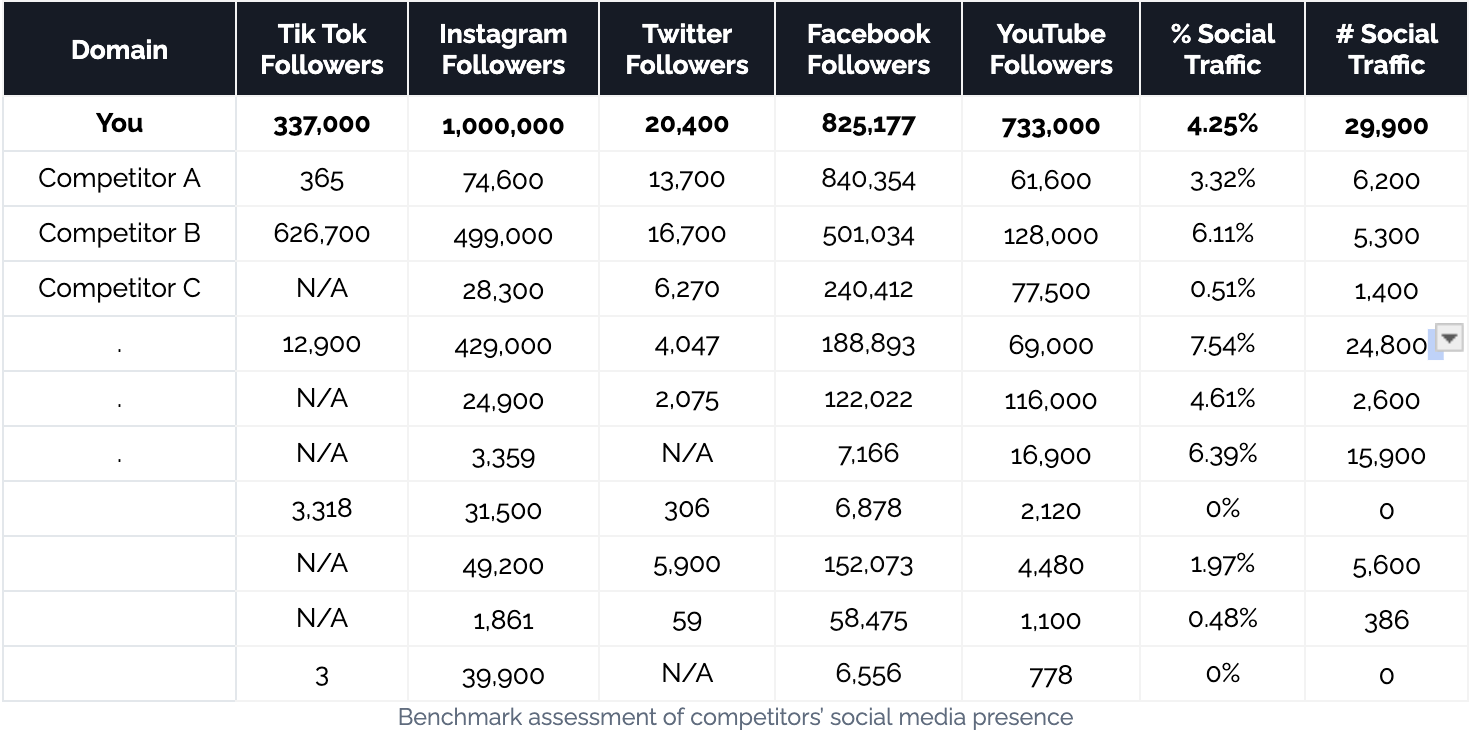
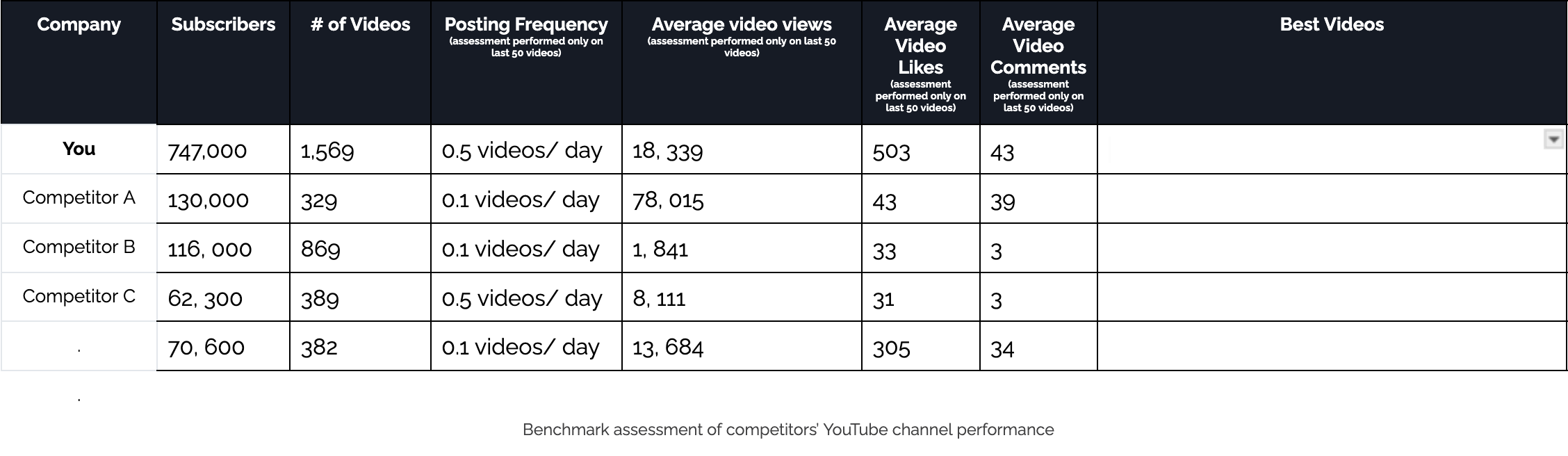
Then benchmark your YouTube channel performance against theirs, taking note of aspects of importance based on the KPIs you set at the start of the audit. Note things like:
- Subscriber count
- Number of videos
- Posting frequency
- Average number of views per video
- Average number of likes per video
- Average number of comments per video
- List of the highest performing videos on their channel
All of this information (and more) is available via vidIQ.
New: build the benchmark table automatically with the YouTube Data API
Copying numbers out of vidIQ for ten competitors gets old fast. So I’ve put together a free notebook that does it for you: grab it from the MLforSEO code hub, add your channel and your competitors’ handles, and run it in Google Colab. It uses the official YouTube Data API v3 (you need a free API key, and one channel costs about four units of your 10,000 daily quota), and for each channel it pulls:
- the benchmark columns from the table above: subscribers, number of videos, posting frequency, and average likes, comments and views over the last 50 uploads (plus the median views, which tells you whether one or two hits are carrying the channel), an engagement rate, and the three best videos;
- some of the Step 2 checks you’d otherwise do by hand: how many of the last 50 videos have chapters in the description, uploaded captions and tags, the average title length and description word count, how many are Shorts-length, and how many playlists the channel has.
Here’s what an example run looked like in October 2026, on four well-known SEO channels:
| Channel | Subscribers | Videos | Uploads per day (last 50) | Avg views | Median views | Engagement | With chapters | Uploaded captions |
|---|---|---|---|---|---|---|---|---|
| Google Search Central | 809,000 | 2,047 | 0.10 | 8,320 | 6,324 | 2.58% | 12% | 76% |
| Ahrefs | 680,000 | 432 | 0.33 | 9,426 | 3,116 | 2.31% | 0% | 8% |
| Semrush | 222,000 | 774 | 0.70 | 1,809 | 1,123 | 1.54% | 48% | 4% |
| Moz | 97,400 | 1,149 | 0.28 | 284 | 270 | 1.16% | 12% | 88% |
Even four rows tell a story. The channel posting least often has the steadiest views (average and median are close), while the one with the highest average views has a median a third of that, so a few breakout videos are doing the heavy lifting. Chapters and uploaded captions vary wildly between channels of a similar size, which is exactly the kind of “quick win you control” this audit is designed to surface. That’s the point of benchmarking: not to copy anyone, but to spot where the bar is in your niche.
Write a benchmark analysis with key observations
In this step, it’s important to identify and highlight the answers to the following questions:
- Who are your competitors?
- Which of your business competitors are also investing in video? How many of them are actively pursuing both TikTok and YouTube? To what extent are they successful with their current strategies?
- Are any of your business competitors actively pursuing other social media channels, and to what degree has this worked in generating traffic to their websites?
- Are there any notable relationships between social media presence and YouTube channel success? E.g. are there any competitors dominating across the board, or ones that are only dominating on YouTube and lacking in other areas?
- What notable insights can you gather about the relationship between how often competitors post, the quality of what they post, and metrics like engagement (views, likes, and comments)?
There are also additional checks I recommend, in order to deep-dive into channel performance and truly understand the competitor landscape for your niche. Explore and analyse aspects like:
- How are competitors using the Posts tab (formerly the Community tab)?
- How are competitors using Shorts?
- How are competitors using playlists?
- Which competitors have a consistent thumbnail structure, and does this have a notable impact on views?
- Which competitors use chapters (key moments), and does this have a notable impact on views?
- Which competitors use content repurposing methods between their websites and their YouTube channels?
- Which competitors have the best descriptions (for channels and videos)?
- Are competitors with a presence on YouTube and TikTok building content synergies between long- and short-form content, and repurposing content?
- Which competitors’ videos show up in Google’s video results and get cited in AI Overviews or AI Mode answers for your main keywords?
Step 2: Assess your own YouTube channel’s health
Now that you have deep-dived into the competitive landscape, it’s time to thoroughly assess your own channel. In this step, you will assess your channel based on its use of features: the qualitative aspects of performance, and the aspects you control.
But before doing that, a quick word on how the YouTube algorithm works.
Understand how the YouTube algorithm works, and what you control
YouTube describes its algorithm as a “sophisticated real-time feedback loop that matches each viewer to the videos they’re most likely to watch.” How does it do that?
For each video, the algorithm evaluates:
- Title
- Thumbnails
- Descriptions
- Viewer interaction (likes, dislikes, comments, shares)
- What they watch
- What they don’t watch
- How much time they spend watching
- “Not interested” feedback
- How satisfied viewers say they are (YouTube runs satisfaction surveys and counts highly rated watch time as “valued watch time”)
The algorithm’s goal is to show viewers videos they want to watch. It also tries to get viewers to keep watching more of what they like (this is called audience retention). So, your goal is to get the algorithm to like your video by getting your audience to like your video, and to watch it right through to the end, because YouTube picks up on that and shows it to more people.
| You control | Your audience controls |
|---|---|
| Title Thumbnails Descriptions (including chapters) Captions and audio tracks Video tags (a minor signal, see below) Info cards and end screens Channel authority Number of your playlists that feature the video | Viewer interactions (likes, dislikes, comments, shares, subscribes) What they watch What they don’t watch How much time they spend watching (watch time) How quickly they click off the video “Not interested” feedback and survey responses Number of viewers’ playlists that feature the video |
Two changes since the 2024 version of this table: I removed annotations, which YouTube retired years ago (cards and end screens replaced them), and I’ve flagged tags, because YouTube’s own help centre now says tags play a minimal role in discovery. They’re mostly useful for commonly misspelled terms.
Assess the qualitative aspects of your YouTube channel performance
Okay, so now that we know what’s in our control, we can move on to assessing how well we are setting up our videos, and our overall channel, for success. I won’t go into too much detail here, as I have a separate guide on optimising YouTube videos and your YouTube channel, which comes with a free checklist.
The ultimate checklist
YouTube SEO Checklist
72 steps to help boost the search visibility of your videos, organised by production area and by when to do each one: before you create, before you upload, when you upload, and after you publish.
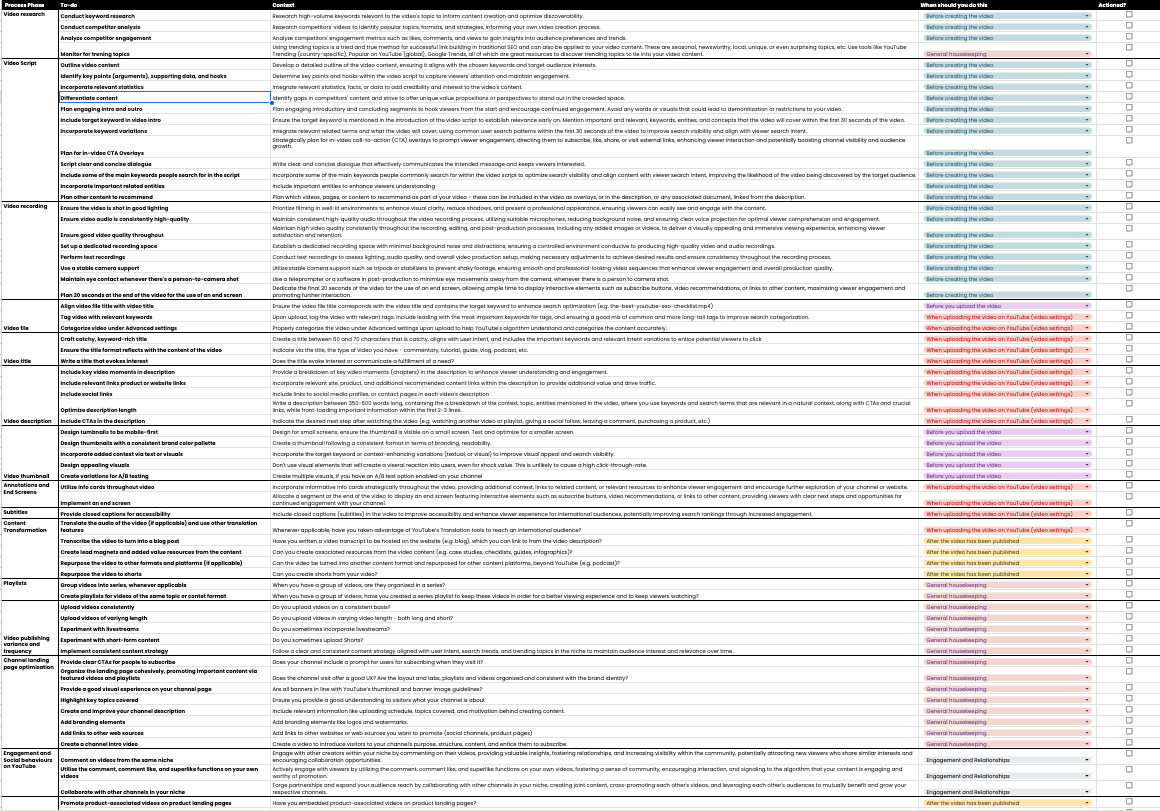
Here are the aspects you should review as part of your YouTube audit, and why they are important:
| Aspect of video or channel | Why it’s important |
|---|---|
| Video titles | Titles carry significance for click-through rates. Inserting keywords or keyword variations, and making the titles as descriptive or as enticing to click on as possible, is a winning strategy. Avoid clickbait, as this can lead to user dissatisfaction. Incorporate intent matching whenever possible. You can now test up to three titles per video with YouTube’s A/B testing tool. |
| Video thumbnails | Video thumbnails (especially custom ones) can help boost click-through rates, as they are the largest visual element in search results. Best practices to consider: keep it relevant to the video, design for mobile first, A/B test variations, and aim for a brand-relevant, consistent look and feel. |
| Video descriptions | The main goal of the description is to get visitors to watch more of your video content and become your subscribers and customers. But YouTube also reads your descriptions and uses that information to rank your video in search results. Writing video descriptions with keywords helps viewers find your videos easily. This is also the place where you can add links to other relevant videos, or external content. Most importantly, each description should have chapters indicated: at least three timestamps, in ascending order, starting at 0:00 (YouTube’s chapter rules). YouTube can also generate automatic chapters, but I’d still write my own. |
| End screens | End screens display similar information to cards, but as you may have guessed, they don’t display until a video is almost over, and they’re a bit more visually detailed. End screens can be added to the last 5 to 20 seconds of a video that’s at least 25 seconds long, with up to four elements, and these useful graphics can be used to link out to a video, playlist, YouTube channel, subscribe prompt or (for Partner Program channels) an approved website. Since 2025, viewers can also tap “Hide” to dismiss them, although YouTube’s own test showed this cost creators less than 1.5% of end screen views. |
| Info cards | YouTube describes cards as preformatted notifications that appear on desktop and mobile, which you can set up to promote your brand and other videos on your channel, aimed at enhancing the viewer experience. You can add up to five cards per video, featuring a video, playlist, channel, or link (link cards to external sites need YouTube Partner Program membership). A couple of the metrics that should be at the forefront of video engagement reporting are the info card clicks, as these, when used for website promotion, are what would be categorised as referral traffic. |
| Captions and audio tracks | Uploaded, accurate captions make your videos accessible, give YouTube (and AI systems that cite videos) a clean transcript to work with, and are a prerequisite for translations. Partner Program channels can also use auto-dubbing or add multi-language audio tracks to reach new audiences. |
| Channel meta elements | The channel landing page meta elements include: the channel description, the banner, the profile picture, the handle and YouTube URL, and the links shown on your channel profile (next to the Subscribe button since 2023). Ideally, these all should convey an organised, unified brand, be professional and insightful regarding the content of the channel, and link to any brand websites or other important assets. |
| Playlists | Playlists are a great way to replicate topic clusters and internal links by bundling relevant content together. They help indicate topic authority and can help boost views and the discovery of associated videos. |
Assess your use of additional YouTube channel enhancement features
YouTube offers additional features that can help boost your performance, and of course, I recommend using all of them, to the degree that they align with your goals and brand. And the good thing is, with a skilful content consultant by your side, there’s always a way to use all of them to promote growth.
Like above, I won’t go into too much detail on each, as this is covered by the YouTube SEO guide, but here’s a summary of the things to audit that might be holding your video and channel performance, and audience engagement, back:
| Aspect of video or channel | Why it’s important |
|---|---|
| Posts (formerly the Community tab) | Engaging your community through posts is a fantastic way to share plans and news, get feedback, and so much more! Consider this a social function that is fully within your control: it’s proactive and visual. In early 2025, YouTube renamed the Community tab to Posts in YouTube Studio, and there’s no longer a subscriber threshold: any channel in good standing with advanced features enabled can post. |
| In-video CTA overlay assets | CTAs should be placed in creative, varied, and strategic ways, with consistent reporting on the performance of each placement. Audience retention usually drops off well before the end of a video (check the retention graph in YouTube Analytics for your own videos). This means you should not place your CTA only at the end, and that is particularly true for longer videos. |
| Comment likes and hearts | Regularly engaging in the comments section by liking comments and giving them a heart might not directly impact rankings, but it can convert non-subscribers into subscribers (you can see which commenters aren’t subscribed in YouTube Studio), and it shows your commitment to your audience. |
| Comment replies | Same for comment replies: these don’t directly impact ranking or channel performance, but can certainly boost video engagement (i.e. entice future commenters, spark discussions) and show your commitment to growing not only your channel and revenue but also your community on YouTube. |
| Polls | Created through Posts, polls are an easy way to gain knowledge and use it to your advantage. A YouTube poll can help creators bridge the gap between brands and customers without using an external page or survey. Polls can be great for promoting videos, providing insights into your publishing schedule or upcoming videos, voting on new product developments or designs, and the overall engagement of your subscribers. |
| Shorts (short-form videos) | Shorts are, and will continue to be, a popular format. No two ways about that. Since October 2024 they can be up to three minutes long, and a Short can link viewers straight to one of your long-form videos (links in Shorts descriptions and comments stopped being clickable in 2023). There are multiple ways to use them for growth, so find what works for you. Definitely don’t neglect them as a content format altogether! |
| Test & compare (A/B testing) | You can test up to three titles, three thumbnails, or combinations of both on one video, from YouTube Studio on desktop. YouTube runs the test for up to two weeks and picks the winner based on watch time rather than click-through rate, which nicely discourages clickbait. Not available for Shorts, scheduled livestreams or Premieres. |
Step 3: Understand your audience
At this stage of your YouTube SEO audit, you will know who your competitors are and how you perform against them, and you will have a pretty good understanding of what you can be doing to further amplify your reach on the platform. One critical element of the YouTube audit is understanding the latter part of the ranking factors table from before: what your audience controls.
In the following section, we’ll cover how to analyse YouTube stats, and how to understand your audience’s preferences a bit better.
Analyse how your audience has responded to your content so far
You won’t be doing a YouTube SEO audit unless you have at least several videos under your belt, meaning you have also had some interaction with your audience. To analyse interactions, you can use the YouTube Analytics connector and move the data into an interactive Data Studio dashboard, or you can just do an analysis in YouTube Studio Analytics. Look for trends in:
- Viewer engagement: videos with outstanding numbers in views, likes, comments, and shares.
- Subscriber growth: videos that have significantly impacted subscriber growth.
- Watch time: videos that your audience has resonated with.
- Like versus dislike ratio: highlighting videos that your audience did not resonate with. Public dislike counts have been hidden since November 2021, but you can still see your own in YouTube Studio.
- Audience retention: how many viewers are watching until the end on average, and what percentage are still there after 0:30. High retention rates are a strong signal to YouTube’s algorithm that your content is engaging, boosting your visibility on the platform.
- Traffic sources: how much of each video’s traffic comes from YouTube search, suggested videos, browse features (the home feed), and external sources like Google.
These metrics offer a clear snapshot of your channel’s overall health and audience interest levels. A healthy channel shows consistent growth in these areas, signalling that your content is resonating with viewers.
If you find that you have several or even tens of successful videos, try to identify commonalities between them:
- Have you used a consistent title structure?
- Do you have any commonalities between their descriptions?
- Do they all have a consistent thumbnail (with a person? with text? colourful? all of the above?)?
- Do they have an exceptionally high CTR? This can be a combination of the thumbnail and title factors playing together.
- Have you done something different in those videos that you haven’t in others? Many video aspects can influence these metrics, but video and audio quality, information quality, delivery style, and editing style are amongst the most common reasons why someone would click away, so take note of these whenever you’re auditing the content.
Essentially, look at the feedback loop your content creates. Pay attention to the videos that gain the most views, likes, and shares. Analysing this feedback loop will help you identify content themes and formats that perform well, guiding your future content creation efforts.
Also evaluate the quality and relevance of your content. Ask yourself if your videos are catering to your intended audience and if they align with current trends within your niche. High-quality, relevant content is more likely to be shared and recommended by YouTube, boosting your SEO. See how many of your videos are getting traffic from YouTube search and YouTube recommendations, meaning they are indexed, ranking competitively, and promoted by YouTube.
Identify key trends in audience demographics and compare them against your ideal user, loyal customer, or website visitor profiles
Once you’ve assessed how your audience has responded to your content, it’s time to dive deeper into understanding who they are. Knowing who watches your videos, their interests, and what they’re looking for on YouTube is critical for tailoring your content and SEO strategies effectively.
Start by analysing your audience demographics in YouTube Analytics. Look for age ranges, geographical locations, and viewing devices (including TV screens, which are a growing share of YouTube viewing). This information paints a clearer picture of who your audience is and how they consume your content. It’s crucial to align your content with the preferences and behaviours of your audience to increase engagement and watch time.
Also, go a step deeper by getting insights on subtitle use, other formats of content that your subscribers watch (Shorts versus long-form versus live, etc.), and other channels your audience watches, as this can paint a clear picture of what they like and can influence your content strategy. The Trends tab in YouTube Studio Analytics (previously called Research) is a goldmine here: it shows top searches from your audience over the last 28 days, and content gaps where viewers can’t find enough good results.
Step 4: Create a video content strategy, based on your YouTube SEO audit insights
After gaining a deep understanding of your audience, it’s time to channel this insight into optimising your content strategy for better SEO performance.
You now should have enough information not only on what your audience likes, but also on:
- aspects of video and channel enhancement;
- potential avenues for experimentation with content and audience engagement;
- what content performs well with your competitors’ audiences, which you can mirror in terms of format and/or topics, and improve upon.
The next step is organising all of these insights into a content strategy, but not before conducting keyword research.
Quick tip
If you have already performed keyword research for your website, you can use that as a starting point for YouTube keyword research. Then, incorporate additional research tools that are specific to YouTube audiences, like YouTube search suggest (my multi-platform autocomplete notebook pulls YouTube suggestions at scale), the Trends tab in YouTube Studio, Semrush video keyword research, and vidIQ.
Your content strategy would likely involve several content format plans:
- ways to improve the visibility of existing videos (updating titles, descriptions and thumbnails, promotion in new videos, adding them to playlists, linking to the videos from external sources);
- new content formats introduced: Shorts, Lives, podcasts, long-form, etc.;
- new videos, based on competitors’ performance;
- new videos, based on keywords with video intent;
- new videos, based on audience feedback and preferences;
- new videos, based on brand goals and KPIs;
- new content, repurposed from web content.
Building a content strategy isn’t a one-off task, and it certainly might not be completed at the same time as a YouTube SEO audit. It’s an ongoing process that requires regularly reviewing your channel’s performance, understanding changes in viewer behaviour, and adapting accordingly. Your audit, however, is the first step in organising your next steps and action items, many of which would likely involve creating new content.
Check your videos’ visibility in Google and AI search
One addition I’d make to every YouTube audit in 2026: look beyond YouTube. A BrightEdge study tracking AI search citations between May 2024 and September 2025 found YouTube was the most-cited domain in Google’s AI Overviews (29.5% citation share) and in AI Mode, with how-to queries leading the way. In other words, a good tutorial video can now earn you a citation in an AI answer for a query where your blog post doesn’t rank.
For your main keywords, check whether a video appears in Google’s results, which channel it belongs to, and whether any videos are cited in the AI Overview. Accurate captions, clear chapters and a descriptive title and description all make it easier for these systems to understand what your video covers (and which part of it answers the question).
Step 5: Create a prioritised list of recommendations and enforce systems for best practices
As with a traditional SEO audit, the YouTube SEO audit will likely grow in size and scope throughout. Let’s discuss some strategies for making sure your insights don’t go unnoticed.
Create a to-do list with prioritised recommendations
While we as SEO consultants like to believe someone will read a 30 (or 100) page audit, others might just want a spreadsheet with action items and a bit of context. Make sure you provide a prioritised list of recommendations, based on each of the audit sections from above. This can help you get some of your recommendations implemented, and work with content creators (or relevant teams) to get your suggestions across.
Provide tips for future video uploads
Be sure to include a list of suggestions on video optimisation that can be implemented prior to future video uploads. This could include guidance on:
- video file titling and file enhancement;
- video quality, audio, and filming;
- video tags and how to use them (sparingly: think misspellings, not keyword stuffing);
- video subtitles, chapters and translations;
- thumbnail design best practices, per the audit.
Each of these optimisation strategies plays a vital role in enhancing your video’s visibility and engagement on YouTube. The YouTube SEO checklist is a handy hand-off document here.
Suggest A/B tests
Suggest a list of A/B tests, based on the YouTube audit, that can yield significant improvements. Experiment with different thumbnails, titles, and descriptions to see what resonates most with the target audience. Titles and thumbnails can now be tested natively with Test & compare; descriptions and in-video changes still need a before-and-after comparison. Even small tweaks can lead to big increases in viewer engagement and channel growth.
Share guidance on systems for boosting channel performance
Remember, growth is an ongoing process. An audit, once done, won’t help you grow forever. Regularly review your video analytics to identify what works and where there’s room for improvement. Engage with your community’s feedback and adapt your strategy to maintain alignment with audience preferences and viewing behaviours.
This step is also crucial to track the impact of the recommendations you’ve made after they’ve been implemented. Use YouTube Analytics and other third-party tools as needed, to map out and annotate key events against performance improvements. Re-running the benchmark notebook every quarter is a cheap way to see whether the gap to your competitors is closing.
Growth is also based on systems, so be sure to share feedback on the identified best practices that separate the winners in the category from the under-performers. Work together with the channel owner to implement systems in aspects like writing titles, creating thumbnails, writing video descriptions, promoting videos, adding videos to playlists, creating videos, and so on. Ideally, create calendars and timeframes for when and how each of these key aspects of YouTube growth should happen.
How to use AI to run your YouTube SEO audit (and where not to trust it)
Everything above works with a spreadsheet, YouTube Studio and a free afternoon. But here’s the honest bottleneck of every YouTube audit I’ve done: reading. Fifty transcripts. Two thousand comments. A wall of thumbnails from eight competitors. Nobody reads all of that carefully. We skim, and skimming is where insights go to die.
That’s exactly the part AI is good at. I’m not saying you should hand your audit to a chatbot and paste whatever comes back into a slide deck. What I am saying is that language models, embeddings and multimodal models can do the heavy reading for you, so you can spend your time on the part that needs a brain: judgement. Here’s how I’d map it onto the audit steps:
| Audit step | AI approach | What you get |
|---|---|---|
| Step 1: Competitor benchmark | YouTube Data API + LLM summarisation of competitors’ outlier videos | What their breakout videos have in common, in plain language |
| Step 2: Channel health | Multimodal critique of titles and thumbnails; LLM review of descriptions and chapters | Consistency, legibility and title/thumbnail overlap issues, video by video |
| Step 3: Audience | Comment classification, sentiment and entity extraction | Questions, requests and complaints, grouped by theme |
| Step 4: Content strategy | Embeddings and topic clustering of your catalogue (and theirs) | Topic clusters with performance attached, and gaps nobody covers well |
| Step 5: Recommendations | LLM drafts the prioritised to-do list from your findings | A first draft you edit, not a final report |
Start with the data, not the chatbot
The most common mistake I see: asking a chatbot to “audit my YouTube channel”. It hasn’t seen your data, so it fills the gap with confident, generic filler. Feed it real inputs instead:
- Metadata: titles, descriptions, durations and stats from the benchmark notebook (its video-level CSV is the perfect input).
- Transcripts: for your own videos, download the captions from YouTube Studio (or transcribe the files with Whisper). The official API only lets you download captions for videos you own, so for competitors you’ll need a provider like DataForSEO’s YouTube API, which returns subtitles.
- Comments: the Data API’s
commentThreadsendpoint, 100 comments per call, one quota unit each. - Your retention and traffic data from YouTube Studio, which no model can guess.
1. Analyse transcripts with an LLM: topic coverage, hooks and retention cues
Your transcript is the most underused asset in a YouTube audit. Run each one through an LLM with a structured prompt, and ask for the same fields every time so you can compare videos side by side in a sheet:
- Topic and entity coverage: the main topic, the subtopics actually covered, and the people, tools and brands mentioned. Then check: does the title promise what the video delivers?
- The hook: what happens in the first 30 seconds? Is there a clear promise, or three minutes of “hey guys, before we start…”?
- Retention cues: open loops, signposting (“in a minute I’ll show you…”), where the first CTA lands (if it only comes at the end, most viewers never hear it), and natural chapter breaks.
Here’s the kind of prompt I start from:
You are auditing a YouTube video for search visibility and retention.
Use ONLY the transcript below. Quote the transcript (with timestamps)
as evidence for every point. If something isn't in the transcript, say
"not found" instead of guessing.

Return JSON with:
- main_topic, subtopics_covered[], entities_mentioned[]
- title_promise_delivered: yes / partly / no, plus evidence
- hook_first_30s: summary, clear_promise (true/false)
- retention_cues[]: {timestamp, type, quote}
- first_cta_timestamp
- suggested_chapters[]: {timestamp, title}

Title: {title}
Transcript: {transcript}
The magic happens when you put this next to your audience retention graph. The LLM tells you what was said at 1:45; YouTube Studio tells you that’s where a third of viewers left. Together, they tell you why. (The “quote your evidence” instruction matters, by the way. More on that in the caveats.)
2. Cluster your video catalogue with embeddings
Embeddings turn text into numbers that capture meaning, so videos about similar things end up close together, even when they share no keywords. Embed each video (title + description + a short transcript summary works well), cluster them, and attach the median views per cluster. Suddenly you can see that your “tutorials” cluster carries the channel, while the “industry news” cluster you film every week barely moves.
Do the same for your competitors’ catalogues, and the gaps jump out: clusters where they get strong views and you have nothing, or clusters where everyone is thin (that’s the opportunity). The clusters also make a great first draft of your playlist structure. If you’re new to this, my BERTopic tutorial walks you through topic modelling step by step; it works on video metadata just as well as on web pages.
3. Critique titles and thumbnails with a multimodal model
Multimodal models can “see” images, so you can pass them your last 20 thumbnails (the API gives you the URLs) alongside the titles and ask specific questions: Is the text readable at mobile size? Is there a consistent visual style? Does the thumbnail repeat the title word for word (wasted space) or add to it? How do they compare against the competitor thumbnails in the same search results?
Then ask for three alternative title and thumbnail concepts per weak video, and put them straight into Test & compare. That last bit is non-negotiable: models are very confident about what people will click and frequently wrong. Let them generate options; let your audience’s watch time pick the winner.
4. Mine your comments with sentiment and entity analysis
Comments are free audience research. Classify each one as a question, a content request, a complaint, praise or noise, add sentiment, and extract the entities people mention (tools, competitors, products). Recurring unanswered questions are your next videos; complaints about audio or pacing are your production fixes; competitor names tell you who your audience compares you with.
You don’t always need a generative model for this. Purpose-built NLP APIs are cheaper and more consistent for plain sentiment and entity extraction, while LLMs win on nuance (sarcasm, “this is sick” meaning good). I’ve compared both in NLP APIs versus generative AI for entity and sentiment analysis.
5. Run a competitor gap analysis with the YouTube Data API and an LLM
Pull each competitor’s recent uploads, and flag the outliers: videos with, say, three times the channel’s median views. Those are the videos the algorithm (and the audience) rewarded. Feed the outliers’ titles, descriptions and transcript summaries to an LLM and ask what they have in common: format, angle, length, hook style, topic cluster. Then compare it with your own clusters from step 2: what are they winning with that you haven’t tried?
6. Put it together: a human-in-the-loop audit agent
Once each piece works on its own, you can chain them into a workflow (in Python, n8n, or an agent with tool access). Mine looks like this:
- Collect: benchmark data, transcripts and comments for your channel and competitors.
- Analyse: run the transcript, thumbnail, comment and clustering steps, saving every output to a sheet.
- Checkpoint: a human spot-checks a sample of outputs against the source (ten minutes, not ten hours).
- Draft: the model writes findings per audit step, citing the rows they came from.
- Decide: you prioritise the recommendations for Step 5. This is your job, not the agent’s, because only you know the client’s goals, budget and capacity.
To get you started, I’ve added a small ai_transcript_audit.py script to the same code hub folder as the benchmark notebook. It runs the transcript prompt above over a folder of transcripts with your own API key and saves the results as a CSV.
The caveats (please read these)
- Hallucinations are real. Models will invent a timestamp, a “strong hook” or a trend that isn’t there. Ask for quotes and timestamps as evidence, and spot-check them. If the evidence doesn’t exist, neither does the finding.
- API quotas run out. Your default is 10,000 units a day. Comments are cheap (1 unit per 100), but every
search.listcall costs 100, and downloading captions through the API costs 200 per video (and only works for your own). Plan the run before you hit “go”. - Comments are personal data. Strip usernames before you send them to a third-party model, and check your client’s policy on which AI tools are allowed.
- Sameness is a risk. If every channel in your niche writes titles with the same model, they all start to sound alike. AI suggestions are a starting point; your voice and point of view are the differentiator.
- Keep a human in the loop. AI speeds up the reading. The judgement, the prioritisation and the client conversation are still yours.
Coming soon on the MLforSEO Academy
The AI-powered YouTube Channel Audit
I’m turning this exact process into a hands-on course: the data collection, the prompts, the clustering and the audit agent, built step by step on a real channel, with templates you can reuse with your own clients. Keep an eye on the MLforSEO Academy, it’s coming soon.
Key takeaways on doing a YouTube audit
- Conducting a YouTube SEO audit is essential for enhancing channel performance, examining areas like content quality, audience engagement, competitor benchmarking, and technical video set-up to optimise for YouTube’s search algorithms and viewer preferences.
- Understanding your audience is critical, with YouTube Analytics and other third-party tools like vidIQ offering insights into demographics, viewing behaviours, and content preferences, enabling content creators to tailor their videos more effectively to audience needs.
- The goal of the YouTube SEO audit is not only to inform about bad practices, but also to identify opportunistic areas for growth, be it new content formats or topics, better channel organisation, or more compelling visual branding and elements.
- Video optimisation has been, and continues to be, an important aspect of discoverability on YouTube, so don’t underestimate the impact of titles, descriptions, chapters, captions, engagement, thumbnail design, and video quality in making content more discoverable and appealing to viewers, on YouTube and in AI search.
- Analysing and tracking results through tools like YouTube Analytics and A/B testing allows for data-driven decisions, helping creators refine their strategies, improve content engagement, and foster channel growth based on viewer feedback and performance metrics.
Bottom line?
In a time when video is becoming ever more important for search visibility and user engagement, sleeping on your video SEO is a mistake. Doing a YouTube SEO audit is a strategic move toward unlocking your content’s potential.
The key to a successful YouTube presence lies in understanding your audience and delivering content that resonates, as simple as that might sound. With the insights gained from a comprehensive audit, you’re well-equipped to refine your strategy, captivate your viewers, and climb the ranks in YouTube’s search results.
Take your video keyword research further
Step 4 starts with keyword research. The Semantic ML-enabled Keyword Research course shows you how to go beyond search volume: query understanding, search intent and semantic clustering, so you know which topics deserve a video, a page, or both.
Frequently asked questions on YouTube SEO audits
What is a YouTube SEO audit?
A YouTube SEO audit is an in-depth review of a channel’s current performance, aimed at improving growth and visibility. It examines the channel’s health, competitors, audience behaviour and response to past content, content strategy, and video optimisation in line with SEO best practices.
Why is conducting a YouTube SEO audit important?
Conducting a YouTube SEO audit is crucial for understanding how to enhance a channel’s visibility and engagement. It helps identify areas of improvement, aligns content strategy with SEO best practices, and optimises videos for better performance.
What does the YouTube SEO audit process include?
The YouTube SEO audit process includes examining the channel’s overall health, benchmarking it against competitor channels, understanding audience behaviour, building an SEO-friendly, data-driven content strategy, sharing best practices on video optimisation, and systems for channel growth.
How can YouTube Analytics help in an SEO audit?
YouTube Analytics plays a pivotal role in an SEO audit by providing insights into how viewers discover videos, their watch time, and which content performs best. Its Trends tab also shows what your audience is searching for on YouTube. This data is essential for making informed decisions to improve SEO and content strategy.
What is the importance of A/B testing in a YouTube SEO strategy?
A/B testing is vital in a YouTube SEO strategy as it allows for experimenting with different video elements (like titles, descriptions, and thumbnails) to see what resonates best with the audience. YouTube’s built-in Test & compare tool now lets you test up to three titles and thumbnails per video and picks the winner by watch time. This can lead to significant improvements in video performance and engagement.
Can third-party SEO tools benefit a YouTube channel?
Yes, third-party SEO tools can significantly benefit a YouTube channel by offering advanced analytics, keyword research capabilities, and competitive insights that are not available through YouTube Analytics alone. These tools can enhance a channel’s SEO strategy and content planning.
Can I automate parts of a YouTube SEO audit?
Yes. Anything based on public data can be pulled through the official YouTube Data API: subscriber and video counts, views, likes and comments per video, posting frequency, and whether videos have chapters or uploaded captions. The free benchmark notebook that goes with this guide does exactly that. Your own retention, traffic source and demographic data lives in YouTube Analytics (or its API and the Data Studio connector).
Can AI do a YouTube SEO audit for me?
Partly. AI is great at the reading-heavy parts of an audit: analysing transcripts for topic coverage and hooks, clustering your video catalogue by topic, critiquing titles and thumbnails, and classifying thousands of comments. It still needs your real data as input, a human to spot-check its output (models do invent timestamps and trends), and you to prioritise the recommendations. See the AI section of this guide for the full workflow.
How do I get transcripts and comments for an AI-assisted YouTube audit?
For your own videos, download captions from YouTube Studio or transcribe the files with a tool like Whisper. The official YouTube Data API only lets you download captions for videos you own, so for competitor videos you need a third-party provider such as DataForSEO’s YouTube API. Comments are available through the Data API’s commentThreads endpoint, at 100 comments per call and one quota unit each. Strip usernames before sending comments to an AI model.
How often should you do a YouTube SEO audit?
A full audit once a year, or whenever growth stalls or your strategy changes, is plenty for most channels. In between, a quarterly check of your benchmark numbers and a monthly look at your top and bottom performing videos keeps you on track.
Related on MLforSEO
MLforSEO Academy
Take your skills further — pick your path
Semantic ML-enabled Keyword Research
by Lazarina Stoy
Query understanding, search intent and semantic clustering for how people and AI really search.
View course →AI Search Optimisation & Agentic SEO
by Beatrice Gamba
How agentic systems retrieve, evaluate and select — and how to become the source they cite.
View course →AI Search, LLMs, Entity SEO & Knowledge Graph Strategies
by Beatrice Gamba
Build the entity authority and knowledge-graph presence that makes AI recognise and trust your brand.
View course →Introduction to Machine Learning for SEO
by Lazarina Stoy
Ship practical ML workflows — classification, clustering, entity extraction — no CS degree required.
View course →