Website planning is complex, and it can get quite messy. We, SEOs, are often involved in this process. The trouble is that we are involved as secondary or tertiary stakeholders, and we often have to raise our voice a little bit higher to make sure that the architecture being built is the best for users and also for search engines.
These conversations matter because the architecture is going to be a key component of the website’s performance, and it’s also going to affect how we are benchmarked and how the performance of our work is evaluated.
Because these conversations can become very difficult to have, with multiple stakeholders involved in the planning and many things to consider, they can often feel quite daunting. So, to help with this, in this guide I’ll explore the topic in depth, through the lens of user search intent. Hopefully, it will feel a lot less daunting by the end of this post than it did at the beginning.
Updated October 2026: what changed since the first version
I first wrote this guide in 2022, after presenting it at the SEO Mastery Summit. The framework still holds (if anything, it matters more now), but a few things around it have changed:
- The metrics moved. Universal Analytics is gone. In GA4, bounce rate is now simply the inverse of engagement rate, and “conversions” were renamed key events in 2024. I’ve updated the KPI sections to match.
- E-A-T became E-E-A-T (Google added “Experience” in December 2022), which makes your company and author pages even more important to the architecture.
- AI search reads your architecture too. AI Overviews and AI Mode break one question into many sub-queries, so pages with one clear purpose and descriptive internal links are easier for them to pick up. There’s a new section on this below.
- There’s now code. The original post told you to troubleshoot intent mismatch but didn’t show you how. I’ve added a free notebook that audits your Search Console data for mismatched pages and suggests intent bridges.
Here is what this guide covers:
- a continuous improvement approach to planning web architecture
- why goal-driven site architecture planning matters
- the relationship between site goals, user personas and search intent
- ways of considering search intent in both page planning and structure planning
- the benefits of an intent-driven website architecture
- different ways to troubleshoot intent mismatch, now with a free notebook to do it at scale
- what changes for intent-first architecture in AI search
- some further reading to set you on a path to success ✨
This guide started life as a talk at the SEO Mastery Summit 2022. If you want to check out the slides I used for the presentation alongside this write-up, they’re embedded below.
Before we begin, I just want to quickly recap what search intent is.
Background to search intent
Search intent represents an objective that the searcher is trying to accomplish through their online journey.
There are several commonly identified search intent categories. They have been around since the days of library searches, and they are reflected in academic research and in Google’s own guidelines. There are multiple subtypes too, which we’re going to discuss a bit later on:
- informational search intent
- navigational search intent
- transactional search intent
- commercial search intent
- localised search intent
Understand what search intent is, in depth ✨
That guide goes much further than this recap: explicit and implicit (micro) intent, how search engines infer intent, and how to classify it for semantic keyword research. Here, we’ll focus on what intent means for the structure of your website.
Understanding intent and how to target it can lead to better performance management. There is a clear relationship between the search intent funnel and the conversion funnel: the higher the likelihood of conversion, the higher the intent.
Understanding the intent categories is only the first step in the process. It can enable a few (very important) things:
- conversion prediction
- a full-funnel, search-first marketing strategy
- and, not to mention, understanding intent and aligning the website architecture to it can also lead to very happy visitors. And who doesn’t want that?
Let’s see how we can achieve this in practice.
Approaching website architecture and search intent with a continuous improvement mindset
We need to take a continuous improvement approach to website architecture planning, and this approach needs to be aligned with intent-defined user personas and goals. Review the five-step process below; we’ll discuss each step throughout this guide. The key thing about this process is that it’s continuous: you can start at any stage and still be successful with the steps that follow.
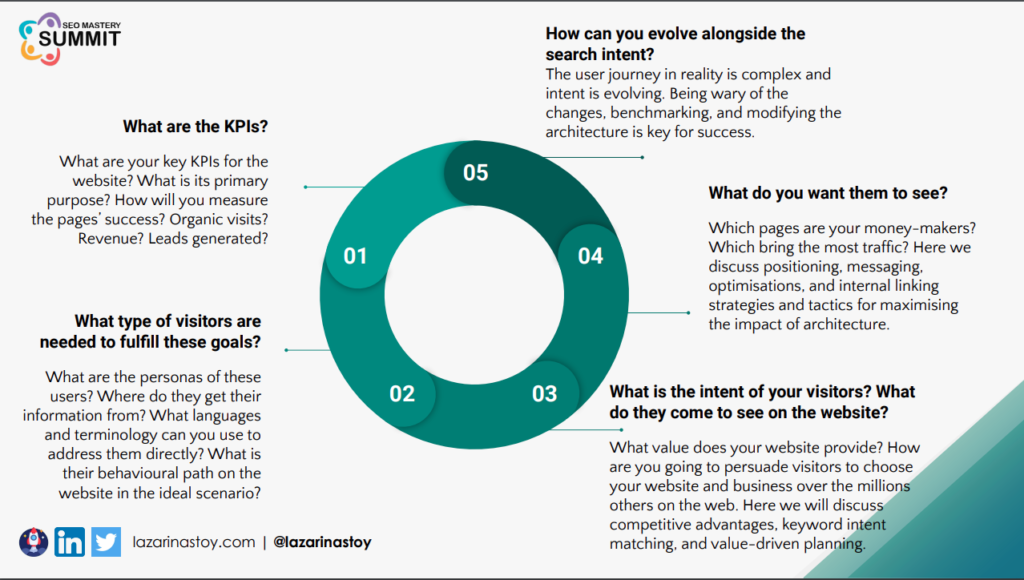
Here is a summary of the five-step, intent-driven continuous improvement process for website architecture:
- Define the KPIs of the website. What are the primary goals you want the pages, or the website as a whole, to fulfil? How do you measure success? Is it organic visits? Is it new users? Is it revenue or leads generated? Whatever it is, you need to be very clear about how you want to benchmark your website.
- Think about the type of visitors you need in order to fulfil these goals. What are their personas? How do they behave in terms of search? What is their demographic information, what languages and terminology do they use when they interact with search engines (and, now, with AI assistants), and what is their ideal behavioural path on your website?
- Define your visitors’ intent type. You want to know the intent of your ideal personas. When you know this, you will know what kind of value your website can provide that is unique compared to what your competitors provide. Here, we need to look into competitive advantages, intent matching and value-driven planning.
- Think about how you can bridge the gaps between what your users want and what you want them to visit. There are inevitably going to be some differences there. It’s important to organise the website architecture with tactics and techniques that bridge the gaps efficiently between what users came to see and your website’s main money-making pages or actions.
- Evolve alongside search intent. The user journey is extremely complex, and we know from the constantly changing search engine results pages that intent is evolving. It’s a living thing, and that’s true not only for individual pages, but for whole topics. Being aware of these changes, benchmarking, and modifying your website architecture is the key to success.
Now, let’s deep-dive into each of these steps in separate sections.
How to build intent-driven KPIs and performance evaluation metrics for your website
What is the main defining characteristic of a high-performing page? It’s an intent match.
How can we measure intent match using common metrics and analytics patterns? Intent match is demonstrated by organic sessions and clicks going up, combined with better engagement: in GA4 terms, a higher engagement rate (the inverse of bounce rate), longer average engagement time, and more pages viewed per session.
An intent match typically results in a higher ranking position over time for the target keywords. The reason is that Google wants to promote content that essentially saves resources: the quickest path to success for its users.
Then, if you look at the queries of an intent-matched page, they will signal the prominent intent the page has matched. Different linguistic characteristics of the queries signal a particular category of intent.
Other query characteristics can also be a signal for engagement. For instance, short-tail, high-volume keywords are typically informational in nature and don’t engage users for long. So, you might expect your engagement metrics to be less impressive when the intent match is in this category. And if you have long-tail, perhaps lower (or even zero) volume queries, you might see higher engagement, such as a higher engagement rate and longer engagement time, which might also lead to more conversions.
An intent match for high-volume keywords will result in more impressions and, respectively, better search metrics: more clicks, a better CTR, and maybe even a higher position in the search results too. However, high traffic for low-intent keywords results in a lower likelihood of conversion, so a worse goal completion rate. In this context, goal completions (key events, in GA4) can be anything: signing up for a newsletter, filling in a contact form, or completing a web-mediated transaction.
You need to be aware of the trade-offs between the different KPIs, based on the intent categories the pages on your website match.
A 2026 caveat: with AI Overviews answering more informational queries directly on the results page, impressions for informational pages can grow while clicks stay flat or drop. When you benchmark resource pages, look at clicks and impressions separately, not just CTR, and don’t read a falling CTR on an informational page as an intent mismatch on its own.
How to build intent-driven website user personas
Web personas are typically built by the web design team before the website is developed. They are a great tool for expressing the main types of ideal visitors. However, where they often fall short, from an SEO consultant’s perspective, is that they don’t incorporate search characteristics and search intent.
My suggestion to you, as an SEO professional consulting on website architecture planning, is to look at these personas and try to understand their search patterns. In other words:
- Why do they visit particular pages?
- How do they search?
- What are their unique characteristics from a query perspective?
- What are their shared pain points?
- What are their shared experiences?
- What are their shared expectations?
And so on… Building personas is all about pattern recognition and segmentation. (If you want to do this with your keyword data, the persona categorisation step in how to structure and categorise keyword data for semantic analysis shows you how.)
The process will also highlight the inevitable: your website will likely have to target different persona types in order to satisfy vastly different goals. For instance, one of these contradictions is wanting both higher traffic and a higher likelihood of conversion (goal completion), because these are vastly different intents you need to target. The website architecture is the thing that will help you achieve both. When you think about personas, a spectrum will form.
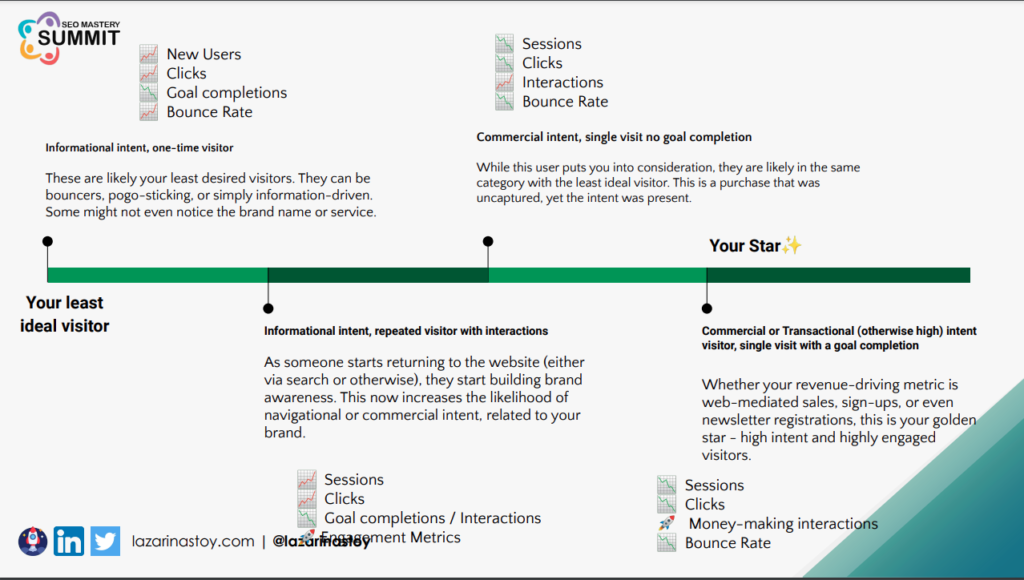
On the left-hand side, you will likely have your least ideal visitor. This is probably someone with informational intent, a one-time visitor. They might bounce off your website fairly quickly, pogo-stick (return to the search results page and enter a new query)… or they might simply be information-driven. They will just skim through your page and continue on. They might not even notice the brand or the service.
Next, you might see informational intent, but with a repeat visit and more interactions. Someone starts returning to the website. That means they will more likely start to build brand awareness, and this increases the likelihood of navigational searches related to your brand appearing in Google as well.
Further along the spectrum, you might see someone with high, commercial intent, but still with a single visit, or a visit with no goal completion. While this user is better, because they put you into consideration for a high-intent, purchase-related decision, they’re still not your ideal visitor. The purchase is left uncaptured while the intent was present, which is a missed opportunity.
Finally, on the right-hand side, you will see your star. ✨ This is your high-intent visitor, with a single visit and a goal completion. This is your one-click person: short time to completion, and your revenue-driving visitor.
What is more important is how these visitor personas tie in with the KPIs:
- The persona on the left-hand side might lead to more new users and more clicks, but fewer goal completions and a low engagement rate (high bounce rate). This persona brings more sessions and clicks, but a worse goal completion rate, or almost no interactions at all.
- With the centre-left persona, you might see better performance, because these visitors are now more engaged with your site: they spend more time on it, and they click through to more pages on each visit.
- Then, with commercial intent (centre-right), you’ll see the market getting smaller and smaller. There typically aren’t a lot of high-intent users, so you might see fewer sessions and fewer clicks, but more interactions, and money-driving interactions too.
- With your star (right-hand side), you will have to compromise on your goal for sessions and clicks, but you will capitalise on money-making interactions: contact form submissions, sign-ups, downloads, purchases, whatever that may be for your website. This is the high-intent, transactional and commercial captured search.
Placing user personas on an intent spectrum, alongside the types of goals and KPIs they will fulfil, will change the way you see subsequent keyword research and link building. It will streamline your view of the off-page and on-page optimisations needed to reach your goals.
Now you can start optimising the site’s main pages based on the type of intent they serve.
How to do intent-driven keyword research and SERP analysis
Intent-focused keyword research (resources linked)
Intent-driven on-page optimisation starts with intent-driven keyword research and SERP analysis. I have previously written about how to incorporate search intent into keyword research and how to do intent-driven international and industry-specific keyword research, and I’ve built some tools to help with these processes, such as the Search Intent Keyword Classifier (Data Studio template), so I’m not going to go too in-depth into keyword research in this section.
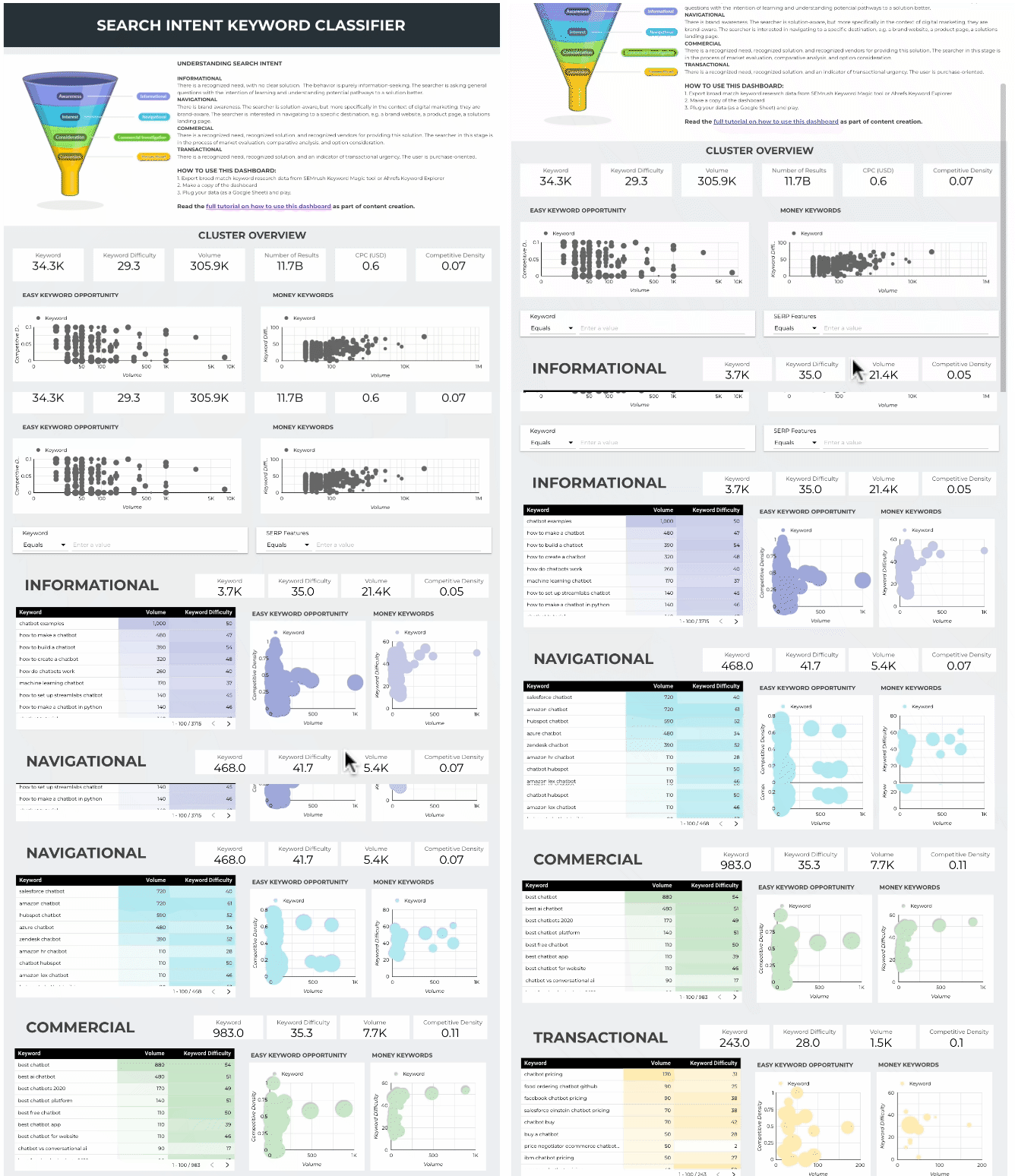
Get your free copy of the Search Intent Keyword Classifier (Data Studio template) ✨
If you’d rather choose a method first, I compare rule-based, SERP-feature-based and ML-assisted options in Search-Intent Classification with Machine Learning: The Approaches Explained.
Intent-driven SERP analysis
The SERP analysis is a very important step because it helps you determine your search competitors. In practice, these might be very different from your real-life business competitors. Knowing your search competitors’ unique advantages and limitations allows you to identify the market gap where you will be able to serve users best.
Google has the advantage of scale in search patterns and hindsight (in other words, a large, large database of historic searches), which enables a great deal of learning and prediction of search patterns and user intent. It strives to satisfy all user queries, to enhance the user experience in search, and to get users the content they need as quickly as possible.
Knowing this, we know that the results pages are full of content reflecting what most users are searching for and what the predominant intent is. So, this is where your research should start. You will also see different elements on the search results page that indicate the intent of the users. When the results page has mixed or uncertain intent, Google uses a variety of rich results that can serve as indicators of a potential intent distribution.
For instance, you might see People also ask boxes, which indicate informational intent. You might also see jump links in some results, which point to bottom-of-funnel, task-focused reading. When the intent is a little bit mixed, you’ll notice it on the results page, as there will be different rich result elements aiming to satisfy every intent type for that query. In more transactional searches, you might see product listings and shopping carousels. And in 2026, you’ll often see an AI Overview at the top, which tells you Google considers at least part of the query answerable without a click. (For a full breakdown of features and what they signal, see What Is SERP Feature Analysis?)
Start by researching intent-driven keyword variations of your main target phrases.
To do this, you need a solid grasp of the main phrases and query characteristics that signal intent. Each of the three main categories of intent (informational, commercial and transactional) can be illustrated by common key phrases that users use to describe what they’re searching for on the web. Here is a visual summary.
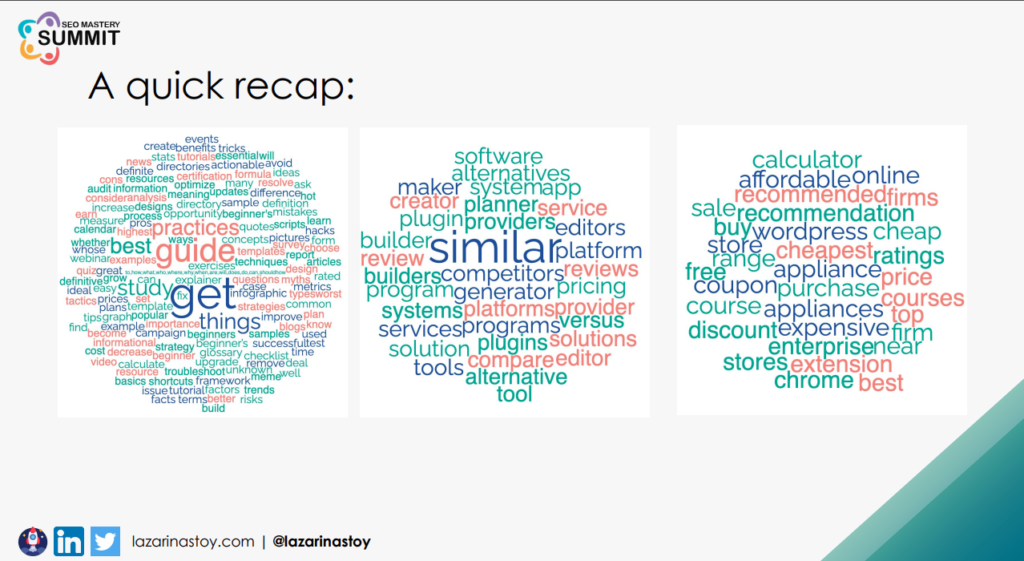
The main phrases can be question-type keywords, but they can also indicate the type of resource the user wants to view (e.g. white paper, case study, research). The keywords can also indicate the length of the resource the user is looking for (e.g. “ultimate guide” or “quick tutorial”). They can also signal the user’s existing knowledge of the topic (e.g. “beginner guide” or “advanced tutorial”).
It’s important to know which keywords you’re looking for in each intent category so you can start building the pages on your website, optimised for search intent. Understand why the content in the top three positions ranks as it does:
- What are your competitors’ unique characteristics that help them match user intent? Break those three pages down into page components. For instance: What is the title structure? Are there any patterns you can find from your research? What are the on-page elements? What is the length of the page? Has any schema been implemented on the page? How many backlinks does it have? How many internal links does it have? … And things like that.
This will give you a very clear idea of the components you need in order to be competitive in this niche.
Then, tie the insights from this research to your goals and user personas, and build pages accordingly. You will need to know which elements of on-page optimisation will help you achieve what you’re aiming for, and then you’re ready to build your pages. Generally speaking (and this is a very big generalisation), there are three types of pages:
- Resource pages, which address informational intent, aim to increase organic traffic and can sometimes serve more than one intent. They can be optimised to support other goals (e.g. CRO initiatives).
- Company pages, which address navigational intent, assist with employer branding. They help establish the credibility of the business and have an important place in the site’s structure, though they’re not directly influential for search performance.
- Product pages, which address transactional intent, are likely the money-makers. They are highly competitive, highly niche pages, and they are where conversions take place.
The resource pages are things like resources, blogs, guides, listicles: basically any in-depth, content-rich resource. The transactional product pages, depending on your industry and niche, might be product pages or solution pages. If it’s a service-based organisation, they’re the services pages, or a portfolio if you’re an individual creator. The company pages are typically branded pages: the introduction of the team, the values, the company culture and philosophy, and the homepage as well. While these pages aren’t extremely valuable for attracting new users via organic search, they are extremely valuable for building the brand and the experience, expertise, authoritativeness and trust (E-E-A-T) of the website. They do have their place in the website architecture.
After understanding how the different resources and pages on the website relate to intent and the user personas, we can circle back to the website’s KPIs. If increasing traffic is one of the main goals of the new website you’re building (or of the improvements to an existing one), you need to know that traffic-related metrics are moved by content that appeals to a mass audience: the top-of-funnel content in your niche. You might not expect a lot of conversions there, but any website owner, or anyone you might be consulting for, will also want their website to make money. Hence, you also need to build a website architecture that supports the transition from informational intent to transactional intent.
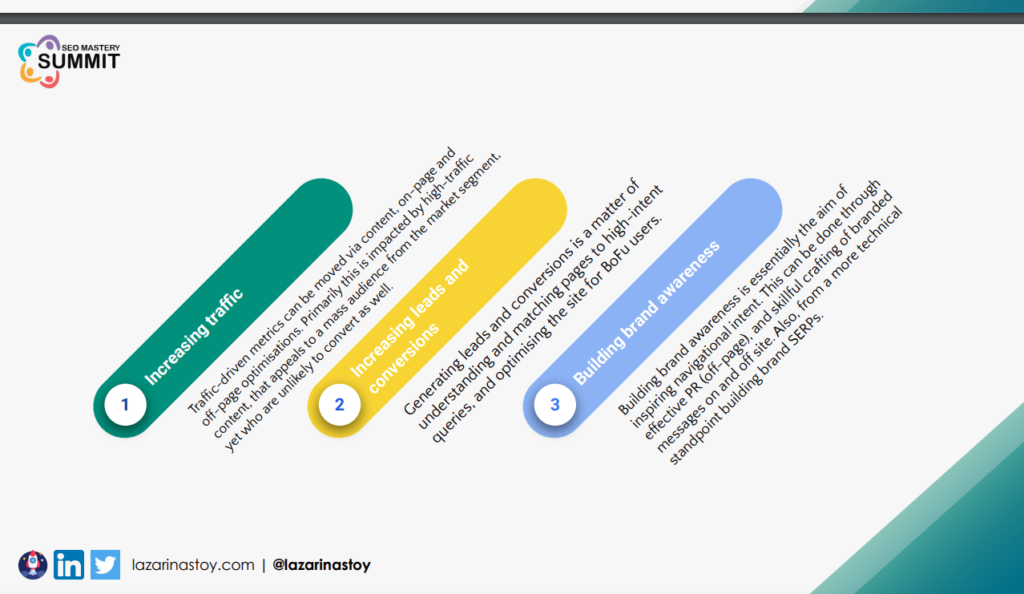
Search engines usually have a way of telling transactional searches from non-transactional ones and adjusting the results accordingly. In practice, this means your money-making product or service pages are not going to rank as high as you might expect for broad, informational queries. Thus, we can begin bridging the gaps between what users want to see on the website and what we, as a business, want them to see.
After understanding patterns and personas, building our pages accordingly, and optimising them based on how the search results look, we can implement architecture that bridges the gap between the two.
Tactics and tools to streamline your website architecture and help each intent page type get discovered
CTAs
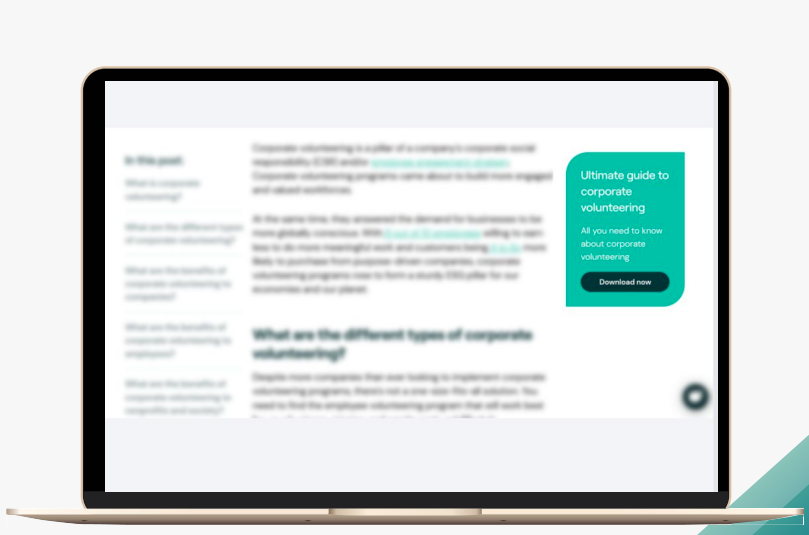
Calls to action can be placed in a sidebar, and they can be text-based, image-based, or buttons in the content. If your website traffic allows it, you can A/B test different types of CTAs and CTA messages, based on your user personas.
CTAs enable you to link from resource pages to high-intent, money-making pages, or to a page that establishes thought leadership, such as a case study or a white paper.
A pro tip for advanced performance: match the message on the CTA box to the intent of the page where it appears.
Jump links and tables of contents
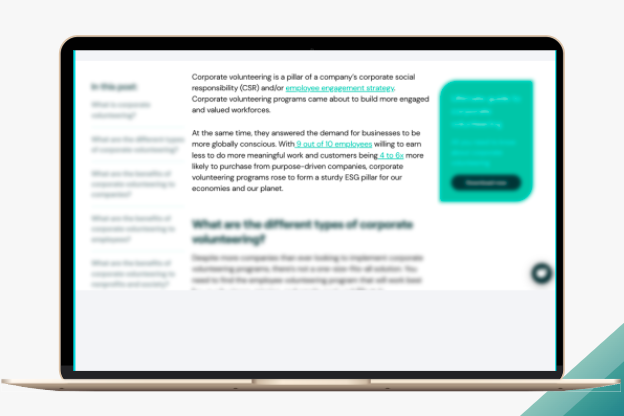
This enhances the reading experience for bottom-of-funnel, high-intent visitors, and it also helps crawlers better understand the page type.
The table of contents also enables a breakdown of the page into the very niche, tailored searches it answers. Google can show these sections as jump links in the results, and they give AI systems clean, labelled passages to quote.
Benefits-organised mega menus for bottom-of-funnel users
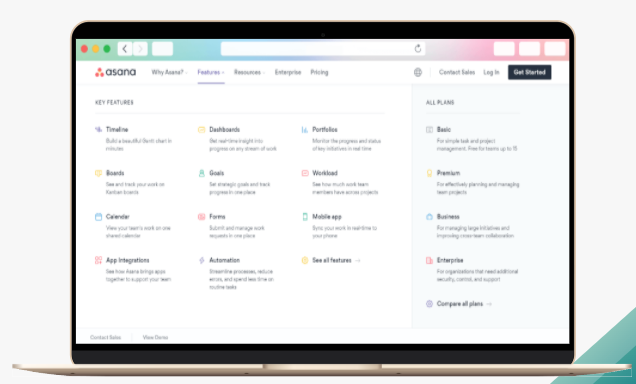
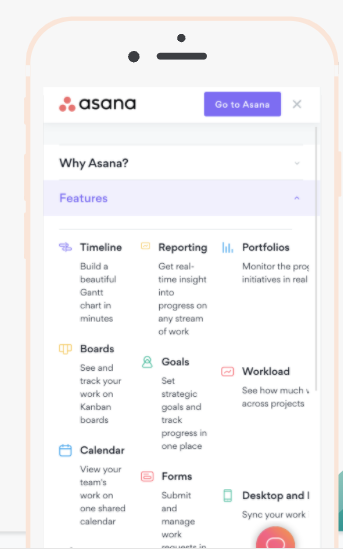
Mega menus can be a great asset to the website. Again, their focus is to improve navigation for bottom-of-funnel users and highlight money-making pages. But in an ideal scenario, mega menus achieve this by highlighting benefits, use cases and unique selling points from a user persona perspective.
A good mega menu highlights the benefits for users and organises the website starting from the benefits for each specific persona type.
An important thing to be aware of when implementing mega menus is that they can be very tricky to implement on mobile, and very tricky to replicate successfully when most of your users are on mobile. So, they might not be the best tactic if that’s the case. They can also dilute the link equity of all the linked pages when they’re improperly organised or cluttered: if you link to most of the pages on the website from the menu, you’re not distributing value properly, and you’re not signalling which pages are more important than others.
For this reason, mega menus are typically more suitable for bigger websites, maybe 500K pages up to a couple of million. But they can also be a very good asset for smaller websites when they’re organised around benefits.
Enhanced, persona-driven footer navigation
Footer navigation can be a very good asset for conversion rate optimisation and for enriching intent.
It can also be great for spotlighting different content on your website, especially if it’s done dynamically: highlighting seasonality, for instance, or new content you’re publishing, something fresh that users are unlikely to discover on their own any other way.
Contextual, cluster-oriented, intent-driven internal linking
Last but certainly not least: internal linking in the content.
Essentially, the aim of internal linking is to enhance the intent: to give each user an additional perspective based on the topic they’re exploring or the page they’ve landed on. The aim is to enable click-throughs to money-making pages, and also to help crawlers identify the relationships and context of each page on the website.
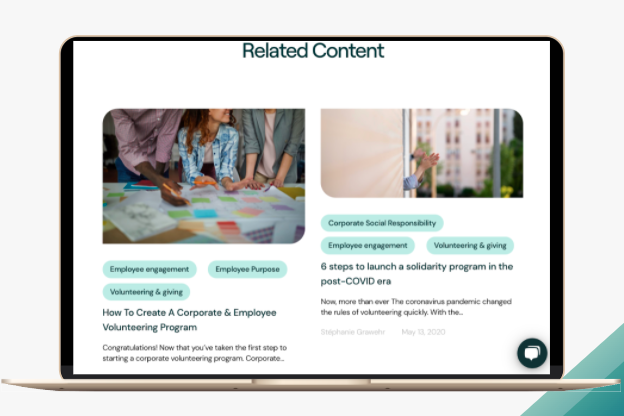
This helps to build topic clusters, and another way to build topic clusters is through related content sections. If you want to learn more about building topic clusters using machine learning (LDA), check out my guide on internal linking.
Ideally, you want the topic cluster to look like this:
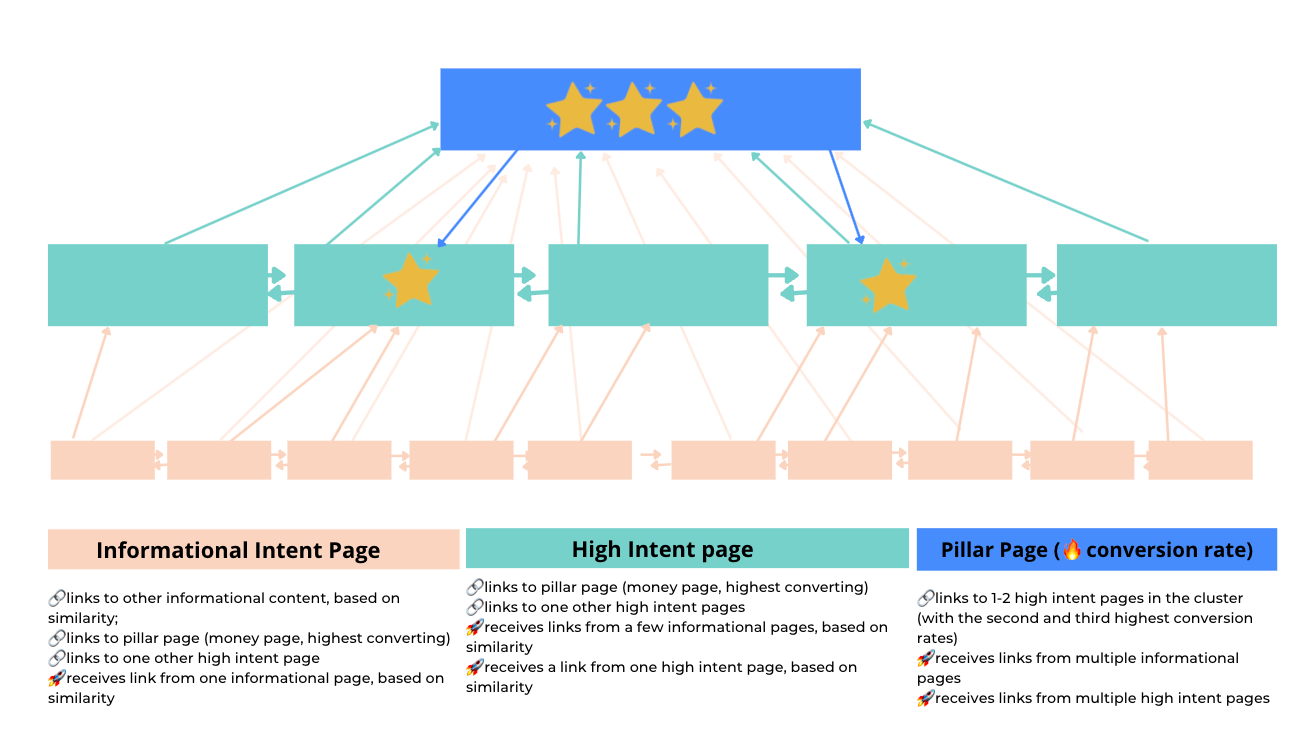
You have informational or low-intent pages acting as the support network for higher-intent pages, and a pillar page, ideally a high-intent page with a high conversion rate, that encompasses everything the topic covers in a way that perfectly captures the transactional or commercial intent of users.
Having this topic cluster structure is an ideal way to enhance your website architecture. But it’s also important to highlight, in the example I provided here, that internal linking in the content has to be organic and natural, and it has to actually support and enhance the user experience. We want to provide context about the other pages we’re suggesting users visit, in a way that matches their familiarity with the topic. Essentially, we want to guide the user from one intent category, such as informational intent, to a higher one, like commercial or navigational intent, and finally to the page we want them to reach in order to convert, whatever the conversion goal is.
Building topic clusters is great, especially when they’re well optimised and there’s a lot of structure and context. But links between the different topic clusters are equally important, to show how each cluster fits into the greater purpose of the website. While this looks pretty, it’s not ideal:
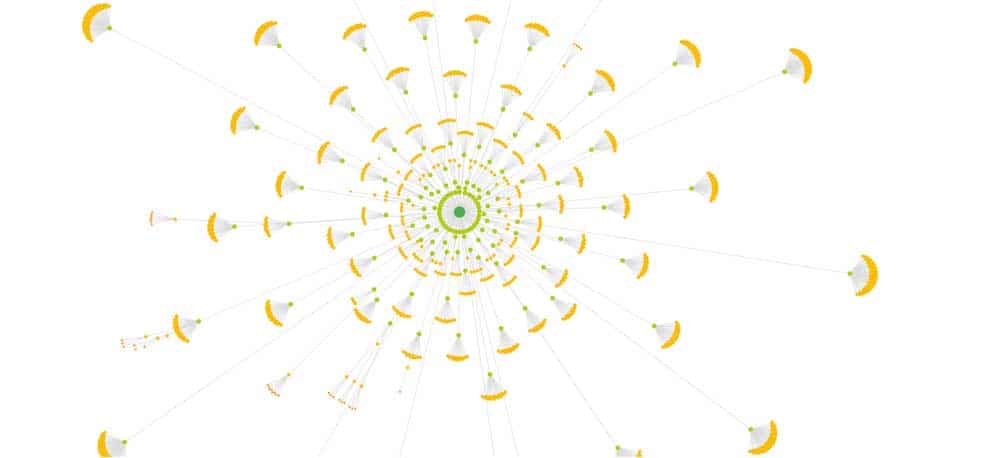
Internal linking is crucial because it enables intent enrichment.
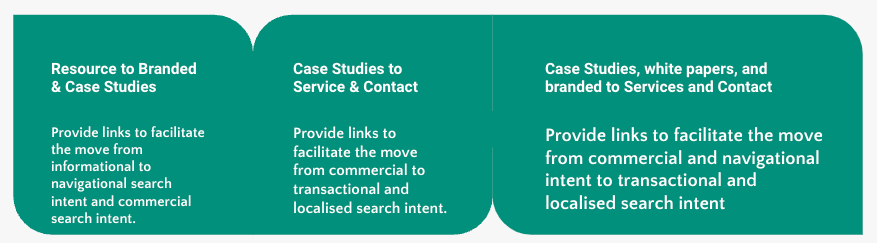
You want to keep visitors on your website, giving them the ability to learn more about the topic, and about your services or your business if they want to, all without leaving your website. The website architecture and the elements discussed here are the vessels for doing this: guiding the user from one search intent to another.
The aim of the website structure is to facilitate these intent shifts as much as possible, without burdening the user (or making them go back to search) and without burdening search engines either.
If you want to find the best link candidates with data rather than gut feeling, the notebook in the troubleshooting section below suggests an “intent bridge” for each resource page, based on the queries it shares with your product pages.
What to avoid
I’d also like to talk a bit about what you should avoid, and for this, I’d like to reference the brilliant work of Aleksandra Zarzycka for Onely, and her guide Site Architecture: How To Build A Website That Ranks And Converts:
- Don’t assume users start on the homepage
- Don’t assume everything is equally important
- Don’t use carousels
- Don’t overdo the above-the-fold content
- Don’t overdo the footer
- Don’t neglect to update your site
On the last point, I want to circle back to what we talked about at the beginning of this guide: embracing continuous improvement of your website architecture.
How to troubleshoot intent mismatch (and evolve alongside search intent)
Understand that the user journey is a lot more complex than what I’ve talked about, and it’s rarely as straightforward as it looks in theory. This is where data comes in, helping you make better decisions about what to change, based on how users interact with your specific site and how they behave in your industry. You can use a variety of data touchpoints to make those decisions:
- Make sure the technical SEO hygiene of the site is good.
- Check content alignment with intent, personas and goals.
- Prune underperforming content for topical authority.
- Analyse user behaviour and performance, including the paths people take before converting (in GA4, the conversion paths and attribution reports replaced Universal Analytics’ Multi-Channel Funnels).
- Identify and address drop-off points relative to your personas.
- Identify restructuring opportunities and pain points via user searches, including your internal site search.
Find mismatched pages at scale with the intent mismatch audit notebook
The second point on that list, content alignment with intent, is the one people most often check by eye, one page at a time. So I’ve built a free notebook that does it for the whole site, from a Search Console export. Grab it from the MLforSEO code hub, open it in Google Colab, and run it on the built-in example first. Here’s what it does:
- Maps your pages to page types (resource, company, product) with URL rules you can edit, and assigns each type the intents it’s meant to serve.
- Classifies the queries each page actually ranks for, with simple rule-based intent filters (a branded query with a modifier, like “acme pricing”, takes the modifier’s intent).
- Flags mismatches: for every page, it works out the click-weighted intent mix of its queries and compares the dominant intent with the page’s job. Each page gets a verdict: match, mismatch, or mixed (no intent reaches 60% of clicks).
- Shows the KPI trade-offs per page type: clicks, impressions, CTR and average position, plus GA4 engagement rate and key events if you add a landing-page export.
- Suggests intent bridges: for each resource page, the product page whose queries share the most vocabulary with it, your first candidate for a contextual link or CTA.
The core of the mismatch check is only a few lines of pandas:
# click-weighted intent mix of each page's queries
mix = gsc.pivot_table(index='page', columns='intent', values='clicks',
                      aggfunc='sum', fill_value=0)
share = mix.div(mix.sum(axis=1), axis=0)


audit = pages.set_index('page').join(share.round(2))
audit['dominant_intent'] = share.idxmax(axis=1)
audit['dominant_share'] = share.max(axis=1).round(2)


def verdict(row):
    targets = TARGET_INTENTS.get(row['page_type'], set())
    if row['dominant_share'] < 0.60:
        return 'mixed'
    return 'match' if row['dominant_intent'] in targets else 'mismatch'


audit['verdict'] = audit.apply(verdict, axis=1)
In the example data (a fictional project-management SaaS), the notebook flags the Gantt chart feature page: most of its clicks come from “how to make a gantt chart” and “what is a gantt chart used for”. That’s informational demand landing on a money page. The usual fixes are to strengthen the resource page for those queries and link from it to the feature page with a CTA that matches the reader’s intent, or, if the results page rewards it, to add a short “how it works” section to the feature page. And the intent bridge for the Gantt chart blog post? The Gantt chart feature page, of course.
Two things to keep in mind. The intent filters are deliberately simple, so review the labels for your niche before you act on them. And treat the bridge suggestions as a shortlist for a human, not an automatic linking rule: the links still have to make sense to a reader.
What changes for intent-first architecture in AI search
When I first gave this talk, the “user” in “user journey” was a person clicking through search results. In 2026, part of that journey happens inside AI Overviews, AI Mode and assistants like ChatGPT and Perplexity, which take one question, fan it out into many sub-queries, and pull passages from whichever pages answer each one best. The good news: an intent-first architecture is already most of the way there. A few things matter even more now:
- One page, one clear job. Pages built for a single intent are easier to retrieve for the sub-query that matches it. Pages that try to be a guide, a comparison and a pricing page at once tend to lose to more focused competitors.
- Descriptive internal links. Anchor text and the sentence around a link are context for machines as well as people. “Read more” tells nobody anything; “compare our plans for teams of 10+” does.
- Hubs built around entities, not just keywords. A pillar page that covers a topic (an entity) and links out to its sub-topics maps neatly onto how AI systems break questions down. I make the case for this in the case for entity hubs over keyword landing pages.
- Query paths, not single queries. People (and AI systems) move through a sequence of related questions. Mapping those query sequences and paths tells you which pages should link to which, and in what order.
- Company pages earn their keep. Clear about, team and author pages support E-E-A-T and help AI systems understand who is behind the content, which is exactly what I said company pages were for, back in 2022.
Takeaway and recommended reading
Incorporating search intent into the planning of your site and link structure is so important, and beneficial to both users and SEO. Hopefully, I’ve demonstrated the WHYs and HOW-TOs of making it part of the website architecture planning process.
This not only creates a pleasant journey through the site (UX), personalised to the visitor’s previous experience with a given topic and their content expectations, but also signals to crawlers (and, now, to AI systems) how your pages relate, and how authoritative and trustworthy the site is.
Taking a continuous improvement approach to planning your website architecture helps your users have a pleasant journey through the website, with content and an experience that feel personalised. It helps them manage their expectations every time they come across your website. And from a technical standpoint, it signals to search engine crawlers the relationships between the different content on your site, through the links you have, and the authoritativeness and trustworthiness your website has.
Build the keyword universe behind your architecture
An intent-first architecture is only as good as the research behind it. The Semantic ML-enabled Keyword Research course shows you how to classify intent, map personas, entities and query paths, and turn it all into a structure you can actually build.
Before we go, I want to share a few resources that were highly influential for me when I was building this talk, and a few creators I want to highlight:
- First is Aleksandra Zarzycka and her resource for Onely, Site Architecture: How To Build A Website That Ranks And Converts.
- Second is Erika Varagouli from Semrush and her resource on how to build your website architecture for SEO.
- And for the intent side, my own practical guide to search intent in semantic keyword research on MLforSEO.
I think these are great resources you can quickly jump into to set you on the right path to building the best possible intent-driven website architecture. And when you’re ready to check your own site, the intent mismatch audit notebook is waiting for you.
Frequently asked questions
What is a search intent-first website architecture?
It’s a site structure planned around what your visitors are trying to accomplish when they search. You start from the site’s goals and KPIs, define the personas you need to reach them, work out each persona’s search intent, build page types that match those intents (resource, company and product pages), and then use links, CTAs and navigation to guide visitors from informational intent towards commercial and transactional intent.
How do you measure intent match on a page?
Look at the queries the page ranks for in Search Console and the intent they signal, together with its performance: clicks and impressions trending up, a healthy engagement rate and engagement time in GA4, and rankings improving over time for the target keywords. A page whose queries mostly signal a different intent from the one it was built for is a mismatch.
How do I find intent mismatches across a whole website?
Export your Search Console data with the page and query dimensions, classify each query by intent, and compare each page’s dominant query intent with the intent its page type should serve. The free intent mismatch audit notebook in the MLforSEO code hub does exactly this and flags each page as a match, a mismatch or mixed.
Which page types serve which search intent?
As a broad generalisation: resource pages (blogs, guides, glossaries) serve informational intent and grow traffic; company pages (home, about, team) serve navigational intent and build brand and trust; product, service, solution and pricing pages serve transactional and commercial intent and are where conversions happen.
Does website architecture still matter for AI search?
Yes, arguably more. AI Overviews, AI Mode and AI assistants break questions into sub-queries and pull passages from the pages that answer each one best. Pages with one clear purpose, descriptive internal links and entity-based hubs are easier for them to retrieve and understand.
Related glossary terms
MLforSEO Academy
Take your skills further — pick your path
Semantic ML-enabled Keyword Research
by Lazarina Stoy
Query understanding, search intent and semantic clustering for how people and AI really search.
View course →AI Search Optimisation & Agentic SEO
by Beatrice Gamba
How agentic systems retrieve, evaluate and select — and how to become the source they cite.
View course →AI Search, LLMs, Entity SEO & Knowledge Graph Strategies
by Beatrice Gamba
Build the entity authority and knowledge-graph presence that makes AI recognise and trust your brand.
View course →Introduction to Machine Learning for SEO
by Lazarina Stoy
Ship practical ML workflows — classification, clustering, entity extraction — no CS degree required.
View course →