Search intent is the thing every SEO claims to optimise for and almost nobody classifies systematically. We eyeball a keyword, decide it “feels” informational, and move on. That works for ten keywords. It falls apart at ten thousand, which is exactly the scale at which AI search operates when it decides what a query really wants and which sources deserve to answer it.
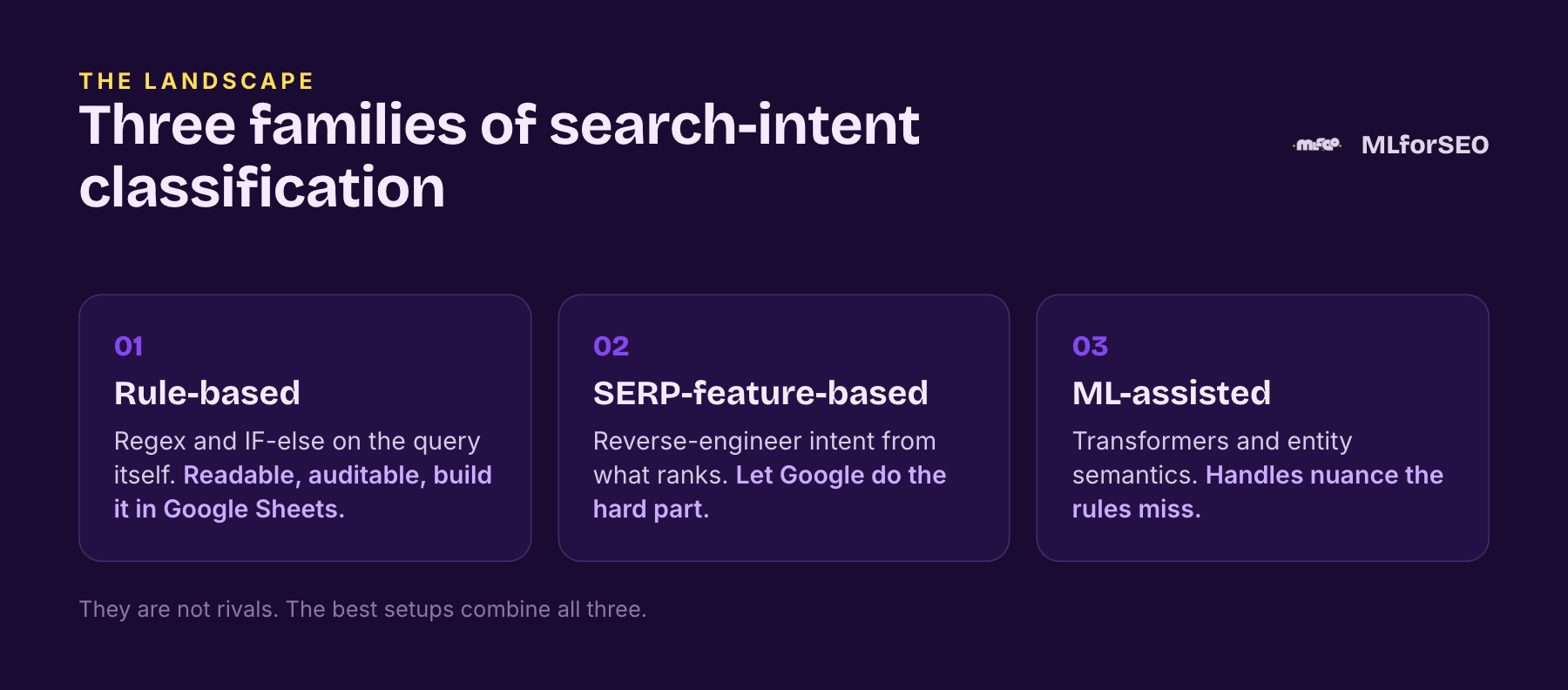
So this post is about doing it properly, with machine learning. I am going to walk you through the full landscape of approaches so you understand what each one does, where it shines, and where it quietly misleads you. There are three families, and the best practitioners combine them. I will also walk you through my free Search Intent Keyword Classifier Data Studio template, which is the easiest way to try the first approach on your own keywords today. And every method comes with a free Colab notebook, all collected in the MLforSEO code hub on GitHub, so you can run it on your own keyword export as you read.
On this page
- Approach 1: Rule-based classification from the query
- Hands-on: rule-based intent classification in Data Studio (free template)
- Approach 2: Classification from SERP features
- Approach 3: ML-assisted classification
- Get the notebooks: every method, free
- Where to Start with Search-Intent Classification
- Frequently asked questions
Approach 1: Rule-based classification from the query
The most accessible approach classifies a query using rules, expressed as IF-else and regex logic. In its plain form this is not machine learning, but it becomes rule-based machine learning once the program learns or evolves its own rules. You can build a genuinely useful version in Google Sheets in an afternoon, then visualise it in Data Studio.
What makes this powerful is that a single query carries far more than one “intent”. You can classify it along many dimensions at once. My free rule-based query classification notebook does exactly that, adding a column for each dimension to your keyword export, and the Google Sheets version does the same with formulas.
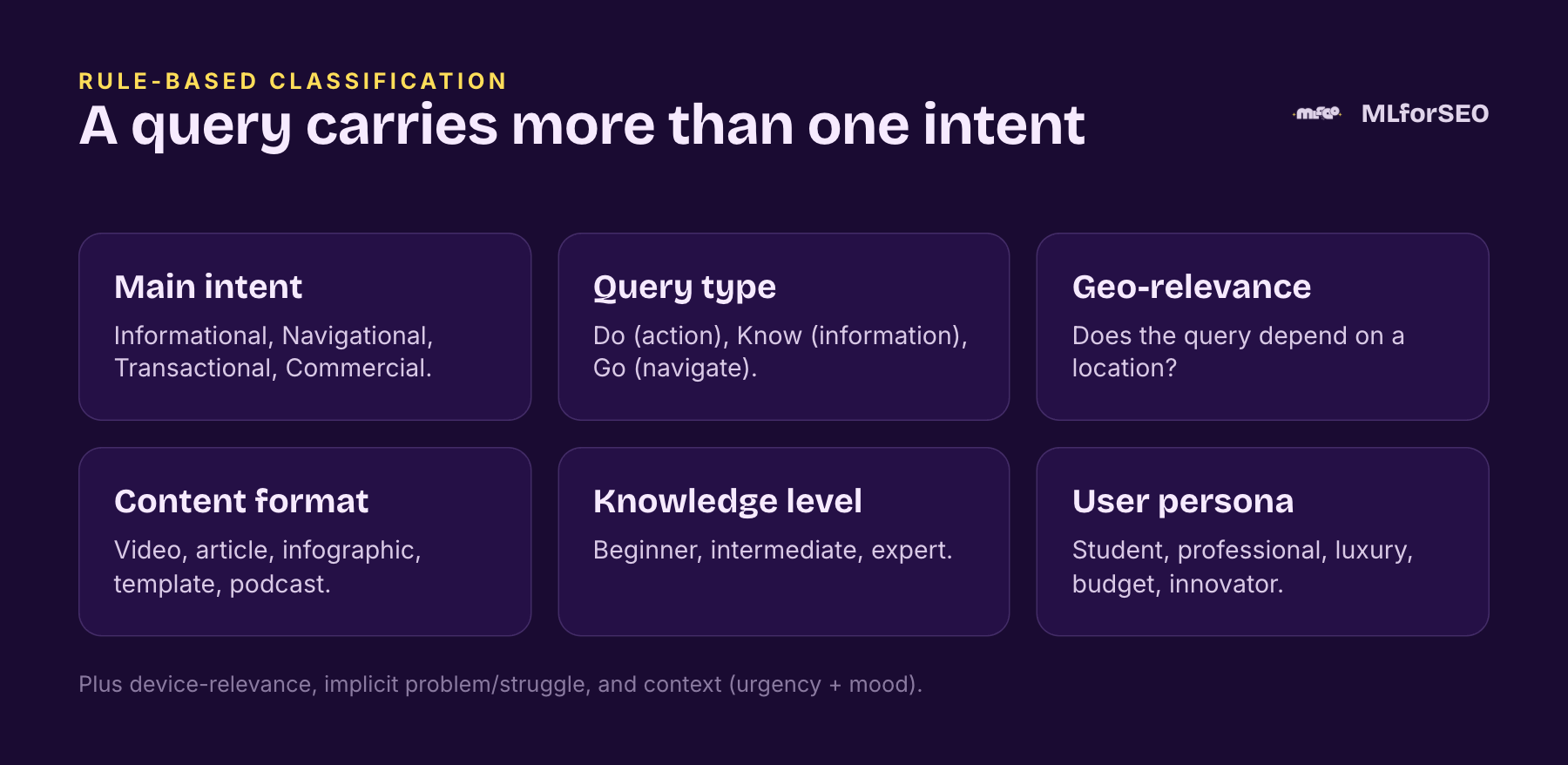
Beyond the six above, the same rule-based sheet can flag whether the query is device-relevant (mobile-specific), whether it carries an implicit problem or struggle (“how to fix”, “won’t”, “can’t”), and its context (urgency and mood, so “fix printer now” reads differently from “printer troubleshooting”). Each dimension is a regex pattern you can read, audit and adjust, which is a big part of the appeal.
Two of these dimensions have real pedigree worth knowing. The core intent categories, informational, navigational and transactional, trace back to Andrei Broder’s 2002 paper “A Taxonomy of Web Search” (commercial investigation was added later by the industry), which still underpins how our whole industry thinks about intent. And the Do-Know-Go framing (is the user trying to do something, know something, or go somewhere?) is Google’s own shorthand for the same idea. Grounding your rule-based categories in these established frameworks means your output speaks a language other SEOs and stakeholders already understand, rather than a taxonomy you invented.
The catch, and it is a real one, is that intent is expressed differently in different industries. Transactional intent in ecommerce (“buy”, “price”, “coupon”) looks nothing like transactional intent in SaaS (“demo”, “free trial”, “API key”) or services (“book”, “consultation”, “portfolio”). A generic keyword list will quietly mislabel a chunk of your data. The fix is to turn your hardcoded lists into dictionaries you customise per niche, and to refine your regex for plurals, typos and word boundaries.
To make that concrete: transactional intent in ecommerce shows up as “buy”, “price”, “cheap”, “coupon”, “order”; in SaaS as “pricing”, “plans”, “demo request”, “free trial”, “API key”; and in services as “book”, “contact”, “consultation”, “portfolio”. Feed an ecommerce keyword list through a services-tuned dictionary and you will mislabel a real chunk of it. This is why the rule-based approach is powerful but never plug-and-play: its value comes precisely from tuning it to your niche, which is also what makes it auditable and defensible in a way a black-box model never is. You can build the whole thing in Google Sheets for a small, collaborative dataset, or move to Google Colab and Python when you need scale, more nuanced multi-label logic, and proper debugging, the same trade-off between a friendly interface and raw power you meet everywhere in this work.
Macro versus micro intent
Here is the nuance most classification skips, and where it gets genuinely interesting for a brand. Standard classification flattens a lot of queries into one bucket.
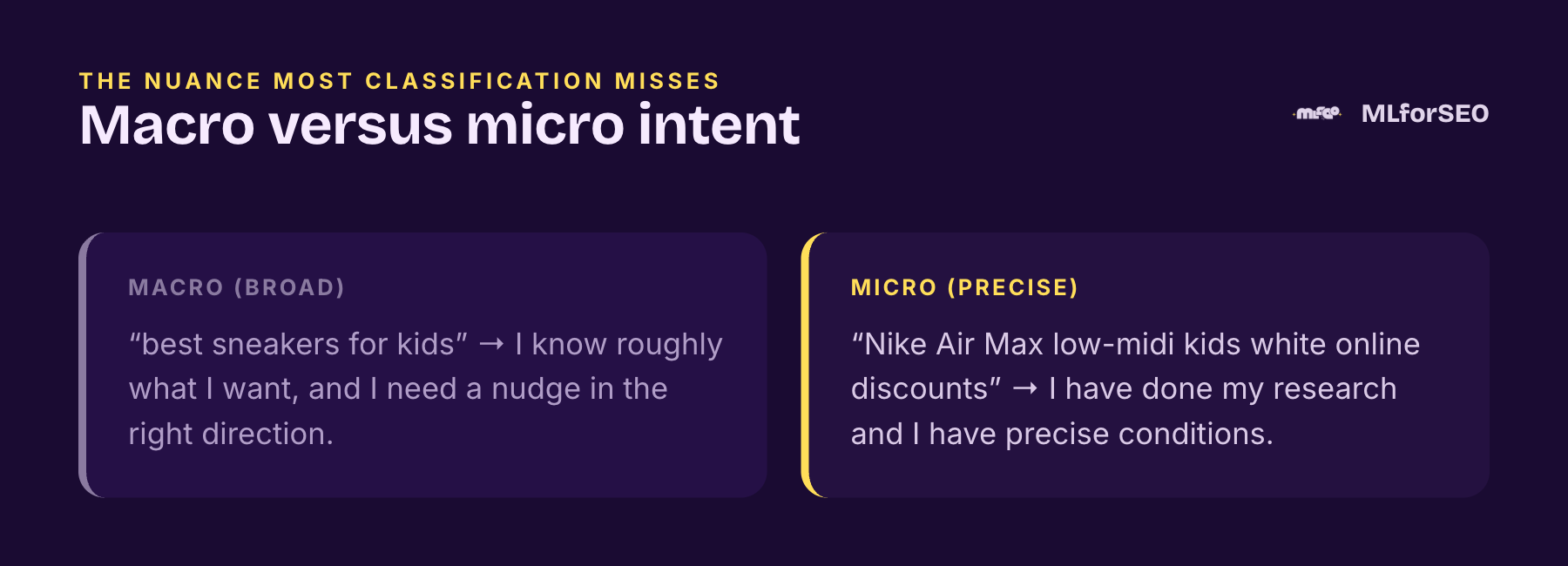
“Best sneakers for kids” and “Nike Air Max low-midi kids white online discounts” both get labelled commercial or transactional. But for an ecommerce brand they mean completely different things. The first says “I know roughly what I want and need a nudge.” The second says “I have done my research and I have precise conditions.” Micro-intents like this are brand-subjective, and the previous approaches miss them. You reverse-engineer them using n-grams and word frequencies across your own query set, which is the kind of step-by-step work I walk through in my Introduction to Machine Learning for SEO course.
Hands-on: rule-based intent classification in Data Studio (free template)
If you want to see the rule-based approach working on real keyword data before writing a line of code, this is where I would start. In 2021 I built a free Search Intent Keyword Classifier Data Studio template, and it still does the job: connect a keyword export and it sorts every keyword into informational, navigational, commercial and transactional groups, using exactly the kind of regex dictionaries described above.
Why I built it: there is no keyword cannibalisation, only search intent cannibalisation
For years there has been a lot of talk in the SEO industry about keyword cannibalisation, which occurs when two or more pages on a website compete for the same keyword. During a webinar, I heard an absolutely magnificent piece of insight, which inspired me to create this resource:
‘There is no such thing as keyword cannibalization, only search intent cannibalization’
Bernard Huang, Co-Founder of Clearscope
According to Bernard, we should move from a keyword-driven to a search intent-driven approach to content strategy, to align with how Google’s algorithm has changed. That is what this dashboard is for: it uses the search intent categories we know and use, and helps you in content planning as well as content creation, so you create content tailored to what your users are searching for and what they need.
According to Ahrefs, doing keyword research is all about ‘choosing topics that potential customers are searching for, serving their needs and eventually converting them into customers.‘ Classifying the keywords by search intent is how you make the “serving their needs” part systematic.
I also walked through the template, and how to classify intent for international keyword research, in my talk for the International Search Summit:
Here is the live report (the demo uses a Semrush export for the seed keyword “chatbot”):
Setting up the Data Studio dashboard with your data
Step 1. Export data from Semrush or Ahrefs.
To create this dashboard, I used a CSV export (converted to Google Sheets) from Semrush’s Keyword Magic Tool, but you can just as easily use Ahrefs’ Keywords Explorer.
If you are using Semrush for your keyword research:
- Go to SEO > Keyword Research > Keyword Magic Tool
- Enter your primary (seed) keyword
- Export the sheet for each of the main keywords, leaving the settings at all keywords, broad match
If you are using Ahrefs’ Keywords Explorer:
- Go to Keywords Explorer
- Enter your primary (seed) keyword
- Open the “Matching terms” report (it was called “Having same terms” when I first wrote this). It shows all the keyword ideas that contain your target keyword as a broad match
- Export the sheet
Once you have the export, upload it to Google Drive and save it as a Google Sheets file.
A 2026 note: both tools now add their own intent label to every keyword. Semrush introduced an Intent column in 2021, and Ahrefs has an Intents filter in Keywords Explorer. They are handy, but neither tool tells you exactly how the label is assigned, and neither knows your brand or your competitors. Keep their label as a column next to your own classification and compare where they disagree; the disagreements are usually where the interesting content opportunities are.
Step 2. Copy the Search Intent Keyword Classifier Data Studio dashboard.
Open the Search Intent Keyword Classifier and make a copy of it.

Step 3. Connect your data.
Connect your keyword research Google Sheet as a data source, using the native Google Sheets connector in Data Studio.
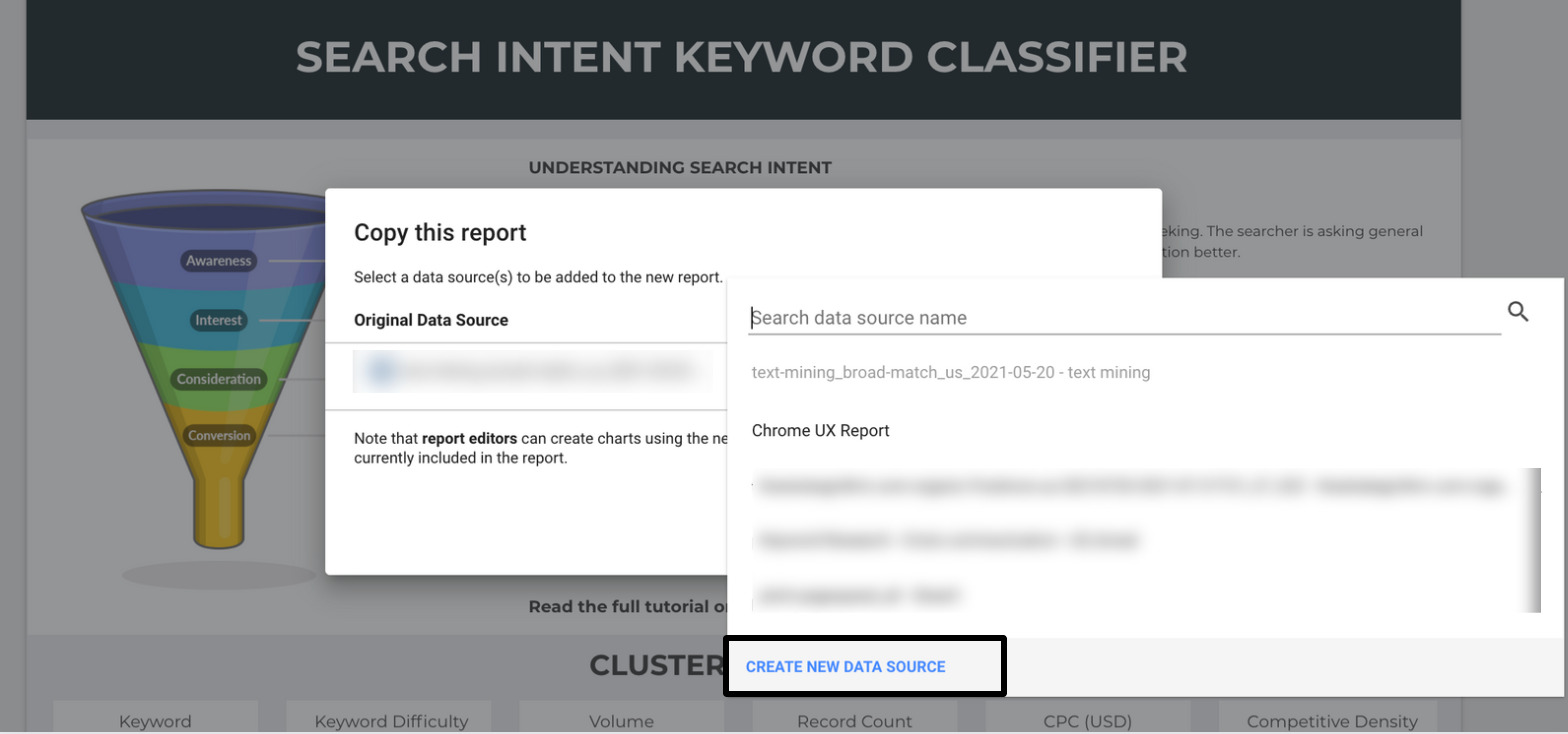
Step 4. Create a multi-page report, using different keywords to build a 360-degree view of a topic cluster.
You can copy the first page of the report as many times as you need for the different keywords you are researching, or for related keywords in the topic cluster. To do this, repeat steps 1 and 3 with related keywords or different seed keywords in the same topic cluster. Then select all the charts on the new page and replace the data source with the sheet for the new keyword.
The field definitions: how the intent dimensions work
Before we start using the classifier, let’s define its parameters and fields.
Each search intent group is a table filtered on keywords that indicate one of the four categories of user search intent. The filters are “RegExp Contains” table filters in Data Studio. (For an even more complex and extended version of this logic, built as calculated fields, see my guide to custom dimensions for advanced Data Studio reporting.)
Informational search intent is identified if the keyword contains one of these defining words:
how | why | does | which | when | who | guide | tutorial | learn | examples | resource | ideas | tips
Transactional search intent is identified if the keyword contains one of these:
buy | price | cheap | expensive | recommendation | recommended | near me | firm | coupon | order | purchase | pricing
Commercial search intent is identified if the keyword contains one of these:
best | top | vs | review | cheap | comparison
Navigational search intent is the most difficult to set a generic filter for. Here, insert your brand name, product names and service names into the filter. You can also add the brand and product names of your competitors. Select the navigational search intent filter and edit it, using the same format as the other filters. In the example below, replace the illustrated brands with ones relevant to you.

Two more fields help you prioritise:
- Easy Keywords are keywords with a keyword difficulty of less than 65. The filter excludes keywords with a difficulty above 65, leaving the easier ones in the tables.
- Money Keywords are keywords with a CPC (USD) of 0.01 or more.
Easy Keywords and Money Keywords are dimensions for prioritisation in content creation, especially when the keyword research for a seed keyword is densely populated with search terms.
Using the dashboard in your content creation process
1. Get an overview of the keyword cluster.
In the main section of the dashboard, you will find a keyword cluster overview. It includes:
- a summary of all the keywords exported
- the average keyword difficulty
- total keyword volume
- total number of results
- average CPC (USD)
- average competitive density
Here, you can also see two scatter charts, with the Easy Keywords and the Money Keywords. The scatter charts show the keyword distribution across several dimensions, which helps with prioritisation as well as with content marketing budget planning.
2. Find out the search intent distribution for a related keyword.
Using the Keyword filter, you can enter any related keyword you want to write content for and check the distribution of search intent around it.
For instance, in the dashboard the primary (seed) keyword is ‘chatbot’. If I were creating content about chatbot benefits, I could filter for the word ‘benefit’.
Not a whole lot of activity there.
How about ‘use case’?
Getting better.
Okay, let’s try something different. Like ‘customer service’.
That is more like it.
3. Search keywords by type of SERP feature.
The SERP Features filter lets you narrow keywords by the SERP features that show for them. These come from your keyword tool’s export and include, but are not limited to:
- FAQ (note that since August 2023 Google only shows FAQ rich results for a small set of well-known government and health sites)
- Ads top (labelled “Adwords top” in older exports)
- Knowledge panel
- People also ask
- Reviews
- Sitelinks
- Top stories
- Video carousel
- Image pack
- Carousel
- AI Overview (in recent exports from both Semrush and Ahrefs)
This is also a nice bridge to Approach 2 below: once you can filter by SERP feature, you are one small step from classifying intent from the SERP features themselves.
The 2026 refresh: the same rules, fixed and portable
Looking at these filters five years on, there are three things I would do differently, and I have done them in a small, free rule-based search intent classifier in the MLforSEO code hub (a Python script and a Colab notebook):
- Match whole words. “RegExp Contains” means
topalso matches “laptop” andhowmatches “showroom”. Word boundaries fix that. - Allow more than one label. “zendesk chatbot reviews” is navigational and commercial. A dashboard filter lets the keyword appear in both tables, but a single calculated field forces a choice, so the script keeps every match plus a primary label.
- Tidy the dictionaries. “cheap” sat in both the transactional and commercial lists (it is commercial), “which” was in there twice, and words like “alternatives”, “compare”, “free trial” and “demo” were missing. And, as above, customise them for your niche.
The script also writes the dictionaries out as a single Data Studio calculated field, so you can replace the four table filters with one “Search intent” dimension:
CASE
  WHEN REGEXP_MATCH(LOWER(Keyword), "(^|.*[^a-z0-9])(amazon|salesforce|hubspot|azure|zendesk)([^a-z0-9].*|$)") THEN "Navigational"
  WHEN REGEXP_MATCH(LOWER(Keyword), "(^|.*[^a-z0-9])(buy|price|prices|pricing|expensive|recommendations?|recommended|near me|firm|coupons?|order|purchase|discount|deal|free trial|demo)([^a-z0-9].*|$)") THEN "Transactional"
  WHEN REGEXP_MATCH(LOWER(Keyword), "(^|.*[^a-z0-9])(best|top|vs|versus|reviews?|cheap|comparison|compare|alternatives?)([^a-z0-9].*|$)") THEN "Commercial"
  WHEN REGEXP_MATCH(LOWER(Keyword), "(^|.*[^a-z0-9])(how|why|what|does|which|when|who|guide|tutorial|learn|examples?|resources?|ideas|tips|meaning|definition)([^a-z0-9].*|$)") THEN "Informational"
  ELSE "Unclassified"
END
Replace the brand names in the first line with your own brand, products and competitors. The order matters: the first match wins, which is why the script’s multi-label output is still worth keeping alongside it. The same logic as a Google Sheets formula (keyword in A2) is in the notebook.
Key takeaways from the template
Keyword research is a task most SEOs do daily. Yet even though we know that content which addresses search intent is crucial to how it performs, there is little effort to bring search intent into the research process itself.
The Search Intent Keyword Classifier aims to be a stepping stone in that direction, enabling a supercharged keyword research process, regardless of the tools you use to extract keywords. It is designed for content creation as well as content planning: its role is to help SEOs, content marketers and content strategists understand the intent behind different keyword clusters faster, through classification.
Approach 2: Classification from SERP features
The second family is my favourite for effort-to-insight ratio, because it lets Google do the hard part. Instead of guessing intent from words, you reverse-engineer it from what actually ranks. Export your keywords and their SERP features from any keyword tool, and map each feature to the intent it usually signals. A featured snippet and People Also Ask lean informational; shopping and product results lean transactional. Coded into a dictionary and a short Python function, you get an intent split for thousands of keywords in seconds.
It works because it reverse-engineers what Google has already decided the query is for. And you can layer it: classify intent by the type of pages that rank (resource pages point to informational intent, company pages to navigational, product pages to transactional), or at broader scale by the domains that rank, building a dictionary of holistic intent per site across the top domains in your niche. Combined with the query-based approach, it captures nuance with remarkably little research effort.
Both layers are in my free SERP-feature intent classification notebook: it maps more than 60 SERP features to the four intents, gives you a percentage split per keyword, and classifies ranking domains by site type. The same SERP features also tell you which formats and platforms Google wants to serve (video, FAQs, reviews, YouTube, Reddit), and the free content formats and platforms notebook adds both as columns to your keyword list.
Approach 3: ML-assisted classification
The third family brings in actual models. ML-assisted classification uses machine learning to identify intent automatically, often combining classification, query semantics, entity extraction and word embeddings into a single label. Two approaches are worth knowing in detail.
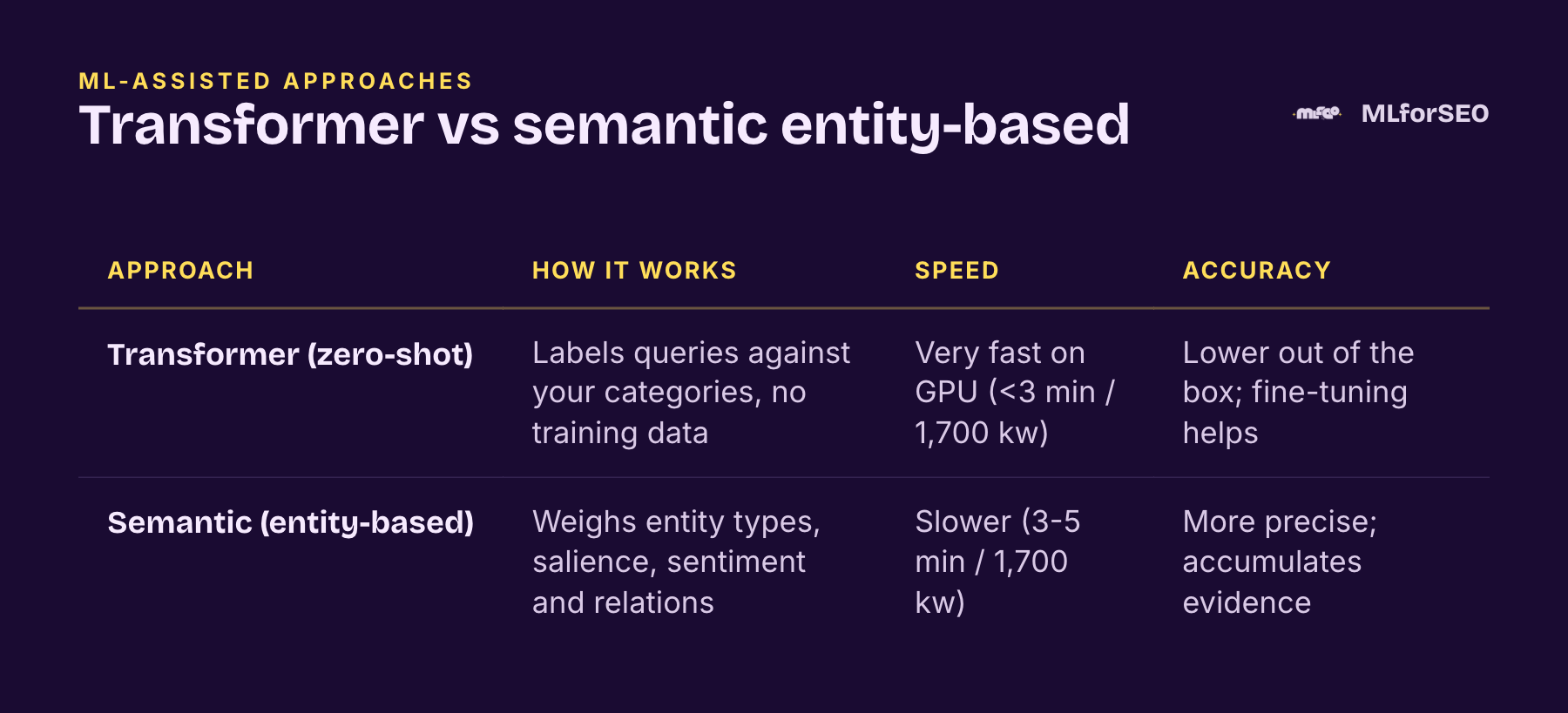
The transformer-based approach uses a zero-shot classifier to label queries against your intent categories with no training data. On a GPU it is very fast, under three minutes for roughly 1,700 keywords, but less accurate out of the box because it leans on a pre-trained model; fine-tuning improves it. The semantic parsing approach is where it gets clever. Instead of treating the query as a bag of words, it runs entity extraction and uses the results as weighted signals: entity types (CONSUMER_GOOD, PRICE and PRODUCT push toward transactional; ORGANIZATION and URL toward navigational), entity salience (more prominent entities count more), entity sentiment, the actual entity names, and how entities relate to the main verb. It accumulates evidence across all the entities in a query rather than flipping on a single flag. It is slower, three to five minutes for the same set, but noticeably more precise.
You can try both for free: the transformer-based notebook (BART zero-shot, blended with rules and SERP signals; switch Colab to a GPU runtime) and the semantic entity-based notebook (spaCy plus Google’s Natural Language API, so you will need your own Google Cloud API key).
That entity-based method relies on entity extraction, which has a guide of its own, and it is a good example of how these techniques stack. Classification, entity extraction and embeddings are not competing approaches; they are ingredients.
Get the notebooks: every method, free
Everything above is the “what” and the “why”. The code that turns it into something you run on your own keyword export is free, too. Each notebook runs top to bottom in Google Colab: upload a CSV, get it back with new intent columns.
- Rule-based, from the query: Colab notebook and Google Sheets template with every regex formula, plus the refreshed multi-label regex classifier from the template section above
- From SERP features and ranking domains: Colab notebook
- Desired content formats and platforms, from SERP features: Colab notebook
- Transformer-based (BART zero-shot): Colab notebook
- Semantic, entity-based (Google Natural Language API + spaCy): Colab notebook
All five are also in the search-intent-classification folder of the MLforSEO code hub on GitHub, with a README that explains each method’s inputs, what it needs (only the semantic notebook needs an API key) and links to the demo data.
Learn the method in depth
If you want me to walk you through these notebooks, show you how to adapt the dictionaries to your niche, and combine the outputs into one keyword universe, that is the Introduction to Classification module of my Introduction to Machine Learning for SEO course on the MLforSEO Academy.
Where to Start with Search-Intent Classification
If you want to build intuition before you go deeper, start with the concepts. Read what search intent actually is in a semantic keyword workflow and how to use SERP feature analysis, since both underpin the approaches above. And if you have never run a classification before, our free Text Classification with Google’s Natural Language API guide is the gentlest possible on-ramp. Then open the notebooks above and run them on your own keywords.
Frequently asked questions
What are the main approaches to search intent classification?
Three families: rule-based classification from the words in the query (regex dictionaries), classification from the SERP features and page types that rank, and ML-assisted classification with models such as zero-shot transformers or entity-based semantic parsing. The most reliable workflows combine them.
What is search intent cannibalisation?
It’s Bernard Huang’s reframing of keyword cannibalisation: pages don’t really compete because they share a keyword, they compete because they try to satisfy the same search intent. Classifying keywords by intent before you plan content is how you avoid it.
Is the Search Intent Keyword Classifier Data Studio template free?
Yes. Copy it from Data Studio for Marketers, connect a keyword export from Semrush, Ahrefs or any other tool as a Google Sheet, and edit the navigational filter with your own brand and competitor names.
Which words signal each search intent?
As a starting point: informational (how, why, what, guide, tutorial, examples, tips), commercial (best, top, vs, review, comparison, alternatives), transactional (buy, price, pricing, coupon, order, near me, free trial, demo). Navigational intent is your own brand, product and competitor names. Always tune the lists to your industry.
Can I rely on the intent labels in Semrush or Ahrefs?
They are a useful second opinion, but neither tool discloses exactly how it assigns intent, and neither knows your brand or niche vocabulary. Keep their label next to your own rule-based or SERP-based classification and investigate where they disagree.
Related glossary terms
MLforSEO Academy
Take your skills further — pick your path
Introduction to Machine Learning for SEO
by Lazarina Stoy
Ship practical ML workflows — classification, clustering, entity extraction — no CS degree required.
View course →AI Search Optimisation & Agentic SEO
by Beatrice Gamba
How agentic systems retrieve, evaluate and select — and how to become the source they cite.
View course →AI Search, LLMs, Entity SEO & Knowledge Graph Strategies
by Beatrice Gamba
Build the entity authority and knowledge-graph presence that makes AI recognise and trust your brand.
View course →Semantic ML-enabled Keyword Research
by Lazarina Stoy
Query understanding, search intent and semantic clustering for how people and AI really search.
View course →