You know what your page is about. You wrote it. The question that matters for entity SEO is whether a machine reading the page comes to the same conclusion, or whether it decides the page is mostly about your brand name, your newsletter box or a word you used three different ways.
Beatrice Gamba showed how this goes wrong in Why Navigation Elements Outrank Your Brand in Entity Analysis: run a page through Google’s Natural Language API and the menu items can come out more salient than the brand the page is meant to define. Her post explains why it happens and how to fix it. I wanted a quick way to check for it on any page, and to compare the result with competitor pages on the same topic, so I built a free Colab notebook that does exactly that.
This post explains what entity salience is (and what it isn’t), how the checker works, and how to read the results, using the sample run that comes with the notebook and a real run on six live pages from 25 October 2026.
Free notebook
Entity Salience Checker: checks whether your page’s target entity is the most salient one according to Google’s Natural Language API v1, and compares it with competitor pages.
On this page
What entity salience is
When you send text to the Google Cloud Natural Language API for entity analysis, it returns every entity it finds (people, organisations, products, places, concepts) along with a few properties. One of them is salience. Google’s v1 reference describes it as a score in the [0, 1.0] range that “provides information about the importance or centrality of that entity to the entire document text”.
So an entity salience score answers a narrow question: of everything mentioned in this text, how central is this one thing? It’s relative within one document, which means your brand, your CTAs and your topic are all competing for the same attention.
The API also tells you how many times each entity is mentioned, whether each mention is a name (PROPER) or a common noun (COMMON), and, when it can link the entity to Google’s Knowledge Graph, a Knowledge Graph MID and a Wikipedia URL. That link matters for disambiguation: an entity with a MID is one the API could pin to a specific real-world thing. If you’re new to this, start with what entity extraction is and where it fits in SEO.
Why the notebook uses v1
The Natural Language API has two versions. Only v1 returns salience: the v2 Entity object has name, type, metadata, mentions and sentiment, and no salience field. The notebook calls the v1 analyzeEntities method on purpose. If Google retires v1, this check goes with it.
What salience isn’t
This is the part that’s easy to get wrong, so I’ll be direct. Salience is the Natural Language API’s own measure for the text you send it. Google hasn’t said that Search, AI Overviews or AI Mode use this score, and LLM-based assistants like ChatGPT don’t call this API. Nobody outside Google knows how close the API’s view is to what its ranking systems see.
Beatrice argues in her post that pages the API misreads are likely to be misread by AI systems too. I agree with the direction: if one well-built language model can’t tell what your page is about, that’s a warning sign worth acting on. But I’d treat salience as a diagnostic, a repeatable second opinion on “what is this page about to a machine reader”, and never as a ranking score to chase. The fixes it points to (a clear opening, one consistent name, less boilerplate inside the article) are good writing practice whatever the API says.
How the checker works
For each URL you give it, the notebook runs eight steps:
- Fetch and extract. It pulls the main article text with trafilatura, the full visible text, the title and headings, and the navigation, header, footer, sidebar and form text (kept separately to spot template entities).
- Estimate cost. It counts billable units before calling anything.
- Analyse. It sends the text to the v1 API with
encodingType: UTF32, so mention offsets line up with Python character positions, and caches every response. - Rank entities. One row per entity, sorted by salience, with type, mentions, MID, Wikipedia URL, how far into the text it first appears and a boilerplate hint.
- Find the target. It matches your target entity by name, by any aliases you list, by Wikipedia URL or by MID, and reports whether it was split across several entity rows.
- Score clarity. A lite 0 to 3 score with plain-English tips.
- Compare. Your page against competitor pages for the same target, and your main text against the full page.
- Export. A Sheets-ready Excel report plus CSVs.
The lite clarity score is the notebook’s own simple rubric:
| Score | Meaning |
|---|---|
| 3 | Target is the most salient entity, linked to the Knowledge Graph, and first mentioned in the first 10% of the text |
| 2 | Target is in the top 3 (or #1 but missing one of the other conditions) |
| 1 | Target is detected but outside the top 3 |
| 0 | Target isn’t detected at all |
It’s a lite version of one check from the Clarity step of the 5C framework (Clarity, Coverage, Consistency, Connection, Corroboration) that I teach in The AI-powered Entity Audit. The full Clarity scoring goes further, across a whole site.
Walkthrough: running the check
1. Run the sample first
Open the notebook in Colab and run all cells with USE_SAMPLE = True. It uses three fictional pages about the French press, with saved responses in the exact v1 response format, so you need no key. The sample salience values come from a stand-in formula, not from Google (the MIDs and Wikipedia URLs are real), so read it for the pattern and use your own pages for real scores.
2. Add your key
For live mode, enable the Cloud Natural Language API in a Google Cloud project with billing turned on, create an API key restricted to that API, and save it as a Colab secret called GOOGLE_NL_API_KEY. The notebook sends it in a request header and never prints or saves it.
3. List your pages
Each row needs a URL, a role (yours or competitor), the target entity and any aliases you use for it. Adding the target’s Wikipedia URL or MID is optional but helps the matching. Here’s the sample’s row for the page being audited:
url:                  https://www.brewly.example/blog/how-to-use-a-cafetiere/
role:                 yours
target_entity:        French press
target_aliases:       cafetière;cafetiere;press pot;plunger pot
target_wikipedia_url: https://en.wikipedia.org/wiki/French_press
Pick competitors that rank for the same topic and serve the same intent. Two or three is plenty.
4. Check the cost, then run
Entity analysis is billed per unit of up to 1,000 characters per request, rounded up, and the first 5,000 units a month are free (see the official pricing page for the rate above that). The notebook prints its estimate first. For the sample it reports “4 requests, about 8 units”: three pages plus a second, full-text request for your own page. A typical article is somewhere between a handful and a few dozen units (in my six-page run below, a 39,000-character tutorial used 40 units of main text and 44 for the full page), so checking a few pages still fits comfortably inside the free tier.
How to read the results
The entity table
Here are the top five entities for the fictional Brewly page, a cafetière guide (sample values):
| Rank | Entity | Type | Salience | Mentions | Target? | Boilerplate hint |
|---|---|---|---|---|---|---|
| 1 | Brewly | ORGANIZATION | 0.1954 | 7 | No | Yes |
| 2 | cafetière | CONSUMER_GOOD | 0.0743 | 5 | Yes (alias) | No |
| 3 | coffee | CONSUMER_GOOD | 0.0731 | 5 | No | No |
| 4 | coffee beans | CONSUMER_GOOD | 0.0549 | 3 | No | No |
| 5 | water | OTHER | 0.0510 | 3 | No | No |
The brand comes first, and it’s flagged as boilerplate because “Brewly” also appears in the page’s navigation and footer. The topic comes second, but under one of its aliases. “French press”, the name the page should be about and the one linked to the Knowledge Graph, sits at rank 13.
The clarity check
| Page | Top entity | Target rank | Target salience | Split into | First mention | Score |
|---|---|---|---|---|---|---|
| Brewly (yours) | Brewly | 13 | 0.1148 | 3 rows | 10.8% | 1/3 |
| Coffee One (competitor) | French press | 1 | 0.3177 | 3 rows | 0.8% | 3/3 |
| Daily Grind Notes (competitor) | coffee | 2 | 0.1769 | 1 row | 0.0% | 2/3 |
Target salience is summed over every row that matches the target. For Brewly, only 19% of it (the primary share) sits on the main “French press” row; the rest is on “cafetière” and another alias. The API didn’t connect the synonyms, so the page’s attention is spread thin. Coffee One also uses three names, but 94% of its target salience sits on “French press”, the name it leads with.
The notebook turns this into tips. For the Brewly page, the sample run prints:
- “Brewly” is more salient than “French press” (rank 13). Make French press the grammatical subject of your opening sentences.
- Template or promo entities outrank the topic (Brewly). Move CTAs, newsletter boxes and brand copy out of the article body or shorten them.
- The first mention is 11% into the text. Mention French press in the first paragraph.
- The topic is split across 3 entity entries. Pick one primary name and introduce the others once, e.g. “French press (also called …)”.
Your page against competitors
The comparison puts your target salience next to the median of competitors with the same target: 0.247 in the sample, with Brewly 0.1325 below it. Treat that as a rough gap and lean on ranks more than raw values, because salience is relative within one document.
Real results: six live pages on 25 October 2026
To see what Google’s API returns on real pages, I ran the notebook on 25 October 2026 against three MLforSEO pages and three competitor pages, each with a sensible target:
- “entity salience”: our Entity Salience Score glossary entry, Impression Digital’s guide and Szymon Słowik’s post.
- “entity extraction”: my post on what entity extraction is and Market Brew’s guide.
- “navigation”: Beatrice’s post itself.
That was 9 requests and 185 units, analysing the main article text unless I say otherwise.
The clarity check on six live pages
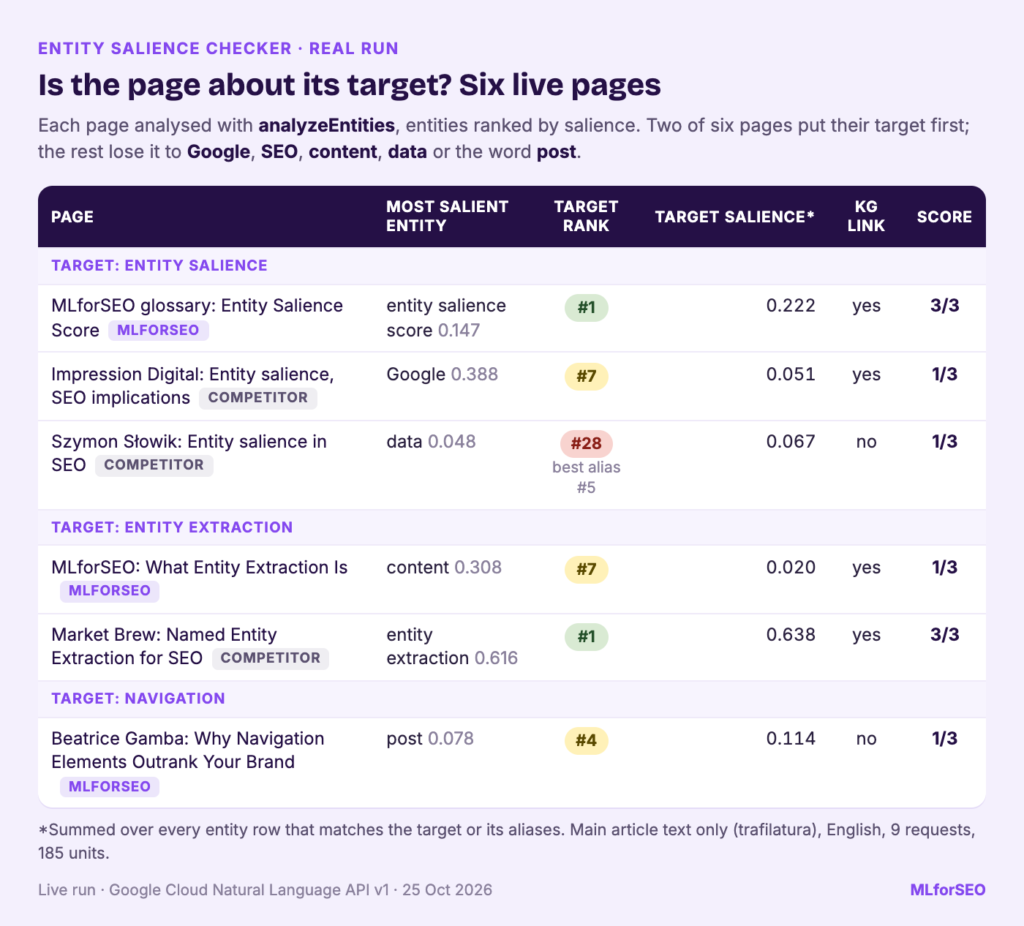
| Page | Target | Most salient entity | Target rank | Target salience | Score |
|---|---|---|---|---|---|
| MLforSEO glossary: Entity Salience Score | entity salience | entity salience score (0.1469) | 1 | 0.2222 | 3/3 |
| Impression Digital | entity salience | Google (0.3879) | 7 | 0.0513 | 1/3 |
| Szymon Słowik | entity salience | data (0.0482) | 28 (alias “salience” at 5) | 0.0669 | 1/3 |
| MLforSEO: What Entity Extraction Is | entity extraction | content (0.3084) | 7 | 0.0198 | 1/3 |
| Market Brew | entity extraction | entity extraction (0.6156) | 1 | 0.6385 | 3/3 |
| Beatrice Gamba: Why Navigation Elements Outrank Your Brand | navigation | post (0.0783) | 4 | 0.1141 | 1/3 |
Two pages put their target first. The glossary entry is short and names its topic in the first sentence; its “Salience” row links to a Knowledge Graph MID, so it scores 3/3. On Impression Digital’s guide, “Google” (28 mentions, 0.3879) is over seven times as salient as anything else, and “Entity salience” sits at rank 7 with 0.0086. On Szymon Słowik’s post nothing goes above 0.05 and the topic is split across 24 entity rows; the best, plain “salience”, is at rank 5.
My own entity extraction post is the uncomfortable result. It names entity extraction in its first sentence, yet the API reads it mainly as a page about “content” (0.3084, 20 mentions) and “SEO” (0.1507). The target’s main row, “NER”, linked to named-entity recognition, is at rank 7 with 0.0053; “entity extraction” itself is at rank 12. A long tutorial covering many uses spreads its attention with them, which is a fair prompt for an edit.
Market Brew wins with 0.6156 on one row, but check the mentions: the API folded 82 into that entity, including “process”, “technique” and “tool”, which refer back to it. Read the mention lists, not just the number. In the comparison step (benchmarked per target), the glossary entry sits 0.163 above the competitor median for “entity salience” (0.059), and the extraction post 0.619 below Market Brew.
Beatrice’s post, main text against full page
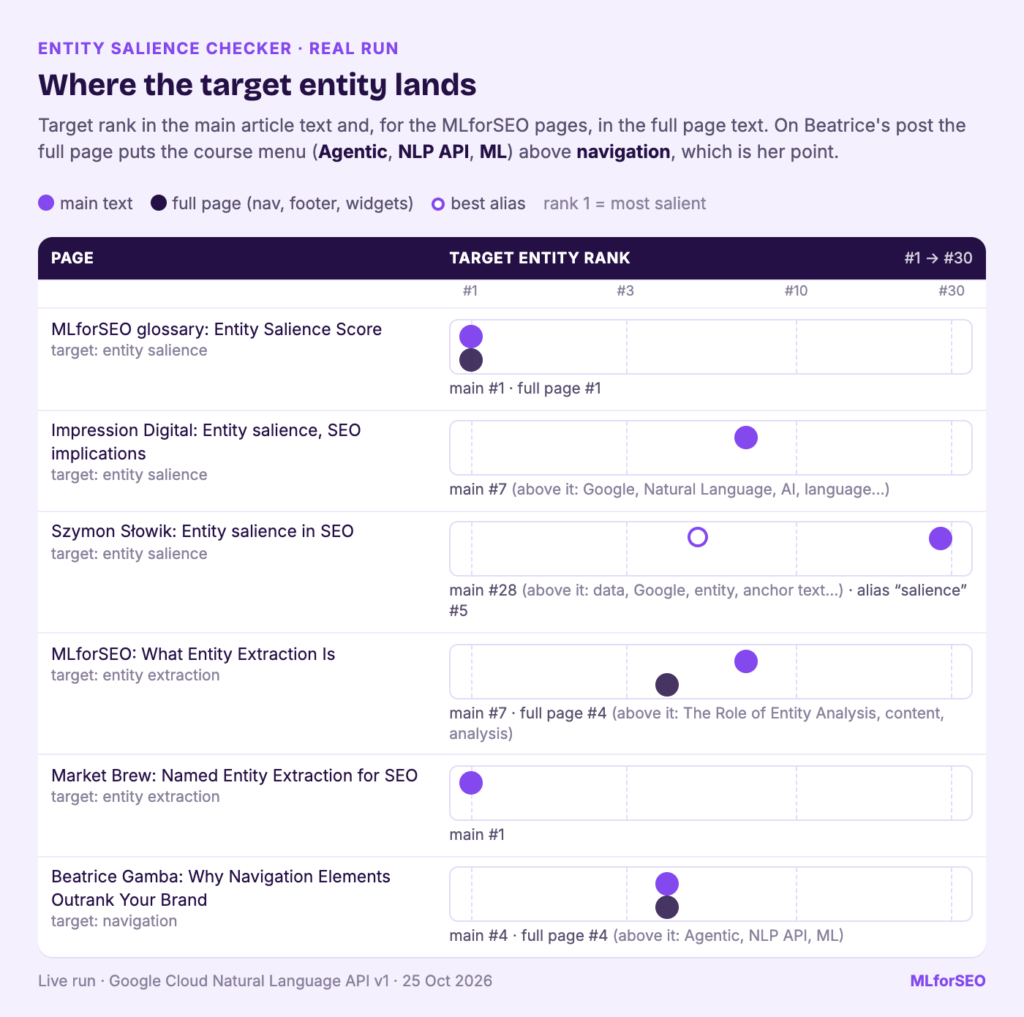
| Text sent | Top three entities (salience) | “navigation” rank | What sits above it |
|---|---|---|---|
| Main text | post (0.0783), API (0.0471), body content (0.0440) | 4 (0.0426) | Words from the article itself |
| Full page | Agentic (0.0557), NLP API (0.0395), ML (0.0376) | 4 (0.0332) | Course menu and site navigation |
For your own pages the notebook also analyses the full visible text, navigation and footer included, which makes Beatrice’s point measurable. In the article text, “navigation” ranks 4th behind “post”, “API” and “body content”, fair for a post about all three. Send the whole page and it’s still 4th, but the entities above it are now “Agentic”, “NLP API” and “ML” from the course menu and site navigation, and “Quarterly MLforSEO”, our newsletter, enters the top eight as a PERSON. That’s what Beatrice describes, measured on her own post. The glossary entry keeps its target at rank 1 in the full page, but Google, ML, Agentic and MLforSEO move into its top five.
Two caveats. This is one day, one API and one extraction method. And salience is the Natural Language API’s measure of the text it was sent, not a confirmed Google Search or LLM signal. What the run shows is that the patterns the sample illustrates (brand and template entities above the topic, topics split across rows, menus pulled in by full-page text) are real.
Fixing a page, then checking again
The fixes follow directly from the tips. For the Brewly page, I’d do four things:
- Rewrite the opening so “French press” is the subject of the first sentence, and introduce the other names once: “A French press (also called a cafetière or press pot) is…”.
- Use “French press” in the title, H1 and at least one subheading, and stick to it in the body.
- Move the newsletter box and the product promo out of the article body, or cut them down.
- Check the template: wrap navigation, sidebars and footers in proper semantic elements, as Beatrice recommends.
Then run the notebook again. Responses are cached by a hash of the text, so unchanged pages cost nothing, and only the edited page uses new units. Look for the target moving to rank 1, the primary share going up and the boilerplate entities dropping below it. I’m not quoting after-numbers yet: the real run above is a before snapshot, and my entity extraction post is first in line for this treatment. Run it on your own page before and after an edit and you’ll have your own.
Pitfalls and limits
- Salience is one API’s opinion. It’s a useful diagnostic. It isn’t a confirmed Google Search or LLM signal.
- The text you send changes the answer. Main-text extraction can miss tabs, accordions and JavaScript-rendered content, or keep in-article boilerplate. If a result looks odd, check the extracted text; JavaScript-heavy pages may need a rendered crawl.
- Knowledge Graph links aren’t guaranteed. Many valid entities come back without a MID, especially niche terms and small brands.
- Language support is limited. Check the API’s supported languages before you run it on non-English pages.
- The score is a rubric I wrote. It’s a quick first pass, deliberately simple.
If you’d rather not touch code, the no-code entity analysis template for Google Sheets runs the same API from a spreadsheet (walkthrough: entity extraction in Google Sheets), and comparing NLP APIs for entity analysis shows how other providers see the same text.
What to do next
- Run the sample, then your three most important pages and two competitors each.
- Fix the pages scoring 0 or 1 first: they’re the ones where a machine reader most clearly disagrees with you.
- Add the check to your entity audit cadence so new templates and CTAs don’t quietly undo the work.
- Read how to audit entity structure in modern search and how to fix entity recognition gaps for what comes after a single-page check.
- For the full audit across all five Cs, with scoring for a whole site, take The AI-powered Entity Audit.
Free notebook
Entity Salience Checker: a Google Colab notebook that ranks the entities on your page and competitor pages by salience and tells you where your target entity lands, with plain-English fixes.
FAQ
What is entity SEO?
Entity SEO is optimising your content and site so search engines and AI systems can recognise the real-world things (entities) you write about, connect them to what they already know, and understand how they relate. Checking that your page’s main entity comes across clearly is one small part of it.
What is a salience score?
It’s the Google Natural Language API’s estimate, from 0 to 1, of how central an entity is to the text you send. Higher means more central. Scores are relative within one document.
Does Google use entity salience for ranking?
Google hasn’t said so. Salience is a property returned by the Natural Language API, and there’s no public documentation linking it to Search or AI features. Use it as a diagnostic for clarity.
How much does it cost to check a page?
Entity analysis is billed per 1,000-character unit, and the first 5,000 units each month are free. A short article uses a handful of units and a long tutorial a few dozen, so checking a few pages usually costs nothing.
MLforSEO Academy
Take your skills further — pick your path
Semantic ML-enabled Keyword Research
by Lazarina Stoy
Query understanding, search intent and semantic clustering for how people and AI really search.
View course →AI Search Optimisation & Agentic SEO
by Beatrice Gamba
How agentic systems retrieve, evaluate and select — and how to become the source they cite.
View course →AI Search, LLMs, Entity SEO & Knowledge Graph Strategies
by Beatrice Gamba
Build the entity authority and knowledge-graph presence that makes AI recognise and trust your brand.
View course →Introduction to Machine Learning for SEO
by Lazarina Stoy
Ship practical ML workflows — classification, clustering, entity extraction — no CS degree required.
View course →