Every content audit I’ve been part of has the same awkward middle. The exports are done: a crawl, a couple of Search Console downloads, a GA4 report. Then someone has to decide what happens to each page, and the meeting turns into gut feel. “That post feels old.” “We should prune.” “But it gets some traffic?”
I wanted that middle to be boring. So I built a content audit template that joins the three exports per URL, checks each page against rules you can read, and suggests a decision with a plain-English reason: keep, update, merge, prune or redirect. Your judgement goes into an override column that always wins.
In this post I’ll explain the decision rules, where machine learning signals fit in, and walk through the template’s sample site so you can see how each of its 24 URLs got its decision.
Free template
Content Audit Template (Google Sheets): joins Screaming Frog, Search Console and GA4 exports per URL and suggests keep, update, merge, prune or redirect for every page, with the reason and editable rules.
On this page
What a content audit is for
A content audit is a page-by-page review of a site’s content, combining technical, search and behaviour data, that ends in a decision for every URL. That last part is the one that matters. An audit that ends in a spreadsheet of metrics hasn’t finished yet.
The template uses five decisions:
| Decision | What it means |
|---|---|
| Keep | The page is healthy, intentionally non-indexable, or converts. Monitor it |
| Update | The page has demand but is decaying, sitting in striking distance, or thin. Improve it |
| Merge | The page overlaps a stronger page. Move the useful parts there and redirect |
| Prune | The page has no meaningful search traffic, visits, conversions or links. Remove it or noindex it |
| Redirect | The page already redirects, is broken but still earns clicks or links, or is being removed but has links worth keeping |
Content pruning gets talked about as if removing pages were a ranking strategy in itself. I’m more cautious than that. Google’s guidance on creating helpful, reliable content is about the content people find useful. Pruning, in my view, is housekeeping: it clears out pages nobody uses so the ones people do use are easier to find, crawl and maintain.
Where machine learning fits into a content audit
The rules are simple. The signals that feed them are where the more interesting methods come in.
Overlap: near-duplicates and semantic similarity
Finding pages that cover the same ground is the hardest part of an audit to do by hand. The template reads two Screaming Frog columns for it. The first is near-duplicate detection: the SEO Spider configuration guide explains that it uses a minhash algorithm with a 90% similarity threshold by default, and only checks indexable pages. The second is the semantic similarity score, which compares page embeddings and gives each page its closest semantically similar address with a score from 0 to 1.
Screaming Frog’s own guide to semantically similar pages treats scores above 0.95 as similar by default. The template flags overlap at 0.9, a little lower, because in an audit I’d rather see a few extra candidates and dismiss them. If that’s too noisy for your site, it’s one cell on the Rules tab. For the theory behind the score, see semantic similarity in the glossary.
Decay
Decay compares clicks in the current period with the previous one. The template flags a 30% or bigger drop on pages that had at least 20 clicks before. That’s a simple two-period rule. It won’t spot a slow slide over a year or tell a seasonal dip from a real decline, so treat it as a prompt to look.
Striking distance, thin content and conversions
Striking distance means an average position between 4 and 20 with 200 or more impressions, where an update has the best chance of moving the page. Thin means under 300 words, which only matters if the page also has search demand. And any page with key events (GA4’s name for conversions, see Google’s help on marking key events) is protected from pruning.
If you want to go further with topic fit, the BERTopic and LDA topic modelling guides show how to cluster a site’s content by topic, and the LDA output organiser template turns that into a sheet you can join to the audit.
The decision rules
The template checks these in order, and the first match wins:
- Status 3xx: Redirect (it already redirects, so update internal links).
- Status 4xx or 5xx: Redirect if it still gets clicks or has referring domains, otherwise Prune.
- Non-indexable (noindex or canonicalised): Keep, with a note to confirm that’s intentional.
- Overlaps a page with more clicks (near-duplicate, or semantic score at or above 0.9) and has no key events: Merge.
- Decaying, in striking distance, or thin with search demand: Update.
- Low value (under 10 clicks, under 200 impressions, under 20 sessions, no key events): Prune, or Redirect if you’ve entered referring domains.
- Everything else: Keep.
All ten thresholds sit on the Rules tab with an explanation next to each, so when a stakeholder asks “why is this page marked Prune?”, the answer is a row in a sheet.
Walkthrough: running the audit
The template expects three standard exports. The sheet finds each column by its header name, so a reordered export still works.
- Crawl. Run Screaming Frog with near-duplicates switched on (and embeddings, if you can), let Crawl Analysis finish, then export Internal > HTML and paste it into the Crawl tab.
- Search Console, twice. Export the Pages report for the last three months and for the three months before, and paste them into GSC current and GSC previous.
- GA4. Download the landing page report for the same dates and paste it into the GA4 tab.
- Check the Rules tab. Every column should show a number in “Column # found”. If one says NOT FOUND, type your export’s header name next to it. Then tune the thresholds.
- Decide. Filter the Audit tab by decision, read each reason, add referring domains for anything you might remove, and override where you disagree.
URLs are matched on their path, ignoring host, query string, fragment, trailing slash and letter case. That’s what lets GA4’s paths line up with the full URLs from the crawl and Search Console.
If you’d rather not paste by hand, an optional Python helper in the GitHub folder strips GA4’s comment lines, reads Search Console’s zip file, renames common header variants and fills a copy of the workbook. It also prints a join check, which is the first thing I look at. Here’s its output on the sample exports:
Join check (URLs are matched on path, ignoring host, query string, trailing slash and case)
  crawl URLs: 24
  GSC pages: 22
  GSC clicks matched to the crawl: 4,845 of 4,880
  GA4 sessions matched to the crawl: 8,035 of 8,075
  1 page(s) get clicks but are not in the crawl (orphans, or outside the crawl scope):
   - https://www.stride-example.com/blog/orphan-race-calendar/
That orphan is worth a look in any real audit: a page earning clicks that your crawler never reached usually has no internal links pointing at it. If you’re new to crawling for content, my guide to web scraping page content with Screaming Frog covers the setup.
Reading the results on the sample site
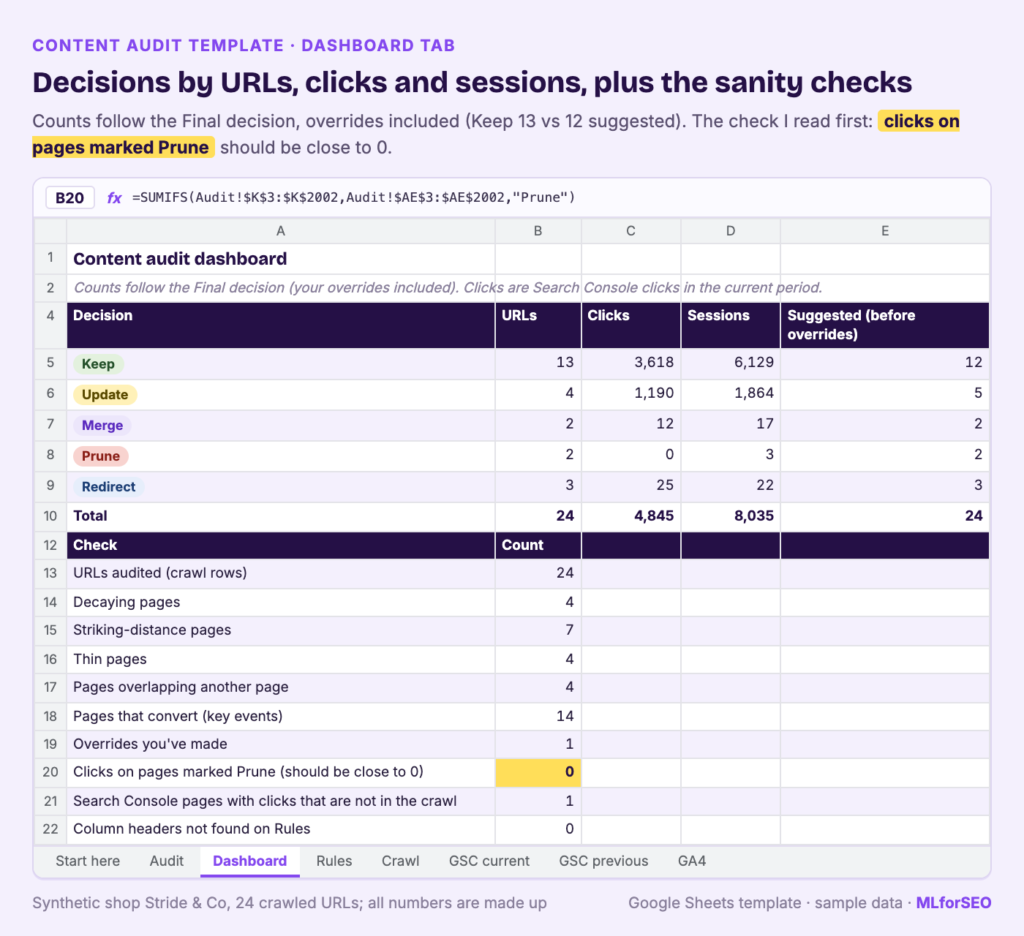
The sample is a synthetic running shoe shop, Stride & Co, with 24 crawled URLs built so every decision type appears. After one override, the Dashboard shows:
| Final decision | URLs | Clicks | Sessions |
|---|---|---|---|
| Keep | 13 | 3,618 | 6,129 |
| Update | 4 | 1,190 | 1,864 |
| Merge | 2 | 12 | 17 |
| Prune | 2 | 0 | 3 |
| Redirect | 3 | 25 | 22 |
| Total | 24 | 4,845 | 8,035 |
Its checks: 4 decaying pages, 7 in striking distance, 4 thin, 4 overlapping another page, 14 that convert, and 0 clicks on pages marked Prune. That last number is my favourite sanity check. If it’s above zero, you’re about to remove something people find in search.
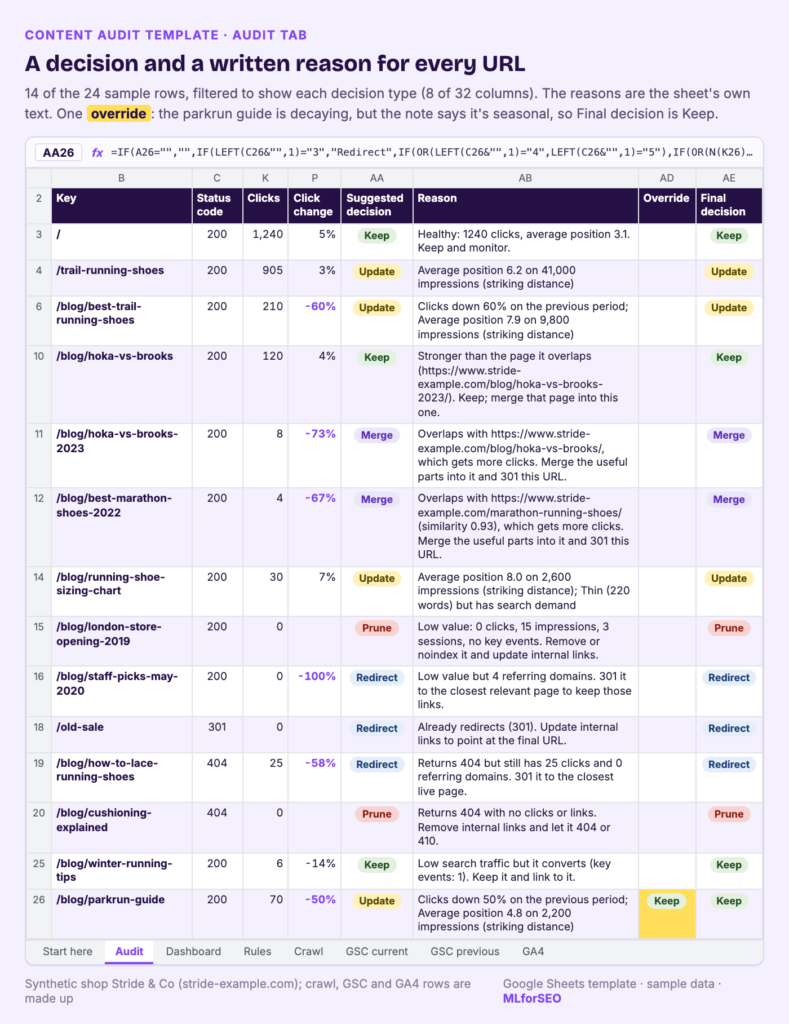
Here’s how a selection of pages got their decisions, with the reasons exactly as the sheet writes them.
Update
| Page | Reason |
|---|---|
| /blog/best-trail-running-shoes/ | Clicks down 60% on the previous period; Average position 7.9 on 9,800 impressions (striking distance) |
| /trail-running-shoes/ | Average position 6.2 on 41,000 impressions (striking distance) |
| /blog/running-shoe-sizing-chart/ | Average position 8.0 on 2,600 impressions (striking distance); Thin (220 words) but has search demand |
| /blog/parkrun-guide/ | Clicks down 50% on the previous period; Average position 4.8 on 2,200 impressions (striking distance) |
Read the page type before you act on an Update. The trail running shoes category page is in striking distance on 41,000 impressions, the biggest opportunity on the site. But for a category page, “update” means better filters, intro copy, internal links and product coverage. A thousand extra words would miss the point.
The parkrun guide shows why the override column exists. It’s flagged as decaying, and the sample’s note says “Seasonal: clicks come back every spring”. The override sets it to Keep. The rules can’t see seasonality, and you can.
Merge
| Page | Reason |
|---|---|
| /blog/hoka-vs-brooks-2023/ | Overlaps with https://www.stride-example.com/blog/hoka-vs-brooks/, which gets more clicks. Merge the useful parts into it and 301 this URL. |
| /blog/best-marathon-shoes-2022/ | Overlaps with https://www.stride-example.com/marathon-running-shoes/ (similarity 0.93), which gets more clicks. Merge the useful parts into it and 301 this URL. |
The Hoka vs Brooks pair is a near-duplicate: the 2023 version gets 8 clicks to the current post’s 120. An easy merge.
The marathon pair is the one I’d question. The overlap comes from the semantic similarity score (0.93), and the stronger page is a category page. A 2022 list post and a category page can be similar in topic and still serve different intents. Before merging, I’d check the post’s queries with the keyword cannibalization checker: if they rotate with the category page, merge; if they don’t, a refreshed “best marathon shoes” guide might be the better home.
Prune and Redirect
| Page | Decision | Reason |
|---|---|---|
| /blog/london-store-opening-2019/ | Prune | Low value: 0 clicks, 15 impressions, 3 sessions, no key events. Remove or noindex it and update internal links. |
| /blog/staff-picks-may-2020/ | Redirect | Low value but 4 referring domains. 301 it to the closest relevant page to keep those links. |
| /blog/how-to-lace-running-shoes/ | Redirect | Returns 404 but still has 25 clicks and 0 referring domains. 301 it to the closest live page. |
| /blog/cushioning-explained/ | Prune | Returns 404 with no clicks or links. Remove internal links and let it 404 or 410. |
| /old-sale/ | Redirect | Already redirects (301). Update internal links to point at the final URL. |
The staff picks page shows why the referring domains column matters. On traffic alone it’s a Prune. With 4 referring domains entered, it becomes a Redirect. The template has no backlink data of its own, so it only knows what you tell it. Google’s documentation on redirects and on HTTP status codes covers the mechanics of 301s, 404s and 410s. For matching removed pages to the right destination, my redirect mapping notebook does the heavy lifting.
Keep
Most pages are Keep, as they should be. A few are worth noticing. The noindexed tag archive and the canonicalised glossary are Keep with a note to confirm that’s intentional. The winter running tips post gets 6 clicks a quarter, low enough to prune, but it has a key event, so the reason reads “Low search traffic but it converts (key events: 1). Keep it and link to it.” And the current Hoka vs Brooks post gets “Stronger than the page it overlaps… Keep; merge that page into this one.”
Pitfalls and limits
- The rules can’t see context. Seasonality, legal pages and campaign landing pages all need a human. Read the reason before you remove anything.
- Backlinks only count if you add them. Enter referring domains for every page you might prune, and prefer a redirect whenever a page has links or traffic.
- Merge needs Screaming Frog’s content features. Without near-duplicates or embeddings switched on, Merge never fires, and everything else still works. Near-duplicate checks only cover indexable pages.
- One host at a time. Because URLs are matched on their path, two subdomains with the same paths would collide.
- Two periods are a blunt instrument. The decay rule compares two windows. Pick windows that make sense for your site’s seasonality.
- Re-pasting a crawl in a different order breaks overrides. The Audit tab follows the Crawl tab row by row, so copy the Audit tab as values before you paste a new crawl.
What to do next
The audit is the last step of the workflow I use for content planning and maintenance:
- Map keywords to URLs before publishing, with the keyword mapping template. After a merge, it’s also where you reassign the merged page’s keywords to the page you kept.
- Detect query-level cannibalisation with real Search Console data, using the keyword cannibalization checker. Its consolidate rows usually reappear here as Merge.
- Audit every page on a schedule with this template, and record your decisions in the Final decision column.
For overlapping titles and headings, pair the audit with the On-page Duplication Analysis template. For the bigger structural questions an audit raises, read my guide to blog and site architecture in the AI search era. And if you want to understand the ML methods behind similarity scores and topic clustering, they’re covered in the Introduction to Machine Learning for SEO course.
FAQ
What should a content audit template include?
At minimum: one row per URL, crawl facts (status, indexability, word count), Search Console clicks, impressions and position for two periods, GA4 sessions and conversions, and a decision column with a reason. Editable rules and an override column make it something a team can agree on.
How often should you run a content audit?
I run a full audit once a year on most sites and a lighter quarterly pass on sites that publish a lot. Compare periods of the same length, and watch for seasonality.
What is content pruning, and is it safe?
Content pruning is removing or noindexing pages with no meaningful traffic, conversions or links. It’s safe when you check those things first and redirect anything with links or clicks. That’s why the template’s Dashboard counts clicks on pages marked Prune.
What is content decay?
Content decay is a sustained drop in a page’s search traffic, often because the content has gone out of date or competitors have published better pages. The template flags a 30% or bigger drop in clicks between two periods.
Should I merge or redirect a page?
Merge when the page has useful content that belongs on a stronger page, then redirect it. Redirect without merging when the page has nothing worth keeping but has links or clicks. If it has neither, pruning is fine.
Free template
Content Audit Template (Google Sheets): paste your crawl, two Search Console exports and GA4, tune the rules, and get a suggested decision and reason for every URL on your site.
MLforSEO Academy
Take your skills further — pick your path
Semantic ML-enabled Keyword Research
by Lazarina Stoy
Query understanding, search intent and semantic clustering for how people and AI really search.
View course →AI Search Optimisation & Agentic SEO
by Beatrice Gamba
How agentic systems retrieve, evaluate and select — and how to become the source they cite.
View course →AI Search, LLMs, Entity SEO & Knowledge Graph Strategies
by Beatrice Gamba
Build the entity authority and knowledge-graph presence that makes AI recognise and trust your brand.
View course →Introduction to Machine Learning for SEO
by Lazarina Stoy
Ship practical ML workflows — classification, clustering, entity extraction — no CS degree required.
View course →