You’ve clustered your keywords. The clusters look sensible, the spreadsheet is tidy, and the next job on the list is writing content briefs. Most guides jump straight there. I think that’s where a lot of SEO plans quietly go wrong.
Between clustering and briefs there’s a step that decides which page does which job: keyword mapping. Skip it, or do it as a quick URL column at the end of a keyword export, and the mistakes stay invisible for months. Then they show up in Search Console as two of your pages competing for the same query, a category page that’s somehow meant to rank for a how-to question, or a blog post that has five “main” keywords and ranks for none of them.
In this post I’ll walk through the rules I use for keyword mapping, and the free Google Sheets template I built to check them while you’re still planning. I’ll use the template’s sample data (a made-up running shoe shop) to show what each flag looks like and how I’d fix it.
Free template
Keyword Mapping Template (Google Sheets): maps every keyword or cluster to one existing or planned URL, labels search intent, scores priority and flags cannibalisation and intent mismatches as you plan.
On this page
What keyword mapping is (and how it differs from clustering)
Keyword mapping is the process of assigning each keyword, or each cluster of keywords, to the one URL on your site that should rank for it. That URL can exist already or be a page you plan to create.
Keyword clustering answers a different question. Clustering groups keywords that share a meaning or a results page, whether you do it with KeyBERT, SERP overlap or supervised and unsupervised topic mapping. Mapping takes those groups and gives each one a job on a specific page, with a page type, a status and a role.
The two get blurred because many tools output “clusters” with a suggested URL attached. That’s a useful starting point, but the tool doesn’t know that your wide-fit category page and your wide-feet buying guide are both chasing the same query. You do, and the map is where you write that decision down. If you want the wider workflow this sits in, I covered it in how to turn semantic keyword research into an actionable SEO workflow.
The keyword mapping rules I use
These are the five rules the template checks. They’re defaults, and I break them when I have a reason. The sheet makes sure I break them on purpose.
1. One keyword, one URL
If the same keyword is mapped to two pages, you’ve planned keyword cannibalisation before writing a word. Sometimes two pages will both appear for a query anyway (more on that in my post on finding the cannibalisation worth fixing), but the plan should always name one page as the target.
2. One primary keyword per URL
Every URL gets one primary keyword or cluster head, and the rest are secondary. A page can still rank for hundreds of queries. The primary keyword gives its title, H1 and opening paragraph one clear job. When a page has three primaries, the brief turns into a compromise.
3. The intent has to fit the page type
A transactional query (“buy trail running shoes”) belongs on a category or product page. An informational one belongs on a guide. I go into the theory in what search intent is and how to use it in semantic keyword research, and the practical side in how to build a search intent-first website architecture. In the map, the check is simple: does this search intent fit this page type, yes, partly or no?
4. A URL should mostly serve one cluster
When a URL holds keywords from two different clusters, either the clustering split one topic in two, or the page is being asked to do two jobs. Both happen, and both are worth a second look.
5. Compare the plan with where you rank today
If Google already ranks a different page of yours for the keyword, mapping it somewhere else is a decision with consequences. For a planned page that’s expected. For two existing pages, it’s often the first sign of a problem.
How the template works
The workbook has six tabs and works in Google Sheets and Excel. It has room for 1,000 keywords, 500 URLs and 300 clusters, and every formula uses functions both apps support.
| Tab | What it does |
|---|---|
| Start here | Steps, how each flag works, legend and credits |
| Keyword Map | The paste zone (keyword, cluster, volume, KD, current ranking URL and position, target URL, page status, page type, role, optional intent, notes) and the calculated columns |
| URL Summary | One row per target URL: keywords mapped, primary keywords, volume, average priority, flags |
| Cluster Summary | One row per cluster: keywords, volume, mapped and unmapped, flags |
| Dashboard | Totals, every flag, and keywords by intent and by page type |
| Settings | The primary-keyword limit, priority weights, the page type × intent grid and the intent word lists |
Each rule above becomes a flag in the Keyword Map:
| Flag | When it fires |
|---|---|
| Cannibalisation | The same keyword (case, spaces and question marks ignored) appears on another row with a different target URL |
| Too many primaries on URL | The target URL has more Primary keywords than the limit on Settings (default 1) |
| URL spans 2+ clusters | The target URL also holds keywords from a different cluster |
| Intent mismatch | The page type × intent grid on Settings says No for this combination |
| Ranking URL is not the target | Your Search Console or rank tracker URL differs from the target (trailing slash and case ignored) |
The cannibalisation check is a plain COUNTIFS: count the other rows with the same cleaned keyword and a different, non-empty target URL. Here’s the formula on the first keyword row:
=IF(OR(A3="",G3=""),"",COUNTIFS($M$3:$M$1002,M3,
  $G$3:$G$1002,"<>"&SUBSTITUTE(SUBSTITUTE(G3,"?","~?"),"*","~*"),
  $G$3:$G$1002,"?*"))
Intent labels
Intent comes from one of two places. If you paste a label (from a classifier, a tool or your own judgement), the sheet uses it. Otherwise it applies whole-word rules from the Settings tab, checked in the order navigational, transactional, commercial, informational. The word lists match my free rule-based intent classifier, plus a few shop words. Replace the navigational row with your own brand and product names before you start.
Priority score
The 0-100 priority score adds three parts, and every weight sits on Settings: up to 50 points for search volume (on a log scale, full points at 5,000 searches), up to 25 points for ease (100 minus keyword difficulty, with a blank KD counted as 50) and up to 25 points for intent (transactional 25, commercial 20, informational 10, navigational 5). You can disagree with the weights and change them in a minute.
Walkthrough: mapping a running shoe shop
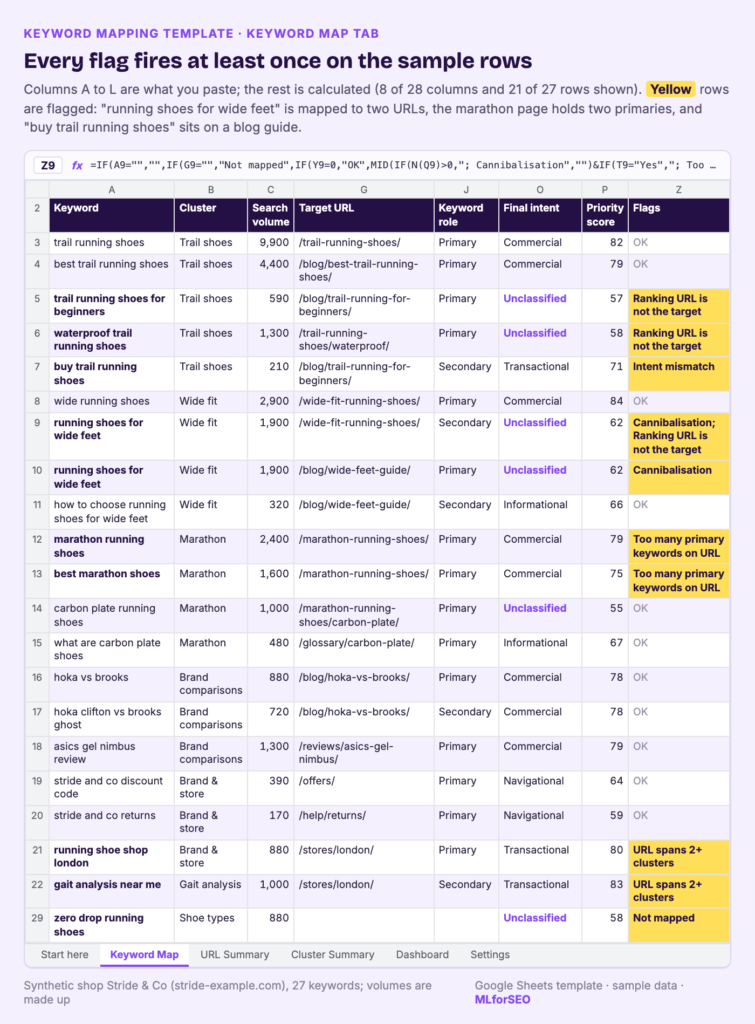
The template ships with 27 synthetic keywords for a fictional shop, Stride & Co (stride-example.com). The numbers are made up, and the rows were built so every flag fires at least once. Here’s the process, the same one you’d follow with your own data.
- Set up Settings. Replace the navigational words with your brand and product names. Check the page types and the page type × intent grid. For example, the default grid says a blog post or guide is a No for transactional intent, and a category page is a No for informational intent.
- Paste your keywords. On Keyword Map, clear the sample rows (columns A to L only) and paste keyword, cluster, search volume and KD. Add the current ranking URL and position from Search Console or your rank tracker if you have them.
- Add intent, if you have it. Paste labels from a classifier into the optional intent column. Leave it blank to use the word rules.
- Map. For each keyword, choose a target URL, page status (existing or planned), page type and role (primary or secondary).
- Read the Flags column. I fix cannibalisation first, then overloaded URLs, then intent mismatches.
- Review the summaries. URL Summary and Cluster Summary show the plan per page and per cluster. Planned pages become briefs.
Reading the results: what the sample flags tell you
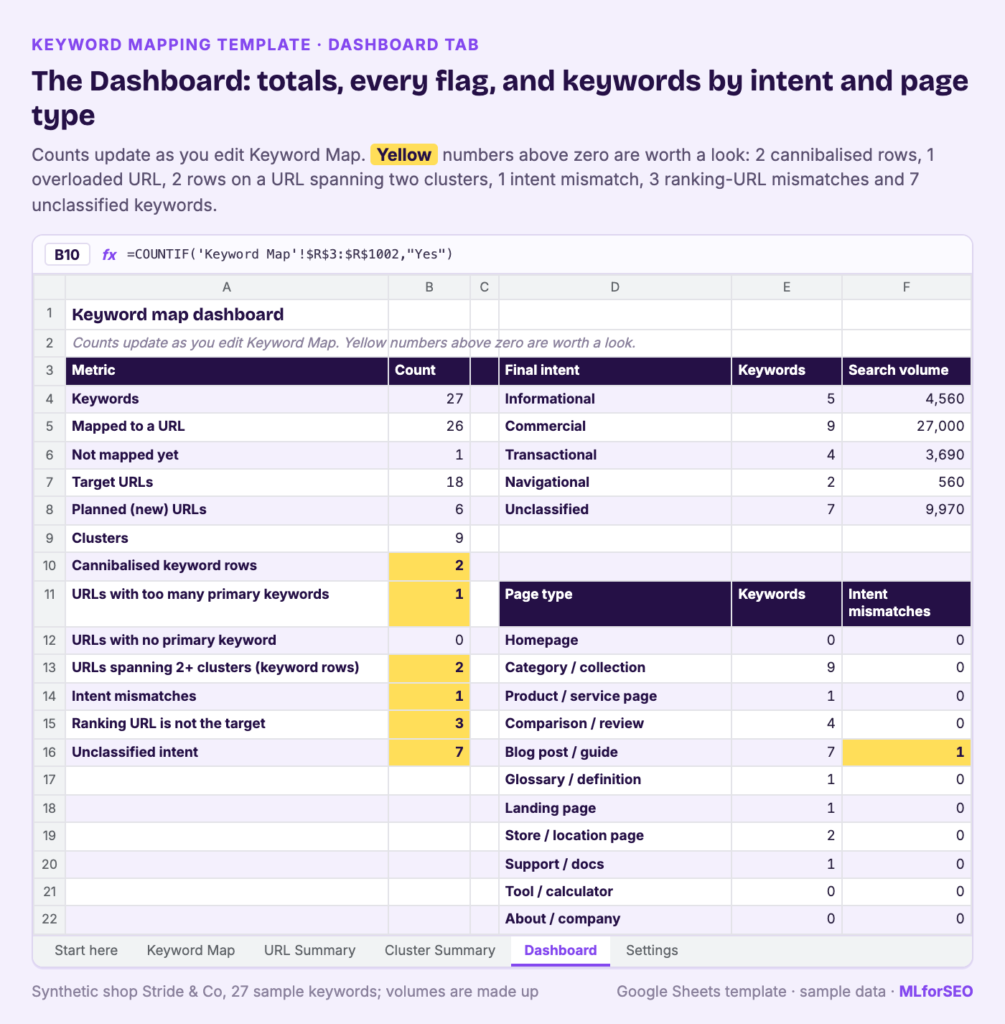
On the sample data, the Dashboard shows:
| Metric | Count |
|---|---|
| Keywords | 27 |
| Mapped to a URL | 26 |
| Not mapped yet | 1 |
| Target URLs | 18 |
| Planned (new) URLs | 6 |
| Clusters | 9 |
| Cannibalised keyword rows | 2 |
| URLs with too many primary keywords | 1 |
| URLs spanning 2+ clusters (keyword rows) | 2 |
| Intent mismatches | 1 |
| Ranking URL is not the target | 3 |
| Unclassified intent | 7 |
Cannibalisation: the same keyword on two pages
“running shoes for wide feet” (1,900 searches in the sample) is mapped twice: as a secondary keyword on the wide-fit category page and as the primary keyword on the wide-feet buying guide. Both rows get the Cannibalisation flag, and URL Summary marks both URLs as “Check flags”.
The fix is a decision, and the sheet can’t make it for you. I’d open the live results page. If it’s mostly product listings, the keyword belongs on the category page, and the guide can own “how to choose running shoes for wide feet”, which it already ranks for at position 4. If it’s mostly guides, I’d do the reverse. Either way, one row goes.
Too many primaries on one URL
The marathon category page holds two primary keywords, “marathon running shoes” (2,400) and “best marathon shoes” (1,600). URL Summary labels it “Too many primary keywords”. One option is to make “best marathon shoes” secondary. The other, which I’d check first, is whether “best” queries in this niche return comparison articles, in which case it deserves its own review page.
A URL spanning two clusters
The London store page holds “running shoe shop london” from the Brand & store cluster and “gait analysis near me” from the Gait analysis cluster. This is a flag I often accept. A location page legitimately serves local queries for several services. The flag’s job is to make you say so out loud, and to check that the gait analysis service page (mapped to “gait analysis”) isn’t the better target.
Intent mismatch
“buy trail running shoes” is labelled transactional and mapped to a planned beginner’s guide. Blog post plus transactional is a No in the grid, so it’s flagged. The fix is easy: move it to the trail running shoes category page as a secondary keyword.
Ranking URL is not the target
Three rows get this flag. Two of them are planned pages: “trail running shoes for beginners” currently ranks at position 18 with the best trail running shoes comparison, and “waterproof trail running shoes” ranks at 21 with the main category page. That’s expected. When the new pages go live, link to them from the pages that rank today, so Google gets a clear signal about which one to show.
The third is the wide-fit category row, where the guide is ranking. For two existing pages, this is the flag I take most seriously, because it’s the cannibalisation flag seen from the other side.
Unclassified intent and unmapped keywords
Seven keywords come out as Unclassified. Look at which ones: “waterproof trail running shoes”, “carbon plate running shoes”, “gait analysis”. They’re mostly short head terms, with no “buy”, “best” or “how to” to trigger a rule. That’s the honest limit of word rules. For those, I paste a label from a SERP-based classifier, such as my rule-based SERP features notebook or the BART zero-shot intent notebook. In the sample, “trail running shoes” and “wide running shoes” have pasted Commercial labels, and the pasted label wins.
“zero drop running shoes” (880) has no target at all, with a note: “Decide: new category or blog post?”. Unmapped is a valid state. It keeps an open question visible instead of forcing a bad answer.
Priorities
The highest-scoring keywords in the sample are “wide running shoes” (84), “gait analysis near me” and “running shoes sale” (83 each) and “trail running shoes” (82). The arithmetic for that last one: 9,900 searches earns the full 50 volume points, KD 54 earns 11.5 ease points, and the pasted Commercial label adds 20, so 81.5 rounds to 82. Commercial keywords carry most of the sample’s demand: 9 keywords and 27,000 monthly searches, against 4,560 for the 5 informational ones.
Pitfalls and limits
- Rule-based intent is a first pass. Seven of 27 sample keywords stayed unclassified. Paste better labels when you have them.
- The flags check your plan, and only your plan. A page can still compete in the results for reasons the sheet can’t see, such as internal anchor text or a duplicated section. That’s what the cannibalisation checker is for, after launch.
- Page types are yours to define. The intent grid is only as good as the page types you assign. Adjust the grid to your site: a SaaS feature page and a shop category page don’t behave the same way.
- Volume and KD come from your tools. The priority score inherits their accuracy. Treat it as a way to sort, and keep the final order a human decision.
- Scale. Beyond 1,000 keywords, copy the last formula row down, or map clusters instead of individual keywords.
What to do next
Keyword mapping is the first of three steps I run as one workflow, each with its own free resource:
- Map keywords to URLs before you write (this template). Then turn each planned page into a brief with the content brief template.
- Detect cannibalisation once pages are live, with real Search Console data. I explain how in how to find keyword cannibalization worth fixing.
- Audit every page on a schedule and decide what to keep, update, merge or prune. That’s the content audit template post.
If your keyword list isn’t clustered yet, start with SERP-based vs semantic keyword clustering, how to structure and categorise keyword data and what a good semantic keyword universe looks like. The full process, from keyword universe to clustering, intent and mapping, is what I teach in the Semantic ML-enabled Keyword Research course.
FAQ
What is keyword mapping in SEO?
Keyword mapping is assigning each keyword or keyword cluster to one target URL, existing or planned, so every page has a clear job and no two pages are planned to compete for the same query.
How many keywords should you map to one page?
One primary keyword (or cluster head) per page, plus as many closely related secondary keywords as the page can genuinely answer. The template’s limit for primaries is 1 by default, and you can change it on Settings.
What’s the difference between keyword mapping and keyword clustering?
Clustering groups keywords that share a meaning or results page. Mapping assigns each group to a specific URL, with a page type and role. You cluster first, then map.
Can one keyword be mapped to two pages?
In the plan, no: that’s the template’s Cannibalisation flag. In the results, two of your pages can still appear for one query, and sometimes that’s fine. The difference is that the plan should always name one target.
Is there a free keyword mapping template?
Yes. The template in this post is free, works in Google Sheets and Excel, and comes with sample data so you can see every flag before you paste your own keywords.
Free template
Keyword Mapping Template (Google Sheets): paste your clustered keywords, assign one URL to each, and let the sheet flag cannibalisation, overloaded URLs and intent mismatches before they reach your site.
MLforSEO Academy
Take your skills further — pick your path
Semantic ML-enabled Keyword Research
by Lazarina Stoy
Query understanding, search intent and semantic clustering for how people and AI really search.
View course →AI Search Optimisation & Agentic SEO
by Beatrice Gamba
How agentic systems retrieve, evaluate and select — and how to become the source they cite.
View course →AI Search, LLMs, Entity SEO & Knowledge Graph Strategies
by Beatrice Gamba
Build the entity authority and knowledge-graph presence that makes AI recognise and trust your brand.
View course →Introduction to Machine Learning for SEO
by Lazarina Stoy
Ship practical ML workflows — classification, clustering, entity extraction — no CS degree required.
View course →