Most topical maps I get sent are keyword lists with a hierarchy drawn on top: cluster a few thousand keywords, call the biggest cluster the pillar, done. Then you ask why one page exists and another doesn’t, and the only answer is “it had volume”.
I build topical maps the other way round. I start from the thing the site is about, list the ways people describe that thing, and list the values each of those descriptions can take. The pages fall out of that structure, and so do the internal links. It’s the entity-attribute-variable (EAV) model applied to planning, and I’ve turned it into a free Google Sheets template so you can do the same without starting from a blank sheet.
Free template
Topical Map Template (EAV-based): fill in an entity, its attributes and their values, and the sheet generates a pillar, cluster and supporting-page map with titles, slugs, internal links, coverage and priority.
On this page
What a topical map is (and what it’s for)
A topical map is a plan of every page you need to cover a topic well, and how those pages connect. It usually has three levels: a pillar page on the main topic, cluster (hub) pages on its main sub-topics, and supporting pages on the specific questions, products or variations within each sub-topic. If you’ve heard of topic clusters, that’s the same idea seen from the linking side.
You build one for coverage (which parts of the topic you haven’t written about) and for structure (every page has an obvious parent and siblings). Both feed into what SEOs call topical authority: covering a subject thoroughly enough to be a good source for it.
A note on that term. Google doesn’t publish a “topical authority” score, and I’m not going to pretend it does. What Google does document is that it wants helpful, people-first content and that links help it find pages and understand them. A good topical map gives you both: pages that exist because a person needs them, and a link structure that makes the relationships between them explicit. That’s reason enough.
Why I use the EAV model for topical maps
I’ve written about what the EAV model is in SEO in detail, so here’s the short version. EAV is a data-modelling pattern borrowed from database design. You describe the world as triples:
- Entity: a distinct thing, such as running shoes, a dog or a city.
- Attribute: a way of describing or filtering that thing, such as terrain, distance or foot type.
- Value (my older posts call it the variable): the specific value an attribute takes, such as trail, marathon or wide feet.
Map that onto a site and you get a topical map almost for free. The entity becomes the pillar. Each attribute becomes a cluster page. Each value becomes a supporting page. Links follow the structure: supporting pages link up to their cluster, clusters link up to the pillar, and siblings link across to each other.
I want to be clear about one thing, because it gets overstated. EAV is a planning lens. It’s a structured way to list what your audience wants to know and to spot gaps. Triples are how knowledge graphs store facts (my post on knowledge graphs covers that), but nobody outside Google knows exactly how its ranking systems use them, and the template doesn’t claim that pages built this way rank because of the structure. They tend to do well because the process forces you to think about every angle of a topic before you write.
How the template turns EAV into a map
The workbook has eight tabs. You only type into three of them:
| Tab | You fill in | What it does |
|---|---|---|
| Entity | The central entity, its type, the pillar URL and three title patterns | Sets the pillar and the default naming for every page |
| Attributes | One row per attribute: type, cutoff rule, intent, relevance 1 to 3, include yes or no | Becomes the cluster level, and flags attributes that shouldn’t be there |
| Values | One row per value: is it an entity itself, real user benefit, optional volume, existing URL | Becomes the supporting level, and drops values with no real benefit |
| Topical Map | Nothing (it’s generated) | Pillar, cluster and supporting rows with titles, slugs, links, intent, format, coverage and priority |
| Combinations | Two attributes to cross | A grid of long-tail page ideas |
| Dashboard | Nothing | Coverage per attribute, gaps and open checks |
It uses plain formulas, so it works the same in Google Sheets and Excel, and holds up to 50 attributes and 500 values. Map one entity per copy.
How to build a topical map with the EAV model, step by step
Step 1: Pick one central entity
Start with one entity per map. For a shop, that’s usually your main product category. For a SaaS company, it might be the problem you solve. For a publisher, a core subject. In the sample, it’s Running shoes, typed as a Product, for an audience described as “recreational and club runners in the UK”.
Then set the three title patterns. They use placeholders, so you can change the naming of the whole map in one place:
Pillar title pattern:      {entity}: the complete guide
Cluster title pattern:     {entity} by {attribute}
Supporting title pattern:  {entity} for {value}
Individual attributes can override these. In the sample, Terrain uses {value} {entity}, so “trail” becomes “Trail running shoes” instead of “Running shoes for trail”.
Step 2: List the attributes, and sort them into finite, cutoff and infinite
This is the step that saves you from programmatic nonsense later. For every attribute, decide which of three types it is:
- Finite: a small, known set of values. Terrain (road, trail, track, treadmill) is finite.
- Finite with a cutoff: practically endless, but you can draw a line. Brand becomes finite once you say “brands we stock (12)”. Price becomes finite as three bands.
- Infinite: names, URLs, slogans. You could list them forever, and a page per value rarely helps anyone.
The sample lists eight attributes: terrain, distance, foot type, cushioning, brand, runner level, price and runner name. Runner name is marked Infinite and excluded, with the note “a page per runner has no reason to exist”. If you include an infinite attribute anyway, the Attributes tab flags it: “Infinite attribute included: add a cutoff or exclude it”. If you pick “Finite with a cutoff” and leave the rule blank, it asks you to add one.
You also give each attribute a typical intent and a business relevance score from 1 to 3. Terrain, distance and foot type get a 3 in the sample; price gets a 1.
Step 3: Add values, and be honest about real user benefit
Next, one row per value. Two columns do most of the work. “Is it an entity itself?” marks values that deserve their own profile page: in the sample, the brands, “overpronation” (“a concept entity in its own right”) and “carbon-plate” (“technology entity: explain what it is”). And “Real user benefit?” asks whether a real person would be better off with a page for this value. Answer No, and the value drops off the map.
The sample has 28 values. Two don’t make it: “£80 to £140” is marked No (“nobody searches this band”), and “Eliud Kipchoge” sits under the excluded runner name attribute. So 26 values are kept. A few are marked Unsure, such as “treadmill” (“check the SERP: mostly treadmill reviews?”), which keeps them on the map at a slightly lower priority until you’ve checked.
Search volume is optional; it only feeds the priority score. To find values, use the Knowledge Graph API extraction notebook and the multi-platform autocomplete notebook (the approach is in how to use Google autocomplete APIs).
Finally, paste the URL of any page that already covers a value. That’s your coverage column.
Step 4: Read the generated map
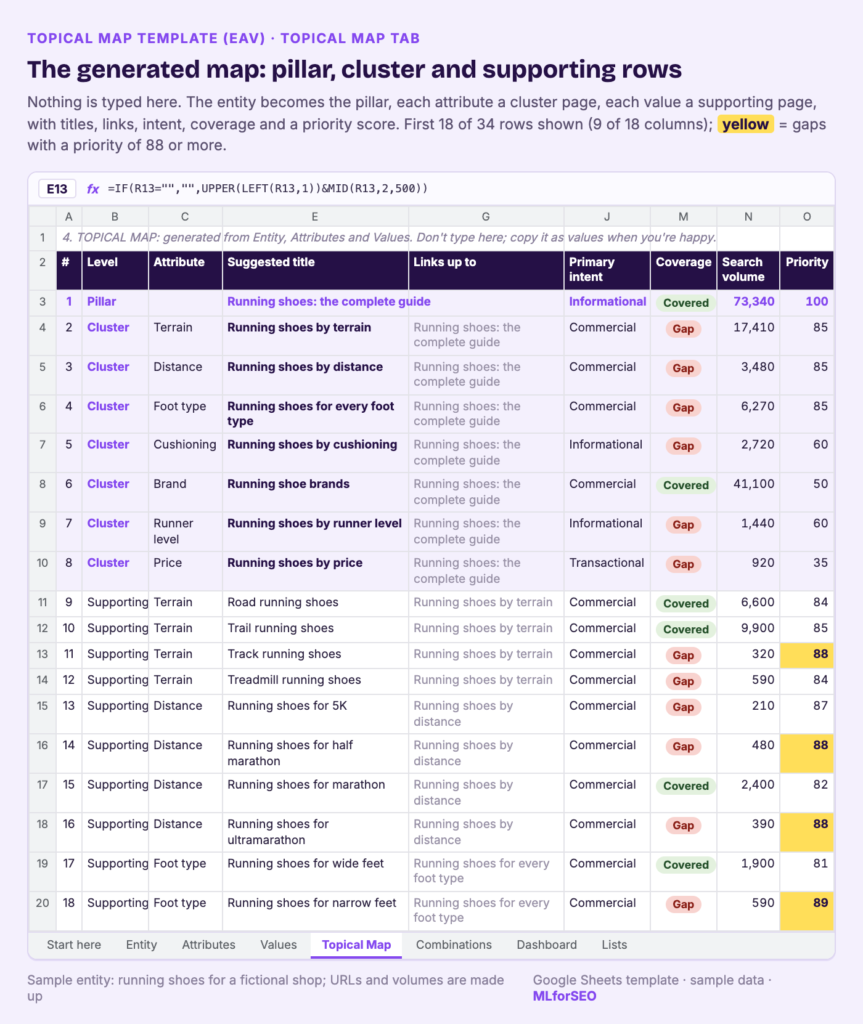
Open the Topical Map tab. With the sample data, it builds 34 rows: 1 pillar, 7 cluster pages (one per included attribute) and 26 supporting pages. Here’s the top of it:
| # | Level | Suggested title | Links up to | Links across to | Coverage | Priority |
|---|---|---|---|---|---|---|
| 1 | Pillar | Running shoes: the complete guide | Covered | 100 | ||
| 2 | Cluster | Running shoes by terrain | Running shoes: the complete guide | Running shoes by distance | Gap | 85 |
| 4 | Cluster | Running shoes for every foot type | Running shoes: the complete guide | Running shoes by cushioning | Gap | 85 |
| 10 | Supporting | Trail running shoes | Running shoes by terrain | Track running shoes | Covered | 85 |
| 19 | Supporting | Running shoes for flat feet | Running shoes for every foot type | Running shoes for high arches | Gap | 91 |
| 21 | Supporting | Running shoes for overpronation | Running shoes for every foot type | Running shoes for wide feet | Gap | 91 |
| 24 | Supporting | Carbon-plate running shoes | Running shoes by cushioning | Minimalist running shoes | Gap | 70 |
Every row also gets a slug, an intent and a format. Sub-entities get “Entity page (profile of the sub-entity)”; commercial values get “Comparison or best-of list”, informational ones “Guide or explainer” and transactional ones “Category or product listing”.
The links are the bit I’d look at first. “Links up to” points supporting pages at their cluster and clusters at the pillar. “Links across to” points each page at the next sibling in the same attribute and loops back to the first, so “Running shoes for overpronation” links across to “Running shoes for wide feet” and the foot type pages form a closed loop. That’s a sensible default for internal linking, and you can always add more contextual links by hand.
Step 5: Find the gaps and sort by priority
In the sample, 9 of the 34 rows are covered and 25 are gaps, which the Dashboard reports as 26% coverage. Per attribute, Terrain is at 50% (2 of 4 values covered), Foot type at 20% (1 of 5), and Cushioning and Runner level at 0%.
Priority is a simple, editable formula: the pillar is 100; a cluster is relevance × 25, plus 10 if it’s a gap; a supporting page is relevance × 20, plus up to 20 points for volume on a log scale, plus 10 if it’s a gap, plus 5 if you marked real user benefit Yes. That’s why the uncovered foot type pages (flat feet and overpronation at 91, high arches at 90, narrow feet at 89) sit at the top of the plan, while “Hoka running shoes”, which is already covered, scores 65 despite having the highest volume in the sample. Covered pages drop down because the work is done. If you’d weight things differently, change the weights in the formula.
A quick caveat on the numbers: the shop, its URLs and its volumes are sample data written for the template. Read them for the method; they say nothing about the real running shoe market.
Step 6: Freeze it, then edit
Once you’re happy, copy the Topical Map tab and paste it as values into a new tab, then edit. Some titles will need it: I wouldn’t publish “Running shoes for returning from injury” as it stands.
Step 7: Use Combinations for long-tail ideas
The Combinations tab crosses two attributes. Pick Terrain and Foot type, and you get a grid of 20 ideas such as “Trail running shoes for wide feet” and “Road running shoes for flat feet”, using the pattern {a} {entity} for {b}. It warns you if either attribute is infinite. Don’t build all 20: keep the pairs a real runner would search for and move them into a content brief.
How to read your topical map
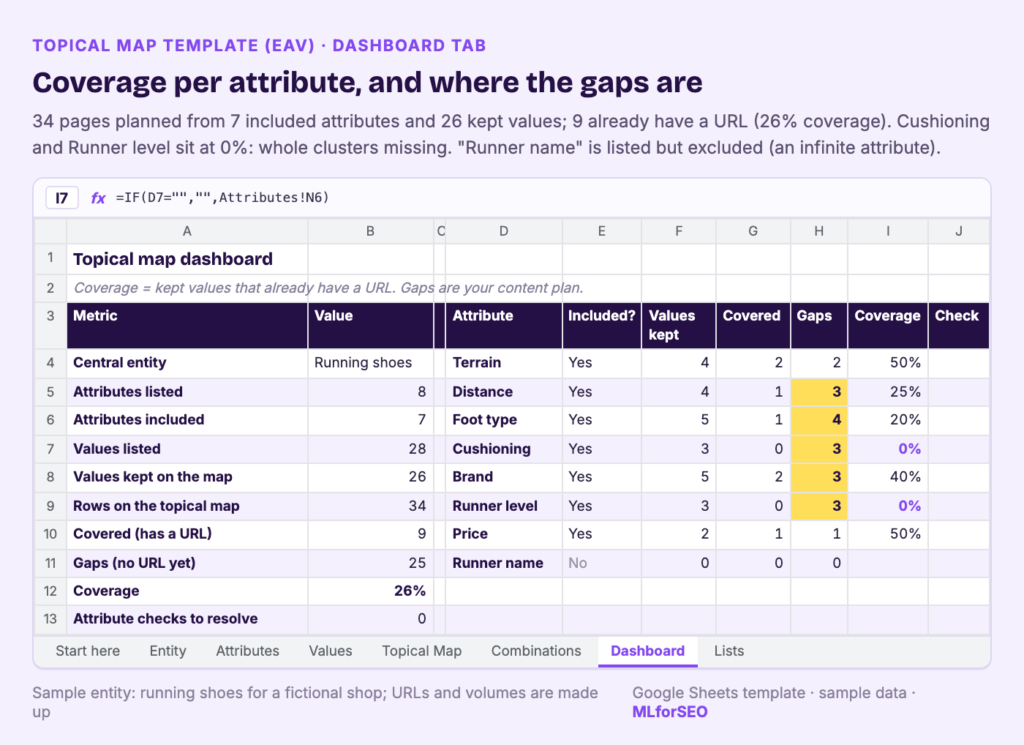
Once your own data is in, I read the map in this order:
- Dashboard checks. Any attribute check still open (an infinite attribute included, a cutoff rule missing, an included attribute with no values kept) needs fixing before anything else.
- Coverage per attribute. An attribute at 0% usually means a whole cluster is missing, which is a bigger job than a single page.
- Cluster gaps. In the sample, six of the seven cluster pages are gaps. Hub pages are easy to forget because they rarely target a big keyword, and they’re the pages that hold the structure together. Beatrice Gamba makes a good case for this in the case for entity hubs over keyword landing pages.
- Top-priority supporting gaps. Sort by priority and take the top ten into next quarter’s plan.
If you’re also restructuring the site, pair this with my post on search-intent-first website architecture, and use the internal link opportunities template or automated internal linking to fill in the contextual links the map doesn’t generate.
Pitfalls and limits
- Garbage in, garbage out. The map is only as good as the attributes and values you list. If you skip research and list what you assume people care about, you’ll get a tidy map of your assumptions. Do the keyword categorisation first.
- It doesn’t find the attributes for you. The planned generator notebook that drafts a map from a seed entity isn’t built yet. For now, the Knowledge Graph and autocomplete notebooks are the research step.
- Search volume is a weak signal for this. Some of the most useful pages, like “returning from injury” in the sample (90 searches, with the note “low volume, real need”), will never have much volume. The real user benefit column is there so you can keep them.
- It plans; it doesn’t promise rankings. The template decides what to build and how to link it. Whether each page performs still depends on the page.
In AI search, assistants split questions into sub-queries that are often entity-plus-attribute combinations (see how entities power query fan-out), so a site with a page per meaningful value has more answers ready. That’s my view; Google hasn’t documented it as a ranking mechanism.
What to do next
- Clear the sample and map one entity from your own site, starting with what a good semantic keyword universe looks like as your guide to research depth.
- Turn the top ten gaps into briefs, and plan the work with my guide to turning semantic keyword research into an actionable workflow.
- If you want the full method, including scaling EAV programmatically with validation and quality controls, it’s taught in my Semantic ML-enabled Keyword Research course.
Free template
Topical Map Template (EAV-based): a Google Sheets workbook that turns one entity, its attributes and their values into a prioritised topical map with internal links and coverage tracking.
FAQ
What is a topical map in SEO?
A topical map is a plan of all the pages you need to cover a topic, organised into a pillar page, cluster pages and supporting pages, with the internal links between them. It shows what you’ve already covered and what’s missing.
How is an EAV topical map different from keyword clustering?
Keyword clustering groups the phrases you already have. An EAV map starts from the entity and its attributes, so it also shows pages you need but have no keywords for yet, and it gives you a reason to exclude pages, such as infinite attributes or values with no real user benefit.
Does a topical map build topical authority?
Google doesn’t document a topical authority score. A topical map helps you cover a subject thoroughly and link related pages clearly, which is what people usually mean by the term. Treat it as a planning tool.
How many pages should a topical map have?
As many as there are values worth a page, and no more. The sample shop ends up with 34 pages from 8 attributes and 28 values, after one attribute and two values are dropped.
MLforSEO Academy
Take your skills further — pick your path
Semantic ML-enabled Keyword Research
by Lazarina Stoy
Query understanding, search intent and semantic clustering for how people and AI really search.
View course →AI Search Optimisation & Agentic SEO
by Beatrice Gamba
How agentic systems retrieve, evaluate and select — and how to become the source they cite.
View course →AI Search, LLMs, Entity SEO & Knowledge Graph Strategies
by Beatrice Gamba
Build the entity authority and knowledge-graph presence that makes AI recognise and trust your brand.
View course →Introduction to Machine Learning for SEO
by Lazarina Stoy
Ship practical ML workflows — classification, clustering, entity extraction — no CS degree required.
View course →