
Type “youtube tag generator” into Google and you’ll find dozens of sites that take a word and hand back thirty tags. No sources, no reasons, no way to tell which of them anyone searches for. Paste them in, hit publish, hope.
Here’s the thing those sites don’t mention. YouTube’s own help page on adding tags says your title, thumbnail and description are more important for discovery, and that unless your topic is commonly misspelled, “tags play a minimal role in your video’s discovery”. So the tag list was never the valuable part. The valuable part is the research a good tag list should come from: what people type into YouTube search, and what the videos that already rank for it do with their titles.
I built a free Google Colab notebook that does that research and, as the last small step, produces a tag list with a reason for every tag. This post walks through it with one real seed, “youtube seo”.
Free notebook
YouTube Keyword and Tag Research Notebook: pulls YouTube autocomplete for your seeds and the titles, tags and views of the top-ranking videos, then finds the gaps and builds a tag list that fits YouTube’s limit.
On this page
Where YouTube keyword data comes from
There’s no official YouTube keyword tool with search volumes. What you can get, for free, is two kinds of evidence.
Autocomplete. When you type in YouTube’s search box, it suggests completions based on what people search for. Those suggestions come from an endpoint (suggestqueries.google.com with client=youtube) that powers the search box but isn’t documented or supported for developers. It works, but Google can change it, rate-limit it or block it at any time. I explain the wider family of Google autocomplete APIs in how to use Google autocomplete APIs for keyword suggestions.
The YouTube Data API v3. This one is official. search.list returns the top videos for a query, ordered by relevance, and videos.list returns each video’s title, tags, view count, publish date and duration. You need a free API key. According to the quota documentation, search.list has its own bucket of 100 calls a day at 1 unit per call, and videos.list costs 1 unit from the general 10,000 units a day. One videos.list call covers up to 50 videos, so each seed you research costs two calls.
Put the two together and you can answer the questions a tag generator can’t: what do people search around this topic, which of those searches do the top videos already target, and which don’t they?
How the notebook works
| Section | What you get |
|---|---|
| 2. Autocomplete | Suggestions for each seed, expanded with a to z, question prefixes and modifiers, grouped into topics |
| 3. Competitor videos | Top videos per seed: title, channel, tags, views, views per day, publish date, duration |
| 4. Tags | Tag frequency (videos using it, views behind it) and tag co-occurrence |
| 5. Titles | Title n-grams (1 to 3 words) and title patterns with median views |
| 6. Gaps | Autocomplete phrases no top video targets in its title or tags |
| 7. Tag list | A suggested tag list with a reason for each tag, within the 500-character limit |
| 8. Export | One CSV per table and an Excel workbook for Google Sheets |
It runs in sample mode by default, so you can see every table before you create a key.
Walkthrough: one seed, end to end
1. Settings
You set your seeds, which seeds to pull competitor videos for, and the language and country:
USE_SAMPLE = True

SEEDS = ["youtube seo", "youtube tags"]
COMPETITOR_SEEDS = ["youtube seo"]
HL, GL = "en", "GB"              # autocomplete language and country
REGION, LANGUAGE = "GB", "en"    # API search region and relevance language
TOP_N_VIDEOS = 20                # 1-50 videos per seed, still one API call either way
Two to five seeds is plenty. Each seed sends about 41 autocomplete requests, with a short pause between them.
2. Autocomplete: what people type
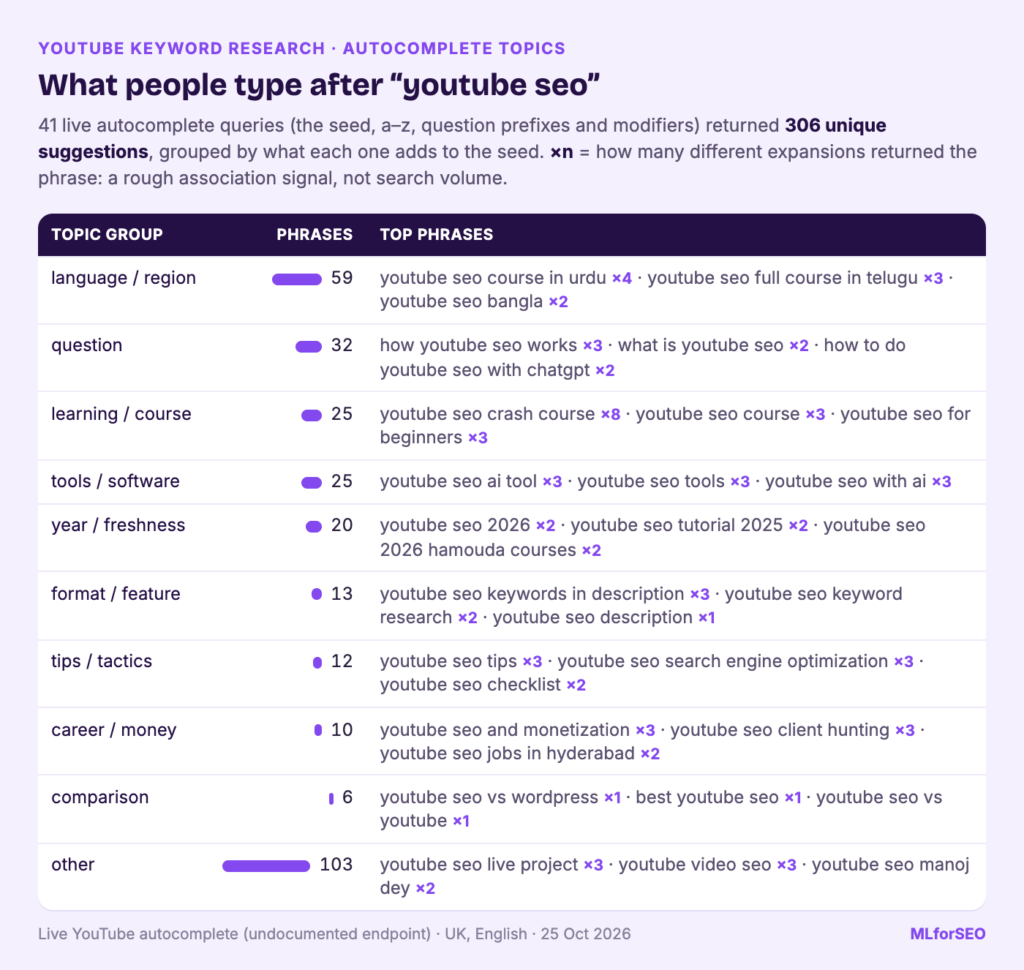
The autocomplete data in the sample is real, collected on 24 October 2026 for the UK in English. For the two seeds, the notebook sent 82 queries and got back 539 unique suggestions.
Each suggestion gets a times_suggested count: how many different expansions returned it. It’s a rough signal of how strongly YouTube associates the phrase with the seed, and it isn’t search volume. The top of the list for “youtube seo”:
| Suggestion | Times suggested | Topic group |
|---|---|---|
| youtube seo crash course | 8 | learning / course |
| youtube seo course in urdu | 4 | language / region |
| youtube seo ai tool | 3 | tools / software |
| youtube seo and monetization | 3 | career / money |
| youtube seo for beginners | 3 | learning / course |
| youtube seo tips | 3 | tips / tactics |
| how youtube seo works | 3 | question |
The topic groups come from simple, readable rules based on what each suggestion adds to the seed. For “youtube seo”, the biggest groups after “other” (103 phrases) are language or region (59), questions (34), learning and courses (25) and tools (25). For “youtube tags”, the questions are the interesting part: “how youtube tags work”, “does youtube tags matter”, “what do youtube tags do”. People are asking the same question YouTube’s help page answers.
I used rules here on purpose. A clustering model might group the phrases more cleverly, but you couldn’t see why a phrase landed where it did, and you’d have a harder time adjusting it for your niche. You can edit the rules in the helper’s topic_bucket() function. If you want to take grouping further, my post on structuring and categorising keyword data covers the options.
3. Competitor videos: what already ranks
This is the part that needs your API key. In sample mode, the notebook uses a set of API responses written in the official format with fictional channels and fake video IDs, so the numbers below show how the analysis works. They aren’t real YouTube results.
Twenty videos come back for “youtube seo”, each with its title, channel, publish date, views, views per day and number of tags. Views per day is worth a look: in the sample, a newer video with 143,000 views has more views per day than a top-ranking one with 412,000, because it was published more recently.
4. Tags and titles: what the top videos have in common
The tag table counts how many of the top videos use each tag. In the sample, “youtube seo” is used by 19 of the 20 videos, followed by “youtube algorithm” and “youtube seo tips” (5 videos each). The co-occurrence table shows which tags travel together, which is a decent map of how creators in the niche describe the topic.
The title tables matter more, because titles matter more. The n-gram table shows “youtube seo” in 11 of the 20 titles. The pattern table compares median views for titles with and without a feature:
| Pattern (sample data) | Share of titles | Median views with | Median views without |
|---|---|---|---|
| Contains a number | 45% | 133,000 | 76,000 |
| Uses brackets | 40% | 104,000 | 81,000 |
| Uses a colon or pipe | 55% | 98,000 | 87,000 |
| Starts with How / What / Why | 15% | 76,000 | 98,000 |
Twenty videos describe a niche. They don’t prove what causes views, so read this as “here’s how titles in this space are written” and nothing stronger. With your own key, these numbers will be real for your seed.
5. Gaps: what people search that top videos don’t target
A gap is an autocomplete phrase that none of the top videos uses in its title or tags. The notebook shows the ones suggested by at least two expansions and leaves out language and region variants. In the sample run (real autocomplete against the sample videos), the top gaps include:
- youtube seo and monetization (3)
- youtube seo keywords in description (3)
- youtube seo client hunting (3)
- how to do youtube seo with chatgpt (2)
- how to seo youtube video (2)
- youtube seo for gaming channel (2)
- youtube seo in mobile (2)
Because the competitor data is a sample, treat these specific gaps as a demonstration. Run it live, and the gaps will be measured against what actually ranks today.
6. The tag list, last and smallest
Finally, the notebook builds a tag list: the seed first, then phrases that autocomplete suggests and at least two top videos use, then other tags shared by at least two top videos, then the strongest remaining autocomplete phrases. It stops at 15 tags or YouTube’s limit. The API documentation sets that limit at 500 characters for the tags field, counting the commas, and treating a tag with a space as if it were wrapped in quotes. The notebook counts it the same way. The sample run produced:
youtube seo: 15 tags, 313/500 characters
youtube seo, youtube seo tips, youtube seo full course, youtube seo 2026, youtube seo ai tool,
youtube seo for beginners, youtube seo tutorial, youtube algorithm, youtube growth,
youtube keyword research, youtube search, youtube description, rank youtube videos,
youtube keyword tool, youtube tips
Every tag comes with a reason, such as “autocomplete + competitor tag” or “competitor tag (2+ top videos)”. Edit it by hand: drop anything your video doesn’t cover, and add a common misspelling if your topic has one, which is the one case where YouTube says tags help.
From gaps to video ideas
This is where the research pays off. Take the gap list, ignore anything you can’t make a good video about, and turn the rest into ideas. From the sample gaps, I’d draft three:
- “youtube seo keywords in description” becomes a tutorial: “Where to put keywords in a YouTube description (with a template)”.
- “how to do youtube seo with chatgpt” becomes a walkthrough: “How to do YouTube SEO with ChatGPT, without sounding like a robot”.
- “youtube seo for gaming channel” becomes a niche guide: “YouTube SEO for gaming channels: titles, tags and chapters”.
Each title uses the searched phrase almost word for word, which is the point. Then check the ideas against the title patterns from your own run, and plan the descriptions and chapters properly; that’s where the YouTube SEO checklist comes in. If you publish talking-head videos, transcribing them helps too: my Whisper transcription tutorial shows how to do it in Colab.
Pitfalls and limits
- Autocomplete isn’t search volume. It shows predicted queries, shaped by language, location and freshness, and it changes daily. If you need trend direction, Google Trends via pytrends can add it.
- The autocomplete endpoint is undocumented. The notebook records failures, stops after five in a row and keeps running, but the endpoint may break.
- API results aren’t personalised. What you see logged in on YouTube can differ.
- Many creators don’t use tags at all. A tag table tells you about the creators who do.
- Small samples. 20 to 50 videos per seed describe a niche; they don’t prove what works.
- Sample mode uses fictional video data. The autocomplete sample is real; the competitor sample is not.
- Tags are a minor signal. YouTube says so. Spend your time on the title, thumbnail, description, chapters and the video itself.
What to do next
- Run the notebook in sample mode, then add your own seeds and a free YouTube Data API v3 key.
- Turn the gaps and title phrases into a short list of video ideas, and add them to your channel’s keyword universe.
- Follow my YouTube SEO guide for the full workflow, and run each new video through the free YouTube SEO checklist.
- Benchmark the channels you found with how to do a YouTube SEO audit.
- If you also research Google Search and Maps, the multi-platform autocomplete notebook covers all three, and my Semantic ML-enabled Keyword Research course shows how to build it into a wider keyword strategy.
Free notebook
YouTube Keyword and Tag Research Notebook: a Google Colab notebook for YouTube keyword research, with autocomplete topics, competitor titles and tags, gaps and a tag list that fits the 500-character limit.
FAQ
Do YouTube tags still matter?
A little. YouTube’s help centre says the title, thumbnail and description matter more, and that tags play a minimal role unless your topic is often misspelled. Add a short, relevant tag list and spend the rest of your time on titles and descriptions.
What’s the best YouTube tag generator?
One that shows you where each tag comes from. The free notebook builds tags from YouTube autocomplete and the tags the top-ranking videos use, with a reason for each, and keeps the list within the 500-character limit.
How do I do YouTube keyword research for free?
Use YouTube autocomplete to see what people type, and the free YouTube Data API v3 to see what the top videos for those searches do with their titles. The notebook combines both, and each seed costs two API calls within the free daily quota.
How many tags can I add to a YouTube video?
The tags field allows 500 characters in total. Commas count, and a tag that contains a space counts as if it were wrapped in quotation marks.
MLforSEO Academy
Take your skills further — pick your path
Semantic ML-enabled Keyword Research
by Lazarina Stoy
Query understanding, search intent and semantic clustering for how people and AI really search.
View course →AI Search Optimisation & Agentic SEO
by Beatrice Gamba
How agentic systems retrieve, evaluate and select — and how to become the source they cite.
View course →AI Search, LLMs, Entity SEO & Knowledge Graph Strategies
by Beatrice Gamba
Build the entity authority and knowledge-graph presence that makes AI recognise and trust your brand.
View course →Introduction to Machine Learning for SEO
by Lazarina Stoy
Ship practical ML workflows — classification, clustering, entity extraction — no CS degree required.
View course →