When I check a page against a keyword, I’m checking it against one query. When someone asks the same thing in Google’s AI Mode, the system doesn’t stop at that one query. Google says it breaks the question into subtopics and runs a whole set of related searches before it writes the answer. Your page can be pulled into that answer for any of those searches, or left out of all of them.
The awkward part is that you never see those searches. Google doesn’t publish them, Search Console doesn’t report them, and no rank tracker can show them to you. So I built a free notebook that does the next best thing: it simulates a plausible set of sub-queries for a seed query, splits your page into passages, and checks which sub-queries your content actually answers. In this post I’ll explain what Google has said about query fan-out, why it shifts the work from pages to passages, and walk you through the notebook with its real sample output.
One honest note up front, because it shapes everything else: the sub-queries in this tool are simulated. They’re a structured brainstorm and a content-gap check, and nothing in them comes from Google.
Free notebook
Query Fan-Out Simulator & Coverage Checker: simulates the sub-queries an AI Mode-style system might run for your seed query and scores how well each passage on your pages covers them, with a free rule-based mode that needs no API key.
On this page
What Google has actually said about query fan-out
There’s a lot of speculation about fan-out, so I start with what Google has put in writing.
- When Google announced AI Mode in March 2025, it described a “query fan-out” technique that issues multiple related searches at the same time across subtopics and several data sources, then brings the results together into one response.
- In the May 2025 AI Mode update, Google repeated that AI Mode breaks your question into subtopics and runs many queries on your behalf, and said Deep Search takes the same technique further and can issue hundreds of searches.
- The Search Central page AI features and your website says both AI Overviews and AI Mode “may use a ‘query fan-out’ technique” to develop a response, and that this lets Google show a wider and more diverse set of supporting links.
That’s the documented part. What Google hasn’t said is just as important: how many sub-queries it generates, how it chooses them, how they vary by user or location, or which sources each one draws on. Beatrice Gamba’s post How entities power query fan-out in AI search walks through the Google patents that describe how a system like this could work, and why entities are the anchors the sub-queries grow from. Patents show what Google has explored. They don’t confirm what runs in production, which is one more reason to treat any fan-out you generate as a simulation.
Why fan-out moves the work from pages to passages
If an AI answer is assembled from results for many sub-queries, each piece of your page competes on its own: the pricing paragraph for the pricing sub-query, the comparison section for the “X vs Y” one. A page that answers the head query well but never mentions grinders will simply not be retrieved for “do I need a separate grinder”.
This is the same idea as passage ranking, and it’s why Beatrice argues that you should write for the chunk, not the page. Retrieval systems cut pages into passages (chunking) and judge each one separately, so a passage needs to make sense on its own and answer one clear question. If you want the bigger picture of where this sits, her post on the five-stage retrieval funnel explains the stages between being indexed and being cited, and Indexed is not selected explains why ranking alone no longer tells you whether you’ll be used.
So the question changes from “does my page rank for this keyword?” to “for each thing a thorough answer needs, does a passage on my site answer it directly?” That’s what the notebook checks.
How the method works
The notebook runs in three stages. None of them is exotic. They’re the standard building blocks of semantic search, put together for a content audit.
1. Simulate the fan-out
You give it a seed query, and it generates sub-queries in one of two ways, or both.
- **Rule-based expansion (free, no key).** The seed is split into a head term and a qualifier, then dropped into templates for the facets a complete answer usually covers: definition, types, buying criteria, price, comparisons, problems, maintenance. It’s crude and English-only, but it’s a free baseline.
- **LLM expansion (your own key).** A documented, editable prompt asks a model to act as the query planner of an AI search engine and return sub-queries across facets such as reformulations, implicit needs, comparisons, entity expansions, specifics and follow-ups. You can use OpenAI, Anthropic or Gemini. The facets are our assumptions about what a planner would look for, based on Google’s description and practitioner reasoning. Google hasn’t documented them.
LLM-generated sub-queries are synthetic queries, and I’ve written about them in more depth in What are synthetic queries?. If you want the older, pre-LLM version of the same idea, query augmentation covers how search engines have expanded queries for years.
2. Split your pages into passages
The notebook fetches each URL, extracts the main content with trafilatura, and builds heading-aware passages of roughly 40 to 160 words. Headings start a new passage and are kept as context, because a heading tells a retrieval system what the passage is about.
3. Score coverage in two steps
- **Retrieve.** Every sub-query and passage is turned into an embedding with multi-qa-MiniLM-L6-cos-v1, a small free model trained to match questions with passages. The five closest passages by cosine similarity go through to the next step.
- **Rerank.** A small cross-encoder, ms-marco-MiniLM-L6-v2, reads the sub-query and each candidate passage together and scores how likely the passage is to answer it.
Why two steps? On a focused page every passage is “about” the topic, so cosine similarity scores almost everything as close. In testing on the sample, cosine alone rated “is buying a used espresso machine worth it” as covered, even though the page never mentions used machines. The reranker didn’t fall for it. Each sub-query then keeps its single best passage across all your pages and gets a label.
| Label | Rerank score | Cosine only | What it means |
|---|---|---|---|
| Covered | 6 or more | 0.75 or more | A passage answers this directly |
| Partial | 3 to 6 | 0.60 to 0.75 | The topic is touched on but not answered head-on |
| Gap | under 3 | under 0.60 | Nothing on the page(s) answers it |
These thresholds were set by reading the sample results, so treat them as a starting point.
Walking through the notebook
Step 1: run the sample first
Open the notebook in Colab and run it with USE_SAMPLE = True. It checks two pages from a fictional coffee site (a beginner’s buying guide and a descaling guide) against the seed query “best espresso machine for beginners”. It needs no key and takes about a minute.
Step 2: set your seed query and pages
For your own run, these are the settings that matter:
USE_SAMPLE = False
SEED_QUERY = "your seed query"
PAGE_URLS = [
    "https://www.example.com/your-page/",
    "https://www.example.com/a-supporting-page/",
]
FANOUT_METHOD = "both"        # "rules", "llm" or "both"
LLM_PROVIDER = "anthropic"    # "openai", "anthropic" or "gemini"
N_SUBQUERIES = 20
SCORING = "rerank"            # or "cosine" for embeddings only
Always add the supporting pages to PAGE_URLS: checking a cluster together tells you which page owns which sub-question.
Your API key is read at runtime from Colab secrets (OPENAI_API_KEY, ANTHROPIC_API_KEY or GEMINI_API_KEY) or a hidden prompt. It’s never written into the notebook. LLM fan-out is one short call per seed query.
Step 3: read the sub-queries before you score them
Delete sub-queries that don’t fit your audience and add the ones you know matter from sales calls or support tickets. The prompt is in plain text, so you can adapt it to your niche, market or language.
Step 4: check the passages, score and export
The passage table shows how each page was split (the two sample pages became 17 passages, median 52 words). If a page comes back nearly empty, it probably needs JavaScript to render: paste its text into a .txt file and add it to LOCAL_TEXT_FILES. Then run the coverage step, read the matches, then export a coverage CSV, a gaps CSV and an Excel file (Coverage, Gaps and Passages tabs) for Google Sheets.
How to read the results: the sample run
One thing to know about the sample first. The rule-based sub-queries were generated by the notebook. The “LLM” sub-queries in sample mode come from an example file I wrote by hand to show the format, labelled “llm (illustrative example)” in the output. They are not a real model response. With your own key, the notebook calls your chosen provider instead.
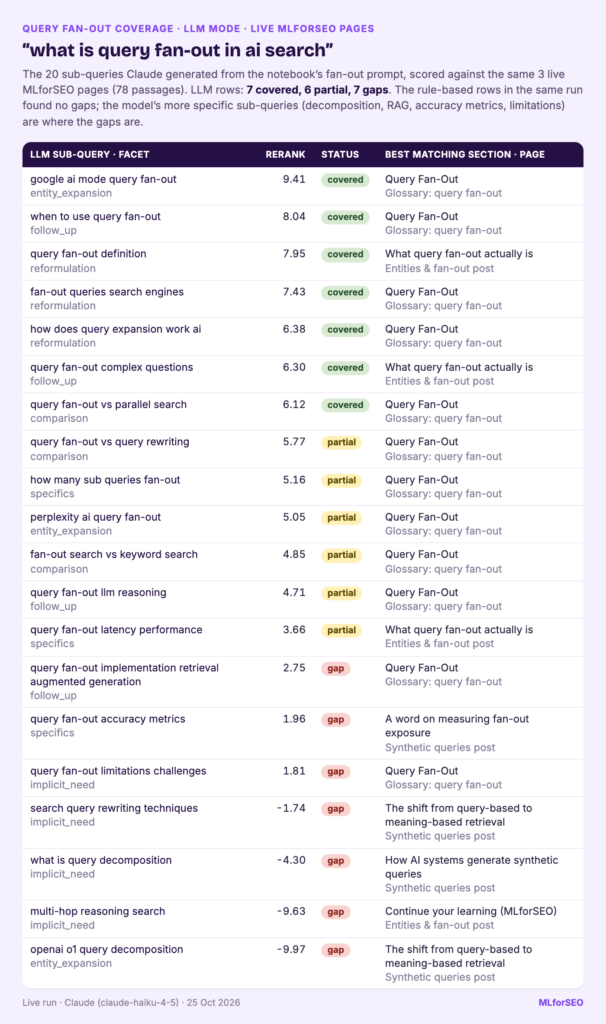
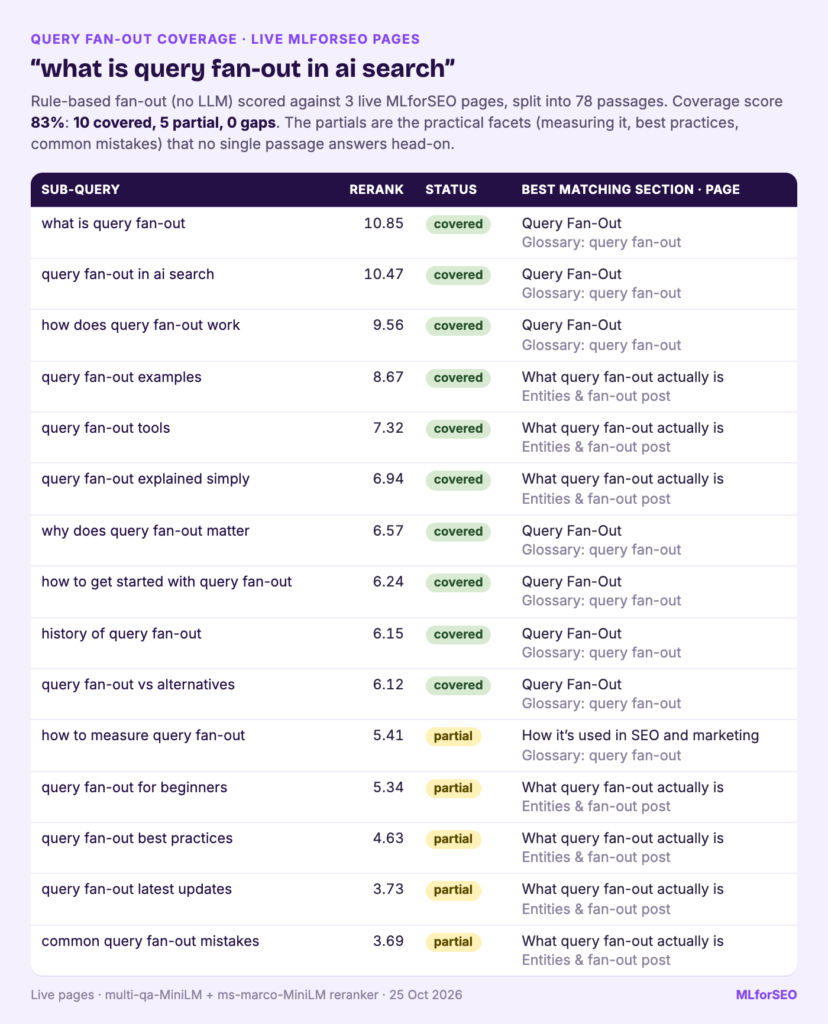
I have since run LLM mode live (25 Oct 2026) for “what is query fan-out in ai search” against three MLforSEO pages. Claude (claude-haiku-4-5) returned 20 sub-queries: 7 covered, 6 partial and 7 gaps, while OpenAI’s gpt-6-luna returned 20 with 8 covered, 9 partial and 3 gaps. In both runs every gap came from the model’s sub-queries; the 15 rule-based ones found none.
Here’s the headline from the saved run:
35 sub-queries for 'best espresso machine for beginners'
Coverage score: 54%  (11 covered, 16 partial, 8 gaps out of 35 sub-queries)

status                      covered  partial  gap
llm (illustrative example)        6        6    6
rules                             5       10    2
The coverage score counts a partial as half, so treat it as a rough summary for comparing runs. The breakdown by source is more interesting. The 17 rule-based sub-queries were mostly easy to cover or vague (“espresso machine reviews”). The LLM-style ones were more specific (named machines, boiler types, grind size) and found more of the real gaps. Rules give you a baseline; a model gives you the useful surprises.
A few rows from the coverage table:
| Sub-query | Source | Score | Status | Best matching section |
|---|---|---|---|---|
| how much does a good beginner espresso machine cost | llm (illustrative) | 9.23 | covered | The Best Espresso Machines for Beginners |
| single boiler vs dual boiler espresso machine | llm (illustrative) | 8.78 | covered | Single boiler, heat exchanger or dual boiler? |
| espresso machine vs nespresso for beginners | llm (illustrative) | 5.68 | partial | Types of espresso machines |
| semi automatic vs super automatic espresso machine | llm (illustrative) | 4.36 | partial | Types of espresso machines |
| do I need a separate grinder for an espresso machine | llm (illustrative) | 1.14 | gap | How much should you spend? |
| breville bambino vs gaggia classic | llm (illustrative) | -11.41 | gap | Our recommendations |
Covered
The buying guide answers the core of the query directly: budgets, machine types, boilers, pressure and steaming milk. The descaling page picks up the cleaning sub-query, which is exactly why it’s worth checking a page together with its supporting pages. The per-page view showed the buying guide as the best match for 29 sub-queries (10 covered, 12 partial, 7 gaps) and the descaling guide for 6 (1 covered, 4 partial, 1 gap).
Partial
Partials are where I’d spend most of my editing time, because they’re cheap to fix. Some are near-misses: the page mentions capsule machines but never compares them with espresso machines head-on, so “espresso machine vs nespresso for beginners” lands at 5.68. Others are answers split across two passages: semi-automatic and super-automatic machines are both described, but in separate paragraphs, so no single passage answers the comparison. A passage-level retrieval system would see the same split.
Gap
The gaps are things a beginner needs that the guide never mentions: a grinder, grind size, dialling in, named models, how long a machine lasts, and drinks like an americano. “breville bambino vs gaggia classic” scored -11.41 because the guide deliberately avoids naming products. That’s a perfectly reasonable editorial choice, and the tool can’t know it. Which brings me to the most important habit with this notebook: read the matched passage before you act on a label.
Turning the gap list into content decisions
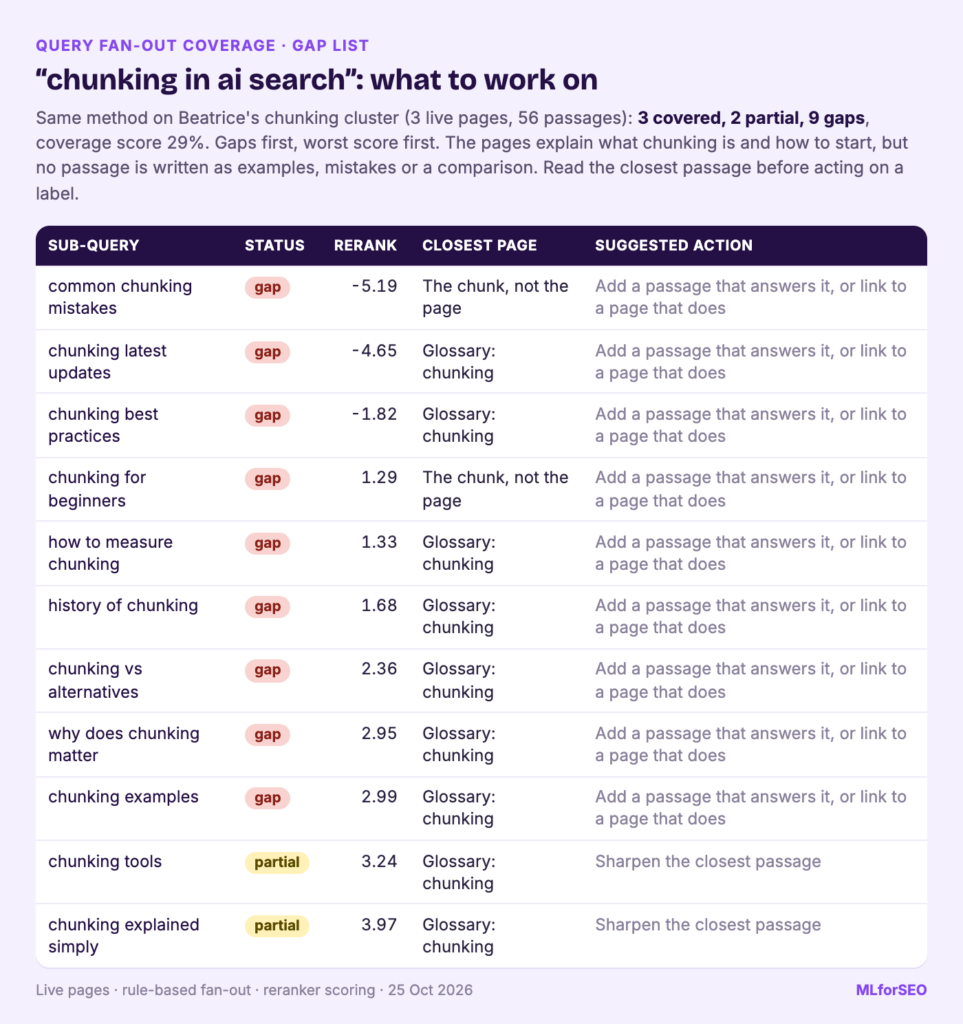
The gap list sorts gaps first and partials second, each with a suggested action. For every row I make one of three decisions:
- **Answer it on this page.** Add a short section with a heading that says what it answers, and put the answer in the first sentence. If it’s a partial, sharpen the closest passage so it answers the sub-query directly and uses its key terms. Beatrice’s three-property sentence test checks whether it’s specific enough.
- **Answer it on a supporting page and link to it.** “What grind size for espresso” deserves its own guide on a coffee site. Write it, then link to it from the buying guide where grinders come up.
- **Leave it.** Not every sub-query fits your audience or your editorial line. A gap you’ve chosen to leave, with a reason, is a perfectly good outcome.
Then rerun it. LLM fan-out isn’t deterministic, so I run each seed two or three times, ideally with two providers. Sub-queries that keep coming back are the ones worth writing for.
Pitfalls and limits
- **It’s a simulation.** Google doesn’t publish its sub-queries, and AI Mode also personalises and draws on sources beyond web pages, such as the Knowledge Graph and shopping data. A clean coverage table is no guarantee of a citation.
- **Scores measure relevance, not quality.** A covered passage can still be vague, outdated or wrong. Read the matches.
- **Thresholds depend on the models and your passage length.** The defaults were set on the sample pages. Check 10 to 15 rows of your own output and adjust.
- **English only by default.** Both models are English. For other languages, try a multilingual embedding model with
SCORING = "cosine"and re-check the thresholds. - **Costs.** The sample and rule-based mode are free. LLM fan-out is one short call per seed with a small default model.
What to do next
Start with the one page that matters most to you this quarter. Run it with its supporting pages, fix the partials first, and plan the gaps as sections or new pages. Then rerun it after you publish to see whether coverage improves.
If you want to go further:
- If your gaps are really about entities the page never names, read Beatrice’s 5 steps to fix entity recognition gaps.
- Check whether your passages are easy to lift out with the Extraction Readiness Audit.
- Use the GEO Checklist to see where fan-out coverage sits among the other things AI search systems check.
- Learn the query research skills behind this in the Semantic ML-enabled Keyword Research course, and the wider AI search picture in AI Search Optimisation & Agentic SEO.
Free notebook
Query Fan-Out Simulator & Coverage Checker: simulates the sub-queries an AI Mode-style system might run for your seed query and scores how well each passage on your pages covers them, with a free rule-based mode that needs no API key.
FAQ
What is query fan-out?
Query fan-out is the technique Google says AI Mode and AI Overviews may use: the system breaks a question into subtopics, runs several related searches at the same time, and combines the results into one answer. Google describes it in its AI features documentation but doesn’t publish the sub-queries themselves.
Can a query fan-out tool show me Google’s real sub-queries?
No. Google doesn’t make its sub-queries available, so any query fan-out tool, including this one, generates plausible sub-queries with rules or an LLM. That’s still useful for finding content gaps, as long as you treat the output as a brainstorm.
Do I need an API key to use the notebook?
Not for the sample run or the rule-based mode. You only need an OpenAI, Anthropic or Gemini key if you want LLM-generated sub-queries, and the notebook reads it from Colab secrets at runtime.
MLforSEO Academy
Take your skills further — pick your path
Semantic ML-enabled Keyword Research
by Lazarina Stoy
Query understanding, search intent and semantic clustering for how people and AI really search.
View course →AI Search Optimisation & Agentic SEO
by Beatrice Gamba
How agentic systems retrieve, evaluate and select — and how to become the source they cite.
View course →AI Search, LLMs, Entity SEO & Knowledge Graph Strategies
by Beatrice Gamba
Build the entity authority and knowledge-graph presence that makes AI recognise and trust your brand.
View course →Introduction to Machine Learning for SEO
by Lazarina Stoy
Ship practical ML workflows — classification, clustering, entity extraction — no CS degree required.
View course →