Here’s a result from the sample run of my AI Overview tracker that I keep coming back to. For the search “screaming frog download” (US, desktop, 24 October 2026), the official Screaming Frog site didn’t appear anywhere in the organic top 10. The results were download mirrors, AppSumo and a package manager. Yet the AI Overview at the top of the page cited Screaming Frog’s own site for four of its six sources, and its first citation was the SEO Spider page.
A classic rank tracker would report that domain as “not ranking” for its own download query. The AI Overview, which sits above every one of those blue links, tells a completely different story. That gap is why I built this notebook.
It’s a free Google Colab notebook that checks, for any keyword list, whether Google shows an AI Overview, which URLs and domains it cites, whether your domain is among them and at which position, and each domain’s share of citations. This post shows you how to run it and, more importantly, how to read what it tells you next to your rank tracker.
Free notebook
AI Overview Tracker: a free Colab notebook that checks which keywords trigger AI Overviews, which domains they cite, whether you’re cited, and your share of citations across your keyword set.
On this page
- What an AI Overview tracker measures
- How the tracker reads AI Overview citations
- Two numbers: share of citations vs keyword coverage
- Running the notebook, step by step
- Reading the results: the real sample run
- What to do with the gap list
- Reading the trend over weekly runs
- Limits worth knowing
- What to do next
- FAQ
What an AI Overview tracker measures
An AI Overview is the generated answer Google shows above (or among) the regular results for some searches. Google’s documentation for site owners describes AI Overviews and AI Mode as surfacing relevant links to help people find more on the web, and it says there’s no special markup required to appear in them (see Google’s AI features and your website guide). Those links are the citations this notebook tracks.
A rank tracker answers “where does my URL sit in the list of links?”. An AI Overview tracker answers a different set of questions, which is why I think of it as the first, simplest layer of AI rank tracking:
- Presence: does an AI Overview appear for this keyword at all?
- Citations: which URLs and domains does it cite, and in what order?
- You: are you cited, at which position, and where do you rank organically?
- Share: across the whole keyword set, what share of citations goes to each domain? That’s a practical, measurable version of AI share of voice.
- Gaps: which AI Overviews cite others and not you?
- Cited vs ranking: who gets cited without ranking in the top 10, and who ranks without being cited?
I’ve argued in Your rank tracker is lying to you about AI search that position is the wrong scorecard for AI search, and in indexed is not selected that being retrievable isn’t the same as being chosen. This notebook is the hands-on companion to both: it measures selection, at least the part of it Google displays.
How the tracker reads AI Overview citations
The data comes from the DataForSEO SERP API (Google organic, advanced results). If you’ve never used it, start with the DataForSEO SERP Collection Starter Notebook, which this tracker is built on, and my walkthrough of the DataForSEO API in Python.
In the response, an AI Overview is an item with type: "ai_overview". Its answer is split into ai_overview_element paragraphs, and each paragraph has a references list with the source’s domain, URL and title. The AI Overview item also has its own references, which match the source cards beside the answer. The tracker reads both and counts each URL once per keyword, in order of first appearance. So your_first_citation_position 1 means yours is the first source the answer leans on.
Two settings matter for accuracy:
load_async_ai_overviewstays on. Many AI Overviews load after the rest of the page, and without this flag you’d only get the ones already rendered, which undercounts presence. It costs up to $0.002 extra per Live call and is refunded when there’s no asynchronous AI Overview.- Subdomains count as you.
blog.example.commatchesexample.com, andwww.is ignored.
Two numbers: share of citations vs keyword coverage
The share table has two columns that look similar and mean quite different things.
share_of_citationsis a domain’s cited URLs divided by all cited URLs across your keyword set.keyword_coverageis the share of AI Overviews that cite the domain at least once.
I usually look at coverage first. A domain cited four times in one answer looks big on share, but it’s still one answer. The sample run shows exactly this, as you’ll see below.
Running the notebook, step by step
1. Try it on the sample
Open it in Colab and leave USE_SAMPLE = True. It replays three real SERPs pulled on 24 October 2026 (“what is entity seo”, “best running shoes” and “screaming frog download”; US, English, desktop), with screamingfrog.co.uk playing the role of “your domain”. No key, no cost.
2. Set your domain and competitors
MY_DOMAIN = "screamingfrog.co.uk"  # change to your domain
COMPETITORS = []                   # e.g. ["competitor-one.com", "competitor-two.co.uk"]
MODE = "live"                      # "live" (instant) or "standard" (queued, cheaper)
LOCATION_CODE = 2840               # 2840 = United States, 2826 = United Kingdom
LOAD_ASYNC_AI_OVERVIEW = True
MAX_SPEND_USD = 0.10
If you list competitors, the gap report only keeps keywords where at least one of them is cited, which is handy when you track a big list and only care about a few rivals.
3. Load keywords and check the cost
Load a CSV with a keyword column or paste a list. The notebook cleans duplicates and prints a worst-case estimate before anything is spent. For the three sample keywords: 3 keywords. Worst-case cost: $0.012 (live mode).
4. Collect
Add your DataForSEO login and API password as Colab secrets (DATAFORSEO_LOGIN and DATAFORSEO_PASSWORD), set USE_SAMPLE = False and run. The spend cap is checked before every paid call. Depth stays at 10: AI Overviews sit at the top of the page, and the organic top 10 is enough for the cited-vs-ranking comparison.
5. Read the tables, then export
The notebook builds the presence table, the share table and chart, the gap list and the cited-vs-ranking comparison, then writes them to CSVs and a Sheets-ready workbook, and appends the run to a history file.
Reading the results: the real sample run
A caveat before the numbers: three hand-picked keywords tell you how to read the outputs, not anything about AI Overviews in general. With that said, here’s what came back.
Presence
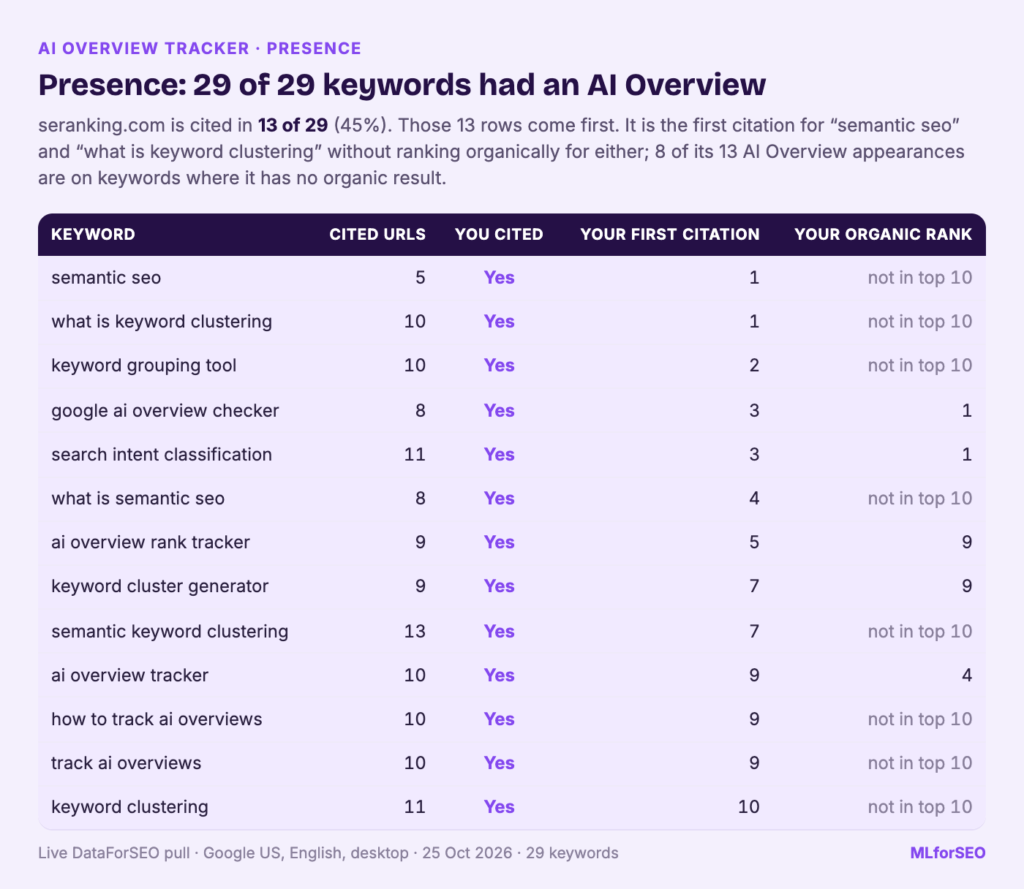
AI Overview on 3 of 3 keywords (100%).
screamingfrog.co.uk cited in 1 of them.| keyword | cited URLs | cited domains | you cited | your first citation position | your organic rank | top cited domains |
|---|---|---|---|---|---|---|
| what is entity seo | 10 | 8 | No | neilpatel.com, demandspring.com, inlinks.com | ||
| best running shoes | 3 | 3 | No | runrepeat.com, fleetfeet.com, rtings.com | ||
| screaming frog download | 6 | 2 | Yes | 1 | screamingfrog.co.uk, youtube.com |
The empty organic rank on the last row is the striking bit from the introduction: cited first in the answer, absent from the organic top 10 in that snapshot.
Share of citations
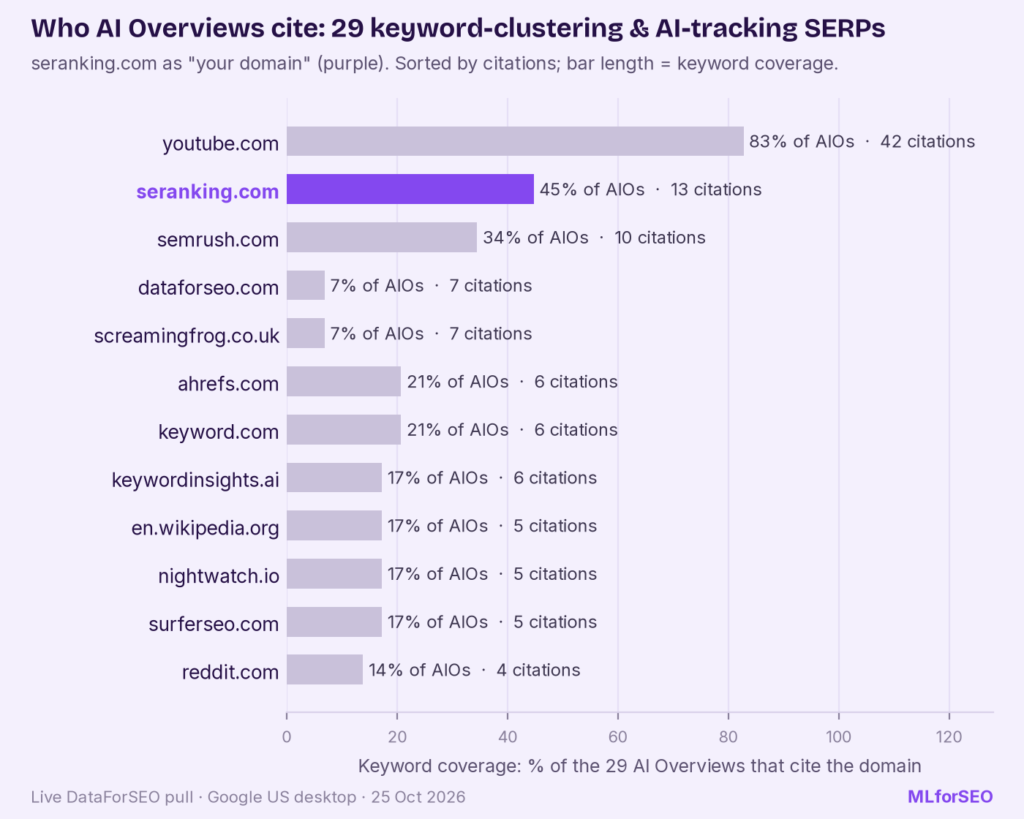
| domain | citations | share of citations | AI Overviews cited in | keyword coverage |
|---|---|---|---|---|
| youtube.com | 4 | 0.211 | 2 | 0.667 |
| screamingfrog.co.uk (you) | 4 | 0.211 | 1 | 0.333 |
| schemaapp.com | 2 | 0.105 | 1 | 0.333 |
| ahrefs.com | 1 | 0.053 | 1 | 0.333 |
| runrepeat.com | 1 | 0.053 | 1 | 0.333 |
This is the share-versus-coverage point in action. youtube.com and screamingfrog.co.uk have exactly the same share, 21.1% of all citations. But YouTube was cited in two of the three AI Overviews, while every Screaming Frog citation came from a single answer about its own product. If you were reporting AI visibility to a client, coverage is the number that would stop you overstating it. (The table above shows the top five of 12 domains; the notebook lists them all and draws a bar chart with your domain highlighted.)
Gaps
Two keywords had an AI Overview that cited others and not the demo domain: “what is entity seo” (neilpatel.com, demandspring.com, inlinks.com, schemaapp.com, ahrefs.com and more) and “best running shoes” (runrepeat.com, fleetfeet.com, rtings.com). For a real site, this is the list you start working from.
Cited vs ranking
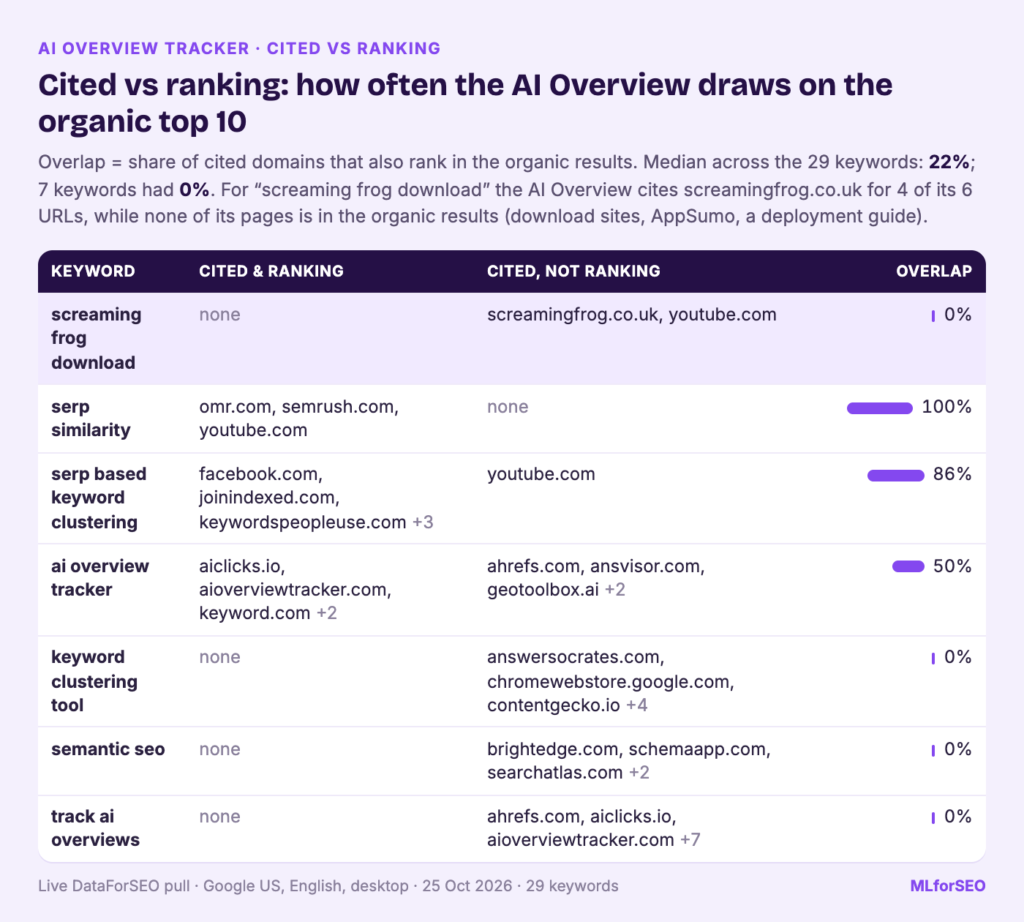
| keyword | cited and ranking | cited, not ranking | overlap |
|---|---|---|---|
| what is entity seo | ahrefs.com, inlinks.com, neilpatel.com, schemaapp.com, seoforjournalism.com, youtube.com | demandspring.com, studiohawk.com.au | 75% |
| best running shoes | fleetfeet.com, rtings.com, runrepeat.com | 0% | |
| screaming frog download | screamingfrog.co.uk, youtube.com | 0% |
The overlap is the share of cited domains that also rank in the organic top 10. For “what is entity seo”, six of the eight cited domains also rank, so the answer mostly drew on pages a rank tracker would already show you. For the other two keywords the overlap is zero: the AI Overview cited a completely different set of sites from the blue links. For “best running shoes”, the ranking-but-not-cited side included reddit.com, runnersworld.com and brooksrunning.com. A rank tracker shows you only that half of the picture.
What to do with the gap list
For each gap keyword, open the live SERP, read the answer and then read the cited pages. Ask what those pages say, or how clearly they say it, that yours doesn’t. Then check your organic rank in the same row, because the two situations need different work:
- You rank well and aren’t cited. Google can already find your page, so the problem is more likely extraction and selection. Look at how your answer is written: is the claim in one self-contained passage? Two posts help here: the chunk, not the page and vagueness is a disqualifier. The Extraction Readiness Audit turns that into a checklist.
- You don’t rank and aren’t cited. Start with the basics: is there a page that answers this query at all, and is it the best one? Then look at who is cited together, because co-citation patterns tell you which sources Google treats as a set (see how LLMs co-cite).
- You’re cited without ranking. Good news, and worth protecting. Note which page is cited and make sure it stays accurate and crawlable.
Reading the trend over weekly runs
Every run is appended to aio_history.csv, one row per keyword per collection date. One run is a snapshot, and AI Overviews are volatile: the same query can show a different answer, different sources, or no AI Overview at all later the same day. The value comes from repetition.
My suggestion: fix a keyword set that represents your topics (50 to 200 keywords is plenty), switch to Standard mode once you’re happy with the output, and run it weekly at the same time. After a few weeks, look at three lines rather than any single day: AI Overview presence rate across the set, your keyword coverage, and which domains enter or leave the top of the share table. A move you see in three consecutive weeks is worth acting on. A single week’s change usually isn’t.
If you’re already pulling these SERPs every week, reuse them. The same organic top 10 is the input for SERP-overlap keyword clustering, which I cover in SERP-based vs semantic keyword clustering with a free clustering notebook.
Limits worth knowing
- One location, language and device per run. Results in the UK, on mobile or for a signed-in user can differ.
- Citations are what Google displays as sources. They don’t tell you how much of the answer came from each page, or whether anyone clicked, which matters in a zero-click world. Pair this with the signals in 7 Alternative Signals of AI Influence and the hidden traffic I describe in dark AI traffic.
- AI Mode isn’t covered. AI Mode is a separate surface with its own endpoint. This notebook tracks AI Overviews in the regular results only.
- Costs are DataForSEO’s and change. At October 2026 list prices a Live call is about $0.002 per keyword plus up to $0.002 for loading asynchronous AI Overviews, so at most about $0.40 per 100 keywords; Standard mode is roughly a third of that. Check the pricing page, and trust the notebook’s cost log over the estimate.
- The sample is small and hand-picked. The 100% presence rate in the sample says nothing about your keyword set.
What to do next
Run the tracker on 20 keywords you care about, look at the gap list and the cited-vs-ranking table, and pick three gaps to investigate by hand. That’s usually enough to change how a team talks about AI visibility. If you want to go beyond AI Overviews to ChatGPT, Perplexity and other assistants, the LLM Citation Tracking guide is the next step.
Turning gaps into content, entity and measurement work is what my AI Search Optimisation & Agentic SEO course covers in depth.
Free notebook
AI Overview Tracker: run it free on three real SERPs, then track presence, citations and your share for your own keywords every week.
FAQ
What’s the difference between an AI Overview checker and an AI Overview tracker?
A checker usually answers one question for one keyword: is there an AI Overview, and am I in it? A tracker does that for a whole keyword set and keeps a history, so you can see share, coverage and gaps change over time. This notebook does both: run it once as a checker, or on a schedule as a tracker.
How much does it cost to track AI Overviews for 100 keywords?
At most about $0.40 per run in DataForSEO’s Live mode at October 2026 list prices, and roughly a third of that in Standard mode. The notebook is free, and the AI Overview surcharge is refunded when there’s nothing extra to load.
How often should I run it?
Weekly is a good default. AI Overviews change too often for a single run to mean much, and weekly runs on a fixed keyword set give you a trend line without much cost.
Can I see which competitors are cited instead of me?
Yes. The gap list shows the domains cited for every AI Overview that doesn’t cite you. Add competitor domains to COMPETITORS and the list keeps only the keywords where at least one of them is cited.
Does it track AI Mode or ChatGPT?
No. It tracks AI Overviews in Google’s regular results. AI Mode and other assistants need separate collection.
MLforSEO Academy
Take your skills further — pick your path
Semantic ML-enabled Keyword Research
by Lazarina Stoy
Query understanding, search intent and semantic clustering for how people and AI really search.
View course →AI Search Optimisation & Agentic SEO
by Beatrice Gamba
How agentic systems retrieve, evaluate and select — and how to become the source they cite.
View course →AI Search, LLMs, Entity SEO & Knowledge Graph Strategies
by Beatrice Gamba
Build the entity authority and knowledge-graph presence that makes AI recognise and trust your brand.
View course →Introduction to Machine Learning for SEO
by Lazarina Stoy
Ship practical ML workflows — classification, clustering, entity extraction — no CS degree required.
View course →