In 2023, a lot of sites added a few lines to robots.txt to “block AI”. GPTBot went in, then CCBot, then whatever else was in the news that week. Most of those files haven’t been touched since. Meanwhile, almost every AI company has split its crawling into separate bots: one that collects training data, one that indexes pages so the assistant can find and cite them, and one that fetches a page when a person asks for it.
That split matters. Blocking GPTBot keeps your content out of OpenAI’s model training. Blocking OAI-SearchBot keeps you out of ChatGPT search answers. Those are two very different decisions, and I regularly see sites that made the second one while only meaning to make the first.
Beatrice Gamba made the case for why this costs traffic in Your robots.txt might be the silent killer of your AI traffic. This post is the practical follow-up: which AI crawlers do what, what I found when I ran a free checker over a handful of well-known sites, the Google-Extended myth, and three robots.txt patterns you can copy, with what each one costs you.
Free notebook
AI Crawler Access Checker: checks what your robots.txt allows for 27 AI crawlers and control tokens, separates training, search and user-initiated bots, flags common mistakes and checks your llms.txt.
On this page
Three kinds of AI crawler
Here’s the split as the vendors document it. I’d group every AI bot you meet into one of three buckets.
- **Training crawlers** collect content that may be used to train models. Blocking them is an opt-out from training. It doesn’t, on its own, remove you from anyone’s search results.
- **Search or answer crawlers** index pages so an assistant can find, show and link them. Block these and you can’t be cited in that assistant’s search answers.
- **User-initiated fetchers** visit a page because a person asked the assistant to read it. Several vendors say robots.txt may not apply to these, because a human made the request.
This table comes from the crawler list in the notebook, which links each token to the vendor’s own documentation (checked on 24 October 2026):
| Vendor | Training | Search / answers | User-initiated |
|---|---|---|---|
| OpenAI | GPTBot | OAI-SearchBot | ChatGPT-User |
| Anthropic | ClaudeBot | Claude-SearchBot | Claude-User |
| Perplexity | (none) | PerplexityBot | Perplexity-User |
| Google-Extended (control token) | Googlebot | ||
| Apple | Applebot-Extended (control token) | Applebot | |
| Amazon | Amazonbot | Amzn-SearchBot | Amzn-User |
| Meta | Meta-ExternalAgent | Meta-WebIndexer | Meta-ExternalFetcher |
| Mistral AI | MistralAI-Training | MistralAI-Index | MistralAI-User |
A few details from the docs are worth knowing by heart:
- OpenAI says GPTBot crawls content that may be used to train its foundation models, while OAI-SearchBot surfaces sites in ChatGPT’s search features, and sites that opt out of OAI-SearchBot won’t be shown in ChatGPT search answers. It also says robots.txt changes can take about 24 hours to apply to search, and that robots.txt rules may not apply to ChatGPT-User because a user started the request.
- Anthropic separates ClaudeBot (training), Claude-SearchBot (search quality) and Claude-User (fetches for a user), and says disabling the last two may reduce your visibility in Claude’s web search.
- Perplexity says PerplexityBot surfaces and links sites in its results and isn’t used to crawl content for foundation models, and that Perplexity-User generally ignores robots.txt because a user requested the fetch.
- Apple says Applebot-Extended doesn’t crawl anything. It only controls whether Applebot-crawled data can train Apple’s models, and pages that disallow it can still appear in search results. Blocking Applebot itself is a different, much bigger decision.
- Microsoft has no separate AI-search token. Bingbot access is what matters for Bing, and Bing’s index also feeds Copilot answers.
The Google-Extended myth
This one deserves its own section, because it’s the mistake I see most often. People block Google-Extended expecting it to keep them out of AI Overviews. It doesn’t.
Google-Extended is a control token with no crawler of its own. According to Google’s crawler documentation, it controls whether content Google crawls can be used to train future Gemini models and for grounding in Gemini Apps and Vertex AI. In Google’s own words, it “does not impact a site’s inclusion in Google Search”. AI Overviews and AI Mode are part of Google Search and run on Googlebot.
If you want to limit what Google’s AI features show from your pages, the documented controls are the snippet controls: nosnippet, data-nosnippet, max-snippet and noindex. Be careful with these, because they limit your regular search snippets too. Google’s AI features page says a page needs to be indexed and eligible for a snippet to appear as a supporting link.
What I found on six well-known sites
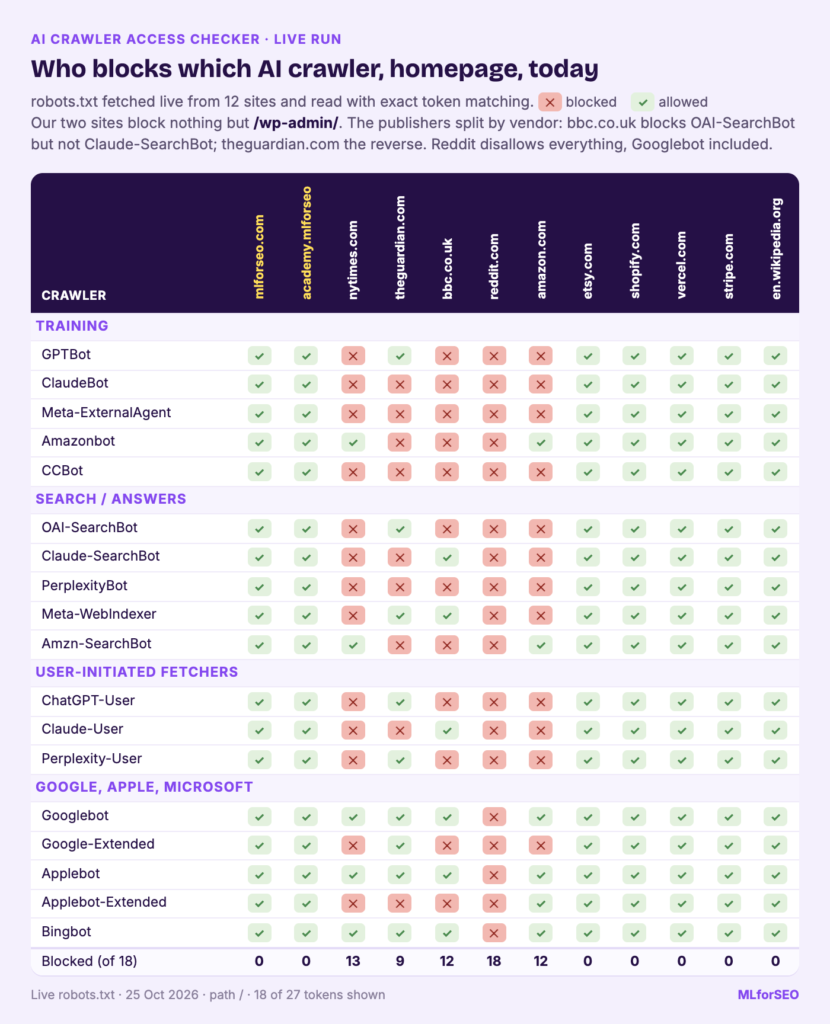
To see how this plays out, I ran the AI Crawler Access Checker on robots.txt files saved on 24 October 2026 from six public sites, plus a fictional shop. These files are in the notebook as sample data, so you can rerun exactly what I ran. The live sites may well have changed since.
The summary below counts how many of each type of bot is blocked on the homepage (seven training bots, seven search or answer bots, six user-initiated fetchers):
| Site | Training bots blocked | Search / answer bots blocked | User fetchers blocked | Google-Extended | llms.txt |
|---|---|---|---|---|---|
| www.mlforseo.com | 0/7 | 0/7 | 0/6 | allowed | no |
| www.nytimes.com | 5/7 | 5/7 | 4/6 | blocked | no |
| www.theguardian.com | 5/7 | 4/7 | 1/6 | allowed | no |
| www.bbc.co.uk | 6/7 | 3/7 | 3/6 | blocked | no |
| www.reddit.com | 7/7 | 7/7 | 6/6 | blocked | soft 404 |
| vercel.com | 0/7 | 0/7 | 0/6 | allowed | yes |
A few things stand out.
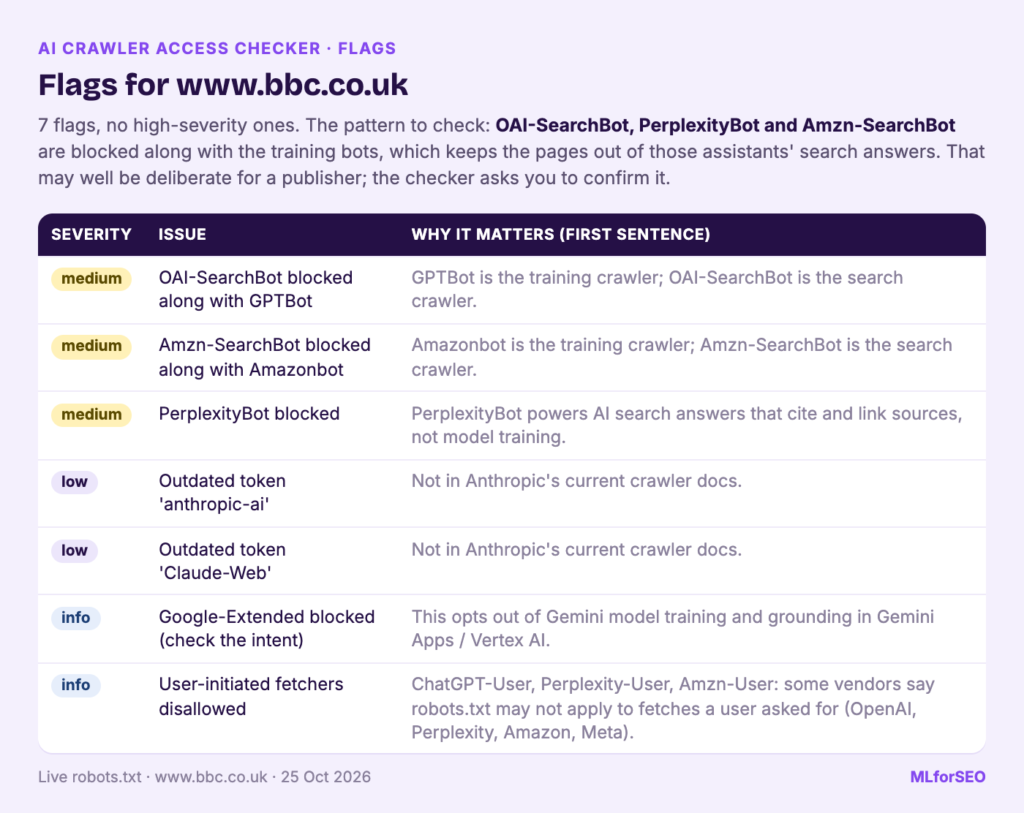
- **Four of the six block at least one search or answer bot.** For news publishers that may be entirely deliberate: they have licensing deals and content policies to protect, and the Guardian’s file says as much in a comment at the top. The checker flags it so you can confirm it was a choice.
- **The same publisher can treat vendors very differently.** In these files, the BBC blocks both GPTBot and OAI-SearchBot but leaves Claude-SearchBot open. The Guardian allows GPTBot and OAI-SearchBot but blocks ClaudeBot, Claude-SearchBot and PerplexityBot. That’s what per-vendor decisions look like.
- **Old tokens linger.** The New York Times, the BBC and the Guardian files all still name
anthropic-ai, and two of themClaude-Web. Neither appears in Anthropic’s current crawler documentation, so those lines don’t control ClaudeBot, Claude-SearchBot or Claude-User. - **Reddit served a blanket
Disallow: /** for every user agent to our fetcher, which the checker reports as two high-severity flags, including Googlebot being blocked. Some sites serve different robots.txt files to different user agents or IP addresses, so what you see from Colab isn’t necessarily what Googlebot sees. For your own site, Search Console’s robots.txt report shows what Googlebot received. - **Developer-focused sites tend to be wide open.** Vercel allows everything and publishes a well-formed llms.txt (9 sections and 28 links, according to the checker).
The fictional shop: the typical mistakes in one file
The seventh sample, example-shop.test, is a robots.txt I wrote to contain the mistakes I see most. The checker raised seven flags on it:
- GPTBot, OAI-SearchBot, ClaudeBot and Claude-SearchBot in one “block AI” group. That opts out of training and also removes the shop from ChatGPT search and Claude’s search results.
- Google-Extended blocked “to stay out of AI Overviews”, which it doesn’t do.
- Applebot blocked to stop Apple’s AI training. That removes the shop from Siri and Spotlight. Applebot-Extended was the token it needed.
Perplexity-Bot, a typo, so PerplexityBot ignores the group.anthropic-aiandClaude: an outdated token and a partial one. Under exact token matching, neither applies to any current Anthropic bot.
How the checker works
I wanted the checker to read robots.txt the way the big crawlers do, so a few details matter.
- **It uses a parser that follows Google’s rules.** Python’s built-in
urllib.robotparserapplies rules in file order and handles wildcards differently from Google. The notebook uses Protego, which follows Google’s approach: the longest matching rule wins, Allow wins a tie, and*and$wildcards work. - **It matches user-agent groups by the exact product token**, as RFC 9309 describes. A group for
Claudedoesn’t apply to ClaudeBot. Abasiscolumn tells you when a more lenient, prefix-matching parser would reach a different answer. - **It treats status codes the way Google documents.** A 4xx robots.txt means no restrictions, while a 5xx or 429 is treated as a full block, as described in Google’s robots.txt documentation.
- **It checks llms.txt and llms-full.txt**: whether they exist, whether the server returns an HTML page with a 200 status instead (a soft 404), and whether the file has the basic structure from the proposal.
- **It can optionally request a page with each crawler’s user-agent string** and record the status codes, to catch firewall or CDN rules that robots.txt can’t show you.
Running it on your own sites takes three settings:
USE_SAMPLE = False
DOMAINS = ["www.yoursite.com", "www.competitor.com"]
PATHS = ["/", "/blog/", "/products/example/"]
Use the exact host (robots.txt is per host) and a few paths that matter, such as the homepage, a blog post and a product page. Then work through the flags from high severity down and export the CSVs or the Sheets-ready Excel workbook.
Which AI crawlers to block: three robots.txt patterns
There’s no single right answer here. It’s a business decision about licensing, brand and traffic, and it’s worth making with whoever owns those things. These are the three patterns I’d choose between.
1. Open to everything
User-agent: *
Disallow: /checkout/
Disallow: /cart/
**What it costs:** your public content can be used for model training by any vendor that crawls it. **What you keep:** full eligibility for AI search and answers everywhere. This is the right choice for most businesses that sell something and want to be recommended. It’s essentially what we do on mlforseo.com, where the only disallowed folder is /wp-admin/.
2. No training, yes to search and citations
User-agent: GPTBot
User-agent: ClaudeBot
User-agent: Google-Extended
User-agent: Applebot-Extended
User-agent: Meta-ExternalAgent
User-agent: CCBot
Disallow: /

User-agent: *
Disallow: /checkout/
Disallow: /cart/
OAI-SearchBot, Claude-SearchBot, PerplexityBot, Googlebot, Bingbot and the rest fall through to the * group and stay allowed. **What it costs:** little in AI search visibility, as far as the vendors document. Your content can still be shown and cited in ChatGPT search, Claude and Perplexity, and Google Search is unaffected. Decide yourself which training bots belong on the list. CCBot, for example, builds the open Common Crawl dataset, which is widely used for training and also by researchers.
3. Block AI as far as robots.txt allows
User-agent: GPTBot
User-agent: OAI-SearchBot
User-agent: ChatGPT-User
User-agent: ClaudeBot
User-agent: Claude-SearchBot
User-agent: Claude-User
User-agent: PerplexityBot
User-agent: Perplexity-User
User-agent: Google-Extended
User-agent: Applebot-Extended
User-agent: Meta-ExternalAgent
User-agent: Meta-WebIndexer
User-agent: CCBot
Disallow: /

User-agent: *
Disallow: /checkout/
**What it costs:** you won’t be shown or cited in ChatGPT search, Claude’s search or Perplexity, and you’ve asked their user-initiated fetchers to stay away. **What it doesn’t do:** it doesn’t take you out of Google’s AI Overviews or AI Mode (that would mean blocking Googlebot, and with it Google Search), and it can’t stop fetchers that the vendors say may ignore robots.txt. If you need real enforcement, that lives in your CDN or firewall.
Whichever you choose, write down why next to each line. The next person to edit robots.txt will thank you.
What about llms.txt?
The checker also looks for llms.txt, because people ask me about it constantly, often as “do I need an llms.txt generator?”. My honest answer: it’s a proposed standard, and no major AI provider has confirmed that its crawlers read it. Google says you don’t need AI text files to appear in its AI features. Beatrice’s robots.txt post has an October 2026 update with more detail on the evidence.
It’s cheap to add and some agents and developer tools look for it, so I see no harm in having one. Just put it after robots.txt access and readable pages. In the sample, the most useful llms.txt finding was the soft 404: Reddit returned a 200 status with an HTML page at /llms.txt, which looks like the file exists when it doesn’t.
Limits
- **robots.txt is a request.** Well-behaved crawlers follow it. Enforcement lives in your CDN, firewall or server.
- **The live user-agent check is only a hint.** It only detects blocking based on the user-agent header. Most CDNs verify real crawlers by IP range or reverse DNS, so a spoofed “GPTBot” request from Colab can be treated differently from the real bot. If the normal browser request isn’t a 200, your network is being blocked and the results say little. Only test sites you own or have permission to test.
- **Crawler names change.** The list is a snapshot from 24 October 2026. Bytespider has no official documentation I could find, so it’s labelled unverified. Open the vendor links before you edit a live file.
- **Allowed doesn’t mean cited.** Access is the first gate. Whether an AI system uses your page depends on what’s on it, which is where Beatrice’s posts on being selected and extractable chunks come in.
What to do next
- Run the checker on your own site and two or three competitors.
- Fix any high-severity flags today. A blanket
Disallow: /or a blocked Googlebot is rarely intended. - Decide training versus search per vendor, agree it with whoever owns licensing, and match robots.txt to it.
- Check your CDN’s bot settings, then look for the bots in your server logs to confirm they get 200 responses.
- Start tracking whether assistants actually cite you. Beatrice’s Your rank tracker is lying to you about AI search explains why rankings can’t show this, the LLM citation tracking guide gives you a method, and Dark AI traffic covers the visits that arrive without a referrer.
Crawler access is check one of the GEO Checklist, and it’s covered in depth, alongside the rest of the agent-readiness stack, in the AI Search Optimisation & Agentic SEO course. If agents are a growing share of your visitors, Beatrice’s Your audience is no longer only human is the next read.
Free notebook
AI Crawler Access Checker: checks what your robots.txt allows for 27 AI crawlers and control tokens, separates training, search and user-initiated bots, flags common mistakes and checks your llms.txt.
FAQ
What is GPTBot?
GPTBot is OpenAI’s training crawler. OpenAI says it crawls content that may be used to train its generative AI foundation models, and that disallowing it signals your content shouldn’t be used for that. It’s separate from OAI-SearchBot, which powers ChatGPT search.
Should I block GPTBot?
It depends on whether you’re comfortable with your public content being used to train OpenAI’s models. Blocking GPTBot alone doesn’t remove you from ChatGPT search answers, as long as OAI-SearchBot is allowed. If you want to be cited in ChatGPT, make sure you haven’t blocked OAI-SearchBot by accident.
Does blocking Google-Extended remove my site from AI Overviews?
No. Google says Google-Extended doesn’t affect inclusion in Google Search. AI Overviews and AI Mode run on Googlebot. To limit what they show, use the snippet controls, keeping in mind they affect regular snippets too.
Do AI crawlers respect robots.txt?
The training and search crawlers from the major vendors say they do. Several vendors say their user-initiated fetchers (ChatGPT-User, Perplexity-User and others) may not, because a person requested the page. robots.txt isn’t access control, so use your CDN or firewall if you need enforcement.
Do I need an llms.txt file?
You don’t need one to appear in AI search. It’s a proposed standard that no major provider has confirmed reading, so treat it as an optional extra after your robots.txt and your pages are in good shape.
MLforSEO Academy
Take your skills further — pick your path
Semantic ML-enabled Keyword Research
by Lazarina Stoy
Query understanding, search intent and semantic clustering for how people and AI really search.
View course →AI Search Optimisation & Agentic SEO
by Beatrice Gamba
How agentic systems retrieve, evaluate and select — and how to become the source they cite.
View course →AI Search, LLMs, Entity SEO & Knowledge Graph Strategies
by Beatrice Gamba
Build the entity authority and knowledge-graph presence that makes AI recognise and trust your brand.
View course →Introduction to Machine Learning for SEO
by Lazarina Stoy
Ship practical ML workflows — classification, clustering, entity extraction — no CS degree required.
View course →