“Can you do GEO for us?” I’ve heard some version of that question from clients, students and colleagues more times this year than I can count. It usually comes without a brief, a budget or a definition, and with a quiet hope that there’s a secret switch somewhere that gets a brand into ChatGPT’s answers.
There isn’t a switch. There is, however, a fairly clear list of things that decide whether AI search systems can reach your content, recognise who you are, lift a clean answer out of your page and trust it enough to cite. So I wrote that list down: 44 checks, in the order AI systems process content, each linked to the article that explains it and labelled with how strong the evidence behind it is.
This post walks you through the checklist area by area, with one worked example from each, and shows you how to set up the prompt tracker and read your first citation baseline. Most of the thinking behind it comes from Beatrice Gamba’s AI search series here on MLforSEO, so you’ll find her articles linked throughout. Treat this post as a map of that series as much as a guide to the template.
Free checklist
Generative Engine Optimisation (GEO) Checklist: 44 checks in eight areas, from AI crawler access to citation tracking, each with an evidence label and links to the article and official docs, plus a prompt tracker and progress dashboard.
On this page
What generative engine optimisation actually is
Generative engine optimisation (GEO), often spelled generative engine optimization, is the work of making your content more likely to be found, used and cited by AI systems that generate answers: Google’s AI Overviews and AI Mode, ChatGPT, Perplexity, Claude, Gemini and Copilot. You’ll also hear it called answer engine optimisation (AEO) or LLM SEO. The labels overlap a lot.
The term comes from a research paper, GEO: Generative Engine Optimization (Aggarwal et al., KDD 2024). The authors built a benchmark of queries and sources and found that some content changes, such as adding citations, quotations and statistics, boosted a source’s visibility in generative answers by up to 40% on that benchmark. They also found the effect varied by domain, which is a useful reminder that research results don’t transfer to every site unchanged.
What Google says is just as useful. Its AI features documentation says there are no additional technical requirements to appear in AI Overviews or AI Mode: a page needs to be indexed and eligible to show with a snippet, and SEO best practices still apply. Google also says you don’t need new machine-readable files or AI text files to appear in these features.
So my working definition is this: GEO is mostly good SEO done with a different reader in mind. That reader extracts passages instead of scanning pages, cross-checks facts against other sources, and doesn’t tell you when it skips you.
How the checklist is organised
The 44 checks follow the order Beatrice describes in the five-stage retrieval funnel: can systems reach the content, can they find and recognise it, can they extract a clean passage, do they believe it, and can you see what happened. That gives eight areas:
| Area | Checks | What it asks |
|---|---|---|
| 1. Crawl access | 9 | Can AI crawlers reach your pages? |
| 2. Indexing & eligibility | 3 | Are pages indexed and eligible to be shown? |
| 3. Entity clarity | 7 | Do systems recognise who you are and what you cover? |
| 4. Chunk extractability | 6 | Can a passage be lifted out and still make sense? |
| 5. Claim quality | 4 | Are your claims specific enough to cite? |
| 6. Structured data | 4 | Does your markup agree with your pages? |
| 7. Trust & corroboration | 5 | Do independent sources confirm your facts? |
| 8. Measurement | 6 | Can you see mentions, citations and accuracy? |
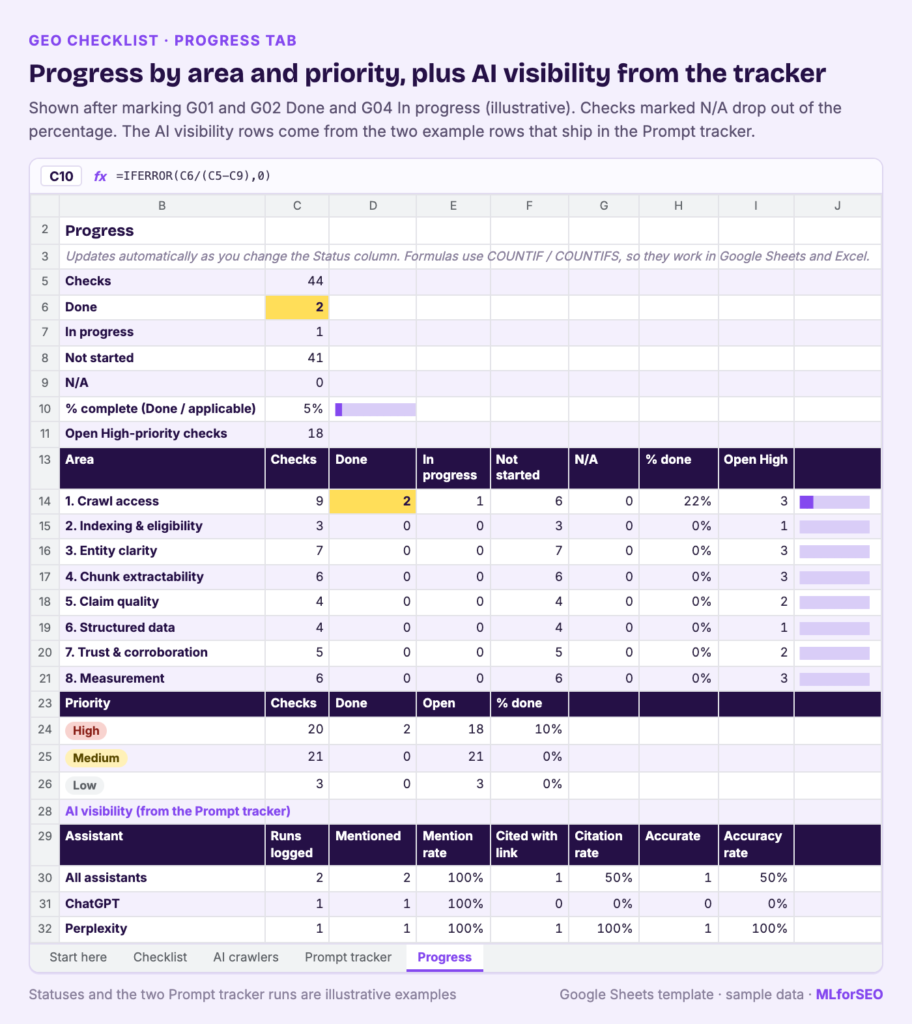
Each check has a priority (20 High, 21 Medium, 3 Low), a “why it matters”, a “how to check” with the tool and where to look, a status dropdown, an owner column, and links to the MLforSEO article and the official documentation.
The evidence labels
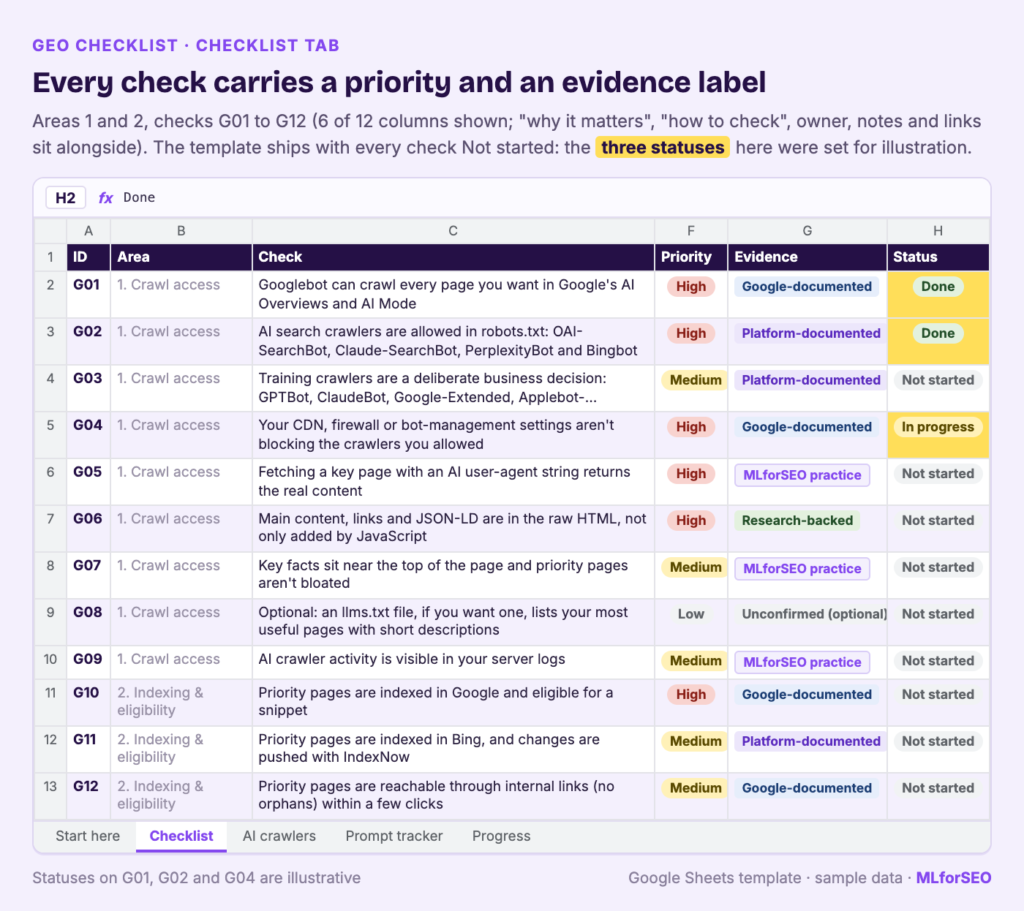
This is the part I care most about. AI search advice is full of confident claims that nobody can verify, so every check carries one of five evidence labels:
- **Google-documented** (11 checks): stated in Google Search Central or Google Help documentation.
- **Platform-documented** (4 checks): stated in another platform’s own docs, such as OpenAI, Anthropic, Perplexity or schema.org.
- **Research-backed** (2 checks): supported by published research or a large public dataset.
- **MLforSEO practice** (26 checks): what we teach and use in audits, based on how retrieval and entity systems work, and not confirmed by the platforms.
- **Unconfirmed, optional** (1 check): a cheap extra no major platform has confirmed using.
Most of the checklist, 26 of 44 checks, is our practice. That’s normal for a field this young, and I’d rather you know which is which.
The eight areas, with one example each
1. Crawl access
The highest-stakes example here is the split between training and search crawlers. Blocking GPTBot keeps your content out of OpenAI’s model training; blocking OAI-SearchBot keeps you out of ChatGPT search answers. The checklist treats training crawlers as a deliberate business decision (check G03) and search crawlers as something to allow if you want citations (G02). It also reminds you that Google-Extended doesn’t affect Google Search or AI Overviews, which run on Googlebot. The AI crawlers tab lists 15 user-agent tokens with what each does and what blocking it does.
Read Beatrice’s Your robots.txt might be the silent killer of your AI traffic for the why, and use the free AI Crawler Access Checker to audit your robots.txt in minutes. This area is also where llms.txt sits, as the only check marked Unconfirmed: it’s a proposed standard that no major AI provider has confirmed reading, so it’s optional and comes last.
2. Indexing & eligibility
Worked example, check G10: priority pages must be indexed in Google and eligible for a snippet. It sounds obvious, but a nosnippet tag or data-nosnippet wrapped around the main content quietly removes a page from consideration as a supporting link in AI features. Check it with URL Inspection in Search Console and a look at the page source and HTTP headers. Beatrice’s Indexed is not selected explains why being indexed is only the entry ticket. For Bing and Copilot, my IndexNow API guide covers how to push new and updated URLs.
3. Entity clarity
Worked example, check G14: use one canonical brand name, character for character, everywhere. “Acme”, “Acme Corp” and “Acme Corporation” can be read as three different entities. Write the canonical form into your style guide and check your schema, profiles and directory listings against it.
This area also holds the fan-out check (G19): does your content cover the sub-questions your key topics fan out into? Beatrice explains the mechanism in How entities power query fan-out, and the Query Fan-Out Simulator checks your passages against simulated sub-queries (Google doesn’t publish the real ones). For brands that share a name with something else, start with Entity disambiguation in practice.
4. Chunk extractability
Worked example, check G21: every section should make sense on its own. An extracted passage carries no memory of the rest of the page, so “as mentioned above” and an orphaned “it” become broken references. Search your priority pages for “as mentioned”, “as noted above” and “see below”, and name the subject in the first sentence of each section. The whole area is built on Beatrice’s The chunk, not the page, and the Extraction Readiness Audit goes deeper.
5. Claim quality
Worked example, check G27: back every marketing phrase with the exact fact underneath. “Flexible pricing” names nothing. “£25 per user per month” can be extracted and checked. You can keep the persuasive line, as long as the fact sits next to it. Search your priority pages for words like “leading”, “world-class”, “flexible” and “affordable”, and add the number, name or date behind each one. Beatrice’s Vagueness is a disqualifier gives you a three-property test for every claim you want cited, and information gain explains why saying something others don’t matters.
6. Structured data
Worked example, check G30: structured data must match the visible text on the page. Google lists this among the basics for its AI features, and markup that disagrees with the page breaks its structured data policies. Spot-check prices, ratings, dates and names in your JSON-LD against the rendered page. Beatrice’s Consistency beats completeness makes the case that contradictions hurt more than gaps, and if you want to audit markup at scale, my guide to structured data automation with Python shows how to detect, generate and validate JSON-LD across a site.
7. Trust & corroboration
Worked example, check G34: your three most important facts should be confirmed by independent sources, with the same values. Pick three (price, ideal customer, founding year), search for each, and count the independent, non-promotional sources that state the same value. Zero is a gap to close. Read Trust isn’t a schema field for the reasoning, Cross-platform entity consistency for the profile audit, and How LLMs co-cite for why being named next to your peers matters.
8. Measurement
Worked example, check G39: build a fixed set of 10 to 50 real customer questions to test in AI assistants. Rankings can’t show whether an assistant selected you, which is the core argument of Beatrice’s Your rank tracker is lying to you about AI search. A fixed prompt set, rerun on a schedule, gives you a baseline you can compare month to month. The other measurement checks cover GA4, where her Dark AI traffic post (updated October 2026) notes that GA4’s default channel group now includes an AI Assistant channel, and the “dark” AI visits that land in Direct with no referrer.
Setting up the prompt tracker and reading your first baseline
The Prompt tracker tab is where the checklist turns into data. It has one row per prompt, per assistant, per run, with these columns:
- Date, the prompt (keep the wording fixed between runs) and its topic or intent
- Assistant (ChatGPT, Perplexity, Claude, Gemini, Google AI Mode, Google AI Overview, Microsoft Copilot or Other)
- Mentioned? Cited with link? The cited URL
- Described accurately? How you appear (for example “listed among several” or “primary recommendation”)
- Competitors named, and notes
Two grey example rows show how it works. In one, a commercial prompt in ChatGPT mentions the brand without a link and gets the price partly wrong (“Price quoted was last year’s”). In the other, Perplexity names the brand as its primary recommendation and links the pricing page. They’re there to show you the format, so delete them before you start.
Here’s how I’d run the first baseline:
- **Pick your prompts.** Pull 10 to 50 questions from sales calls, support tickets, Search Console queries and People Also Ask. Mix category questions (“best tool for…”), comparison questions and questions about your brand.
- **Run each one in every assistant you care about**, logged out where possible, and log the result. Don’t rephrase between assistants.
- **Read the Progress tab.** It calculates three rates per assistant: mention rate (runs where you were named, divided by runs logged), citation rate (runs with a link to your site, divided by runs logged) and accuracy rate (accurate descriptions, divided by runs where you were named).
- **Rerun monthly with the same wording.** AI answers vary with prompt wording, location, account and the day you ask, so a single run tells you little. The trend across runs is what counts.
When you read the baseline, the accuracy rate often tells you more than the citation rate. A wrong price or an outdated description points straight to a source you can fix, which is check G44: trace wrong answers back to the pages they came from and fix them there. Correcting the sources an answer relies on is the fix that lasts.
If you want a more structured method, the LLM citation tracking guide and 7 alternative signals of AI influence pair well with the tracker. The glossary entry on AI citation covers the vocabulary.
Running your first sprint
You don’t need to do all 44 at once. My suggestion:
- Make your own copy and read the Start here tab.
- Filter the Checklist tab by Priority = High and Status = Not started. That’s your first sprint.
- Start with crawl access and entity clarity. If crawlers can’t reach you or systems can’t tell who you are, nothing further down the list can help.
- Fill in the AI crawlers tab while you’re in robots.txt, so your training and search decisions are written down with the reasons.
- Start the prompt tracker in week one, even before you’ve fixed anything. You want a “before” number.
The Progress tab tracks completion by area and by priority as you change statuses, and checks you mark N/A drop out of the percentage.
Limits and honest caveats
- **No checklist can guarantee citations.** It removes the reasons you’d be skipped. Whether you’re selected also depends on the competition, the prompt and the system.
- **Most checks are practice.** 26 of the 44 are MLforSEO practice, labelled as such. They’re grounded in how retrieval and entity systems work, and the platforms haven’t confirmed them.
- **Platforms change quickly.** Everything was checked in October 2026. Crawler names, GA4 channels and Google’s documentation all move, so recheck the linked docs before big decisions.
- **Several checks are plain SEO.** That’s by design. Google says its AI features have no extra technical requirements, so foundations come first.
What to do next
Make a copy of the checklist, run your first High-priority sprint, and log a baseline in the prompt tracker this month. If you want to go further than the checklist, Beatrice’s AI Search Optimisation & Agentic SEO course covers every area in depth, including the agent-readiness work in Your audience is no longer only human.
Free checklist
Generative Engine Optimisation (GEO) Checklist: 44 checks in eight areas, from AI crawler access to citation tracking, each with an evidence label and links to the article and official docs, plus a prompt tracker and progress dashboard.
FAQ
What is generative engine optimization (GEO)?
GEO is the practice of making content more likely to be found, extracted and cited by AI systems that generate answers, such as Google’s AI Overviews and AI Mode, ChatGPT, Perplexity, Claude and Gemini. The term comes from a 2024 research paper by Aggarwal et al.
Is GEO different from SEO?
There’s a lot of overlap. Google says there are no extra technical requirements to appear in its AI features beyond being indexed and eligible for a snippet. The differences are in emphasis: passages that stand on their own, specific and verifiable claims, consistent entity information across the web, and measuring citations as well as rankings.
Do I need an llms.txt file for GEO?
No. llms.txt is a proposed standard that no major AI provider has confirmed reading, and Google says you don’t need AI text files for its AI features. The checklist marks it as optional and low priority.
How do I measure GEO?
Track a fixed set of real customer questions across the assistants you care about, every month, and record whether you were mentioned, cited with a link and described accurately. The prompt tracker and Progress tab in the checklist calculate those rates for you.
Is the GEO checklist free?
Yes. It’s a free Google Sheets template with 44 checks, an AI crawler reference, a prompt tracker and a progress dashboard. A plain Markdown version of every check is on GitHub.
MLforSEO Academy
Take your skills further — pick your path
Semantic ML-enabled Keyword Research
by Lazarina Stoy
Query understanding, search intent and semantic clustering for how people and AI really search.
View course →AI Search Optimisation & Agentic SEO
by Beatrice Gamba
How agentic systems retrieve, evaluate and select — and how to become the source they cite.
View course →AI Search, LLMs, Entity SEO & Knowledge Graph Strategies
by Beatrice Gamba
Build the entity authority and knowledge-graph presence that makes AI recognise and trust your brand.
View course →Introduction to Machine Learning for SEO
by Lazarina Stoy
Ship practical ML workflows — classification, clustering, entity extraction — no CS degree required.
View course →