Site migrations rarely go wrong in interesting ways. Google’s own guide to moving a site with URL changes reads like a list of the mistakes I’ve seen in real projects: redirects pointing to the wrong place, noindex rules and robots.txt blocks left over from staging, URL mappings nobody finished. None of it is hard. It’s just a lot of small things that all have to be right on the same day.
So I keep a checklist, and I keep the redirect map in the same file as the checklist, because the redirect map is where most of the risk sits. I’ve now turned both into a free Google Sheets workbook. This post walks through the seven phases of the SEO site migration checklist I use, and then shows how I build the redirect map with fuzzy matching, which is the part that used to take days.
Free checklist
SEO Site Migration Checklist + Redirect Mapping Workbook: 43 checks in seven phases plus a redirect map that takes fuzzy-matching output and tracks QA for every URL.
On this page
What counts as a site migration
“Migration” covers very different projects, so the first check (M01) is writing down exactly what is changing: domain, protocol, URL structure, CMS, design or hosting. Each carries different risks. A hosting move with no URL changes needs no redirects at all; Google has a separate, shorter guide for that. A domain change needs redirects and the Change of Address tool. A CMS replatform usually changes URLs, templates and internal links at once.
If you can, change one thing at a time. Google’s guide says so directly (“plan your changes to your site one after the other”), and it also makes it far easier to tell what caused any drop.
The seven phases, and the checks I’d never skip
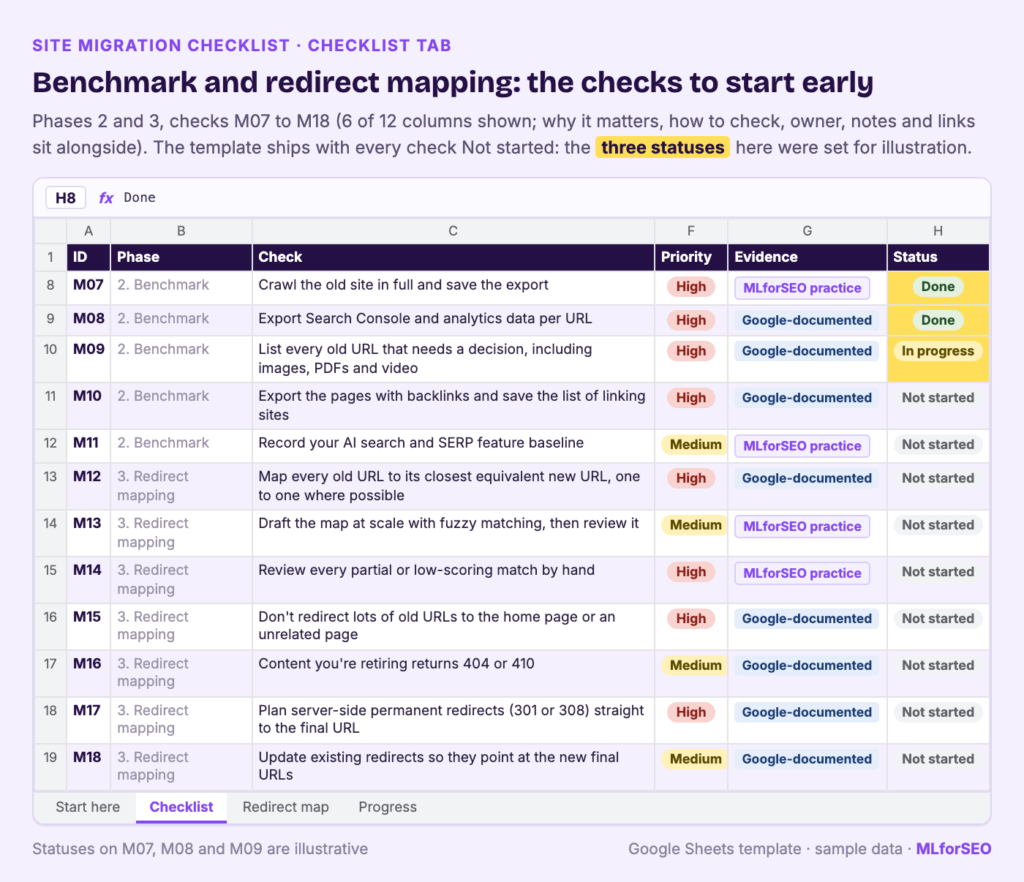
Each of the 43 checks in the workbook has a priority, a “why it matters”, a “how to check” and an evidence label: Google-documented, platform-documented (Bing, IndexNow) or MLforSEO practice. I’m not going to repeat all of them here. These are the ones I’d never skip.
1. Scope and plan
- Pick a quieter traffic period, agree a content and code freeze, and write a rollback plan.
- Set expectations. Google says that for medium-sized sites “it can take a few weeks or more” for the new URLs to replace the old ones, and longer for large sites. Agree that before launch so nobody panics in week two.
- Keep the old domain registered (Google suggests at least a year) with a valid TLS certificate, so the redirects keep working and nobody else can buy it.
2. Benchmark
Crawl the old site in full and save the export, including Address, Title 1, H1-1, H2-1, H2-2 and Meta Description 1, because you’ll feed those columns to the fuzzy-matching notebook later. Export Search Console and analytics data per URL, list every old URL that needs a decision (images, PDFs and video included) and save the pages with backlinks. One check I added for 2026 is an AI search baseline: rich results by type, AI Overview appearances for key queries and a quick citation check in ChatGPT, Perplexity and Gemini. It’s MLforSEO practice, and my post on measuring AI search explains why rank trackers alone won’t show you this.
3. Redirect mapping
Map every old URL to its closest new equivalent, one to one where possible. Don’t send lots of old URLs to the home page or an unrelated page: Google’s guide warns that this “can confuse users and might be treated as a soft 404 error”. Content you’re retiring should return 404 or 410. And plan server-side permanent redirects (301 or 308) that go straight to the final URL. Google’s redirects documentation says Googlebot follows up to 10 hops, and advises redirecting to the final destination directly. I come back to this phase below, because it’s where machine learning saves the most time.
4. Pre-launch (staging)
- Keep staging out of search, and record every noindex rule and robots.txt block you’ll need to remove at launch. Google calls this out specifically.
- Point internal links straight at the new URLs, not through redirects.
- Prepare the production robots.txt and diff it against the old one. Rebuilds often drop rules for AI search crawlers, which I’ve written about in robots.txt as the silent killer of AI traffic.
- Update structured data to the new URLs and keep entity @id values stable (more on why in what schema.org @id does).
- Test the full redirect map on staging with a list-mode crawl.
5. Launch day
Switch on the redirects, remove the staging blocks and crawl every old URL. The pass condition is strict: each one returns a 301 or 308 in one hop to a URL that returns 200. For a domain change, submit Change of Address for every verified variant (www, non-www, subdomains). Submit the new sitemap and an old-URL sitemap in Search Console and Bing Webmaster Tools, and send the changed URLs through IndexNow (my IndexNow API guide has the code).
6. First weeks
Watch indexing, crawl stats and errors every day for two weeks. Fix 404s on old URLs with traffic or links within days. Compare organic traffic and conversions with the benchmark by section, and recheck AI answers and SERP features for your key queries.
7. Months 1 to 12
Google’s guide says to keep redirects “for as long as possible, generally at least 1 year”. I’d keep them permanently, and document them somewhere other than one developer’s memory. Remove the old-URL sitemap once the old URLs have dropped out, and review results at 3, 6 and 12 months.
Redirect mapping with fuzzy matching
Redirect mapping is the slow part. On a site with a few thousand URLs, matching every old page to a new one by hand takes days, and it’s mind-numbing work, which is exactly when mistakes creep in.
Fuzzy matching speeds up the first draft. It compares strings (URLs, titles, headings) and scores how similar they are, using algorithms like Levenshtein distance in libraries such as TheFuzz, RapidFuzz and PolyFuzz. If you’re new to it, start with what fuzzy matching is and where it fits in SEO. In my 404 and redirect mapping tutorial, thousands of URLs are processed in minutes in Google Colab. You then spend your time reviewing the suggestions instead of searching for them.
Which tool to use depends on the job:
| Situation | Tool |
|---|---|
| Under about 300 URLs, no code | Fuzzy Matching for SEO Google Sheets template |
| Old crawl against new crawl (URL, title, H1, H2, meta description) | Triple fuzzy matching redirect notebook |
| 404s to live pages | Mapping 404 URLs to live pages notebook |
Step 1: Crawl both sites
Crawl the old site (you did this in the benchmark phase) and the new site on staging, with the same columns in both exports. I use Screaming Frog; my guide to web scraping with Screaming Frog covers custom extraction if you need more fields.
Step 2: Run the notebook
Upload both crawls to the triple fuzzy matching notebook. It matches on each field, returns the pre-migration value, the post-migration match, a similarity score, a match type (exact, partial or no suitable match) and which column produced the match. When several algorithms agree on the same suggestion, that’s a safer bet.
Step 3: Paste into the Redirect map
Paste your old URLs, clicks and referring domains into columns A to C, and the notebook’s output into columns E to J: matched on, suggested new URL, similarity (0 to 100), match type, algorithm and algorithms agreeing. The 404 notebook scores from 0 to 1, so multiply by 100 first.
The sheet marks each old URL High, Medium or Low priority using thresholds you set in row 2 (by default, High if clicks are 100 or more or referring domains 5 or more), so you review the important URLs first.
Step 4: Decide, and let the sheet do the rest
For each URL, pick a decision: Accept suggestion, Override, 410 Gone, 404 or No change (same URL). The sheet then builds the final destination, the redirect type, the source path, an Apache rule and a Flags column. Here’s how it handles the four example rows that ship with the workbook:
| Old URL | Clicks / RDs | Priority | Suggestion (score) | Decision | Result |
|---|---|---|---|---|---|
| /blog/how-to-choose-running-shoes/ | 420 / 12 | High | /guides/choosing-running-shoes/ (82, Partial Match, 3 algorithms agree) | Accept suggestion | 301 to the suggestion |
| /products/trail-runner-2/ | 95 / 3 | Medium | /shop/trail-runner-3/ (71, Partial Match) | Override | 301 to /shop/trail-runners/ (“model discontinued, category is the closest match”) |
| /2019-summer-sale/ | 0 / 0 | Low | the home page (38, No Suitable Match Found) | 410 Gone | Redirect gone /2019-summer-sale/ |
| /about-us/ | 60 / 25 | High | /about/ (100, Exact Match) | (blank) | Flag: “Needs decision” |
For the first row, the generated Apache rule is:
Redirect 301 /blog/how-to-choose-running-shoes/ https://www.example.com/guides/choosing-running-shoes/The third row is my favourite, because it’s the mistake the sheet is designed to stop. The best the algorithms could do for an expired 2019 sale page was the home page, with a score of 38. Accepting that would be the classic “redirect everything to the home page” move. Choosing 410 Gone is the honest answer.
Step 5: Read the flags
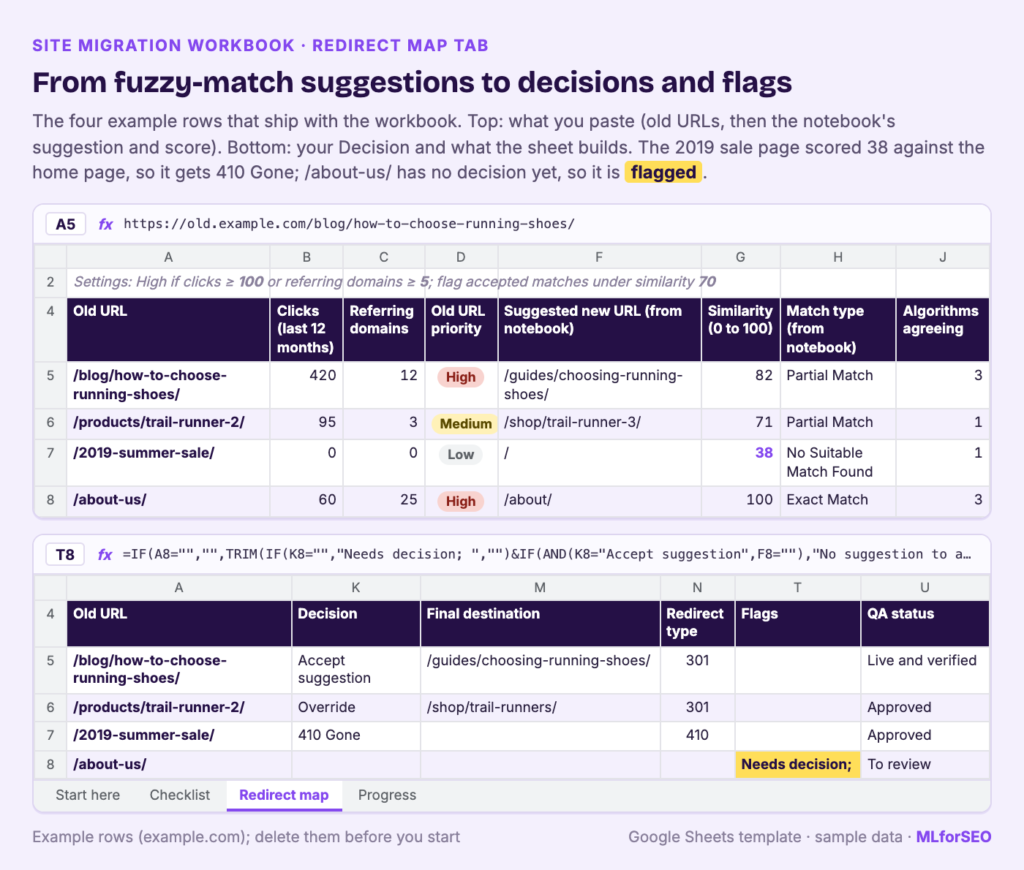
The Flags column checks every row for the problems I see most often:
- Home page redirect: the final destination is the root of a domain. Had I accepted the suggestion on the 2019 sale row, this flag would have fired.
- Below your threshold: you accepted a match scoring under the cutoff in row 2 (70 by default).
- Chain: the test crawl recorded more than one hop.
- Destination not 200: the final URL doesn’t return a 200.
- Redirects to itself, No suggestion to accept, Override URL missing and Needs decision.
Filter the column for anything non-empty before launch. A busy Flags column means the map isn’t ready; an empty one is the minimum bar for launch.
Step 6: QA before and after launch
Crawl the old URLs against staging in list mode, with redirects followed, and fill in the status code, hops and whether the final URL returns 200. Do it again on launch day against production. Move each row through the QA status column until it reads “Live and verified”. The Progress tab then shows how many URLs are decided, overridden, flagged and verified.
Pitfalls and limits
- Fuzzy matching compares characters. It has no sense of meaning or intent. In the example rows, the old trail shoe matched its successor model with a score of 71, and that was the wrong page for the user. Every partial match needs a human review.
- Check the Apache rules with your developer. They use mod_alias
Redirect, which matches by prefix, so a short source path can catch more URLs than you meant. Use your platform’s redirect manager if you have one. - The sheet doesn’t crawl anything. You’ll need a crawler for the benchmark and the redirect tests.
- Column names may differ. The Redirect map follows the notebooks’ documented output. Paste a real export once and check the headers line up before you do the full run.
- Indexed isn’t the same as selected. A migrated page can be crawled and indexed and still lose visibility. My post on indexed versus selected covers what to check next.
What to do next
- Make your own copy of the workbook and write the scope (check M01) before anything else.
- Run the benchmark crawl now, even if launch is months away.
- Draft the redirect map with the triple fuzzy matching notebook and review it in the Redirect map tab.
- To understand the matching methods properly (which algorithm suits which problem, and how to set thresholds), see the fuzzy matching reference guide and the fuzzy matching module in my Introduction to Machine Learning for SEO course.
Free checklist
SEO Site Migration Checklist + Redirect Mapping Workbook: a Google Sheets workbook with 43 migration checks and a redirect map that flags home page redirects, chains and weak matches before launch.
FAQ
What should an SEO site migration checklist include?
Scoping, a benchmark of the old site, a full redirect map, staging checks (robots.txt, noindex, canonicals, internal links, structured data), launch-day QA, monitoring in the first weeks and a review over the first year. The free workbook covers all seven phases in 43 checks.
How long should I keep redirects after a migration?
Google recommends keeping them as long as possible, generally at least one year. I’d keep them permanently.
Can I redirect old pages to the home page?
Avoid it. Google may treat irrelevant redirects as soft 404s, and they confuse users. Redirect to the closest equivalent page, or return 404 or 410 for content with no replacement.
How long does it take to recover after a site migration?
Google says rankings can fluctuate while it recrawls, and for a medium-sized site it can take a few weeks or more for the new URLs to replace the old ones. Larger sites take longer.
MLforSEO Academy
Take your skills further — pick your path
Semantic ML-enabled Keyword Research
by Lazarina Stoy
Query understanding, search intent and semantic clustering for how people and AI really search.
View course →AI Search Optimisation & Agentic SEO
by Beatrice Gamba
How agentic systems retrieve, evaluate and select — and how to become the source they cite.
View course →AI Search, LLMs, Entity SEO & Knowledge Graph Strategies
by Beatrice Gamba
Build the entity authority and knowledge-graph presence that makes AI recognise and trust your brand.
View course →Introduction to Machine Learning for SEO
by Lazarina Stoy
Ship practical ML workflows — classification, clustering, entity extraction — no CS degree required.
View course →