A SERP analysis you do once is a snapshot. A SERP analysis that runs every week is a dataset. Most guides to SERP analysis still describe the snapshot: type the keyword into Google, look at the top 10, take notes, write the brief. That made sense when the results page changed slowly. It doesn’t now, when the same query can open with an AI Overview one month and a forum carousel the next, and when the sources an AI answer cites aren’t necessarily the pages that rank.
In this guide, we’ll turn SERP analysis into something that runs on its own. You’ll get ten methods, each with working Python code, real data I collected in October 2026 for the keyword “serp analysis”, and the results of running every AI step live, including what it cost and where it went wrong:
- Collect SERPs on a schedule with a SERP API, and backfill history on day one.
- Classify results, intent and SERP features with LLM structured outputs.
- Find entity and n-gram gaps between the ranking pages and yours.
- Mine and cluster People Also Ask questions into the sections your page needs.
- Track AI Overview and AI Mode citations, and how they differ from rankings.
- Monitor your brand in ChatGPT and Perplexity answers, with the same tables.
- Measure share of search over time, by slots and by estimated clicks.
- Score SERP volatility and alert on change, so you know when to look.
- Cluster keywords by SERP overlap, and compare markets, so you know which ones one page can target.
- Run it as a scripted pipeline, with an agent on top for the “so what?” question.
Where this guide comes from
I first presented machine learning for SERP analysis at BrightonSEO in October 2022, as four methods: categorising competitors, entity analysis, sentiment analysis and n-grams. You can read the write-up of that talk on my personal site. This guide is the 2026 version: the same ideas, rebuilt as an automated workflow.
- All the code is in the MLforSEO code hub: one Python module, a notebook that runs on the sample data with no keys, a scheduled pipeline and an agent.
- The original four-method notebook (competitor categories, Google Natural Language API entities and sentiment, n-grams) lives in the same folder.
- Cost of the sample data: a few cents of DataForSEO credit. Running every AI step in this guide live (classification, question clustering and the agent) cost about 17 cents of Claude credit in total.
Get the code from the MLforSEO code hub
Before you start: what you need
You don’t need to be a developer for this. If you can run a Google Colab notebook, you can run everything below. Here’s the kit:
- A keyword list you’ve already researched. Automation multiplies whatever you feed it. Feed it a bad list, and you’ll get a very efficient pile of irrelevant data.
- A SERP API. I use DataForSEO in the examples because it returns every SERP element typed, plus AI Overview and AI Mode references. The same ideas work with any provider that returns structured results (for example SerpApi), or with your rank tracker’s export.
- Python (Colab is fine) with pandas, scikit-learn, scipy and spaCy.
- Optional keys: an LLM API key for classification and the agent (the code uses Claude, but any model with structured outputs works the same way), and a Google Cloud Natural Language API key for entities.
And here’s how the ten methods compare, so you can pick where to start:
| Method | The question it answers | Needs AI? | Running cost |
|---|---|---|---|
| 1. Scheduled collection | What does the SERP look like, every week? | No | About $0.002 per keyword per pull, plus $0.002 if an AI Overview loads |
| 2. LLM classification | What kind of pages rank, and what does the searcher want to do? | Yes (an LLM) | About 1 cent per SERP in my test |
| 3. Entity and n-gram gaps | What do ranking pages cover that mine doesn’t? | Optional (an NLP API) | Free with spaCy; Google NL has a free monthly tier |
| 4. People Also Ask mining | Which questions should my page answer? | Optional (an LLM to group them) | Included in the pull; about 1 cent to cluster |
| 5. AI citation tracking | Who do AI Overviews and AI Mode cite, and am I one of them? | No | Included in the pull (AI Mode is a separate request) |
| 6. Brand monitoring in LLM answers | Do ChatGPT and Perplexity mention and cite me? | No (you’re measuring the AI) | Under 1 cent per answer in my test |
| 7. Share of search over time | Who’s gaining and losing visibility? | No | Free once collected |
| 8. Volatility and alerts | Which SERPs changed enough to look at? | No | Free once collected |
| 9. SERP-overlap clustering | Which keywords can one page target? Do markets differ? | No | Free once collected |
| 10. Pipelines and agents | What changed, and what should we do? | Agent only | Pipeline: free to run. Agent: about 10 cents per brief in my test |
Prices are DataForSEO’s and Anthropic’s as of October 2026 (the LLM figures are for Claude Opus 5.5); check their pricing pages before a big run.
1. Collect SERPs on a schedule with a SERP API
Everything else in this guide depends on this step, so let’s get it right. The goal is a small, boring, reliable dataset: one row per ranking result, per keyword, per date, plus the SERP features and AI citations for the same pull.
Three endpoints cover it:
- Organic SERP, advanced: the full page, every element typed (organic, People Also Ask, video, AI Overview and so on). Set
load_async_ai_overviewto true, or you’ll only get AI Overviews that happen to be cached; DataForSEO charges an extra $0.002 for it and refunds it when there’s no AI Overview. - AI Mode: Google’s AI Mode answer with its references, as a separate request.
- Historical SERPs: monthly snapshots for up to a year back, so your tracker has a history on the day you build it. DataForSEO prices these at $0.00012 per monthly snapshot.
The module wraps those in a small client with a spend cap (so a loop can never run away with your credit), parses each response into three tidy tables, and appends them to CSVs, de-duplicated, so the same job can run daily without double-counting:
import serp_automation as sa

client = sa.DataForSEO(max_spend_usd=0.25)        # reads DATAFORSEO_LOGIN / _PASSWORD
keywords = ["serp analysis", "serp checker", "how to do serp analysis"]

# day one: backfill a year of monthly snapshots
for kw in keywords:
    for snapshot in client.historical(kw, date_from="2025-11-01"):
        sa.save_snapshot(sa.parse_serp(snapshot), "data")

# every week after that: organic + AI Overview, and AI Mode
snap = sa.collect(keywords, client, "data", ai_mode=True)
print(f"spent ${client.spent:.4f}")
To make it weekly, schedule run_pipeline.py. The code hub includes a GitHub Actions workflow that runs every Monday, commits the new snapshots back to your repository and posts the change report as the job summary. Cron on any server works just as well. One tip from experience: schedule it at an odd minute (06:17, not 06:00), because everyone’s jobs fire on the hour.
Two caveats before we trust this data. First, a SERP API shows you one location, language and device at a time; pick the combination that matches your audience and keep it fixed. Second, historical and live data can come from different collection runs. If you mix them (as my sample does), treat a sudden change at the seam with suspicion until the next pull confirms it.
2. Classify results, intent and SERP features with LLM structured outputs
Here’s a step a lot of people over-engineer: SERP feature detection doesn’t need AI. The API already labels every element, so a pivot table tells you which features appeared for which keyword on which date. My “serp analysis” data, for example, shows an AI Overview and People Also Ask in every snapshot this year, a video block in August and a discussions-and-forums block in March.
sa.feature_matrix(snap["features"]) # keyword x date, 1 = feature presentWhere an LLM earns its place is the judgement layer, the bit you used to do by eye: what kind of page each result is, what intent it serves, and what the searcher mostly wants to do on this SERP (read, use a tool, compare, buy, watch, discuss). That’s a classification task, and the trick that makes it reliable is structured outputs. You give the model a JSON schema with your label lists as enums, and it can only answer from them. No invented categories, no chatty paragraph instead of a label.
PAGE_TYPES = ["guide or tutorial", "definition or glossary", "free tool", "product or pricing page",
              "listicle or comparison", "forum or community", "video", "news", "course", "other"]
INTENTS = ["informational", "commercial", "transactional", "navigational"]

resp = client.messages.create(
    model="claude-opus-5-5", max_tokens=4000,
    output_config={"effort": "low",
                   "format": {"type": "json_schema", "schema": sa.CLASSIFY_SCHEMA}},
    messages=[{"role": "user", "content": sa.serp_prompt(keyword, organic, features)}])
So does it work? I ran it live to find out. Before the run, I hand-labelled every result on four SERPs: “serp analysis” on two dates, “serp checker” and “how to do serp analysis”. That’s 33 results. Where two labels were genuinely defensible (is Backlinko’s “What are SERPs” page a definition or a guide?), I accepted either. Then I compared Claude’s labels with mine.
| What I measured | |
|---|---|
| Page type | 33 out of 33 correct (32 out of 33 counting only my first-choice label) |
| Intent | 32 out of 33 correct (31 out of 33 counting only my first choice) |
| SERP-level calls | “serp analysis”: informational, mixed format. “serp checker”: transactional, use a tool. “how to do serp analysis”: informational, read |
| Cost and speed | About 1 cent per SERP (1,000 to 1,400 input tokens, 300 to 370 output tokens), 3 to 8 seconds |
That’s a small, fairly easy sample, so read it as “this works” rather than as an accuracy benchmark. The more useful finding was the miss. A Quora thread titled “How do you analyze your SERP performance? Which tool do you use?” came back as commercial. When I ran the same SERP again, it came back informational, and nothing else changed. Borderline results are exactly where labels flip between runs. So, if a label matters, run the classification twice and send the disagreements to a human. Two more things I noticed: 17 of the 33 results had titles but no snippets, and the labels held up anyway; and the line between “commercial” and “transactional” for a free tool is a convention, so write your rule into the prompt.
A few habits that make the labels worth trusting:
- Classify the whole SERP in one call, not one result at a time. The model labels each result better when it can see its neighbours, and it’s cheaper.
- Send titles and snippets, not bare domains. “What does this page do?” is far easier to answer from its title than from its URL.
- Treat intent as dominant, not exclusive. Plenty of queries carry mixed intent. That’s why the schema asks for a dominant intent and a dominant format.
- Spot-check a sample by hand before you build a report on the totals, especially the “other” bucket.
And my usual caveat, because I’m a broken record on this: a general-purpose LLM is great for custom categories that no off-the-shelf classifier knows. For standard tasks with a purpose-built API, use the purpose-built API. Sentiment is the classic example. Google’s Natural Language API scores the sentiment of every title and description consistently, and its score plus magnitude lets you spot “mixed” results (a score near zero with a high magnitude), which are often exactly the reviews or threads you want to read. The original four-method notebook in the code hub does that, and I compare the approaches in search-intent classification with machine learning.
3. Find entity and n-gram gaps between the SERP and your page
A gap analysis asks a simple question: what do the ranking pages (and the pages AI answers cite) talk about that your page doesn’t? We’ll answer it two ways.
N-grams (word sequences) count how many ranking documents use each phrase. Document frequency, not raw counts, so one repetitive page can’t dominate. Entities do the same for recognised things and concepts, using Google’s Natural Language API (v1, which still returns the salience score; v2 dropped it) or the free spaCy library as a first look.
latest = snap["organic"].query("date == date.max()")
serp_docs = (latest["title"] + ". " + latest["description"]).tolist()
my_page = open("my_page.txt").read()

sa.ngram_gap(serp_docs, my_page, min_share=0.2)            # phrases + in_my_page flag
sa.entity_gap(serp_docs, my_page, min_docs=2)              # or extractor=sa.entities_google
Here’s what that turned up when I ran it against a written SERP analysis guide. The gaps weren’t topics at all. Phrases like “free serp checker” kept turning up, in roughly one in four of the ranking titles and snippets. The lesson isn’t “add the phrase free SERP checker five times”. It’s that, on that day, Google was rewarding tools for this query, and any written guide is answering a different need. A gap analysis is often an intent check in disguise.
Two practical notes. Run the n-grams twice: once with stop words kept (to see title patterns like “what is”, “how to”, “vs”) and once with them removed (to see topics), because patterns made entirely of stop words vanish otherwise. And for a deeper version, scrape the full pages rather than working from snippets. If you want the background on the entity side, start with what entity extraction is and where it fits in SEO and which NLP API to use.
4. Mine and cluster People Also Ask questions
People Also Ask is the SERP telling you, in the searcher’s own words, what they want to know next. You’re already pulling the full SERP in step 1, so the questions come free: the module stores them in a fourth table, next to the organic results. Ask the API to expand the box one level (paa_clicks=1, $0.00015 a click), and each SERP gives you about six questions instead of four.
raw = client.organic("serp analysis", paa_clicks=1)
tables = sa.parse_serp(raw)                    # organic, features, citations, questions
qt = sa.question_table(snap["questions"])      # de-duplicated, counted across SERPs
themes = sa.cluster_questions(qt["question"].tolist(), topic="a practical guide to SERP analysis")
Two steps, and only the second needs AI. First, count: a question that shows up for several keywords, or in several markets, is the core of the topic. Then group: an LLM call with structured outputs merges questions that ask the same thing in different words, and says how a page on your topic should use each group. The schema only allows four answers: a section in the main page, an FAQ entry, a separate page, or off-topic. The function then checks that every question was placed, rather than trusting the model to have kept them all.
I ran it live on three SERPs from 22 October: “serp analysis” and “how to do serp analysis” in the US, and “serp analysis” in the UK. That gave 18 questions, 14 of them unique. “What is a SERP checker?” appeared on all three SERPs, and “What is the difference between SEO and SERP?” on two. Claude grouped the 14 into seven themes for about 1 cent:
| Theme | Questions | Suggested use |
|---|---|---|
| What SERP analysis is | What does SERP analysis mean? / What is a SERP analysis? / What does SERP analysis stand for? | Section in the main page |
| SERP basics and purpose | What is SERP in simple words? / What is SERP used for? | Section in the main page |
| SERP vs SEO | What is the difference between SEO and SERP? / What is SERP vs SEO? | FAQ entry |
| Checking SERP positions and tools | What is a SERP checker? / How to check SERP position? | Section in the main page |
| General SEO, website analysis, AI for SEO | How to get SEO ranking? / What is search engine optimization (SEO)? / Can I do SEO myself? / How can I effectively analyze a website? / Can ChatGPT do SEO? | Off-topic (three themes, merged here) |
The off-topic call is the useful part. PAA boxes drift: expand one question and Google happily wanders off to “Can ChatGPT do SEO?”. Without the filter, you’d end up with an FAQ section about everything. And notice how well this agrees with step 2 and step 3: the searchers asking about SERP analysis also want to know what a SERP checker is. The SERP keeps telling us the same story from different angles. For thousands of questions, swap the LLM grouping for embeddings and clustering, and use the LLM only to name the clusters.
5. Track AI Overview and AI Mode citations
This is the method I’d add first if you only add one. An AI Overview sits above the organic results and cites its sources. AI Mode does the same in a conversational answer. Neither shows up in a classic rank tracker, and, as the data below shows, being cited and ranking are not the same thing.
Because we collect the references with every pull, tracking them is a few lines of pandas: how many URLs each answer cited, how many of those also ranked in the organic top 10 that day, which domains get cited consistently, and how often your own domain appears.
sa.citation_overlap(snap["citations"], snap["organic"])     # cited vs ranking, per date and surface
sa.citation_presence(snap["citations"], "serp analysis")    # domain x date grid
sa.my_citation_rate(snap["citations"], "example.com")       # share of answers that cite you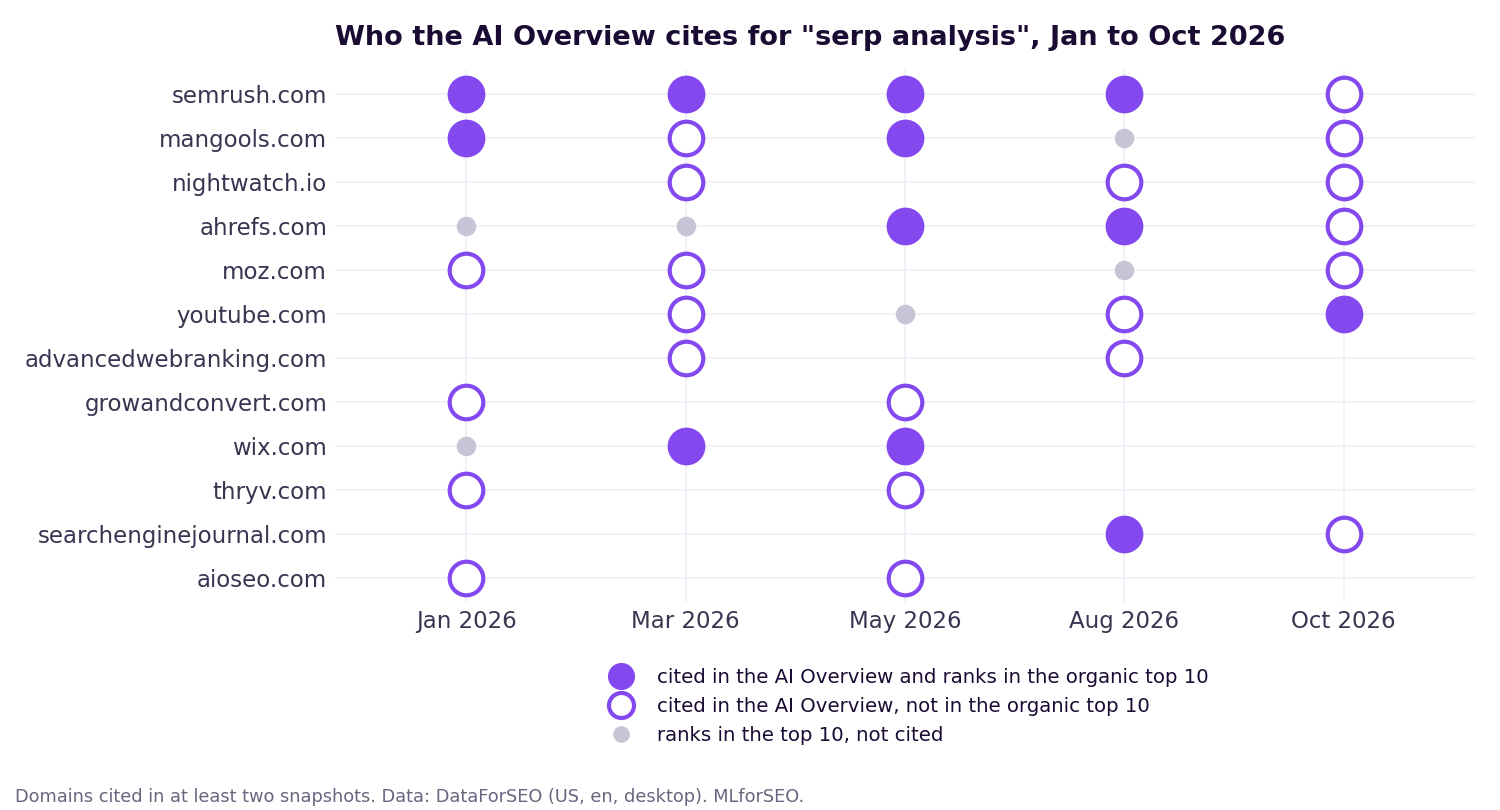
What the “serp analysis” data showed:
- Citations and rankings overlap less than you’d think. From January to August, the AI Overview cited between 9 and 19 URLs per snapshot, and only two to four of them also ranked in the organic top 10. On 22 October, none of the eight cited URLs ranked in the top 10 (only YouTube matched, at domain level, with a different video).
- A few sources are sticky. Semrush’s SERP analysis guide was cited in all five snapshots, even on the day it didn’t rank in the top 10. Most other sources came and went.
- AI Mode cited a superset of the AI Overview. On the same day, AI Mode cited 11 URLs, including all eight the AI Overview cited, plus Neil Patel, Coursera and a second YouTube video.
One keyword is an anecdote, not a study, so please don’t quote these as industry benchmarks. Run it on your own keyword set and see what your SERPs do. And one more thing I noticed: AI Mode told me the top three results “historically claim over 68% of all clicks”, citing a general SERP explainer. A citation tells you where an answer came from, not whether the claim holds up. Verify before you repeat it.
If you want to go further on the measurement side, Beatrice Gamba explains why your rank tracker is lying to you about AI search and how LLMs co-cite sources, and her LLM citation tracking guide (step 6) extends the same idea beyond Google to other AI assistants.
6. Monitor your brand in ChatGPT and Perplexity answers
Google’s AI answers are one surface. Your audience also asks ChatGPT and Perplexity, and nothing in a SERP pull tells you what those say. The good news: the same pipeline handles them. DataForSEO’s LLM responses API sends a prompt to ChatGPT, Perplexity, Gemini or Claude and returns the answer with any sources it cited, and the module stores those sources in the same citations table as the AI Overview, with the platform as the surface. Then a regex list tells you which brands each answer mentions, and in what order.
prompt = "What are the best tools for SERP analysis?"
raw = [client.llm_response(prompt, "chat_gpt", model="gpt-4.1-mini"),
       client.llm_response(prompt, "perplexity", model="sonar")]   # Perplexity always searches
parsed = [sa.parse_llm_answer(r) for r in raw]
answers = pd.concat([x["answers"] for x in parsed])
sa.brand_mentions(answers, {"Semrush": r"sem ?rush", "Ahrefs": r"ahrefs", "Moz": r"\bmoz\b"})
Note the prompt: it’s a question, not a keyword. People don’t type “serp analysis” into ChatGPT; they ask for recommendations. Build your prompt list from the questions in step 4 and from what your sales team hears. I asked both platforms the same question once, on 22 October:
| ChatGPT (gpt-4.1-mini, no web search) | Perplexity (sonar, with web search) | |
|---|---|---|
| Brands mentioned, in order | Ahrefs, Semrush, Moz, Serpstat, AccuRanker, SpyFu, Google Search Console | Semrush, Ahrefs, SE Ranking, Mangools, Surfer, STAT, Google Search Console |
| Sources cited | None (no web search) | 10, all “best SERP analysis tools” listicles |
| Cost | $0.0009 | $0.006 |
Three things stood out. Only Ahrefs, Semrush and Google Search Console made both lists. None of the free rank checkers that held the US top 10 for “serp analysis” that day (step 7) were mentioned by either. And of Perplexity’s ten sources, only one domain had appeared anywhere in my Google data: a LowFruits listicle that Google’s AI Overview had also cited back in May. So each surface has its own winners, and ranking well on Google doesn’t carry over automatically.
The caveat is bigger here than anywhere else in this guide: one answer is an anecdote. LLM answers vary from run to run, so in practice you run each prompt several times on a schedule and track mention rates, not single answers. Beatrice Gamba’s LLM citation tracking implementation guide covers that side properly, from building the prompt set to reporting.
7. Measure share of search over time
Share of search here means: of all the top-10 positions across your keyword set, how much does each domain hold? I calculate it two ways, and I’d suggest you do the same:
- Share of ranking slots: count the positions. Simple, and free of assumptions.
- Click-weighted share: weight each position by an estimated click-through rate, so position 1 counts for far more than position 9. The CTR curve is an assumption: replace the default in the code with your own Search Console data, and say which curve you used.
sos = sa.share_of_search(snap["organic"], weight="ctr")   # date x domain, rows sum to 1
sa.biggest_movers(sos)                                    # winners and losers, first vs last snapshot
The over-time view is the whole point. One snapshot tells you who’s winning today. Five tell you how stable “winning” is:
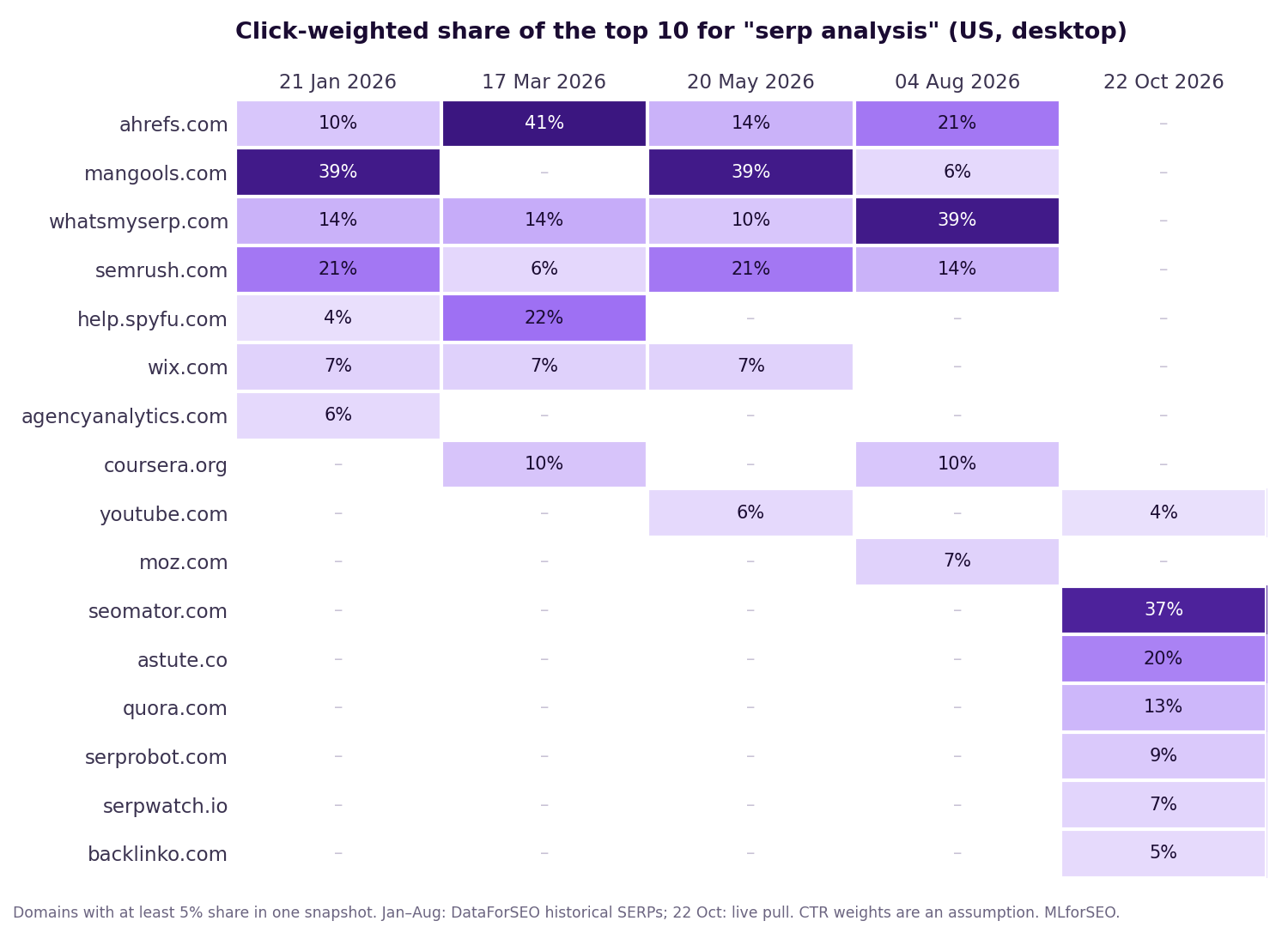
From January to August, the same four tool vendors (Ahrefs, Mangools, WhatsMySERP and Semrush) traded the top spots, and the leader changed in almost every snapshot. Then the 22 October live pull showed a completely different top 10, led by free rank-checker tools and a beginner’s guide. That might be a real reshuffle, or it might be the seam between historical and live data I warned you about in step 1. Two more pulls narrowed it down a little. A second US pull that afternoon kept seven of the nine URLs, so the live data is consistent with itself. And the UK top 10 for the same keyword, the same day, looked like the US list from January to August: Ahrefs, WhatsMySERP, Mangools, Moz, Semrush. So either the US results changed and the UK hasn’t (yet), or the historical database and the live pull differ. This is exactly why you schedule collection: a few more weekly pulls will tell us which.
Two ways to make this more useful. Group domains into site types (vendors, publishers, forums, course platforms) before calculating share, so you see the kind of competition shifting, not just names. And calculate share per keyword cluster (step 9), not across everything, so a big head term doesn’t drown out the rest.
8. Score SERP volatility and alert on change
Once you track hundreds of keywords, you can’t read every change report. You need one number per keyword that says “look at this one”. That’s a volatility score: how much the top 10 changed between two snapshots.
The module calculates two. URL turnover is the share of URLs that are new or gone (one minus the Jaccard similarity of the two URL sets). Volatility also weighs where things moved: every position change counts, a URL that entered or dropped out counts as moving to position 11, and the total is divided by what it would be if every URL had been replaced. So 0 means an identical top 10, 1 means a completely new one, and a shake-up at positions 1 to 3 scores higher than the same shake-up at 8 to 10.
vol = sa.serp_volatility(snap["organic"])     # keyword x pair of snapshots
sa.volatility_alerts(vol, threshold=0.5) # the ones worth a human look| From | To | URL turnover | Volatility | Entered / left |
|---|---|---|---|---|
| 21 Jan | 17 Mar | 0.38 | 0.36 | 1 / 2 |
| 17 Mar | 20 May | 0.56 | 0.45 | 3 / 2 |
| 20 May | 4 Aug | 0.60 | 0.43 | 3 / 3 |
| 4 Aug | 22 Oct | 1.00 | 1.00 | 9 / 7 |
Even in the quiet months, this SERP moved a lot: a third to a half of the top 10 changed every couple of months. That’s normal for a competitive keyword, and it’s why the alert threshold should come from your history, not from a number in a blog post. Calculate volatility over a few months, see what’s typical, and alert on what isn’t. The October pull scores the maximum, and the change report now flags it as an alert. Whether it’s a real reshuffle or a data seam (step 7), it’s exactly the kind of change you want a human to look at.
Volatility also works for the AI citations: treat the citation order as the rank, and the same function tells you how stable the sources behind an AI Overview are. In my data, from January to August, 78% to 92% of the cited URLs turned over between snapshots, against 38% to 60% for the organic top 10. Then in October, when the top 10 turned over completely, the citations changed less (69%). AI answers and rankings don’t just differ; they move on different schedules.
cit = snap["citations"].query("surface == 'ai_overview'")
sa.serp_volatility(cit.assign(rank_group=cit["citation_order"]), top_n=20)
9. Cluster keywords by SERP overlap, and compare markets
If two keywords share several of the same top-10 URLs, Google is treating them as the same need, and one page can usually target both. If they share none, they probably need separate pages, however similar they look. This is SERP-based keyword clustering, and once you collect SERPs anyway, it’s free.
overlap = sa.serp_overlap(snap["organic"])              # keyword x keyword, shared top-10 URLs
sa.cluster_by_overlap(overlap, min_shared=3)            # linked if they share >= 3 URLs
link = sa.dendrogram_data(overlap)                      # softer view: average-linkage hierarchy
The threshold is a judgement call. I start at three shared URLs out of ten and tune it by checking a few pairs by hand. The cluster_by_overlap function is a hard clustering (every keyword gets exactly one cluster); the dendrogram gives you a hierarchical view if you want to see near-misses. If you prefer a similarity score to a count, Jaccard similarity on the URL sets works the same way.
On 22 October, the results were a nice reminder of why this beats eyeballing keywords:
| serp analysis | how to do serp analysis | serp checker | |
|---|---|---|---|
| serp analysis | 9 | 1 | 0 |
| how to do serp analysis | 1 | 8 | 0 |
| serp checker | 0 | 0 | 9 |
“serp analysis” and “how to do serp analysis” sound like one topic, but they shared a single URL. “serp checker” shared none. By the SERP’s definition, that’s three pages, not one. If you’d rather cluster by meaning than by SERPs (useful before you have SERP data, or for thousands of long-tail keywords), see keyword clustering with KeyBERT and what machine learning clustering is and where it fits in SEO.
The same trick works across markets. Add a market column when you store each pull (a country, a device, or both), and compare_markets tells you how much the top 10 for one keyword overlaps between them. If you run a site in several countries, this is how you find out whether one page can serve them all, or whether each market needs its own angle.
mm = pd.read_csv("sample_data/multi_market.csv")     # one row per result, with a market column
sa.compare_markets(mm, "serp analysis")| Pair | Shared URLs | Shared domains |
|---|---|---|
| US morning vs US afternoon | 7 of 9 | 7 |
| US afternoon vs UK | 0 | 1 (WhatsMySERP, with a different page) |
| US morning vs UK | 0 | 0 |
Same language, same day, and not a single shared URL between the US and the UK. Two pulls in the same market a few hours apart shared seven. So if you’re tracking an English keyword in only one English-speaking market, you’re seeing only one of several quite different SERPs.
Learn the methods properly
Classification, clustering, entity extraction and sentiment analysis are the building blocks of everything in this guide. The Introduction to Machine Learning for SEO course walks you through each one hands-on, with templates and notebooks.
10. Run it as a scripted pipeline, with an agent on top
Now let’s put the pieces together. There are two ways to automate this, and they’re good at different things:
| Scripted pipeline | Agentic pipeline | |
|---|---|---|
| What it is | The same steps, in the same order, every run | An LLM decides which analysis tools to call, based on your question |
| Good at | Collection, metrics, alerts, anything you’ll chart over time | Open questions: “what changed, why might it have, what should we do?” |
| Consistency | Identical output for identical data | Varies run to run; needs guard-rails |
| Cost | Only the SERP pulls | SERP pulls plus LLM calls per brief |
| In the code hub | run_pipeline.py + the GitHub Actions workflow | serp_agent.py |
The scripted pipeline is the backbone. Every week it collects, stores, recalculates share of search, citation overlap and clusters, and writes a plain-text change report: which domains entered or left the top 10, the volatility score (with an alert when it’s high), which SERP features are present, how many AI citations also rank, and whether your domain was cited. That’s the thing you read on Monday morning.
python run_pipeline.py --keywords keywords.txt --data-dir data --ai-mode \
    --my-domain example.com --max-spend 0.25
python run_pipeline.py --demo        # no keys: runs on the sample data
The agent sits on top of the same data. It gets read-only tools over your snapshot store (ranking history, share of search, AI citations, SERP features) and one paid tool, a live SERP pull, capped at a couple of calls per run (and switched off unless you pass --live). You ask it a question in plain English, it decides what to look up, and it writes a brief. The code uses the Anthropic Python SDK’s tool runner, which handles the tool-call loop for you:
runner = client.beta.messages.tool_runner(
    model="claude-opus-5-5", max_tokens=16000, system=SYSTEM,
    output_config={"effort": "medium"}, max_iterations=8,     # a hard cap on model calls
    tools=[list_tracked_keywords, ranking_history, share_of_search,
           ai_citations, serp_features, fetch_live_serp],
    messages=[{"role": "user", "content": "What changed in the SERPs we track, and what should we do?"}])
for message in runner:          # one message per model call: log tokens and cost as you go
    sa.log_usage(message, "agent")
print(message.content[-1].text)
Here’s what it did when I ran it on the sample data, with live pulls switched off. It made three model calls in 27 seconds, for about 10 cents. First it listed the tracked keywords. Then it called four tools at once: ranking history, share of search, AI citations and SERP features. Then it wrote the brief. I checked every number in it against the data, and they all held up: the first-place domain on each date, Seomator’s 37% click-weighted share in October, the citation counts, Semrush being cited on every date.
What impressed me more was what it questioned. Without being asked, it pointed out that the historical snapshots hold only six or seven organic results, so “top 10 share” on those dates is really share of what was recorded. And it refused to treat the October reshuffle as real, giving three reasons it might be a collection artefact: AI Mode and the related-searches box appear for the first time on that date, the AI answers still cite the domains that no longer rank, and a complete turnover is very unusual for a mature keyword. That’s the system prompt’s “flag weak evidence” instruction doing its job.
Its recommendations were sensible, too: confirm the October data before reacting, add the keywords you actually target, and benchmark new content against the pages AI answers cite rather than the checker tools that rank. Two failure modes to watch for. It will happily offer to run a paid live pull, so the cap in code matters. And it writes about whatever domain you give it, so point --my-domain at a domain you actually track, or a good part of the brief goes on saying that domain isn’t in the data.
A few guard-rails I’d insist on, whichever agent framework you use:
- Read-only by default. Any tool that spends money gets a hard cap, and the cap lives in code, not in the prompt.
- Facts come from tools. The system prompt tells the agent never to state a ranking or a citation it hasn’t looked up, and to flag weak evidence (one keyword, assumed CTRs, mixed data sources).
- The agent reads the pipeline’s data; it doesn’t replace the pipeline. Metrics you chart over time should come from the deterministic script, so last month’s number means the same thing as this month’s.
If you’d rather not write code at all, the same idea works conversationally: DataForSEO offers an MCP server, which lets an assistant like Claude call the SERP API directly. It’s great for exploring. For anything you’ll report on, I’d still schedule the script.
Coming from “4 ways to boost your SERP competitor analysis”?
This guide replaces my earlier tutorial. Here’s where each of the original four methods lives now:
- Categorising competitors by site type and intent is method 2 (LLM structured outputs), with the share-of-search calculations in method 7. The original rule-based taxonomy plus LLM categorisation is still in the four-method notebook.
- Entity analysis with Google’s Natural Language API is part of method 3. Stay on v1 for salience and per-entity sentiment.
- Sentiment analysis of titles and descriptions is covered in the four-method notebook (Google NL v2 sentiment with a “mixed” label), and in sentiment analysis: theory, methods and applications.
- N-grams are part of method 3, and the tested
=NGRAMS()Google Sheets custom function is still in the code hub for anyone who prefers Sheets. - The dashboards are available as the ML-enabled SERP analysis Data Studio template from Data Studio for Marketers; the pipeline exports tidy CSVs you can plug into it.
Key takeaways
A word of caution before the summary, the same one I gave on stage in 2022: correlation does not equal causation. Seeing a relationship between, say, an entity and a ranking doesn’t mean that’s why the page ranks. Automation makes your analysis faster and more frequent. It doesn’t replace keyword research or content strategy, and data in still equals data out.
- Collect on a schedule. A weekly SERP pull costs pennies, and history beats a snapshot. Backfill a year on day one.
- Don’t use AI where the API already answers. SERP features come typed. Save the LLM for judgement, constrain it with structured outputs, and check a sample by hand: in my test it matched my labels on 32 or 33 of 33 results.
- Read gaps as intent signals, not as phrases to stuff in.
- Let People Also Ask write your outline, and filter out the questions that drift off-topic.
- Track AI citations next to rankings. In my data, most cited sources didn’t rank in the top 10.
- Look beyond Google. ChatGPT and Perplexity named different tools from different sources, so track mention rates there too.
- Measure share of search over time, and be honest about the CTR assumption.
- Alert on volatility, with a threshold based on your own history, so you know which SERPs to read.
- Let the SERP decide your page structure: cluster keywords by shared URLs, and check each market separately.
- Script the backbone, add an agent for questions, and keep the agent read-only and capped.
Everything is in the MLforSEO code hub, and the resources library has more templates and notebooks, including a lab notebook for identifying desired content formats and platforms from SERP data and the guide to SERP feature analysis.
Frequently asked questions
Can I automate SERP analysis without coding?
Partly. Some SERP APIs offer Google Sheets add-ons, the n-gram analysis runs as a Sheets custom function, and an assistant connected to a SERP API through an MCP server can explore results conversationally. For scheduled collection and anything you want to chart over time, a small script is the reliable route, and the notebook in the code hub runs in Google Colab with no setup.
How much does automated SERP tracking cost?
With DataForSEO in October 2026, a live organic SERP at depth 10 costs about $0.002 per keyword, plus $0.002 when an AI Overview loads, and historical monthly snapshots cost $0.00012 each. A weekly pull for 100 keywords is well under a dollar a week. On top of that, in my October 2026 test with Claude Opus 5.5, classifying a SERP cost about 1 cent and an agent brief about 10 cents. An answer from ChatGPT or Perplexity through DataForSEO cost under 1 cent.
How do I track whether Google’s AI Overview cites my site?
Pull the SERP with a SERP API that returns AI Overview references (with asynchronous AI Overviews loaded), store the cited URLs with the date, and check how often your domain appears. Track it next to your rankings, because the two often differ: in my October 2026 data for “serp analysis”, none of the URLs the AI Overview cited ranked in the organic top 10.
How accurate is an LLM at classifying search results?
In my October 2026 test, Claude Opus 5.5 with a JSON schema matched my own labels for page type on all 33 results across four SERPs, and for intent on 32 of 33. The one miss was a genuinely borderline forum thread, and it flipped label when I ran the same SERP again. Treat that as “it works”, not as a benchmark: check a sample of your own SERPs by hand, and run borderline cases twice.
Do I need an LLM to detect SERP features?
No. SERP APIs label every element (AI Overview, People Also Ask, video, forums and so on), so a pivot table is enough. Use an LLM for judgement calls the API can’t make, such as page type, intent and what the searcher wants to do, and constrain it with a JSON schema so it can only answer from your labels.
How many shared URLs mean two keywords belong on the same page?
There’s no universal number. I start at three shared URLs in the top 10 and tune the threshold by checking a few keyword pairs by hand. Keywords that share no URLs almost always need separate pages, even when they look similar. Check markets separately, too: in my data, the US and UK top 10 for the same English keyword shared no URLs at all.
Should I use an agent or a script?
Both, for different jobs. Use a scheduled script for collection and metrics, so numbers are consistent over time. Add an agent on top for open questions about what changed and what to do, with read-only tools and a hard cap on anything that costs money.
Related glossary terms
MLforSEO Academy
Take your skills further — pick your path
Introduction to Machine Learning for SEO
by Lazarina Stoy
Ship practical ML workflows — classification, clustering, entity extraction — no CS degree required.
View course →AI Search Optimisation & Agentic SEO
by Beatrice Gamba
How agentic systems retrieve, evaluate and select — and how to become the source they cite.
View course →AI Search, LLMs, Entity SEO & Knowledge Graph Strategies
by Beatrice Gamba
Build the entity authority and knowledge-graph presence that makes AI recognise and trust your brand.
View course →Semantic ML-enabled Keyword Research
by Lazarina Stoy
Query understanding, search intent and semantic clustering for how people and AI really search.
View course →